

The tool stack problem nobody talks about
Most California entrepreneurs did not sit down one day and decide to build a fragmented software stack. It happened gradually, one tool at a time, each one solving a real problem in the moment.
First came the project management tool — Monday, Asana, or Notion — because the team needed somewhere to track work. Then came a separate accounting platform because the project tool could not handle invoices. Then inventory software because the accounting tool did not track stock. Then an HR platform for the growing remote team. Then a CRM for the sales side.
Before long, you are paying for six or seven subscriptions, your data lives in six or seven separate places, and your team spends a meaningful chunk of every week manually moving information between systems that were never designed to talk to each other.
This is the tool stack problem. It is extremely common among California SMBs with remote teams, and it is one of the primary reasons entrepreneurs start seriously exploring ERP as an alternative.
Understanding where each approach genuinely excels — and where it falls short — is the only way to make a decision that serves your business rather than just your next quarter.
What project management software actually does well
To be fair about this comparison, project management tools are genuinely excellent at what they are designed to do.
Platforms like Asana, Monday, ClickUp, and Notion are built around task visibility and team coordination. They make it easy to assign work, set deadlines, track progress, and communicate in context. For a remote team that needs to stay aligned on who is doing what and by when, these tools work extremely well.
They are also fast to set up, intuitive for non-technical users, and flexible enough to adapt to many different workflows. A marketing team and an engineering team can both live productively inside the same project management platform while working in completely different ways.
For early-stage businesses and small teams where the primary challenge is coordination rather than operational complexity, a good project management tool paired with a basic accounting platform covers a lot of ground without a significant investment of time or money.
The problems start when the business grows beyond that early stage.
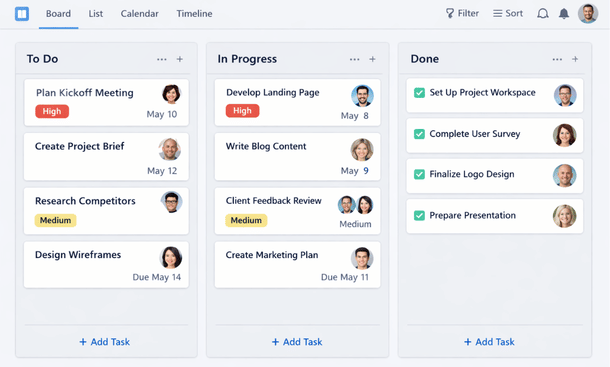
Where standalone tools start breaking down
The limitation of project management software is not what it does — it is what it does not do and what happens when you try to connect it to everything else your business needs.
Consider a practical scenario. Your sales team closes a deal and marks it won in your CRM. Someone then manually creates a project in your project management tool to kick off delivery. Finance creates an invoice in the accounting platform. The operations team updates inventory in a separate system. If something changes — the deal scope shifts, a payment is delayed, stock runs short — that information has to be communicated manually across four different platforms and four different teams.
Every one of those manual steps is an opportunity for error, delay, or miscommunication. In a physical office, people catch these gaps by talking to each other. In a remote environment, they fall through the cracks.
The deeper problem is data fragmentation. When your financial data, project data, inventory data, and customer data live in separate systems, you never have a complete, current picture of your business. Reports require manual assembly. Decisions get made on incomplete information. And as the team grows, the coordination overhead compounds.
This is the ceiling that standalone SaaS tools inevitably hit for growing remote businesses.
What ERP brings to the table that SaaS stacks cannot
An ERP system — enterprise resource planning software that connects financials, operations, HR, inventory, and sales into a single platform — addresses the fragmentation problem at its root.
Instead of data moving between systems through manual exports or imperfect integrations, everything lives in one place and updates in real time. When a sale closes, the inventory, finance, and project delivery functions all reflect that event simultaneously. Nobody needs to manually copy information from one tool to another.
For remote teams specifically, this unified data environment solves several problems at once. Managers get a real picture of business performance without waiting for someone to compile a report. Approvals and handoffs happen through automated workflows rather than Slack messages and follow-up emails. New team members onboard into a single system rather than learning five separate tools.
ERP also handles the compliance complexity that California businesses face. Payroll rules, sales tax across multiple jurisdictions, and employment record requirements are built into the platform rather than managed manually across disconnected systems.
The trade-off is real, though. ERP platforms require more upfront investment — in time, configuration, and often cost — than a project management tool. That trade-off makes sense at a certain scale and becomes less defensible below it.
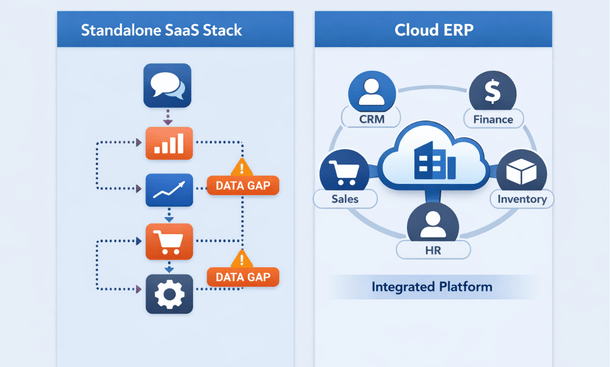
SaaS vs Cloud ERP
The real cost of a fragmented tool stack
When California entrepreneurs evaluate whether to stick with their current SaaS stack or move to ERP, they usually compare subscription costs. That comparison almost always favors the stack — five individual tools often add up to less per month than a mid-tier ERP license.
But subscription cost is only one part of the picture.
The hidden costs of a fragmented stack are harder to see and easier to underestimate. They include the hours your team spends every week manually moving data between platforms. They include the errors that happen during those manual transfers and the time spent finding and fixing them. They include the decisions made on incomplete information because nobody had time to compile a full report. They include the cost of onboarding new remote employees into multiple disconnected systems.
A study published by Aberdeen Group found that businesses running integrated ERP systems closed their monthly books significantly faster than those relying on disconnected tools. For a California SMB where time is genuinely money, that kind of operational efficiency has real dollar value.
The math on ERP versus a SaaS stack looks very different once you factor in the cost of the coordination overhead that fragmented tools create.

When standalone SaaS tools still make sense
This comparison is not an argument that every California SMB should immediately replace their tool stack with an ERP. There are situations where standalone tools remain the right choice.
If your business is under ten people and your primary operational challenge is task coordination rather than cross-functional data management, a project management tool plus basic accounting software is probably sufficient. The overhead of implementing and maintaining an ERP would outweigh the benefit at that scale.
If your business has a very narrow operational footprint — a service business that does not manage inventory, for example — the full breadth of an ERP may be more than you need. A targeted combination of two or three well-integrated SaaS tools might cover your requirements more cleanly.
If your team is highly technical and genuinely capable of maintaining custom integrations between standalone tools, you can extend the useful life of a SaaS stack significantly. But be honest about whether that capability actually exists and will continue to exist as your team changes.
The honest answer is that most California SMBs hit the ceiling of their SaaS stack somewhere between fifteen and fifty employees, though the exact point depends heavily on business model and operational complexity.
How to decide what your remote team actually needs
Rather than asking “should we get an ERP,” a more useful starting question is “where is our current setup actually costing us time and money.”
Map out the manual processes your remote team relies on every week. How many times does data get copied from one tool to another? How many approval processes run through Slack or email because there is no structured workflow? How long does it take to answer the question “how is the business actually performing right now?”
If the honest answer to those questions reveals significant friction, the cost of that friction is your baseline for evaluating ERP. If the friction is manageable and your team is not hitting visible coordination limits, your current stack may still have runway.
The goal is not to adopt the most sophisticated software available. The goal is to find the setup that lets your remote team operate with the least overhead and the most clarity.
Project management software and ERP are not really competing for the same job. One is built for task coordination. The other is built for operational integration. The question is which problem your remote California business actually needs to solve right now.
For businesses that have grown beyond the early stage and are feeling the friction of disconnected tools, ERP offers something a SaaS stack fundamentally cannot — a single, unified view of the business that remote teams can act on without manual assembly.
For a complete picture of how ERP fits into the broader remote work strategy for modern businesses, our guide on how ERP technology supports distributed teams across the full operational lifecycle gives you the strategic context behind this comparison.
And when you are ready to move from the comparison stage to the implementation stage, our next piece on how to implement ERP for a remote team without blowing your budget or your timeline walks through exactly what that process looks like for a lean California SMB. That is the practical next step once you have decided ERP is the right direction.
About the Author

mike
Mike is a tech enthusiast passionate about SaaS innovation and digital growth. He explores emerging technologies and helps businesses scale through smart software solutions.
Did you find this helpful?
Your feedback helps us curate better content for the community.