
Table of contents
- The warehouse that nobody tidied
- What database optimization actually means for a founder
- The three culprits that slow your database down
- Too much old data with nowhere to go
- Missing indexes slowing every search
- Poorly structured queries doing too much work
- How to spot a database problem before it becomes a user problem
- What BaaS platforms do to help you stay organized
- A simple maintenance habit that saves you later
You launched with a clean, fast app. Every button click felt instant, every page loaded without drama. Six months later, with a few thousand users on board, something has shifted. Pages that used to load in under a second now take three. Your support inbox has a new category of complaint: “the app feels slow.” Nothing in your code has changed. The problem is not what you built — it is what has accumulated inside it.
A growing database that nobody has tidied is one of the most common and least glamorous performance problems a scaling SaaS founder will face. The good news is that understanding it does not require a computer science degree. It requires the same instinct you would apply to any business operation that has gotten messy from success.
The warehouse that nobody tidied
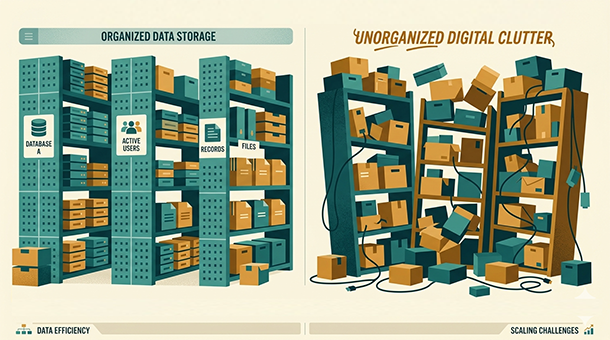
Picture a warehouse that started with 500 carefully labeled boxes. Every item had a designated shelf, every shelf had a clear category, and finding anything took seconds. Now picture that same warehouse after three years of rapid growth with no reorganization. Thousands of boxes, some outdated, some duplicated, some sitting in the wrong aisle entirely. The inventory is all still there, technically, but finding anything now means searching through chaos.
Your database is that warehouse. At launch, it holds a manageable volume of structured information — user accounts, settings, transactions, activity logs. Every query your app runs is essentially a search through that warehouse. When the warehouse is small and tidy, searches are fast. When it has grown without any maintenance, those same searches start taking longer because there is simply more to sift through.
The business consequence is direct. Slow database queries mean slow app responses. Slow app responses mean frustrated users. Frustrated users at the trial stage mean lower conversion. Frustrated users on a paid plan mean churn. The technical problem and the revenue problem are the same problem viewed from different angles.
What makes this particularly tricky for first-time founders is that database slowdowns rarely announce themselves dramatically. There is no crash, no error message, no obvious incident. Things just gradually feel heavier. By the time users are commenting on it, the problem has usually been building for weeks.
What database optimization actually means for a founder
Database optimization is the process of making your database faster and leaner without necessarily changing what data you store. It involves organizing existing data more efficiently, removing or archiving what is no longer needed, and structuring the way your app searches for information so it finds answers faster.
For a non-technical founder, the useful mental model is not SQL syntax or query plans — it is the difference between a filing cabinet with labeled tabs versus one where everything is stuffed in chronologically. Both cabinets hold the same documents. One lets you find what you need in ten seconds. The other means flipping through the entire drawer every time.
Optimization is also not a one-time event. It is closer to the cleaning and restocking cycle of a well-run retail store. You do not reorganize the stockroom once and declare it permanently solved. You build habits around it so the mess never accumulates past a manageable point. The same principle applies to your database as your user base grows.
The reassuring part for founders building on a BaaS platform is that many of the most impactful optimizations happen automatically or are surfaced clearly in the dashboard. You do not need to be a database administrator. You need to know enough to recognize the warning signs and understand what levers are available to you.
The three culprits that slow your database down
Too much old data with nowhere to go
Every action a user takes in your app potentially writes something to your database. Login events, button clicks, session data, error logs, notification records — it all accumulates. Much of it is useful for a short period and then becomes dead weight that your app continues to search through on every query.
A SaaS app with 10,000 users that has been running for a year might be storing millions of rows of data that nobody has looked at in months. Your app does not know which rows matter and which are historical noise. It searches all of them every time. Archiving or purging stale data — moving old records to cheaper long-term storage or deleting them according to a retention policy — is one of the fastest ways to restore query speed without changing anything else.
Missing indexes slowing every search
An index in a database works exactly like the index at the back of a textbook. Without it, finding a specific topic means reading every page from the beginning. With it, you flip to the right page number immediately. When your app queries your database for a specific user, order, or record, an index tells the database exactly where to look instead of scanning the entire table.
At a small scale, missing indexes are barely noticeable because the table is small enough that a full scan is still fast. At 50,000 rows, the absence of the right index can turn a query that should take milliseconds into one that takes several seconds. Adding indexes to the columns your app searches most frequently is often the single highest-impact optimization available, and on most BaaS platforms it requires no code — just a configuration change in the dashboard.
Poorly structured queries doing too much work
Sometimes the slowdown is not the data itself but the way the app is asking for it. A query that requests far more data than it actually needs, or one that runs the same lookup multiple times in a loop, puts unnecessary strain on the database even when the underlying data is well-organized.
This category of problem usually requires a developer to address properly. But as a founder, knowing it exists means you can ask the right question when performance degrades: is this a data volume problem, an index problem, or a query structure problem? Each has a different fix, and distinguishing between them saves significant debugging time.
How to spot a database problem before it becomes a user problem
The earliest signals of a database performance issue are usually visible in your app’s response times before users start commenting. If your BaaS platform provides query performance metrics — and most modern ones do — a sudden increase in average query duration is the clearest leading indicator.
Other signals worth watching include a gradual increase in the time it takes to load your most data-heavy screens, a rise in timeout errors in your logs, and support tickets that describe slowness on specific features rather than the whole app. That last pattern is particularly useful: if slowness is isolated to one feature, it almost always points to a specific query or table rather than a general infrastructure problem.
Building a lightweight habit of reviewing your database metrics once a week takes less than ten minutes and surfaces most problems while they are still minor. Think of it as checking the stockroom before the weekend rush rather than discovering the shortage when the shelves are empty. This kind of proactive monitoring connects naturally to the broader practice of app performance monitoring, which gives you a complete picture of how your app is behaving across every layer, not just the database.
What BaaS platforms do to help you stay organized
One of the practical advantages of building on a BaaS platform as a non-technical founder is that database maintenance tooling comes bundled with the service. Supabase, for example, surfaces slow queries directly in its dashboard and flags missing indexes automatically. Firebase structures its Firestore database in a way that encourages efficient querying by design. These are guardrails that would take a self-managed engineering team significant effort to build and maintain independently.
Most BaaS platforms also handle routine maintenance tasks — vacuuming dead rows, updating internal statistics that help the database make smarter search decisions — automatically in the background. The heavy infrastructure work happens without your involvement, which means the optimization effort you actually need to apply as a founder is considerably smaller than it would be on a raw cloud setup.
Where BaaS platforms still require your input is in data modeling decisions: how you structure your tables, which columns you index, and what retention policies you apply to historical data. These are product decisions as much as technical ones, and they are worth thinking through early rather than retrofitting later when the database is already carrying significant load.
A simple maintenance habit that saves you later
The most effective database maintenance strategy for an early-stage founder is not a complex optimization project — it is a short weekly review combined with a clear data retention policy set up at launch.
A data retention policy is simply a documented decision about how long different types of data need to be kept. Session logs might only need thirty days. User activity records might need a year for product analytics purposes. Payment records might need seven years for compliance. Writing these decisions down and configuring your BaaS to enforce them automatically means your database never silently accumulates years of data it no longer needs.
Pair that with a monthly check of your platform’s query performance dashboard and you have a maintenance habit that takes under an hour a month and prevents the kind of gradual degradation that most founders only notice when users are already complaining. When you are ready to think about the bigger picture of how all these moving parts connect as your product scales, a broader look at app scalability for startups puts database health in context alongside the other infrastructure decisions that compound over time.
About the Author

AISalah
Bridges linguistics and technology at PointOfSaaS, exploring AI applications in business software. English Studies BA with hands-on back-end and ERP development experience.
Did you find this helpful?
Your feedback helps us curate better content for the community.