
Table of contents
- Why a successful load is not enough
- Build a migration testing plan
- Reconcile records and balances
- Test complete business workflows
- Validate integrations
- Check performance and security
- Run user acceptance testing
- Manage defects and approvals
- Conclusion
Why a successful load is not enough
A completed data load does not prove that your new ERP is ready.
Customer records can reach the destination while addresses land in the wrong fields. Financial totals can look correct while individual invoices point to the wrong accounts. Inventory can load successfully but fail when employees try to reserve products for an order.
Data migration testing verifies that information is complete, accurate, secure, connected, and usable.
The testing process should cover individual records, totals, relationships, integrations, permissions, reports, and real business workflows. It should also confirm that the migration can be completed inside the planned cutover window.
This quality gate is part of our complete ERP data migration framework, where testing provides the evidence leaders need before approving production launch.
Build a migration testing plan
Create the testing plan before the first migration cycle.
Waiting until data reaches a test environment creates confusion about who should validate it and what counts as a successful result.
The plan should define:
- Test scope
- Data domains
- Business workflows
- Test environments
- Expected results
- Owners
- Required evidence
- Defect priorities
- Approval criteria
- Retesting procedures
Assign business and technical owners to each test area.
Technical specialists can verify that records loaded and integrations completed. Finance must approve balances and accounting relationships. Operations must validate inventory, products, locations, and order status. Sales must review customer and pipeline information.
Use several types of tests rather than one final review.
A sample test can validate early mapping rules. A complete test can reveal volume and relationship problems. A dress rehearsal can prove the final sequence, timing, communication, and support model.
Each cycle should become more realistic.
Reconcile records and balances
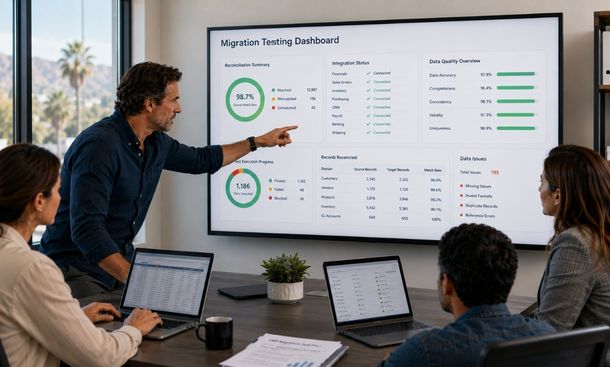
Reconciliation compares the source data with the migrated results.
Start with record counts.
If the legacy ERP contains 20,000 customer records, the team should know how many were loaded, merged, archived, rejected, or removed. The totals should explain every source record.
Do the same for vendors, products, orders, invoices, payments, employees, and inventory entries.
Counts are only the first layer.
Compare important totals such as:
- Customer balances
- Vendor balances
- Open invoice amounts
- Credits
- Tax totals
- Inventory quantities
- Inventory value
- Open order value
- Purchase commitments
- General ledger balances
Finance should reconcile opening balances to the approved source totals. Operations should compare inventory by product and location rather than only checking one company-wide number.
Review individual records too.
A total can match even when values are attached to the wrong accounts. Select samples across normal and unusual scenarios. Include customers with several addresses, partial orders, inactive vendors with open invoices, products with multiple units of measure, and transactions in different currencies.
Keep the reconciliation evidence. Record the source total, destination total, difference, explanation, owner, and approval.
Test complete business workflows
Data becomes valuable when employees use it to complete work.
That is why migration testing must go beyond database tables.
Run realistic end-to-end scenarios such as:
- Create an order for a migrated customer
- Apply the correct pricing and tax rules
- Reserve migrated inventory
- Release the order for fulfillment
- Generate an invoice
- Record a payment
- Confirm the accounting entries
- Run the related management report
Test purchasing as a complete flow too. Create a purchase order for a migrated vendor, receive inventory, match the invoice, approve payment, and review the financial result.
Include exceptions.
Test an out-of-stock product, rejected approval, returned order, duplicate invoice, customer credit limit, missing required field, and canceled purchase order.
Normal scenarios prove that the basic process works. Exceptions reveal whether the ERP can support the situations employees face on a real Tuesday afternoon.
Validate integrations
An ERP can contain perfect data and still fail operationally if connected systems do not work.
Test every integration that supports a launch-critical process.
That may include:
- Customer relationship management software
- Ecommerce platforms
- Payment processors
- Banks
- Warehouse systems
- Shipping providers
- Payroll tools
- Tax services
- Reporting platforms
- Supplier portals
Verify the direction, timing, format, and completeness of each data exchange.
Create a customer in the correct source platform and confirm that the ERP receives the right values. Update an order and verify that connected systems receive the status. Process a failed payment and check whether the error reaches the correct team.
Test duplicate handling.
If an integration retries after a timeout, the ERP should not create the same order or payment twice. Confirm how the systems identify records that have already been processed.
Test failure alerts as well.
A silent integration failure is dangerous because employees assume the information moved. The responsible person should receive an alert with enough detail to investigate and recover.
Check performance and security
Testing with a few hundred records can hide problems that appear at production volume.
Use realistic data volumes when measuring:
- Migration load time
- Search response
- Report generation
- Batch processing
- Integration throughput
- Concurrent user activity
- Backup duration
- Recovery time
If the final migration must fit inside an eight-hour cutover window, a small sample cannot prove the timeline.
Run at least one production-sized rehearsal. Measure every stage, including extraction, transformation, loading, reconciliation, correction, and approval.
Security needs equal attention.
Role-based access means employees receive permissions based on their responsibilities. A salesperson may need customer and order information without access to payroll or bank details. A warehouse employee may update inventory without changing financial accounts.
Test accounts for each major role.
Confirm that users can complete required work and cannot access restricted information. Include approval limits, administrative rights, exports, reports, and sensitive fields.
Also verify that former employees, test accounts, and temporary migration users do not retain unnecessary access.
Run user acceptance testing
User acceptance testing lets real employees confirm that the new ERP supports their work.
Select participants from finance, sales, operations, purchasing, customer service, and management. Include experienced employees who understand the legacy process and newer employees who can judge whether the new workflow is clear.
Give each participant structured scenarios with expected outcomes.
Do not only ask users to explore the platform. That produces inconsistent feedback and makes coverage difficult to measure.
A useful test case includes:
- Starting conditions
- Required data
- Steps to perform
- Expected result
- Actual result
- Pass or fail status
- Evidence
- Tester comments
Ask users to validate both accuracy and usability.
The data may be correct while the workflow remains confusing. An important status may be difficult to find. A report may group information in a way managers cannot use. An approval notification may not include enough context.
User feedback should be reviewed, prioritized, and retested like any other defect.
Manage defects and approvals
Every failed test needs a controlled path to resolution.
Create one defect log with:
- Unique issue number
- Description
- Data domain or workflow
- Severity
- Business impact
- Owner
- Target resolution date
- Fix details
- Retest result
- Approval status
Define severity levels before testing begins.
A critical defect prevents an essential business process or creates unacceptable financial, security, or data risk.
A high-severity defect seriously limits a process but may have a temporary workaround.
Medium and low issues can often move into the post-launch backlog when owners accept the risk.
Do not close a defect because someone changed a script or mapping rule. Close it after the corrected result passes testing.
Before cutover, produce a readiness summary showing passed tests, open defects, accepted risks, reconciliation status, integration results, and business approvals.
That evidence should support the launch decision.
Data migration testing proves that your new ERP can do more than store imported records.
Reconcile counts and balances. Test complete workflows. Validate integrations, performance, permissions, reports, and exception handling. Bring real employees into acceptance testing and require evidence before closing defects.
The result should be a clear answer to one question: can the business operate accurately and safely after cutover?
The next step is protecting operations while the final migration happens. Use the business continuity plan for ERP cutover to prepare backups, communications, support coverage, and rollback triggers.
For the complete process connecting testing with strategy, cleanup, planning, and stabilization, continue with our ERP data migration guide.
About the Author

mike
Mike is a tech enthusiast passionate about SaaS innovation and digital growth. He explores emerging technologies and helps businesses scale through smart software solutions.
Did you find this helpful?
Your feedback helps us curate better content for the community.