

Running a remote team in California felt manageable at first. A project management tool here, a cloud accounting platform there, maybe a separate system for inventory or HR. Each tool solved a specific problem, and for a while, the stack held together.
Then the business grew. The team spread across time zones. The manual handoffs between disconnected platforms multiplied. And what once felt like a lean, flexible setup started feeling like a coordination tax that nobody officially budgeted for but everyone was quietly paying.
This is where most California entrepreneurs discover ERP — not through a sales pitch, but through the exhaustion of trying to run a distributed business on software that was never designed to work together.
Enterprise resource planning software, which connects your financials, operations, inventory, HR, and sales into one unified platform, has been quietly transforming how remote-first businesses operate. The platforms available today are significantly different from the complex, expensive enterprise systems that gave ERP its intimidating reputation. Modern cloud ERP is built for lean teams, accessible from any device, and deployable in weeks rather than years.
This guide covers everything a California entrepreneur needs to understand about how ERP supports remote work — from what the technology actually does to which platforms deserve serious consideration in 2025. Each section goes deep on a specific part of the picture, so whether you are exploring ERP for the first time or comparing platforms before a final decision, you will find what you need here.
Why remote work broke most small business software
The tools most small businesses were using when remote work accelerated were not built for distributed teams. They were built for offices — environments where people sit near each other, share the same network, and can resolve coordination problems by walking across the room.
When those same businesses went remote, the tools technically still worked. You could still log into your accounting software from home. You could still update your project tracker from a coffee shop in Pasadena. But the informal coordination that used to happen in person — the quick question to the person at the next desk, the hallway conversation that caught a data discrepancy before it became a problem — disappeared. And the software had nothing to replace it.
The result was a coordination gap that every remote California SMB felt but not everyone could name precisely. Data lived in too many places. Nobody had a complete picture of the business. Decisions got made on incomplete information. Month-end reporting became an excavation project. New remote hires took weeks to get fully operational because the knowledge they needed was spread across multiple systems and multiple people’s heads.
This is not a people problem. The teams running these businesses are capable and motivated. It is an infrastructure problem — a mismatch between the tools in place and the operational reality of a distributed workforce.
The businesses that solved this problem most effectively were the ones that stopped adding tools to the stack and started thinking about unification. They asked a different question — not “which new app fixes this specific pain point” but “what would it look like if all of our business data and processes lived in one connected system.”
That question leads to ERP. And for California remote teams specifically, the timing has never been better. The platforms available today are more accessible, more affordable, and more remote-ready than anything that existed five years ago.
Understanding what those platforms actually offer — and what they require — starts with a clear picture of what cloud ERP is and what it is not. That is what our deep-dive on cloud ERP for remote California SMBs covers in full detail, including why entrepreneurs across the state are making the switch right now.
What cloud ERP actually means for a distributed team
The term enterprise resource planning carries a lot of baggage. For most small business owners, it conjures images of massive IT projects, six-figure consulting fees, and software so complex that only specialists can operate it. That image is outdated, but it persists — and it keeps a lot of California entrepreneurs from exploring a category of tools that would genuinely solve their operational problems.
So let’s be precise about what cloud ERP actually is in a modern context, and more importantly, what it means practically for a team working remotely across California.
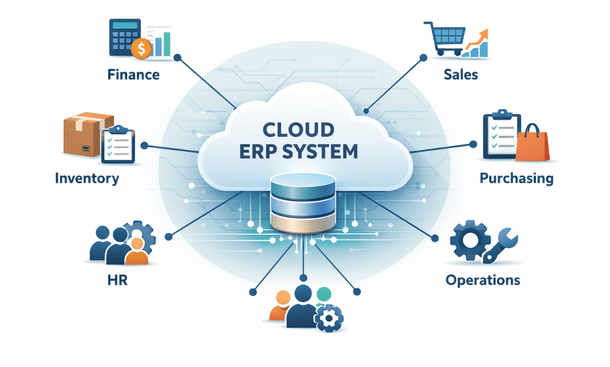
At its core, an ERP system is software that connects the primary functions of your business — financials, inventory, purchasing, sales, HR, and operations — into a single platform that shares data in real time across all of those functions. Instead of your accounting software sitting in one place, your inventory system in another, and your HR platform somewhere else entirely, everything runs inside one connected environment.
The cloud part means this system lives online rather than on a server in a back office. Any team member with the right credentials can access the platform from a laptop in San Francisco, a home office in Fresno, or a client site in San Diego. The data they see is current because it updates in real time across the entire system. When your sales team closes a deal, the finance team sees it immediately. When inventory drops below a threshold, the purchasing team gets an automatic alert. When a new employee is added to the system, their onboarding workflow kicks off without anyone manually triggering it.
For a remote team, this matters in a way that is hard to fully appreciate until you have experienced the alternative. The coordination problems that fragmented tools create — the manual data transfers, the outdated reports, the decisions made on incomplete information — are not minor inconveniences. They are a daily tax on your team’s time and your business’s ability to move quickly.
Cloud ERP eliminates that tax by making the coordination automatic. The platform becomes the single source of truth that every team member, regardless of location, works from. There is no reconciling different versions of a spreadsheet. There is no chasing down a colleague in a different time zone to get the latest inventory count. There is no waiting until the end of the month to understand how the business is performing financially.
What cloud ERP is not is equally important to understand. It is not a project management tool, though many platforms include project tracking functionality. It is not a communication platform, though workflow notifications keep team members informed without requiring a separate message. And it is not a solution reserved for large companies with IT departments. The platforms available today serve businesses with five employees as naturally as they serve businesses with five hundred.
The distinction between cloud-native ERP — platforms built from the ground up for online access — and cloud-compatible ERP — older systems adapted for web access as an afterthought — also matters practically. Cloud-native platforms tend to offer better mobile experiences, more reliable performance for distributed teams, and faster update cycles that keep the product improving without requiring manual upgrades on your end.
For California businesses specifically, cloud ERP addresses a set of pressures that are particular to operating in this state. The complexity of California payroll rules, the multi-jurisdictional sales tax environment, and the employment record requirements under state law all create administrative overhead that a well-configured ERP handles systematically rather than manually.
The talent market in California also plays a role. Professionals who choose remote work expect modern tools. Showing up to a recruiting conversation with a fragmented, outdated software stack is a real disadvantage when competing for skilled operations, finance, or sales talent in a market where candidates have options.
Understanding what cloud ERP offers is the foundation. The next practical question is which specific features inside those platforms actually move the needle for remote teams — and which ones are vendor marketing dressed up as functionality.
That is the question our detailed breakdown of the ERP software features that remote teams actually need answers directly, with a focus on the capabilities that replace in-person coordination rather than simply digitizing existing processes.
The ERP features that make remote work function properly
Not every feature in an ERP catalog matters equally for a remote team. Vendors will show you everything their platform can do during a sales demo, and the list is always impressive. The challenge is separating the capabilities that genuinely change how a distributed team operates from the ones that look good in a presentation and rarely get used in practice.
For California remote teams specifically, there are five capabilities that consistently make the difference between an ERP deployment that transforms operations and one that gets quietly abandoned six months after launch.
Real-time data synchronization is the foundation everything else depends on. When every team member — regardless of location, device, or time zone — pulls from the same live data environment, the coordination problems that fragmented tools create simply stop occurring. A sales rep in Los Angeles sees current inventory before quoting a delivery date. A manager in Oakland approves a purchase order from her phone during a commute. A finance team member in San Diego sees a payment post in real time rather than discovering it during the monthly reconciliation.
This sounds like a basic expectation. In practice, a surprising number of platforms update data on a delay, sync between modules inconsistently, or require manual refresh actions that remote team members forget or skip. When evaluating any ERP, test the real-time synchronization claim explicitly rather than accepting it at face value.
Genuine mobile functionality is the second capability that separates remote-ready platforms from legacy systems with a mobile coat of paint. The distinction worth holding onto is mobile-first versus mobile-compatible. A mobile-first platform is designed for phone and tablet use as a primary interface. A mobile-compatible platform is a desktop system that technically loads on a phone but loses significant functionality and usability in the process.
For a California remote team where members work from home offices, client sites, co-working spaces, and occasionally a car between meetings, mobile-first functionality is a daily operational requirement. The specific mobile capabilities that matter most include approving purchase orders and expense reports with a tap, accessing role-specific dashboards with current data, submitting and tracking time entries, and receiving actionable push notifications that link directly to the relevant record in the system.
Test the mobile app before you evaluate anything else about a platform. If it feels like a compressed desktop interface rather than a purpose-built mobile experience, the adoption rate among your remote team will reflect that friction.
Automated workflow management is what makes asynchronous work reliable at scale. Remote teams operate asynchronously by nature — people complete tasks on their own schedules and hand off to colleagues who may be in a different location or working different hours. Without structured automation, those handoffs depend on Slack messages, follow-up emails, and the memory of whoever is supposed to act next.
Workflow automation inside an ERP replaces those informal handoffs with systematic triggers. When an invoice exceeds a certain amount, it routes automatically to the appropriate approver. When inventory drops below a defined threshold, a purchase request generates without anyone manually checking stock levels. When a new remote employee is added to the system, their equipment requests, system access provisioning, and payroll setup initiate automatically based on their role.
The most useful platforms let non-technical team members build and modify these workflows using visual rule-builders rather than code. This matters for California SMBs without dedicated IT staff — your operations manager should be able to adjust an approval threshold without filing a support ticket.
Role-based permissions address a security and clarity challenge that is specific to remote environments. In a physical office, informal observation provides some natural limit on who accesses what. In a remote environment, that informal limit disappears entirely. Role-based permissions replace it with a systematic structure where each team member sees only the data and functionality relevant to their work.
This is not just a security measure, though it does help California businesses meet their obligations under the California Consumer Privacy Act. It is also a usability feature. A system that shows every user every function and every data set is overwhelming to navigate, especially for new remote hires who are learning the platform without in-person support. A thoughtfully configured permissions structure makes the platform feel simpler and more relevant to each person using it.
Integrated reporting is the capability that changes how remote managers make decisions. When financial data, operational metrics, inventory performance, and sales results all come from the same underlying system, reports reflect a complete and current picture of the business rather than a manually assembled approximation.
For remote California entrepreneurs who cannot physically observe operations, real-time reporting is the closest equivalent to walking the floor. A well-configured ERP gives every role a default dashboard surfacing the metrics most relevant to their work, while allowing deeper exploration when a specific question requires it. The result is faster decisions, fewer surprises at month-end, and a shared understanding of business performance that does not require a weekly all-hands meeting to communicate.
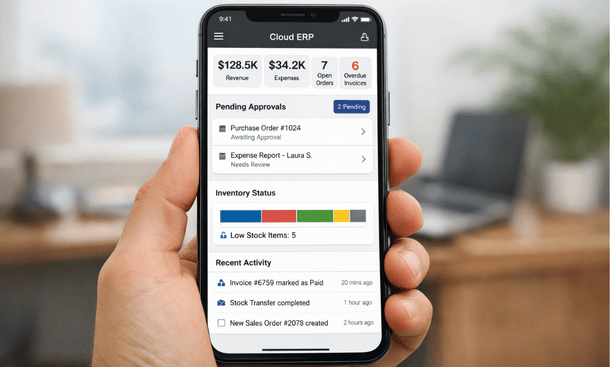
These five capabilities — real-time data, mobile-first access, workflow automation, role-based permissions, and integrated reporting — are the core of what makes an ERP genuinely useful for a remote California team. They are also the capabilities most worth stress-testing during any vendor evaluation, because the gap between what platforms promise and what they deliver in these specific areas varies significantly across the market.
For a complete breakdown of each capability and practical guidance on evaluating them before you commit to a platform, our detailed guide on the ERP features that distributed teams actually rely on day to day goes deeper on every point covered in this section.
ERP versus standalone SaaS tools — the honest comparison
Most California entrepreneurs do not arrive at the ERP conversation because they went looking for it. They arrive because their current tool stack stopped working well enough to ignore.
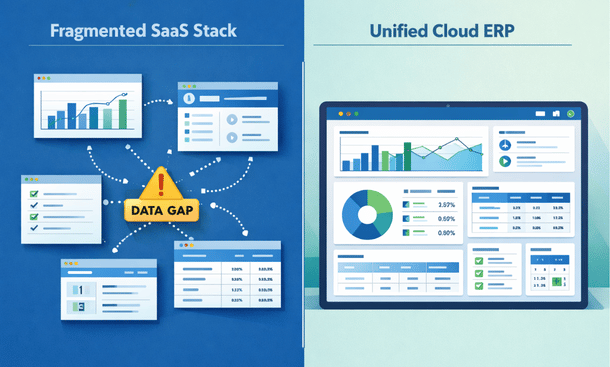
The stack usually looks something like this. A project management platform for task coordination. A separate accounting tool for financials. An inventory system that does not talk to either of those. A CRM for the sales team. An HR platform for payroll and benefits. Maybe a few additional point solutions filling specific gaps. Each tool was adopted for a legitimate reason, each one works reasonably well within its own boundaries, and together they create a coordination overhead that compounds quietly until it becomes impossible to ignore.
Understanding why that happens — and when ERP becomes the more rational choice — requires an honest look at what each approach actually delivers and what it costs beyond the monthly subscription fee.
What standalone SaaS tools do genuinely well
Project management platforms, purpose-built accounting software, and best-in-class CRM tools are excellent at their specific jobs. They are typically faster to set up than ERP, more intuitive for non-technical users, and flexible enough to adapt to many different workflow styles. For early-stage California businesses where the primary operational challenge is task coordination rather than cross-functional data management, a well-chosen stack of three or four integrated SaaS tools covers significant ground without a large upfront investment.
The integration ecosystem around major SaaS platforms has also improved substantially. Tools like Zapier, Make, and native API connections mean that data can flow between platforms more automatically than it could even a few years ago. For businesses with technical capacity to set up and maintain those integrations, the useful life of a SaaS stack extends meaningfully.
Where the stack starts breaking down
The ceiling of a SaaS stack becomes visible at a specific point in a business’s growth. It is not always about company size — some businesses hit the ceiling at fifteen employees, others manage comfortably at fifty with a well-maintained stack. The ceiling appears when the coordination overhead of keeping disconnected systems aligned starts costing more than the efficiency they provide.
The breaking point typically manifests in one of a few ways. Month-end financial close becomes a multi-day project because data from five different platforms needs manual reconciliation. A remote manager asks a simple question — “how are we performing against budget this quarter” — and nobody can answer it without spending two hours assembling a report. A new remote hire takes three weeks to reach full productivity because their onboarding requires access to seven different systems, each with its own login, interface, and learning curve. A process change — a new approval threshold, a revised pricing structure, a new product category — requires manual updates across multiple platforms rather than a single configuration change.
These are not signs of a poorly run business. They are signs of a business that has outgrown the infrastructure supporting it.
The hidden cost calculation
When California entrepreneurs compare the cost of their current SaaS stack against an ERP investment, the subscription line items almost always favor the stack. Five individual tools often add up to less per month than a mid-tier ERP license.
But the subscription comparison captures only the most visible portion of the total cost. The hours your remote team spends every week manually transferring data between platforms, reconciling discrepancies, and chasing down information that should be instantly accessible — that time has real dollar value that never appears in a software budget.
Consider a conservative estimate. If three people on your remote team each spend four hours per week on coordination tasks that a unified ERP would automate or eliminate, that is twelve hours of productive capacity lost every week. At an average fully-loaded cost of fifty dollars per hour for a California knowledge worker, that is over thirty thousand dollars in annual operational overhead that does not appear on any software invoice but is absolutely real.
The math shifts further when you factor in the cost of decisions made on incomplete or outdated information. A purchasing decision based on yesterday’s inventory data. A sales commitment made without visibility into current production capacity. A hiring decision made without a clear picture of current labor costs relative to revenue. These are not hypothetical — they are the daily reality of running a remote business on fragmented tools.
When standalone tools remain the right choice
This comparison is not an argument that every California remote business should immediately migrate to ERP. There are situations where a well-chosen SaaS stack remains the more practical option.
If your business is under ten people and operational complexity is low, the implementation overhead of an ERP is unlikely to deliver a return that justifies the investment of time and money. If your business model is narrow enough that two or three tightly integrated tools genuinely cover your operational needs, adding the breadth of an ERP creates unnecessary complexity rather than eliminating it. And if your team lacks the internal capacity to manage a thoughtful implementation, a simpler stack maintained competently is always better than a sophisticated platform deployed poorly.
The honest guideline is that most California remote SMBs hit the ceiling of their SaaS stack somewhere between fifteen and fifty employees, though operational complexity matters as much as headcount. A twenty-person product business managing inventory, manufacturing, multi-channel sales, and a distributed fulfillment team will hit that ceiling earlier than a twenty-person professional services firm with straightforward project and billing needs.
For a deeper look at how this comparison plays out across specific business scenarios — including the total cost analysis and the practical signs that your stack has reached its limit — our full breakdown of ERP versus standalone SaaS tools for distributed California teams covers the decision framework in detail.
How to implement ERP without derailing your remote team
Deciding that ERP is the right move is one thing. Actually getting a remote California team onto a new platform — without losing weeks of productivity, creating data chaos, or triggering a quiet revolt from the people who have to use it every day — is a different challenge entirely.
Implementation is where ERP projects succeed or fail. Not in the platform selection, not in the contract negotiation, and not in the feature configuration. In the human side of the rollout — the preparation, the communication, and the adoption work that determines whether the investment delivers its promised return or quietly gets worked around.
For remote teams specifically, implementation carries risks that in-office rollouts do not face to the same degree. You cannot gather everyone in a conference room for a training day. You cannot walk the floor to see who is struggling with the new system. You cannot overhear a conversation between two team members that reveals a workflow problem before it becomes a support ticket. Everything has to be more deliberate, more documented, and more structured than it would be in a physical office.
The good news is that modern cloud ERP platforms are significantly more implementation-friendly than the enterprise systems that built ERP’s difficult reputation. A realistic rollout for a California SMB with ten to thirty remote employees runs between eight and sixteen weeks from contract signing to full team go-live — not the eighteen-month nightmare that the category’s history sometimes suggests.
Getting to the shorter end of that range requires arriving at the implementation with a specific kind of preparation.
Map your operations before you open any software
The most expensive mistake California entrepreneurs make during ERP implementation is starting with the platform rather than with the business. They sign a contract, open the configuration interface, and then try to figure out how their actual workflows fit into the system’s structure. This gets the sequence backwards and creates implementation problems that are far more costly to fix mid-project than they would have been to prevent upfront.
Before you evaluate a single platform or attend a single vendor demo, document how your business actually operates. Not how you wish it operated — how it actually works today, including every manual step, every informal workaround, and every place where information currently moves between systems through human effort rather than automation.
Map your core operational flows in plain language. How does a sale move from closed to invoiced to collected? How does an inventory purchase get requested, approved, received, and recorded? How does a new remote employee get onboarded — what systems need to be set up, what information needs to be entered, and who is responsible for each step?
This documentation serves two purposes. First, it gives you a clear picture of what the ERP needs to replicate and improve — which makes configuration decisions significantly faster and more confident. Second, it surfaces the manual handoff points in your current process where remote coordination breaks down most frequently. Those handoff points are exactly what workflow automation inside the ERP should target first.
Handle data migration before it handles you
Data migration — moving your existing customer records, vendor lists, inventory data, financial history, and employee information from your old systems into the new platform — is consistently the most underestimated part of ERP implementation for small businesses.
The temptation is to treat migration as a technical task that happens near the end of the project. In reality, it is a business task that needs to start near the beginning. The reason is data quality. Years of operating across disconnected systems almost always produces duplicate records, inconsistent naming conventions, outdated entries, and reconciliation gaps between platforms. Moving that data as-is into a new ERP imports the problems along with the information.
Invest time in cleaning your data before migration begins. Remove duplicates. Standardize how customer names, product codes, and vendor entries are formatted. Reconcile any discrepancies between your accounting system and your inventory system. It is tedious work that produces no immediately visible output, but it pays dividends for years after go-live by ensuring that the new system’s reports and workflows are built on accurate information.
For remote teams, assign a specific person — not a committee, one person — to own the data migration process. That person does not need to be technical. They need to be detail-oriented, have authority to make decisions about data standardization, and have enough time allocated to do the work properly rather than rushing it to meet a go-live deadline.
Train for roles, not for features
Remote team training is where more ERP implementations lose momentum than anywhere else. The default approach — a comprehensive walkthrough of everything the platform can do, delivered in one or two long sessions — produces low retention and high frustration in an office environment. For a remote team learning asynchronously without in-person support, it is even less effective.
The approach that works for remote California SMBs is role-specific training organized around actual daily workflows. Instead of showing your sales team how the inventory module works, show them the three specific actions they will take every day — how to check current stock before quoting, how to create and submit a sales order, how to track delivery status for a customer inquiry. Keep each training module short, focused, and immediately applicable to the work that person does.
Most modern cloud ERP vendors provide video libraries, in-app guides, and live webinar training as part of their onboarding package. Use these resources, but supplement them with internal documentation that reflects your specific configuration. A vendor’s generic tutorial shows how the platform works in a default setup. Your internal guide shows how it works in your business, with your workflows, your approval thresholds, and your specific data structure.
Designate one person on your remote team as the internal ERP point of contact during the first three months. This person becomes the first line of support for colleagues who hit a wall — answering the questions that do not require vendor involvement and catching adoption problems early enough to address them before they become habits. Choose someone with patience and strong communication skills rather than technical expertise.
Set realistic expectations for the transition period
Every ERP implementation involves a productivity dip in the first four to six weeks after go-live. Team members are learning a new system while continuing to do their jobs. Processes that were automatic under the old setup require conscious effort under the new one. Some things that used to take two minutes now take five while the learning curve flattens out.
This is normal. It is also temporary. Communicating clearly with your remote team before go-live — acknowledging that there will be a transition period, setting explicit expectations about what support is available, and celebrating early wins when team members successfully complete workflows in the new system — significantly reduces the frustration that makes people want to go back to their old tools.
The businesses that navigate implementation successfully are almost always the ones that treated it as an organizational change project rather than a software project. The technology is the easier part. Getting a distributed remote team to genuinely adopt a new platform and trust it as their primary operational environment is the real work.

For a complete walkthrough of the implementation process — including the realistic budget numbers, a week-by-week timeline, and a clear picture of what success looks like in the first ninety days — our detailed guide on implementing ERP for a remote small business team in California covers every stage from process mapping to post-launch adoption.
The best ERP platforms for remote California SMBs in 2025
Choosing an ERP platform is not a decision that benefits from a feature comparison spreadsheet alone. The platforms that work best for remote California small businesses share a specific set of characteristics — cloud-native architecture, genuine mobile functionality, realistic implementation timelines for lean teams, and integration depth with the SaaS tools California businesses already rely on.
What follows is an honest assessment of the five platforms that consistently earn serious consideration from California entrepreneurs running distributed teams. Each one has a distinct profile, a different strength, and a different type of business it serves best. None of them are perfect. All of them are meaningfully better than a fragmented tool stack for a remote team that has outgrown its current setup.
NetSuite — the platform that scales with your ambition
NetSuite is the most widely deployed cloud ERP for growing businesses globally, and that position reflects genuine product depth rather than just marketing reach. The platform covers financials, inventory, CRM, e-commerce, HR, and project management within a single unified system. For a California business with a clear growth trajectory — one that expects to move from thirty employees to one hundred and fifty over the next few years — NetSuite’s breadth means the platform grows with the business rather than requiring replacement at the next inflection point.
Real-time reporting is one of NetSuite’s strongest capabilities. The customizable dashboard system gives every role a relevant, current view of business performance without requiring a finance team member to compile a manual report. For remote managers who need accurate operational visibility without being able to physically observe their team, this matters in practice every day.
The trade-offs are real. NetSuite is not a budget platform. Licensing starts around one thousand dollars per month for a base configuration and climbs as modules and users are added. Implementation complexity is high enough that most businesses engage either NetSuite’s professional services team or a certified implementation partner, which adds meaningful cost to the total investment. And the interface, while functional, carries a steeper learning curve than newer cloud-native competitors — a practical consideration for remote teams where self-directed learning replaces in-person support.
Best fit for California remote teams with thirty or more employees, a clear growth trajectory, and the budget and patience for a thorough implementation.
Odoo — the modular option for businesses that want to start lean
Odoo occupies a genuinely unique position in the market. Its open-source foundation means the base platform is free to use and modify, while the hosted cloud version functions like a standard SaaS product with managed updates and vendor support. The modular structure lets California businesses start with the specific functions they actually need — accounting, inventory, CRM, or HR — and add capability as the business grows without paying for functionality that is not yet relevant.
For remote California teams with some technical capacity, Odoo’s flexibility is a genuine advantage. The integration library covers Shopify, Stripe, PayPal, and a wide range of shipping and logistics providers that matter for California product businesses. The web-based interface and mobile app cover the daily workflow needs most SMBs require without requiring significant configuration to reach a usable state.
The honest limitation is that Odoo’s apparent simplicity can be misleading. The modular structure means more configuration decisions upfront than platforms with more opinionated default setups. And the quality of implementation support varies — the community edition lacks dedicated vendor support, while the enterprise cloud version shifts pricing into a more competitive range with other platforms on this list.
Best fit for California SMBs with some internal technical capacity, a preference for starting with a focused set of modules and expanding over time, and a business model that values flexibility over out-of-the-box polish.
Acumatica — the remote-access platform with an unusual pricing model
Acumatica is the ERP on this list that most explicitly orients its product around remote and distributed work, and that positioning reflects genuine architectural decisions rather than marketing language. The platform’s consumption-based licensing model — charging based on computing resource usage rather than per user — is particularly relevant for California businesses with variable team sizes, seasonal workforces, or a mix of full-time employees and occasional external users who need periodic system access.
The mobile experience is among the strongest in this category, with a purpose-built app that covers approvals, time entry, project management, and financial reporting without requiring the desktop interface as a fallback. Industry-specific editions for manufacturing, distribution, construction, and field services provide pre-configured templates that reduce implementation time for California businesses in those verticals — sectors that represent a significant portion of the state’s SMB economy.
The practical limitation is market presence. Acumatica is less widely recognized than NetSuite or SAP, which means a smaller ecosystem of third-party implementation partners and a less extensive community of peer users to learn from. For a remote California team that values being able to find answers and support independently, this gap is worth factoring into the evaluation.
Best fit for California SMBs in manufacturing, construction, distribution, or field services with variable team compositions, mobile-heavy workflows, and a preference for consumption-based pricing over per-user fee structures.
SAP Business One — depth for product-based businesses in regulated industries
SAP Business One is the small business offering from one of the largest enterprise software companies in the world. It is a mature platform with deep functionality, particularly for businesses managing complex inventory structures, manufacturing processes, or multi-entity financial reporting. For California businesses in food and beverage production, medical device manufacturing, pharmaceutical distribution, or complex wholesale operations — industries with specific compliance and traceability requirements — the platform’s depth in these areas is difficult to match at its price point.
The partner ecosystem is a genuine strength. A large network of certified implementation partners operates across California, many specializing in specific industries, which provides access to local, ongoing support that more lightly resourced platforms cannot match. For California businesses that want a long-term implementation relationship rather than a self-service deployment, this matters practically.
The honest trade-offs involve interface modernity and remote adoption friction. SAP Business One retains some of the operational characteristics of its on-premise origins, and the learning curve is steeper than newer cloud-native competitors. For remote teams where self-directed learning replaces in-person support, this creates real adoption challenges that require more deliberate training investment to overcome.
Best fit for California product-based businesses in regulated industries or complex distribution environments where financial depth and compliance traceability matter more than implementation simplicity or interface modernity.
Microsoft Dynamics 365 Business Central — the Microsoft ecosystem play
If your California remote team already operates within the Microsoft 365 environment — Outlook for communication, Teams for collaboration, Excel for analysis, SharePoint for document management — Business Central deserves serious consideration because its integration with those tools is native rather than built on third-party connectors.
The practical value of that integration is real. Business Central surfaces ERP data directly inside Outlook when you open a customer or vendor email. Workflow notifications and approval requests appear inside Teams. Financial reports export to Excel with live data connections that update when the underlying records change. For a remote team that lives inside Teams for daily coordination, having ERP functionality accessible within that environment reduces context switching in a way that improves daily adoption rather than just theoretical efficiency.
The platform covers core ERP functions well — financials, inventory, purchasing, sales, and basic manufacturing — with a clean interface that tends to earn higher adoption rates than older ERP platforms among remote teams learning the system independently. Microsoft’s regular update cadence means continuous improvement without manual upgrade cycles.
The limitations involve depth at the complex end of the operational spectrum. Business Central’s advanced manufacturing, multi-warehouse management, and sophisticated multi-entity financial consolidation capabilities are thinner than NetSuite or SAP Business One at equivalent price points. And the ecosystem integration advantage diminishes significantly if your remote team’s stack is built around Google Workspace rather than Microsoft 365.
Best fit for California remote teams deeply embedded in the Microsoft 365 ecosystem, prioritizing clean interface design and fast adoption, with operational needs that fall within the platform’s mid-market sweet spot.
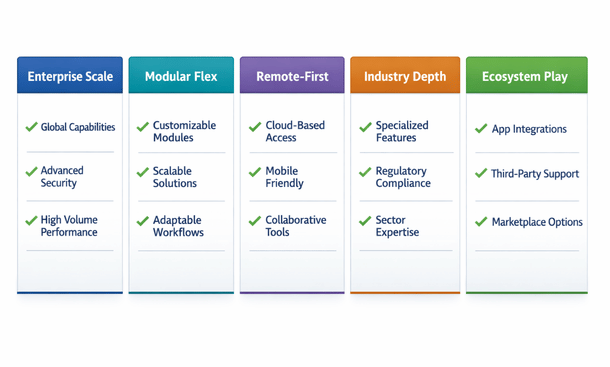
The right platform for your California remote business is the one that aligns with your specific operational priorities, your team’s technical capacity, and your realistic budget over a three-year horizon — not the one with the longest feature list or the most recognizable brand name.
For a detailed, platform-by-platform breakdown that includes honest assessments of trade-offs, pricing structures, and implementation realities for each option — along with a practical framework for matching the right platform to your specific business situation — our complete guide to the best ERP software for remote-first California small businesses in 2025 gives you everything you need to walk into a vendor conversation with clarity and confidence.
Remote work did not create the operational problems that California small businesses face today. It revealed them.
The fragmented tools, the manual coordination overhead, the decisions made on incomplete data — those problems existed before distributed work became the default. Remote work simply removed the informal, in-person mechanisms that kept them manageable and made the underlying infrastructure gaps impossible to ignore.
ERP is not a response to remote work as a trend. It is a response to the genuine operational complexity of running a modern business — one that happens to be particularly well-suited to the distributed, asynchronous, mobile-first reality that California entrepreneurs are navigating right now.
What this guide has covered is the full arc of that response. Why the tools most small businesses built their operations on were never designed for distributed teams. What cloud ERP actually means in a practical, non-enterprise context. Which specific features move the needle for remote California teams and which ones are vendor marketing dressed up as functionality. How the honest comparison between ERP and a SaaS stack plays out when you factor in the hidden costs that subscription line items never capture. What a realistic implementation looks like for a lean remote team without a dedicated IT department. And which platforms deserve serious consideration in 2025 based on the specific needs of California SMBs.
None of this is theoretical. The businesses that have made this transition successfully are not larger or better-resourced than the ones still running on fragmented stacks. They are the ones that recognized the coordination tax they were paying and decided the return on a unified platform justified the investment of time and effort to get there.
The decision does not have to be made all at once. Most California entrepreneurs who land on ERP as the right direction start by mapping their current processes, identifying the highest-friction points in their remote operations, and using that clarity to evaluate platforms against real requirements rather than feature lists. That preparation work alone — before any contract is signed — changes the quality of every subsequent decision in the process.
If there is one next step that delivers the most immediate practical value from everything covered here, it is understanding which platform is the right fit for your specific business before you start talking to vendors. The difference between choosing a platform based on a clear operational picture and choosing one based on a compelling demo is the difference between an implementation that transforms how your team works and one that creates a new set of problems to manage.
Our detailed breakdown of the best ERP software for remote-first California small businesses in 2025 gives you the honest, platform-by-platform assessment you need to walk into those conversations with clarity — including the trade-offs, the pricing realities, and the specific business profiles each platform serves best.
The operational foundation your remote California team deserves is closer than the implementation horror stories suggest. It starts with the right information and a clear picture of what your business actually needs.
About the Author

mike
Mike is a tech enthusiast passionate about SaaS innovation and digital growth. He explores emerging technologies and helps businesses scale through smart software solutions.
Did you find this helpful?
Your feedback helps us curate better content for the community.