

Why ERP implementation has a bad reputation — and why that reputation is outdated
Ask most California entrepreneurs what they think about implementing an ERP and you will hear some version of the same story. A large company spent eighteen months and a small fortune deploying enterprise software, half the features never got used, and the team resisted it for years afterward.
That story is real. It happened — and still happens — at large enterprises running legacy ERP systems designed for organizations with dedicated IT departments, armies of consultants, and implementation budgets that dwarf what most SMBs spend in an entire year on everything.
But that story has almost nothing to do with what ERP implementation looks like for a California small business in 2025.
Modern cloud ERP platforms are built with lean teams in mind. Implementation timelines have compressed dramatically. Vendor onboarding support has improved. And the platforms themselves are significantly more intuitive than the enterprise software of a decade ago.
That does not mean implementation is effortless. It means the scale of the challenge is manageable for a small remote team when approached with a clear plan and realistic expectations.
This article is that plan.
The three phases of a realistic ERP rollout for remote SMBs
Every successful ERP implementation — regardless of company size or platform — follows the same basic structure. There is a preparation phase, a deployment phase, and an adoption phase.
Most failed implementations fail because they skip or rush the preparation phase, get overwhelmed during deployment, and then never reach genuine adoption. Understanding what each phase actually involves, and what can go wrong in each one, is the most valuable thing you can do before you start talking to vendors.
For a remote California SMB, each phase has specific considerations that differ from an in-office rollout. Communication happens asynchronously. Training needs to be self-paced and accessible. And there is no physical IT desk to walk up to when something does not work as expected.
Let’s go through each phase in practical detail.
Phase one — mapping your operations before you touch any software
The most common mistake small businesses make when implementing ERP is starting with the software. They pick a platform, sign a contract, and then try to figure out how their business processes fit into the system.
This gets it exactly backwards.
Before you open a single demo or speak to a single vendor, you need a clear map of how your business actually operates today. Not how you wish it operated, and not how the vendor’s template assumes it operates — how it actually works, with all the workarounds, manual steps, and informal processes your remote team has built up over time.
Start by documenting your core operational flows. How does a sale move from closed to invoiced to collected? How does an inventory purchase get requested, approved, and received? How does a new remote employee get onboarded — what systems do they need access to, what information needs to be set up, and who is responsible for each step?
Document these flows in plain language. You do not need a formal process mapping tool. A shared document with numbered steps is sufficient. The goal is to make the invisible visible so you can make intelligent decisions about how the ERP should be configured.
This phase also surfaces your actual requirements. When you know your processes in detail, you can evaluate ERP platforms against what you genuinely need rather than being dazzled by features that sound impressive but do not apply to your business.
For remote teams specifically, pay particular attention to approval workflows and handoff points — the moments in your process where one person finishes a task and another person needs to act. These are where remote coordination breaks down most often, and they are exactly what a well-configured ERP automates.

Phase two — configuration, data migration, and the mistakes to avoid
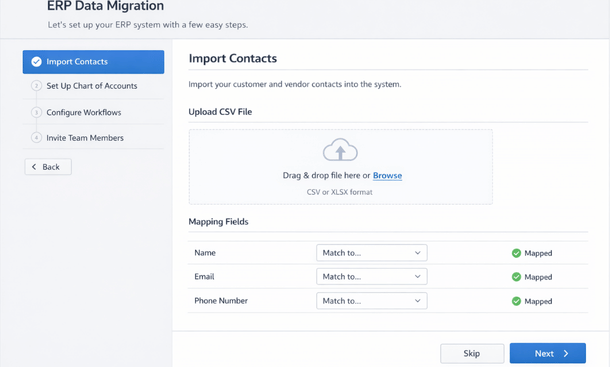
Once you have chosen a platform and signed a contract, the technical work begins. For most cloud ERP platforms, this phase involves three main activities — configuring the system to match your business processes, migrating your existing data into the new platform, and testing everything before the team goes live.
Configuration is where your process mapping from phase one pays off. Instead of accepting the vendor’s default setup and working around it, you can configure the platform to reflect how your business actually operates. This includes setting up your chart of accounts to match your financial structure, building the approval workflows your remote team needs, configuring role-based permissions so each team member sees what is relevant to their work, and connecting any integrations with tools your team already uses.
Data migration is where many small businesses underestimate the effort involved. Moving historical data — customer records, vendor lists, inventory counts, financial history — from your old systems into a new ERP requires cleaning and organizing that data first. Dirty data going into a new system creates dirty data inside the new system, which undermines trust in the platform from day one.
Invest time in data cleaning before migration. Remove duplicate records. Standardize naming conventions. Reconcile any discrepancies between your old systems. It is tedious work, but it pays dividends for years afterward.
For remote teams, the testing phase deserves special attention. Before going live, run your core business processes end-to-end through the new system with a small group of remote team members acting as testers. Identify anything that does not work as expected in a remote context — notifications that do not reach mobile devices, approval workflows that stall, reports that do not surface the right data. Fix these issues before the full team is on the platform.
Phase three — training a remote team without losing momentum
Training is the phase that determines whether your ERP investment delivers its promised return or quietly collects digital dust while your team goes back to their old habits.
For remote teams, training cannot rely on gathering everyone in a conference room for a full-day session. It needs to be modular, accessible on demand, and relevant to each person’s specific role rather than a comprehensive tour of every feature the platform offers.
The most effective approach for remote California SMBs is role-based training organized around real workflows. Instead of training your sales team on how the inventory module works, train them on the specific steps they will take every day — how to look up a customer account, how to create a quote, how to check current availability before committing to a delivery date. Keep each training module short, focused, and immediately applicable.
Most modern cloud ERP vendors provide video libraries, in-app guides, and sometimes live webinar training as part of their onboarding packages. Use these resources, but supplement them with internal documentation that reflects your specific configuration rather than the vendor’s generic setup.
Designate a point person on your remote team — not necessarily a technical person, but someone with patience and strong communication skills — to serve as the internal ERP resource during the first few months. This person becomes the first line of support for colleagues who hit a wall, which reduces the volume of issues that escalate to the vendor and keeps the team moving.
Expect a productivity dip in the first four to six weeks. It is normal, it is temporary, and it is a sign that the team is actually using the new system rather than avoiding it.
Budget reality for California small businesses
Let’s talk numbers, because this question comes up in every conversation about ERP implementation and the honest answer is more nuanced than vendors typically advertise.
Cloud ERP pricing for small businesses generally falls into a per-user per-month model. Entry-level platforms suitable for teams under twenty people start around 40 to 100 dollars per user per month. Mid-market platforms with broader functionality run between 100 and 300 dollars per user per month. Some platforms charge by module rather than by user, which can be more economical for businesses with a small core team managing broad operational scope.
Beyond licensing, budget for implementation costs. These include the time your internal team spends on the project — process mapping, data cleaning, testing, training — which is real cost even if it does not appear on an invoice. If you engage a vendor’s professional services team or an independent implementation consultant, budget between two thousand and fifteen thousand dollars depending on complexity for a small business deployment.
California businesses should also account for the cost of any integrations with existing tools. Most cloud ERP platforms connect to common SaaS products through pre-built connectors, but customized integrations or less common tools may require development work.
A realistic total first-year investment for a California SMB with ten to twenty remote employees, including licensing, implementation support, and internal time, typically falls between fifteen thousand and forty thousand dollars. That range is wide because business complexity varies enormously, but it gives you a working frame for planning purposes.

The timeline question — how long does this actually take
For a California SMB with a remote team of ten to thirty people and a reasonably well-documented set of business processes, a realistic cloud ERP implementation timeline runs between eight and sixteen weeks from contract signing to full team go-live.
The wide range reflects the primary variable — how prepared your business is before implementation starts. Companies that arrive with clean data, documented processes, and a clear sense of their requirements move through implementation significantly faster than those that are figuring these things out while the clock is running.
Week one through three typically covers initial configuration, user setup, and integration connections. Weeks four through seven cover data migration and internal testing. Weeks eight through twelve cover role-based training and a phased rollout, starting with a pilot group of two or three team members before expanding to the full team.
The sixteen-week end of the range usually reflects businesses that discovered significant data quality issues during migration, needed custom workflow configurations, or had to work through integration challenges with existing tools.
One practical note — resist the pressure to rush the go-live date. Going live on a clean, well-tested system two weeks later than planned is dramatically better than going live on a rushed system that erodes team trust in the platform during the critical first few weeks.
What success looks like in the first ninety days
Setting realistic expectations for the post-launch period is as important as any technical aspect of the implementation.
In the first thirty days, success looks like the team using the system for their daily workflows rather than reverting to old tools. Not loving it, not moving faster than before — just using it consistently. This is the adoption baseline and it matters more than any other metric at this stage.
In days thirty to sixty, you should start seeing the coordination benefits that motivated the project. Approval workflows running without manual follow-up. Reports generating without someone spending half a day assembling data. New team members onboarding into a single system with a clear structure.
By day ninety, the productivity dip from the learning curve should be behind you and the operational benefits should be clearly visible. Month-end close should be faster. Data discrepancies between teams should be significantly reduced. Your remote team should be making decisions with better information than they had before.
If you are not seeing those outcomes by day ninety, the issue is almost always adoption rather than technology. Go back to the training approach and identify where the team is still working around the system rather than through it.
ERP implementation for a remote California SMB is a real project that requires real preparation. But it is not the eighteen-month enterprise nightmare that the software’s reputation sometimes suggests. With a clear process map, clean data, role-specific training, and realistic timeline expectations, a lean remote team can be fully operational on a cloud ERP platform in under four months.
The businesses that struggle are the ones that treat implementation as a purely technical project and underinvest in the human side — the process mapping, the training, and the internal communication that turns a software deployment into an operational transformation.
For the full strategic context on why remote businesses are making this investment in the first place, our guide on how ERP technology supports the complete remote-work lifecycle in modern businesses covers the bigger picture behind everything discussed here.
And once your implementation is complete and your team is running on a solid ERP foundation, the natural next question is which platform was the right choice to begin with. Our breakdown of the best cloud ERP systems for remote teams in California walks through the leading options with the kind of honest evaluation that vendor websites will never give you.
About the Author

mike
Mike is a tech enthusiast passionate about SaaS innovation and digital growth. He explores emerging technologies and helps businesses scale through smart software solutions.
Did you find this helpful?
Your feedback helps us curate better content for the community.