

Table of Contents
- Why most ERP feature lists miss the point
- Real-time data access — the feature everything else depends on
- Mobile-first functionality — not mobile-friendly, mobile-first
- Automated workflows — the async superpower
- Role-based permissions — control without micromanaging
- Integrated reporting — one version of the truth
- The features that sound good but rarely get used
- Final thoughts
Why most ERP feature lists miss the point
Go to any ERP vendor’s website and you’ll find a features page that reads like a hardware store inventory. Hundreds of capabilities, modules for every conceivable business function, and enough acronyms to make your head spin.
For a California entrepreneur running a remote team of ten or thirty people, that list is almost useless. Not because the features aren’t real, but because most of them aren’t relevant to the specific challenge you’re trying to solve — keeping a distributed team aligned, informed, and moving in the same direction.
Remote work introduces a very specific set of operational problems. People aren’t bumping into each other in the hallway. Nobody’s walking over to the finance desk to ask a quick question. Information doesn’t travel naturally the way it does in a physical office. The ERP features that matter for remote teams are the ones that replace those organic, in-person information flows with something systematic and reliable.
So instead of walking through a vendor checklist, this piece focuses on the capabilities that actually move the needle for remote-first small businesses — the ones where the absence of the feature creates real, daily friction.
Real-time data access — the feature everything else depends on
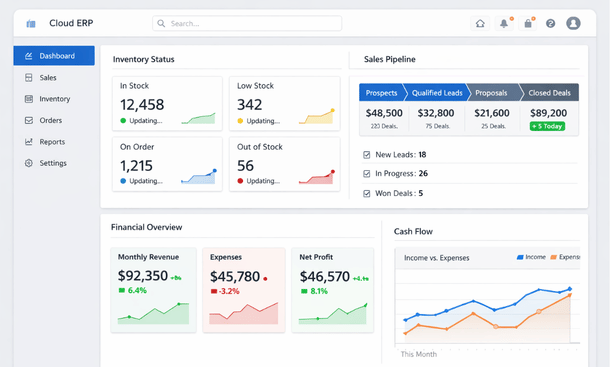
If there is one feature that underpins everything else on this list, it is real-time data synchronization — the ability for every person on your team to see the same current information at the same time, regardless of where they are.
This sounds obvious. It is not obvious in practice.
A lot of small businesses run on systems where data is updated manually, exported to spreadsheets, or synced on a delay. When your operations manager in San Jose is looking at inventory numbers that are twelve hours old and your sales rep in San Diego is quoting lead times based on yesterday’s stock levels, you have a coordination problem that compounds daily.
Real-time data access means that when a purchase order gets approved in the morning, the inventory team sees it immediately. When a customer makes a payment, the finance team’s dashboard reflects it within seconds. When a support ticket gets escalated, the relevant manager gets a notification regardless of their time zone or location.
This is the foundation. Every other feature on this list is only as good as the data feeding it.
Mobile-first functionality — not mobile-friendly, mobile-first
There is a meaningful difference between a platform that works on mobile and one that is built for mobile. Most legacy ERP systems were designed for desktop use and then adapted for smaller screens as an afterthought. You can technically use them on a phone, but the experience is clunky, slow, and missing half the functionality.
For a remote team operating across California — where someone might be reviewing an approval request from their car in Pasadena or checking inventory from a job site in Sacramento — a genuine mobile-first experience is not a luxury.
What mobile-first actually looks like in an ERP context includes being able to approve purchase orders with a tap, submit expense reports with a photo of a receipt, check real-time dashboards without scrolling sideways, and receive actionable push notifications that link directly to the relevant record.
When evaluating any ERP platform, open the mobile app before you look at anything else. If it feels like a compressed version of the desktop interface, keep looking.
Automated workflows — the async superpower
Asynchronous work — where team members complete tasks on their own schedule rather than in real-time coordination — is the natural rhythm of remote teams. But async only works when the handoffs between people are clean and automatic.
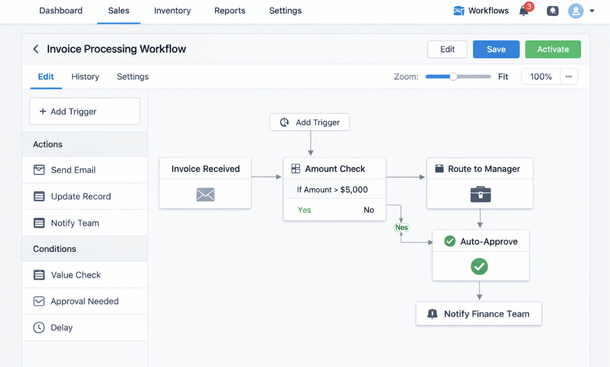
Automated workflows, sometimes called business process automation within ERP platforms, are what make async handoffs reliable. When an invoice hits a certain threshold, it automatically routes to the right approver. When inventory drops below a set level, a reorder request is triggered without anyone manually checking. When a new employee is added to the system, their onboarding tasks, equipment requests, and payroll setup kick off automatically.
For a California SMB without a large operations team, this kind of automation is the difference between a remote setup that runs smoothly and one that requires constant manual follow-up.
The key is configurability. The best ERP platforms let you build these workflows without writing code, using visual rule-builders that non-technical team members can manage and adjust as the business evolves.
Role-based permissions — control without micromanaging
When your team is remote, you cannot physically observe who has access to what. Role-based permissions — a system where each team member sees only the data and functions relevant to their role — is how you maintain security and clarity without turning into a control-obsessed founder.
In practice, this means your sales team sees customer accounts, pipeline data, and pricing. Your warehouse team sees inventory levels and purchase orders. Your finance team sees everything related to money. Nobody sees data that isn’t relevant to their work, which reduces confusion, protects sensitive information, and keeps the system clean.
For California businesses handling customer data, this is also a compliance consideration. California’s Consumer Privacy Act places specific obligations on how businesses handle and restrict access to personal data. An ERP with robust role-based permissions helps you meet those obligations without building a manual process around them.
Integrated reporting — one version of the truth
Remote teams make decisions without the benefit of in-person context. A manager who can’t walk the floor or pop into a meeting needs reports that are accurate, current, and easy to interpret.
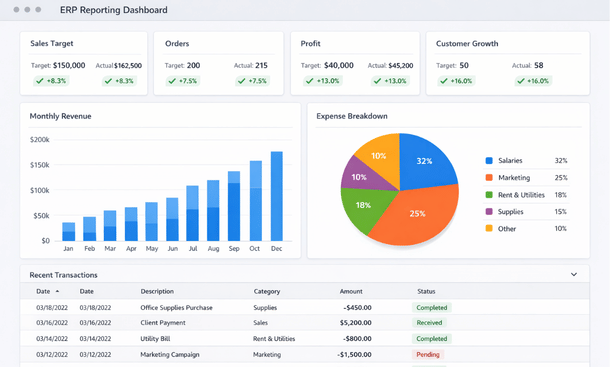
Integrated reporting inside an ERP means your financial reports, operational metrics, and team performance data all come from the same underlying system. There is no reconciling numbers between platforms, no arguing over which spreadsheet is current, and no waiting for someone to compile a monthly report manually.
The best implementations give each role a default dashboard that surfaces the metrics most relevant to their work, while still allowing deeper exploration when needed. A sales manager should open the platform and immediately see pipeline health, conversion rates, and revenue against target. A purchasing manager should see supplier performance, outstanding orders, and budget consumption.
When reporting is integrated and live, remote teams make faster, better-informed decisions. That alone justifies a significant portion of what most ERP platforms cost.
The features that sound good but rarely get used
Worth mentioning briefly — there are ERP features that show up in every demo and rarely survive contact with a real remote team.
Advanced AI forecasting modules tend to require more historical data and configuration time than most SMBs have. Social collaboration layers built into ERP platforms almost always lose to Slack within a week of launch. Complex customization capabilities look impressive in a sales presentation and create expensive maintenance headaches six months later.
None of this means those features are inherently bad. It means that for a lean California SMB in the early to mid stages of ERP adoption, they should not be the reason you choose a platform. Prioritize the fundamentals — real-time data, mobile access, workflow automation, permissions, and reporting — and evaluate everything else as a secondary consideration.
The ERP features that matter for remote teams are not the flashiest ones. They are the foundational ones — the capabilities that replace the informal, in-person information flows of a physical office with something systematic, reliable, and accessible from anywhere in California or beyond.
Real-time data, genuine mobile functionality, automated workflows, smart permissions, and integrated reporting are the five pillars of a remote-ready ERP setup. Everything else is a bonus.
If you want to zoom out and understand the full strategic case for ERP in a remote business context, our complete guide on how ERP technology supports the remote-work lifecycle in modern businesses covers the bigger picture from the ground up.
When you are ready to take the next practical step, head over to our breakdown of ERP versus standalone SaaS tools for distributed teams — where we get into the honest trade-offs between consolidating onto one platform versus stacking best-in-class individual tools. That comparison will help you make a smarter buying decision before you start talking to vendors.
About the Author

mike
Mike is a tech enthusiast passionate about SaaS innovation and digital growth. He explores emerging technologies and helps businesses scale through smart software solutions.
Did you find this helpful?
Your feedback helps us curate better content for the community.