
Table of contents
- The barista who already knows your order
- What caching actually is in plain language
- The three types of caching your app uses
- Browser caching: storing answers on the user’s device
- Server-side caching: storing answers closer to your app
- Database query caching: skipping the heavy lifting entirely
- Why caching matters more as you scale
- How BaaS platforms implement caching automatically
- What founders should configure and what they can safely ignore
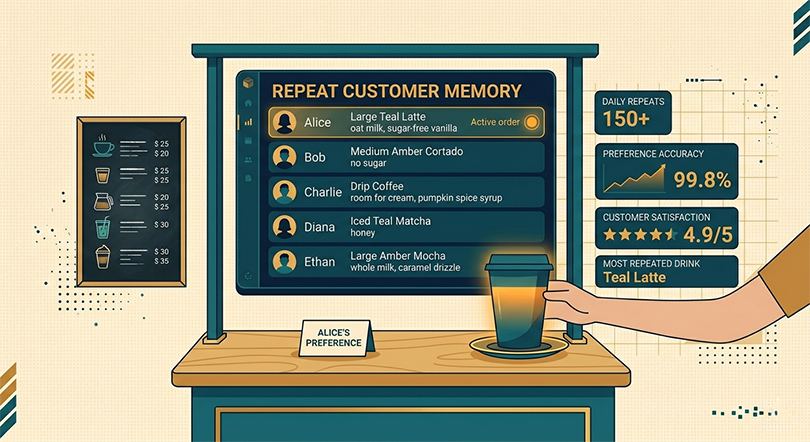
There is a coffee shop near most busy offices where the morning regulars never have to say their order out loud. The barista sees them walk in, starts the process, and has their drink ready before they reach the counter. The coffee is not made any differently. The ingredients are the same. What changed is that the barista stopped treating every customer like a stranger and started remembering what the regulars want.
Your app can work the same way. Instead of going through the full process of fetching, calculating, and assembling data every single time a user asks for something, it stores a ready-made version of the answer nearby and serves that instead. The result is a faster experience for the user, lower strain on your infrastructure, and meaningful cost savings at scale. That process is called caching, and understanding it is one of the highest-leverage things a non-technical founder can do to think clearly about their app’s performance.
The barista who already knows your order
The analogy holds up further than it first appears. When a new customer walks into that coffee shop for the first time, the barista goes through the full process: take the order, clarify preferences, and prepare the drink from scratch. That full process is what your app does every time it receives a request it has never seen before — or one where the answer has changed since the last time it was asked.
But for the regular who orders the same oat flat white every weekday at 8:15, the barista has two options. Option one: treat every visit as a fresh interaction, ask for the order again, and go through the full preparation process. Option two: remember the order, start preparing it when the customer walks in, and have it ready in a fraction of the time.
Option two is caching. The answer is stored somewhere accessible so that when the same question arrives again, the app skips the expensive process of going all the way back to the source and serves what it already knows.
The important nuance — and this is where the analogy earns its keep — is that the barista still needs to update their memory when something changes. If the regular switches to almond milk, serving the old order is no longer helpful. Cache management is the system your app uses to decide when a stored answer is still valid and when it needs to be refreshed. Get that balance right and caching delivers speed without serving stale information.
What caching actually is in plain language
Caching is the practice of storing a copy of data or a computed result in a location that is faster to access than the original source, so that future requests for the same data can be served more quickly.
The “original source” in most SaaS apps is the database — the authoritative record of everything your app knows. Reaching the database involves a chain of steps: the request travels from the user’s device to your server, the server queries the database, the database searches its tables, assembles the result, sends it back to the server, and the server formats and returns it to the user. Each of those steps takes time.
For data that does not change frequently — a user’s profile settings, a product pricing page, a list of available plan options — going through that entire chain on every request is wasteful. The answer is the same every time, so retrieving it fresh every time adds latency without adding value.
A cache sits between the user and the database and intercepts requests it has already seen. When a cached answer exists and is still valid, it gets returned immediately without touching the database at all. When it does not exist or has expired, the request goes through the full chain, the fresh result gets stored in the cache for next time, and the cycle continues.
For a founder thinking about infrastructure costs, that “without touching the database at all” is significant. Every database query your app skips is compute time and bandwidth it does not have to pay for. At a few hundred users, the savings are negligible. At tens of thousands of daily active users making dozens of requests each, caching directly reduces your monthly infrastructure bill.
The three types of caching your app uses
Browser caching: storing answers on the user’s device
Browser caching stores copies of static assets — images, stylesheets, fonts, scripts — directly on the user’s device after they load for the first time. When the user navigates back to your app or visits another page that uses the same assets, their browser serves those files from local storage instead of downloading them again from your server.
The practical effect is that returning users experience dramatically faster load times than first-time visitors, because a significant portion of what makes up your app’s interface is already sitting on their device. For a SaaS product where users log in repeatedly throughout the week, browser caching compounds into a meaningfully better daily experience without any active effort on your part once it is configured.
Most BaaS platforms set appropriate browser cache headers automatically for files stored in their hosting or storage services. The assets your app serves get told how long browsers should consider them valid, and browsers respect those instructions without any additional configuration needed from you.
Server-side caching: storing answers closer to your app
Server-side caching stores the results of expensive operations — API responses, computed aggregations, assembled page data — in fast-access memory on or near your server. Tools like Redis, a high-speed in-memory data store, are the most common implementation. When your app needs data that is already in the cache, it retrieves it from memory in microseconds rather than querying the database in milliseconds.
The difference between microseconds and milliseconds sounds trivial until you consider that a single page load in a modern app might involve dozens of data requests. Shaving twenty milliseconds off each of those requests adds up to a noticeably faster page load that users feel even if they could not articulate why.
Server-side caching is where the barista analogy gets most precise. The cache is the barista’s memory — fast, accessible, and specific to the requests that come in most frequently. Like the barista’s memory, it needs to be updated when the underlying data changes, which is why cache invalidation — the process of clearing or refreshing cached data when it becomes stale — is one of the more nuanced challenges in backend architecture.
Database query caching: skipping the heavy lifting entirely
Database query caching stores the results of specific database queries so that identical queries do not have to be executed against the full dataset again. If your app’s dashboard loads a summary of the last thirty days of user activity, and that summary is requested hundreds of times per hour by different users, running the full query against your entire activity table every time is unnecessarily expensive.
With query caching, the first execution runs the full query, stores the result, and every subsequent identical request gets the stored result instantly. The database only does the heavy lifting once per cache period rather than hundreds of times per hour.
This type of caching has the most direct impact on database performance and, by extension, on the infrastructure costs associated with running a growing database. Understanding how query caching connects to overall database health is worth reading alongside the broader topic of database optimization for startups, where the full picture of keeping your data layer fast comes together.
Why caching matters more as you scale
At fifty users, your app can afford to be inefficient. The database is small, the query volume is low, and the infrastructure has plenty of headroom. Performance problems that caching would solve are invisible at this scale because the underlying operations are fast enough that the absence of optimization does not register.
At five thousand users making requests throughout the day, the picture changes. Popular endpoints get hit hundreds of times per minute. Database tables that were once tiny now hold millions of rows. Queries that took two milliseconds at launch now take forty. The cumulative effect of all those inefficiencies starts showing up as the gradual slowdown that users notice and founders struggle to diagnose.
Caching is one of the most cost-effective responses to this pattern because it reduces load at the source. Rather than solving a performance problem by upgrading to more powerful infrastructure — a valid but expensive approach — caching reduces how much work the existing infrastructure has to do. The same backend plan that was starting to strain under load can often handle significantly more traffic once caching is properly implemented, which directly delays the point at which you need to spend more on infrastructure.
For founders thinking about the economics of scaling, this is a meaningful lever. Upgrading a backend plan costs a predictable monthly amount. Implementing caching effectively can extend the useful life of your current plan by months, with the savings compounding as your user base grows. The relationship between caching, infrastructure costs, and growth planning is one of the core themes in a broader look at app scalability for startups and what it actually demands at different stages of growth.
How BaaS platforms implement caching automatically
Modern BaaS platforms embed caching at multiple layers of their infrastructure without requiring manual configuration from the developer, let alone the founder. This is one of the most concrete practical advantages of building on a managed platform versus assembling a custom backend stack.
Supabase, for example, implements connection pooling that reduces the overhead of repeated database connections and pairs it with query-level optimizations that act as a form of implicit caching. Firebase’s Firestore is architected around offline-first data access, which means data retrieved once is stored locally and served from that local store on subsequent access — a form of client-side caching baked into the platform’s data model. Most BaaS platforms also sit behind CDN infrastructure that caches static content at edge locations globally, as covered in the context of making your app fast for users everywhere.
What this means practically is that a founder building on a BaaS platform gets a meaningful caching architecture out of the box, without having to understand Redis configuration, cache invalidation strategies, or TTL settings. The platform makes reasonable default decisions that cover the majority of use cases at early and mid-stage scale.
Where manual caching configuration becomes relevant is at a higher scale, when the default behavior is no longer sufficient for your specific traffic patterns. At that point, a developer can tune cache durations, implement custom invalidation logic, and add dedicated caching layers for high-traffic endpoints. But for most founders reading this, the default BaaS caching behavior is already doing more work than they realize.
What founders should configure and what they can safely ignore
The honest answer for most early-stage founders is that there is very little active caching configuration required when building on a BaaS platform. The infrastructure handles the heavy lifting. What founders do need to think about is the data design decisions that make caching effective.
The most important of these is avoiding unnecessary real-time data dependencies. If your app loads data that rarely changes — user profile details, subscription plan information, static content — but treats every request as urgent and live, you are preventing the platform from caching it effectively. Designing your data fetching with an awareness of what genuinely needs to be real-time and what can tolerate being slightly stale gives the platform’s caching layer more to work with.
Beyond that, the configuration worth spending time on is alert thresholds in your monitoring dashboard for cache hit rates, if your platform exposes them. A low cache hit rate on a high-traffic endpoint is a signal that something in your data fetching pattern is preventing the cache from doing its job. Catching that signal early, before it translates into infrastructure costs or user-facing slowdowns, is exactly the kind of proactive habit that separates founders who scale smoothly from those who are perpetually firefighting.
About the Author

AISalah
Bridges linguistics and technology at PointOfSaaS, exploring AI applications in business software. English Studies BA with hands-on back-end and ERP development experience.
Did you find this helpful?
Your feedback helps us curate better content for the community.