

Most Basecamp trials fail in the first week. Not because the product is difficult it is genuinely one of the easier project management tools to get running but because most founders open the account, create a couple of projects without much thought and invite their team before they have made any of the decisions that determine whether the tool actually reflects how their business operates.
The result is a workspace that looks like Basecamp but functions like organized chaos. Projects named vaguely. To-do lists that do not map to real workflows. A Campfire channel that immediately becomes a general chat room. Team members who log in once, feel uncertain about where anything belongs and default back to email within three days.
That failure is not inevitable. It follows directly from a setup approach that prioritized speed over sequence. The right sequence even for a simple tool like Basecamp is what separates an implementation that produces a lasting operational habit from a trial that expires quietly at the end of the free period.
This guide walks through that sequence hour by hour across the first 48 hours.
Before you open Basecamp: the 20 minute clarity session
The most important thing you can do before creating your first project is spend 20 minutes on paper first.
Write down every active project your business is currently running. Not tasks actual projects. A project in Basecamp terms is a piece of work with a defined scope that involves more than one step and potentially more than one person. Client engagements, product development cycles, internal initiatives, recurring operational processes that benefit from structured tracking list all of them.
For each project write two things: what the end result looks like when the project is complete and the names of the people involved in it. You are not planning the projects in detail yet. You are taking stock of what actually needs to live inside Basecamp before you start building structure around it.
This 20 minutes prevents the most common Basecamp setup mistake building a workspace around imagined workflows rather than actual ones. The founders who skip this step almost always end up restructuring their workspace in week two when they realize the organization they built does not reflect how work actually moves through their business.
Hour one: account setup and your first three projects
Sign in to Basecamp and resist the temptation to explore every feature before doing anything concrete. The most useful thing you can do in hour one is get your actual work into the tool.
Create your first project using one of the active projects from your clarity session list. Use a specific, descriptive name not “Client Work” but “Website Redesign Torres Studio.” The name should tell anyone on your team exactly what this project is without requiring context.
When you create the project Basecamp will ask which tools you want to activate for it. The default selection includes everything Message Board, To-dos, Campfire, Docs and Files, Schedule and Card Table. Activate all of them for now. You can deactivate tools you are not using later but starting with everything visible gives you the full picture of what is available before you decide what fits your workflow.
Inside the project add one message to the Message Board introducing the project its purpose, its current status and any important context the team needs. This first message does three things. It establishes the message board as the place where important project communication lives. It gives your team a clear signal about how you intend to use the tool. And it creates the first piece of real content in the workspace so the project does not feel empty when your team joins.
Create your second and third projects using the same approach. By the end of hour one you should have three active projects with descriptive names, all tools activated and at least one message in each message board.

Hours two and three: to-dos that reflect real work
Now that your projects exist it is time to populate them with actual work. This is where setup quality determines whether Basecamp becomes a genuine operational tool or a container that holds a vague approximation of what the business is actually doing.
Open your first project and navigate to To dos. Create a list for the first major category of work within that project. If the project is a client website redesign your first list might be “Discovery and Strategy” or “Design Phase” or “Development Tasks” whatever reflects the actual phases of that engagement.
Add tasks to the list that represent the next concrete steps forward. Not every task that will ever exist in the project just the next two weeks of real work. Each task needs three things to be genuinely useful: a specific action-oriented name that describes what done looks like rather than just a topic, one assigned team member and a due date even if it is approximate.
A task named “copy” tells nobody anything. A task named “Write first draft of homepage headline three options for client review” tells the assigned person exactly what done looks like and implicitly what is needed to start.
Work through each active project adding to-do lists and tasks following the same standard. By the end of hour three your projects should contain real tasks owned by real people with real dates. At that point Basecamp has already earned its existence as a tool it is holding information that was previously scattered across your head, your email and your team’s chat history.
Hour four: set up your HQ and team communication norms
Basecamp has a company-wide space called HQ that sits outside individual projects. It has its own Campfire for general team chat, a Message Board for company-wide announcements and a Docs and Files section for materials that belong to the whole organization rather than a specific project.
Spend hour four setting up HQ with intention rather than leaving it as an empty default.
Post one message to the HQ Message Board explaining how the team should use Basecamp. Keep it direct and specific. Something like: “Project-specific communication goes in the relevant project’s message board or Campfire. Company-wide updates and decisions go in HQ. Quick questions go in Campfire. Anything that needs to be findable later goes on a message board not in Campfire.”
That message is not bureaucratic overhead. It is the communication norm that determines whether Basecamp’s structure actually gets used as designed or collapses into another general chat room within two weeks. Teams that operate without this clarity almost always end up using Campfire for everything which defeats the message board’s entire purpose.
Add any existing company-wide documents to HQ Docs and Files your operating procedures, team contact information, recurring meeting agendas, anything that the team needs access to regardless of which project they are working on.

End of day one: invite your team with context
At the end of day one your workspace has real projects, real tasks, real to-do lists and a clear communication framework in HQ. Now is the time to invite your team not before.
Most founders make the mistake of inviting team members the moment the account is created. The team arrives at an empty workspace with no projects, no tasks and no context for how the tool is supposed to be used. The natural response is confusion followed by disengagement. By the time the founder has built out the workspace properly the team has already formed an impression that the tool is not ready and their adoption motivation has dropped.
When you invite your team the workspace should already hold enough real work that logging in immediately makes sense. They can find their assigned tasks, read the project context in the message boards and understand from the HQ communication norms how the tool is supposed to be used.
Send a brief personal message with the invitation two or three sentences explaining why you chose Basecamp, what they will find when they log in and what you need from them in the first week. Personal context from the founder matters more than any product onboarding flow.
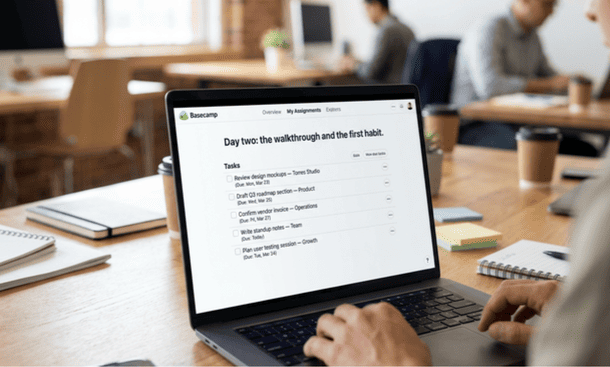
Day two: the walkthrough and the first habit
On day two schedule a 20-minute live walkthrough with your team. Not a training session a walkthrough. Show three things in real time: how to find their assigned tasks across all projects, how to post a message on a project message board and how to mark a task complete.
Those three actions cover 80 percent of what most team members will do inside Basecamp on any given day. Everything else can be learned through use. Covering the three core actions in a live session removes the friction of team members feeling uncertain about basic navigation which is the single most common reason people avoid a new tool in the first week.
End the walkthrough by setting one clear expectation: for the next 30 days all task updates and project communication happen inside Basecamp. Not “try to use Basecamp when you can” a specific norm with a specific timeframe. Behavioral change requires a clear boundary and a defined period to build the habit.
Schedule a check in for two weeks out. Not to review everything to surface the two or three things that feel wrong or awkward and fix them before they become established workarounds.
The two week checkpoint
Every Basecamp implementation hits a natural friction point somewhere between day ten and day fourteen. Tasks are being created but not always in the right lists. Team members are posting in Campfire things that should be on the message board. A project exists that nobody is updating because the structure does not quite reflect how that particular piece of work actually moves.
These are not signs that the implementation failed. They are information. The two week checkpoint is where you turn that information into adjustments rather than letting it accumulate into reasons to abandon the tool.
Ask your team three direct questions at the checkpoint. What took longer than it should have because of the way Basecamp is currently set up? What are you still doing outside Basecamp that feels like it should be inside it? And what one change would make you more likely to open Basecamp first rather than going somewhere else?
Fix the top two issues before week three. Small targeted adjustments at this stage renaming a project, restructuring a to-do list, clarifying which Campfire to use for which type of message have an outsized effect on whether the adoption habit solidifies over the following months.
Before building anything inside Basecamp it is worth grounding the setup in a complete understanding of what Basecamp is genuinely designed to do for startups and small businesses because the setups that work best are the ones built around the product’s actual logic rather than around assumptions imported from other tools.
Setting up Basecamp correctly is not complicated. It is sequential. The 20 minute clarity session before opening the account. Three real projects with real tasks in hour one. Communication norms established in HQ before the team is invited. The team invited with context rather than into an empty workspace. A walkthrough covering three core actions on day two. A checkpoint at two weeks to fix the first friction points.
Follow that sequence and Basecamp has the best possible chance of becoming the operational center of your business rather than another trial that did not quite take.
Once the setup is done the next question most founders face is how their choice compares to the alternatives whether Basecamp’s specific structure and philosophy give it a genuine edge over Asana and ClickUp or whether one of those tools would have served the business better. That comparison, done honestly without vendor bias, is exactly what Basecamp vs Asana vs ClickUp: which tool wins for small teams in 2026 covers next.
About the Author

Pamela
Pamela is a dynamic professional with a deep passion for SaaS and emerging technologies. She provides valuable insights into software trends, digital innovation, and cutting-edge tools that empower businesses to thrive and expand.
Did you find this helpful?
Your feedback helps us curate better content for the community.