
Table of contents
- The support rep who asks you to repeat yourself
- What backend and helpdesk integration actually means
- What your support team can see when the systems are connected
- Account and subscription data at a glance
- Recent activity and error history in context
- Automated triggers that open tickets before users do
- The business case for connected support infrastructure
- How BaaS platforms make integration accessible to non-technical founders
- Choosing the right helpdesk to connect first
Every SaaS founder eventually has a version of this experience. A paying customer sends a support message describing a problem they have been dealing with for two days. Your support team, working from a helpdesk that has no connection to your backend, asks the customer to describe their account setup, confirm their subscription tier, and explain what they were doing when the problem occurred. The customer, already frustrated, provides all of it again. The support agent investigates, asks a follow-up question, and the thread stretches across three days to resolve something that should have taken twenty minutes.
The problem is not the support agent’s competence. It is the absence of context. When your helpdesk and your backend operate as separate islands, your support team is always flying blind, asking customers to become the bridge between two systems that should already be talking to each other. Connecting those systems is one of the highest-leverage operational improvements a growing SaaS founder can make, and it pays dividends in customer satisfaction, support efficiency, and churn prevention long before you have a dedicated support team to manage.
The support rep who asks you to repeat yourself
There is a particular kind of customer frustration that does not always produce angry tickets but quietly accelerates churn. It is the frustration of feeling like a stranger to a product you pay for every month. When a support interaction begins with “can you confirm your account email and describe the issue from the beginning,” the implicit message to the customer is that the company does not know who they are.
Contrast that with a support interaction where the agent opens the ticket and immediately sees the customer’s plan, their last three login sessions, the specific error your system logged four hours ago, and the feature they were using when it happened. The agent’s first message is not a request for basic information — it is a demonstration of awareness. “I can see you ran into an issue with the export function this afternoon — here is what happened and here is how we are fixing it.” That interaction does not just resolve the problem faster. It actively builds trust in a moment that would otherwise erode it.
This is the business case for backend and helpdesk integration in a single sentence: connected systems turn support from a cost center that manages complaints into a retention tool that demonstrates competence. For a SaaS product where monthly recurring revenue depends on customers choosing to stay, that distinction compounds significantly over time.
What backend and helpdesk integration actually means
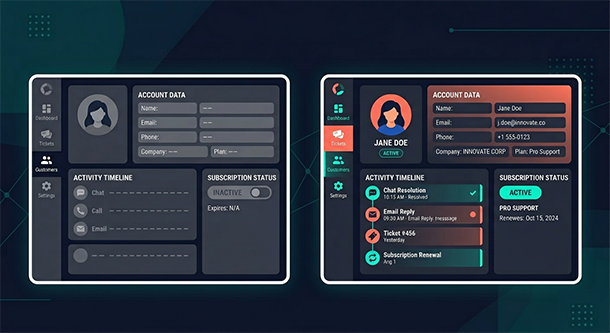
At its most basic level, backend and helpdesk integration means that the data living in your database — user accounts, subscription details, activity logs, error records — becomes visible and actionable inside your support tool. Instead of your support team having to switch between your helpdesk and your admin panel to piece together context, the relevant information surfaces automatically when a ticket arrives or an agent opens a customer record.
The integration works through APIs, essentially structured communication channels that allow two software systems to share data in real time. Your backend exposes specific data points through its API — account status, plan tier, recent events — and your helpdesk pulls that data in and displays it alongside the conversation. The customer does not see any of this happening. From their perspective, they sent a message and got a knowledgeable, contextualized response.
For founders building on a BaaS platform, the backend side of this equation is largely handled. BaaS platforms expose well-documented APIs by default, which means the data your helpdesk needs is already accessible — the work is on the helpdesk configuration side, connecting it to pull the right fields. Most major helpdesks, including Intercom, Zendesk, and Freshdesk, offer native integrations or low-code connection options that make this setup achievable without a dedicated developer.
The result is not just a better support experience. It is a fundamentally different operational model where your team has the information they need to act, rather than the information they need to start asking questions.
What your support team can see when the systems are connected
Account and subscription data at a glance
The most immediately useful data to surface in your helpdesk is the basic account picture: who this customer is, what plan they are on, when they signed up, and whether their account is in good standing. This information eliminates the opening round of every support conversation where the agent establishes basic context.
More importantly, it changes the nature of the support interaction for edge cases. When a customer writes in about a feature not working, an agent who can immediately see that the customer is on a starter plan can recognize in seconds that the feature they are describing is only available on a higher tier — and turn what could have been a frustrating back-and-forth into a clear, helpful explanation with an upgrade path attached.
Subscription data also flags at-risk accounts proactively. A customer who has been on a trial for twelve days and has just submitted their first support ticket is a conversion opportunity as much as a support case. An agent with that context can resolve the technical issue and address the buying decision in the same interaction.
Recent activity and error history in context
Activity logs and error records from your backend give support agents the ability to see what actually happened rather than relying on the customer’s description of what they think happened. These two sources of information are often meaningfully different. Customers describe symptoms; logs describe causes.
When a customer says “the dashboard stopped loading this morning,” an agent with access to your backend logs can see that a specific API call started timing out at 9:47 AM, identify whether it affected other users, and confirm whether a fix has already been deployed — all before typing their first response. That level of specificity turns a vague complaint into a precise, resolved interaction.
Error history is also valuable for identifying patterns that individual support tickets obscure. If your helpdesk is showing that the same backend error is referenced in fifteen tickets from different customers over the past week, that is a product issue that needs escalation — not fifteen separate support conversations. Connected systems surface that pattern in a way that disconnected ones simply cannot.
Automated triggers that open tickets before users do
The most sophisticated version of backend and helpdesk integration goes beyond reactive support and into proactive intervention. When your backend detects a specific event — a payment failure, a failed data export, an authentication error on three consecutive attempts — it can automatically create a support ticket or send a targeted message to the affected user before they have had a chance to feel the frustration.
A customer who receives a message saying “we noticed your export did not complete earlier and we are looking into it” before they have written a single complaint word has a fundamentally different emotional experience than one who discovers the problem themselves, waits to see if it resolves, and eventually fires off a frustrated ticket. Proactive outreach signals operational competence in a way that even excellent reactive support cannot fully replicate.
For early-stage founders, setting up even one or two of these automated triggers for your highest-impact failure scenarios — payment processing issues, onboarding errors, core feature failures — creates a support posture that feels enterprise-grade regardless of your team size. This kind of operational maturity connects directly to the broader challenge of app performance monitoring, where catching problems before your users do applies as much to the support layer as to the infrastructure layer.
The business case for connected support infrastructure
The efficiency argument for integration is straightforward. Support agents who spend less time gathering context spend more time resolving problems. A team that handles context gathering manually might average fifteen minutes per ticket. The same team with full backend context visible in the helpdesk might average seven. At any meaningful ticket volume, that difference translates directly into headcount capacity — your existing team handles more tickets without burning out, or you delay the hire of an additional support agent by months.
The retention argument is less obvious but more significant. Customer churn in SaaS is rarely the result of a single bad experience. It is the accumulation of small frictions — slow responses, repeated context requests, generic answers that miss the specific situation — that erode confidence in the product over time. Connected support infrastructure removes many of those friction points systematically, not by making individual agents better but by giving every agent the context they need to perform at their best on every interaction.
There is also a revenue signal buried in support data that most founders underutilize. A customer who contacts support three times in their first thirty days about the same category of problem is telling you something about your onboarding experience. A customer who writes in asking about features that already exist in your product is telling you something about your discoverability. Support conversations, when connected to backend data that reveals exactly where in the product journey customers are struggling, become one of the richest sources of product intelligence available to an early-stage team.
How BaaS platforms make integration accessible to non-technical founders
The practical barrier to backend and helpdesk integration has historically been the developer time required to build and maintain the connection. Custom integrations require API knowledge, ongoing maintenance when either system updates, and someone who understands both the backend data model and the helpdesk configuration well enough to keep them aligned.
BaaS platforms reduce this barrier significantly on the backend side. Because BaaS platforms expose standardized, well-documented APIs for user data, authentication records, and database content, the connection point is predictable and stable. A developer familiar with the helpdesk’s integration framework can typically build the connection in a day rather than a week, and the BaaS platform’s API stability means the integration does not require constant maintenance.
For founders who want to move faster without developer involvement, several BaaS platforms have begun building native helpdesk integrations directly into their ecosystem. Supabase, for example, can be connected to tools like Intercom and Zendesk through middleware platforms like Zapier or Make with no custom code required. The setup involves connecting your BaaS account, selecting which data fields to expose, and configuring how that data appears in your helpdesk — a process that takes an afternoon rather than a sprint.
The tradeoff of the no-code approach is flexibility. Native or custom integrations can surface more specific data and trigger more sophisticated automations. For most early-stage SaaS products, however, the no-code approach delivers eighty percent of the value at ten percent of the effort, which is exactly the right trade to make when speed matters more than perfection.
Choosing the right helpdesk to connect first
The most common mistake founders make when approaching this integration is trying to evaluate helpdesk tools as standalone products rather than as components of a connected support system. The relevant question is not which helpdesk has the best ticket management interface in isolation — it is which helpdesk has the most straightforward integration path with your specific BaaS platform and the data model you are working with.
Intercom is the most commonly recommended starting point for SaaS products at early and mid-stage, primarily because its data model is built around users and events rather than just tickets — which maps naturally onto the kind of backend data a BaaS platform exposes. Zendesk offers broader enterprise functionality and a larger integration ecosystem, making it a better fit for products with more complex support workflows. Freshdesk sits between the two in terms of cost and capability and is worth considering for founders who need more than a basic tool but are not yet ready for Intercom’s pricing at scale.
Regardless of which tool you choose, the integration principle is the same: decide which backend data points are most useful for your support team, configure the connection to surface those specifically, and build from there as your support operation matures. Trying to connect everything at once creates noise. Connecting the highest-signal data first creates clarity.
As your product grows and your support operation scales alongside it, the investment in connected infrastructure compounds. The habits and systems you put in place now determine how smoothly your team handles the volume and complexity that comes with real growth — which is precisely the territory covered in a broader look at app scalability for startups and the operational decisions that determine how well your product handles success.
About the Author

AISalah
Bridges linguistics and technology at PointOfSaaS, exploring AI applications in business software. English Studies BA with hands-on back-end and ERP development experience.
Did you find this helpful?
Your feedback helps us curate better content for the community.