

Pricing is where Basecamp becomes genuinely interesting as a conversation. Most SaaS tools charge per user you pay more as your team grows and less when it shrinks. Basecamp does not work that way. It charges a flat monthly fee regardless of how many people are using it and that model has strong opinions on both sides.
Some founders call it the most honest pricing in SaaS. Others sign up, look at their team size and quietly conclude they are paying for more than they need. Both reactions make sense depending on where the business actually sits.
The math is not complicated but it does require doing it honestly against your specific team size rather than against an abstract scenario. That is what this breakdown is for.
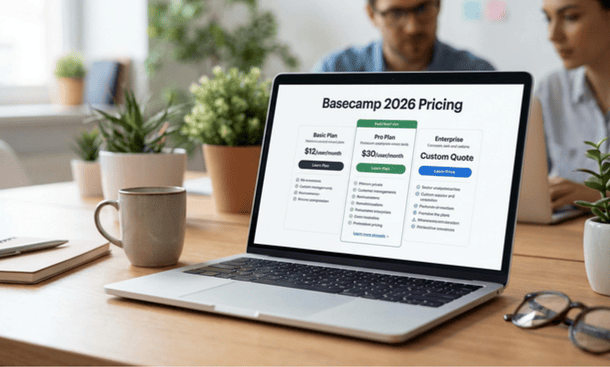
What Basecamp actually charges in 2026
Basecamp offers two plans.
Basecamp is the standard plan at $15 per user per month. This tier is positioned for smaller operations or individuals who want Basecamp’s core functionality without a large upfront commitment. It includes the full feature set message boards, to-dos, Campfire, Docs and files, Card Table, schedules and client access.
Basecamp Pro Unlimited is the flat-fee plan at $299 per month billed annually which works out to approximately $3,588 per year. This plan covers unlimited users, unlimited projects and includes 500GB of storage along with priority support and a few additional administrative features.
The per-user plan is the entry point most people evaluate first. The Pro Unlimited plan is the one that changes the pricing conversation entirely and it is the one worth spending more time understanding.
The math at three team sizes
The flat-fee model only makes financial sense above a specific team size. Below that threshold the per user plan or a competitor with per-user pricing is the smarter financial choice. Here is what the numbers actually look like.
Solo operator or two-person team
At $15 per user per month a solo founder pays $15 per month on the standard plan. A two-person team pays $30 per month. The Pro Unlimited plan at $299 per month is between ten and twenty times more expensive for the same functionality. There is no scenario where a solo operator or very small team benefits financially from the flat-fee model.
At this scale Basecamp’s standard per-user plan is competitive. It is also worth comparing to ClickUp’s free plan and Notion’s individual plan which cover similar ground at no cost a relevant consideration for a bootstrapped operation watching every dollar.
Three to five person team
At three people the standard plan costs $45 per month. At five people it costs $75 per month. Pro Unlimited at $299 per month is still significantly more expensive roughly four to six times the cost of the standard tier for the same team.
Unless the business anticipates rapid team growth in the near term or has specific needs that Pro Unlimited’s priority support and storage addresses the standard plan is the financially sensible choice at this stage.
Eight to twelve person team
This is where the pricing conversation starts to shift. At eight people the standard plan costs $120 per month. At ten people it costs $150 per month. At twelve people it costs $180 per month.
Pro Unlimited at $299 per month is still more expensive at eight people but only by about 2.5 times. At ten people the gap closes to roughly double. At twelve people it narrows further. And at fifteen people $225 per month on the standard plan Pro Unlimited begins to look like genuine value rather than an expensive upgrade.
The tipping point
The flat-fee model becomes financially advantageous at approximately 20 users. At that point the standard plan costs $300 per month essentially the same as Pro Unlimited and every additional team member above 20 is effectively free under the flat-fee model.
For a growing business that expects to add team members regularly over the next 12 to 18 months Pro Unlimited can make sense earlier than the pure current-team-size math suggests because the price is locked regardless of how many people join. But that argument only holds if the growth is real and reasonably certain rather than aspirational.
What Pro Unlimited actually adds beyond pricing
The financial comparison is only part of the decision. Pro Unlimited includes a few things the standard plan does not that are worth evaluating on their own merits.
Unlimited projects the standard plan also has unlimited projects so this is not a real differentiator for most businesses.
500GB of storage the standard plan includes 500GB per user so for small teams the standard plan actually provides more total storage than Pro Unlimited. This is worth noting because it is counterintuitive and rarely highlighted in Basecamp’s own marketing.
Priority support Pro Unlimited includes faster access to the Basecamp support team. For a business where operational continuity depends on the tool working correctly this has genuine value. For a team comfortable with self-service support and the extensive Basecamp documentation it is less relevant.
Administrative features Pro Unlimited includes some additional administrative controls around user management and permissions that are more relevant to larger teams than to small businesses in the five to fifteen person range.
The honest summary: for most small businesses the functional difference between the standard plan and Pro Unlimited is minimal. The decision comes down almost entirely to team size math and growth trajectory rather than feature gap.
How Basecamp pricing compares to the main alternatives
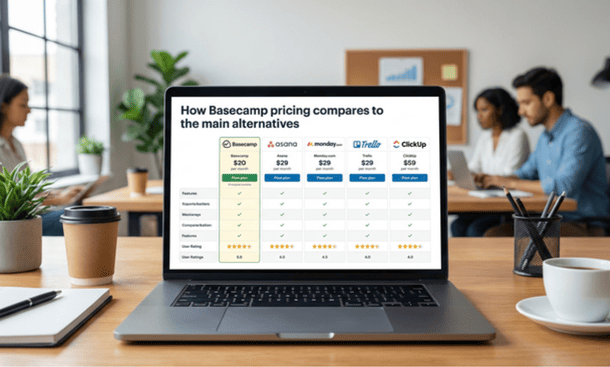
Context matters in any pricing evaluation. Here is how Basecamp’s 2026 pricing sits against its most direct competitors for small business use.
Asana charges $10.99 to $24.99 per user per month depending on tier. For a ten-person team that is $109.90 to $249.90 per month. Basecamp’s standard plan at $150 for ten users sits in the middle of that range. Asana’s free plan covers basic functionality for up to 15 users which is a relevant consideration for very small teams.
ClickUp charges $7 to $12 per user per month on its paid tiers. For a ten-person team that is $70 to $120 per month meaningfully less than Basecamp’s standard plan at that team size. ClickUp’s free plan is one of the most generous in the market and covers the core needs of many small businesses without any cost at all.
monday.com charges from $9 per seat per month with a three-seat minimum. For a ten-person team that ranges from $90 per month upward depending on tier. Comparable to Basecamp at similar team sizes but with no meaningful free tier.
Notion offers a very capable free individual plan and paid plans starting at $8 per user per month significantly less expensive than Basecamp’s standard plan at most team sizes.
The competitive picture is honest: Basecamp is not the cheapest option in the small business project management market at any team size. What it offers in exchange for its price point is a more opinionated, communication-integrated product that some teams find significantly more adoption friendly than the alternatives. Whether that trade is worth it is a workflow question as much as a financial one.
The hidden cost most founders forget
Price per month is the visible cost. Implementation time is the one that does not appear on any billing statement.
Any project management tool requires investment to set up properly workspace configuration, team onboarding, the period of adjustment before daily use becomes habitual. That investment has a real dollar value for a small business where every hour carries an opportunity cost.
Basecamp’s implementation time tends to be shorter than more complex tools because the product is simpler. There is less to configure, fewer decisions to make during setup and a shallower learning curve for most team members. That faster ramp-up has genuine financial value that does not show up in the monthly subscription comparison but it is real and worth factoring in.
The flip side is that Basecamp’s simplicity may require supplementing with other tools if the business has needs the product does not cover. A separate time tracking tool if billing by the hour. A more sophisticated CRM if client relationship management is complex. A dedicated reporting tool if visibility into team workload matters. Each of those additions has its own cost that should be considered as part of the total stack expense rather than evaluated against Basecamp’s subscription fee in isolation.
The question the pricing cannot answer
Pricing tells you what something costs. It does not tell you whether it is worth it because worth depends entirely on whether the tool gets used consistently enough to deliver value.
A $299 per month tool that your entire team uses every day is less expensive in real terms than a $15 per month tool that gets abandoned in six weeks. The subscription fee is the entry cost. The return on that cost is determined by adoption and operational impact.
That consideration whether Basecamp’s structure and philosophy are likely to produce the kind of consistent team adoption that justifies any price point — is exactly what the complete guide to whether Basecamp is the right project management tool for your startup or small business addresses before the pricing question even becomes relevant.
The flat-fee model makes financial sense for teams of approximately 20 or more people. Below that threshold the standard per-user plan is almost always the more financially sensible choice for a small business.
At current pricing Basecamp is competitive but not the cheapest option in its category. The value proposition is not primarily financial — it is operational. A product designed around communication clarity, project-centric organization and fast team adoption that some businesses find worth the premium and others do not depending entirely on how their work actually flows.
Run the math honestly for your current team size. Factor in growth trajectory if it is concrete rather than aspirational. And weight the pricing decision against the workflow fit question rather than in isolation from it.
Once the pricing makes sense the next practical question is how to get Basecamp configured and running in a way that gives it the best chance of actually sticking. That is exactly what how to set up Basecamp for your startup in the first 48 hours covers the specific sequence that separates implementations that produce lasting habits from trials that expire quietly.
About the Author

Pamela
Pamela is a dynamic professional with a deep passion for SaaS and emerging technologies. She provides valuable insights into software trends, digital innovation, and cutting-edge tools that empower businesses to thrive and expand.
Did you find this helpful?
Your feedback helps us curate better content for the community.