
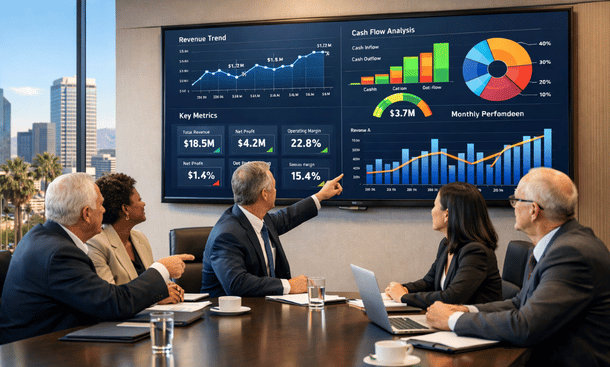
Your executive team makes decisions based on data that’s already two weeks old. Your board asks questions during meetings that nobody can answer without promising to follow up later. Your investors request reports that take your finance team three days to compile manually.
This is the reality for most growing California companies. The data exists somewhere in your systems, but getting it into a format that actually helps people make decisions requires way too much manual work.
ERP financial reporting changes this equation completely. When done right, your leadership team can access current financial data anytime, slice it however they need, and answer their own questions without waiting for finance to pull reports.
Let me show you how to build a dashboard strategy that actually gets used.
Why real-time reporting matters now
California’s business environment moves fast. Your competitors are making data-driven decisions daily. Your investors expect transparency and real-time visibility. Your team needs current information to execute effectively.
Traditional monthly financial statements don’t cut it anymore. By the time you finish closing the books and producing reports, the information is historical. You’re steering your business looking in the rearview mirror.
Real-time reporting means your financial data updates continuously as transactions occur. When a sale closes, it appears in your revenue dashboard immediately. When you pay a vendor, your cash position reflects it instantly. When a customer pays an invoice, your accounts receivable aging updates automatically.
This isn’t about faster month-end close, though that helps. It’s about fundamentally changing how your organization uses financial information. Instead of waiting for finance to produce reports, stakeholders access the data they need when they need it.
The shift from periodic reporting to continuous visibility changes behavior. Department managers make better spending decisions when they can see their budget status anytime. Sales leaders adjust strategies when they have daily visibility into revenue trends. Executives spot problems early instead of discovering them weeks later.
Building your core financial dashboard
Every company needs a foundational financial dashboard that shows overall business health at a glance. This becomes your financial command center, the first place people look when they want to know how the business is performing.
Start with the metrics that matter most for your business. Revenue and cash are universal, but beyond that, your key indicators depend on your business model. Subscription companies care about monthly recurring revenue and churn. Services firms track utilization and backlog. Manufacturers monitor gross margin and inventory turns.
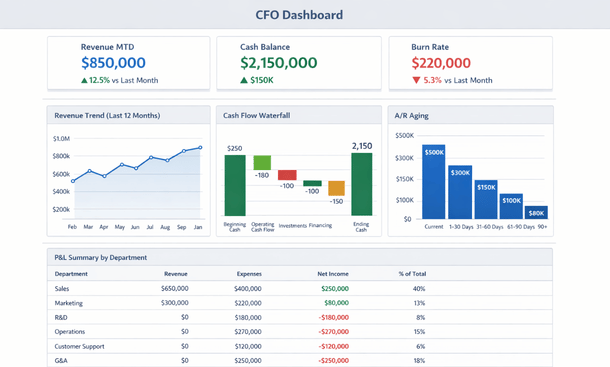
CFO Dashboard Mockup
Your core dashboard should include actual versus budget comparisons. Showing just actuals without context doesn’t help people make decisions. They need to know if performance is ahead or behind expectations. Color coding helps here. Green for favorable variances, red for unfavorable, yellow for items needing attention.
Trend visualizations communicate more than tables of numbers. A line chart showing revenue over the past twelve months tells a story that a spreadsheet of numbers doesn’t. Bar charts comparing department spending show relative scale instantly. Pie charts reveal mix and composition at a glance.
Keep your core dashboard focused. Including too many metrics dilutes attention and makes the dashboard overwhelming. Aim for ten to fifteen key indicators that truly drive your business. Everything else can live in secondary dashboards or detailed reports.
Design for your actual users. If your CEO checks dashboards from their phone between meetings, make sure key metrics are visible without scrolling. If your board reviews dashboards during quarterly meetings on a large screen, optimize for that viewing experience.
Department and functional dashboards
Beyond the company-wide view, different roles need specialized dashboards focused on their specific responsibilities. The goal is giving people exactly the information they need to do their jobs well.
Sales dashboards track pipeline, bookings, and revenue by rep, region, product, and customer segment. Sales leaders need visibility into deal flow, conversion rates, and sales cycle length. They want to spot trends early and coach their teams effectively.
Operations dashboards monitor the metrics that drive service delivery or production. This might include project profitability, resource utilization, on-time delivery rates, or manufacturing efficiency. Operations managers use these dashboards to optimize processes and allocation.
Marketing dashboards connect spending to results. Cost per lead, customer acquisition cost, and marketing-influenced revenue help marketing teams optimize their investments. Linking marketing metrics to financial outcomes justifies budget and guides strategy.
Department manager dashboards show budget versus actual spending with drill-down capability. Managers need to understand where their department stands financially and have visibility into the details when variances occur. Self-service access reduces the constant requests to finance for information.
Executive dashboards provide the highest-level view with the ability to drill into details when something catches their attention. Executives want to monitor overall performance, identify issues quickly, and investigate anomalies without scheduling special reports from finance.
Advanced reporting capabilities
Once you have basic dashboards operational, advanced capabilities unlock deeper insights and more sophisticated analysis. These features separate good financial reporting from exceptional reporting.
Dimensional reporting lets you analyze financial data across multiple dimensions simultaneously. You might look at revenue by customer, by product, by region, and by sales rep all at once. This multi-dimensional view reveals patterns and insights that single-dimension reports miss.
Comparative analysis shows performance across time periods, entities, or scenarios. Year-over-year comparisons reveal growth trends. Quarter-over-quarter analysis spots seasonal patterns. Actual versus forecast identifies where predictions missed the mark.
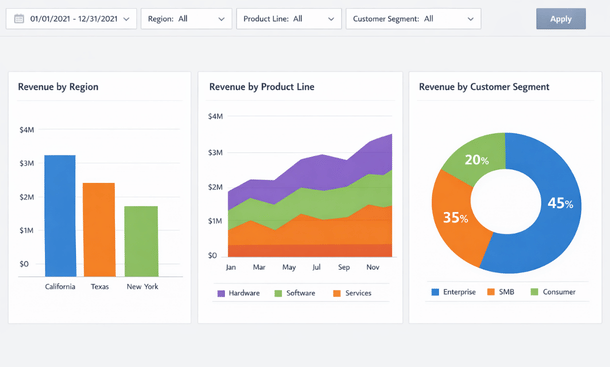
Drill-down functionality starts with summary metrics and lets users click through to increasing detail. Click on total revenue to see revenue by customer. Click on a specific customer to see individual transactions. This exploration capability lets people answer their own questions without creating custom reports.
Customizable views allow different users to configure dashboards for their specific needs. Your VP of Sales might want to see different metrics than your VP of Operations. Letting users customize their experience increases adoption and usefulness.
Automated distribution schedules reports to stakeholders on a regular cadence. Your board might receive a monthly performance package automatically. Department managers get their budget variance reports every Monday morning. Executives receive a daily flash report with key metrics before the workday starts.
Building dashboards people actually use
The difference between dashboards that get used daily and those that get ignored comes down to thoughtful design focused on user needs rather than technical capabilities.
Start by understanding what decisions your users make and what information they need to make those decisions well. Interview executives, managers, and team members. Ask about the questions they’re trying to answer and the challenges they face getting information today.
Design for scanning, not reading. People glance at dashboards to get a quick sense of status. Use visualization, color coding, and layout to communicate information quickly. Important metrics should be prominent. Trends should be instantly apparent.
Provide context with every metric. A number without comparison means nothing. Is revenue of two million dollars this month good or bad? You need to show it against budget, against last year, or against trend to give it meaning.
Update frequency should match decision-making speed. If decisions happen daily, dashboards should update at least daily. If you’re monitoring something that requires immediate action, real-time updates matter. For strategic metrics reviewed monthly, daily updates might be sufficient.
Make dashboards accessible from anywhere. Your executives aren’t sitting at desks all day. They’re in meetings, traveling, working from home. Mobile-responsive dashboards or dedicated mobile apps ensure access regardless of location.
Train users on what they’re seeing and how to interpret it. Even intuitive dashboards benefit from initial training. Walk through the metrics, explain the visualizations, demonstrate drill-down capabilities, and answer questions about data sources and timing.
Data accuracy and trust
The most beautiful dashboard in the world is useless if people don’t trust the data. Building confidence in your financial reporting requires attention to data quality, transparency about sources, and consistency in definitions.
Establish a single source of truth for each metric. When different reports show different numbers for the same metric, trust evaporates quickly. Your ERP should be the authoritative source for financial data, with clear lineage showing where numbers come from.
Document metric definitions clearly. What exactly counts as revenue? When does a sale get recognized? How is gross margin calculated? Written definitions prevent confusion and ensure everyone interprets metrics the same way.
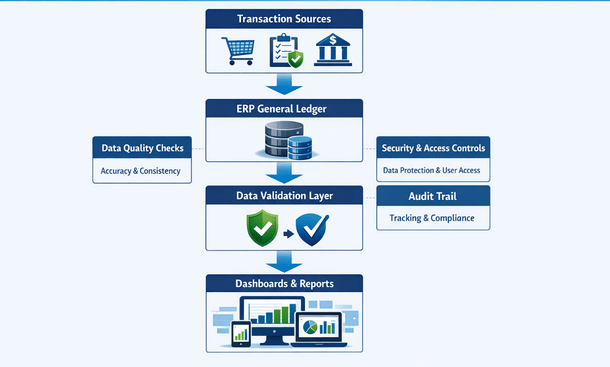
Reconcile dashboard numbers to official financial statements regularly. Your real-time dashboards might use slightly different timing or accrual methods than your formal GAAP financials. Document these differences and reconcile them monthly so users understand any variances.
Implement data quality controls at the source. Validation rules, required fields, and automated checks catch errors before they flow into reporting. Prevention is much easier than fixing bad data after it’s already in your dashboards.
Create transparency around data freshness. Let users know when data was last updated. If there’s a delay between transactions and reporting, make that timing clear. Uncertainty about data recency undermines trust.
Handling complex reporting scenarios
As your business grows, reporting requirements become more sophisticated. Your ERP financial reporting capability needs to handle increasingly complex scenarios without breaking.
Multi-entity consolidation combines financial results from multiple legal entities while eliminating intercompany transactions. Your dashboards should show both consolidated views and individual entity performance. Users need to understand overall company results and drill into specific entities when needed.
Multi-currency reporting matters for companies with international operations. Dashboards should display amounts in both transaction currency and reporting currency. Exchange rate impacts need visibility so users understand whether performance changes reflect operational results or currency movements.
Project-based reporting tracks profitability at the project level for services businesses. Dashboards show revenue, costs, and margin by project with visibility into remaining budget and forecast to complete. Project managers need this information to deliver profitably.
Segment reporting breaks down performance by business unit, product line, customer type, or geographic region. Your dashboards should make it easy to view results by any relevant segment and compare performance across segments.
What-if analysis lets users model different scenarios. What happens to cash flow if payment terms change? How does profitability look if you raise prices by ten percent? Scenario modeling helps with planning and decision-making.
Integration with operational systems
Your most powerful financial dashboards combine data from your ERP with information from operational systems. This integrated view connects financial outcomes to operational drivers.
CRM integration shows how sales pipeline translates to revenue. You can see the relationship between marketing spend, lead generation, opportunity creation, and closed revenue. This visibility helps optimize the entire revenue generation process.
Project management integration connects project status to financial performance. See which projects are on track versus over budget. Understand resource allocation and utilization in financial terms. Link project delivery to revenue recognition.
Inventory and supply chain integration shows the financial impact of operational decisions. Track inventory carrying costs, stockout impacts, and supplier performance in financial terms. Connect operational metrics like on-time delivery to customer satisfaction and retention.
Payroll and HR integration provides workforce analytics with financial context. See fully-loaded labor costs by department, project, or function. Understand the relationship between headcount, productivity, and financial performance.
E-commerce and point-of-sale integration gives real-time visibility into sales as they happen. For retail or e-commerce businesses, seeing hourly or daily sales trends helps with inventory decisions, staffing, and marketing adjustments.
Scaling your reporting strategy
Your dashboard strategy should evolve as your company grows. What works for a twenty-person startup needs enhancement as you scale to one hundred people or five hundred people.
Start simple and add complexity as needed. Early-stage companies need basic financial dashboards showing revenue, cash, and burn rate. As you grow, add department views, project tracking, and customer analytics. Let your dashboards mature with your business.
Standardize before you customize. Establish core dashboards that everyone uses, then allow customization for specific roles or needs. Standardization ensures consistent definitions and makes it easier to onboard new team members.
Build a reporting roadmap that anticipates future needs. If you plan to expand internationally, design your chart of accounts and reporting structure to support multi-currency and multi-entity reporting from the start. Retrofitting is much harder than building it right initially.
Invest in dashboard governance. Assign someone responsibility for maintaining dashboards, ensuring data quality, managing access, and fielding user questions. Without ownership, dashboards deteriorate over time as business needs change.
Gather feedback continuously from dashboard users. What works well? What’s confusing? What information is missing? Regular feedback helps you improve dashboards and increase adoption over time.
Making reporting a competitive advantage
Companies that excel at financial reporting make better decisions faster than their competitors. When everyone in your organization has access to accurate, timely financial information, the entire company becomes more data-driven and effective.
Your dashboards should empower people to act, not just observe. If a department manager sees spending trending over budget, they should be able to drill into details and identify specific areas to adjust. If a sales leader notices revenue softening in a region, they can investigate and intervene quickly.
The visibility that strong financial reporting provides also changes your relationship with investors and board members. Instead of quarterly surprises, stakeholders have continuous visibility into performance. Conversations shift from explaining what happened to discussing strategy and opportunities.
Real-time financial reporting positions your finance team as strategic partners rather than scorekeepers. When you’re not spending all your time compiling reports manually, you can focus on analysis, forecasting, and helping business leaders make better decisions.
The dashboard strategy you build today should support your company through years of growth. Take the time to design it thoughtfully, involve the right stakeholders, and build on a solid technical foundation. Your investment in financial reporting pays dividends every time someone makes a better decision because they had the right information at the right time.
If you’re just getting started with understanding how financial ERP systems provide the foundation for this level of reporting capability, our guide on what financial ERP systems are and why they matter will give you the context you need. And for comprehensive guidance on selecting and implementing the ERP platform that makes real-time financial reporting possible, our complete ERP for finance resource walks through everything from evaluation through go-live.
About the Author

mike
Mike is a tech enthusiast passionate about SaaS innovation and digital growth. He explores emerging technologies and helps businesses scale through smart software solutions.
Did you find this helpful?
Your feedback helps us curate better content for the community.