
Table of contents
- Why the migration method matters
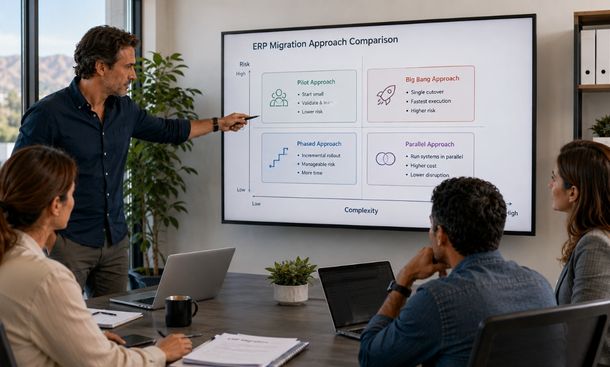
- Big-bang migration
- Phased migration
- Pilot migration
- Parallel operation
- How to compare the options
- Can ERP migration have zero downtime?
- How to make the final decision
- Conclusion
Why the migration method matters
ERP data migration methods determine how quickly your company moves, how much disruption it may face, and how widely a problem can spread.
There is no approach that is always safest.
A big-bang migration may work well for a smaller company with straightforward processes. A phased rollout may be better for a business with several locations, complex integrations, or teams that cannot change at the same time.
The right choice depends on operational risk, data complexity, available support, integration readiness, and how long the company can tolerate working across two systems.
This decision fits within our complete ERP data migration guide, where migration strategy, data cleanup, testing, cutover, and stabilization work together to protect the business.
Big-bang migration
A big-bang migration moves the entire company from the legacy ERP to the new platform during one cutover window.
The old system stops processing new transactions. The final data is extracted, transformed, validated, and loaded. Users then begin working in the new ERP.
This approach has one major advantage: speed.
The company does not spend months operating two systems. Temporary integrations are limited. Employees have one clear source of truth after launch.
Big-bang migration can also reduce project fatigue. The transition period is shorter, and the company does not have to maintain several rollout waves.
The risk is concentration.
If critical records fail to load, an integration breaks, or users cannot complete a core process, the entire business may be affected at once.
A big-bang approach works best when:
- Business processes are relatively simple
- The company has one main location or entity
- Data volume is manageable
- Integrations are limited and well tested
- The cutover can use a quiet business period
- A complete rehearsal has already succeeded
- The rollback plan is practical and tested
It is a weak choice when operations cannot tolerate a failed launch or when several departments depend on complex custom workflows.
Phased migration
A phased migration moves the business in controlled stages.
The company may migrate one module at a time, such as finance first and inventory later. It may move one legal entity, department, product line, or location during each wave.
This limits the blast radius. A problem in one phase does not automatically affect the whole organization.
The team can also learn from each rollout. Mapping rules, training materials, integrations, and support processes can improve before the next group moves.
The tradeoff is complexity during the transition.
The business may need temporary integrations between the legacy and new ERP. Employees may need to enter or review information in both systems. Reporting can become difficult when some transactions live in the old platform and others live in the new one.
A phased migration works well when:
- The company has several locations or business units
- Modules can operate independently for a limited time
- Leaders want to reduce company-wide launch risk
- The project team can support several rollout waves
- Temporary integrations are practical
- Lessons from early phases will improve later ones
Define the sequence carefully. Moving finance before the systems that create financial transactions may require complicated temporary processes. The rollout order should follow real data and workflow dependencies.
Pilot migration
A pilot migration begins with one controlled group before the broader rollout.
The pilot might involve one location, department, legal entity, or product line. It uses real users and real processes to test whether the new ERP works under normal operating conditions.
A good pilot gives the project team evidence.
It shows whether users understand the system, whether integrations behave correctly, whether reports are useful, and whether support can resolve issues quickly.
Choose a representative pilot group.
The easiest department may produce a smooth result without revealing the challenges other teams will face. A useful pilot includes common workflows, realistic data volume, and enough complexity to test the migration design.
The pilot group should also have engaged leaders and employees who can provide clear feedback.
A pilot migration works well when:
- The company can isolate one business group
- Leaders want proof before wider adoption
- Processes are similar across several locations
- The team needs real operational feedback
- The new ERP will be deployed in repeated waves
A pilot is not a casual experiment. It needs approved success measures, support coverage, rollback criteria, and a plan for applying lessons to the larger rollout.
Parallel operation
Parallel operation keeps the legacy and new ERP active at the same time for a defined period.
Teams process or compare the same business activity in both systems until the new ERP produces trusted results.
This approach offers strong assurance. Finance can compare balances. Operations can compare inventory. Managers can compare reports. If the new platform has a serious issue, the legacy system may still support the business.
The cost is extra work.
Employees may need to enter transactions twice or verify that integrations keep both systems aligned. Duplicate entry can create errors and frustration. The company must also define which system controls each type of information.
Parallel operation works best when:
- Financial or operational risk is high
- Outputs can be compared clearly
- Employees can support temporary duplicate work
- The legacy ERP can remain stable during transition
- The company needs strong evidence before final cutover
Keep the parallel period as short as the risk allows.
Operating two systems for too long creates confusion. Employees may choose the platform they prefer. Records drift. Support costs rise. The temporary setup can become permanent if leadership does not define a clear exit point.
How to compare the options
Compare migration methods using business conditions rather than personal preference.
A practical decision matrix can include:
| Decision factor | Big bang | Phased | Pilot | Parallel |
|---|---|---|---|---|
| Speed | High | Moderate to slow | Moderate | Slow |
| Company-wide risk | High | Lower | Lower | Lowest when controlled |
| Temporary complexity | Low | High | Moderate | High |
| Duplicate work | Low | Possible | Limited | High |
| Learning between waves | Low | High | High | Moderate |
| Rollback flexibility | Time-sensitive | Better by phase | Strong for non-pilot groups | Strong during overlap |
| Best fit | Simple environments | Complex organizations | Repeatable business units | High-risk operations |
Your company may also combine methods.
A business could run a pilot at one location, then use phased migration for the remaining locations. Finance might operate in parallel for one closing cycle while other departments use a direct cutover.
Combined approaches can reduce risk, but they need clear ownership. Every extra transition point creates more coordination work.
Can ERP migration have zero downtime?
True zero downtime is uncommon.
Most ERP migrations require at least a short period when transactions are limited, queued, or processed through a temporary method. The more useful goal is minimal business disruption with no uncontrolled loss of service or data.
Teams can reduce downtime by moving stable historical records before the cutover. Only changed and newly created records need to move during the final window.
Incremental migration, which transfers records in smaller updates, can reduce the final workload. It requires reliable change tracking so the same record is not missed or loaded twice.
A company can also use:
- Read-only access to the legacy ERP
- Temporary transaction queues
- Planned maintenance windows
- Parallel system operation
- Manual emergency procedures
- Real-time or frequent data synchronization
- A rehearsed rollback process
Do not promise zero downtime unless the technical design and business process support it.
A short planned transaction freeze may be safer than forcing both systems to accept live changes while data is moving.
Customers and employees are more likely to accept a clear maintenance window than an unexpected failure.
How to make the final decision
Bring business owners, technical leaders, and implementation specialists into the decision.
Begin with the processes the company cannot afford to lose. These may include order entry, shipping, payments, inventory movements, customer support, or financial controls.
Then evaluate the data.
How much needs to move? How clean is it? How many systems depend on it? Can changed records be identified reliably? How long did the last test migration take?
Evaluate the organization too.
Can employees support duplicate work? Can locations move at different times? Is the support team large enough to manage several rollout waves? Are leaders willing to delay later phases if the first one reveals serious issues?
Finally, define the decision in writing.
Document the selected method, the reasons, rejected alternatives, key assumptions, risks, and conditions that would require a change.
That prevents the team from reopening the entire debate whenever the schedule gets difficult.
The best migration method is the one your company can test, support, and execute with discipline.
ERP data migration methods shape the risk and pace of your transition.
Big-bang migration offers speed but concentrates risk. Phased migration limits disruption while increasing temporary complexity. A pilot creates real-world evidence before a larger rollout. Parallel operation provides strong assurance but demands more work from employees.
Choose based on business continuity, data complexity, integration readiness, support capacity, and the results of full migration rehearsals.
Once the approach is selected, convert it into a detailed data migration plan with owners, dependencies, quality gates, and cutover tasks.
For the complete framework connecting migration methods with strategy, cleanup, testing, and stabilization, continue with our ERP data migration guide.
About the Author

mike
Mike is a tech enthusiast passionate about SaaS innovation and digital growth. He explores emerging technologies and helps businesses scale through smart software solutions.
Did you find this helpful?
Your feedback helps us curate better content for the community.