

Most small business owners have tried going digital at least once. They identified a real operational problem scattered communication, missed deadlines, invoices going out late, a team that spent more time figuring out who owned what than actually doing the work. They researched tools, found something promising, spent a weekend setting it up and announced to the team that things were going to run differently.
Thirty days later nothing was different. The tool was technically active. The subscription was running. The business was operating almost exactly as it had before just with one more monthly charge and a vague sense of having failed at something that should have been straightforward.
That experience is not a sign of a bad founder or a bad tool. It is a sign of a broken process. And the process is broken in the same specific ways across different industries, different business sizes and different tools which means the failure is predictable and the fix is learnable.
Going digital for a small business is not about adopting more technology. It is about building a coherent operational infrastructure where the right tools at each layer connect cleanly to the adjacent layers, where the team has clear practices around using them and where someone is responsible for maintaining them as the business evolves. When those conditions are met the SaaS stack delivers what it promises — compounding operational leverage that lets the business grow without proportionally growing the overhead required to manage it. When those conditions are absent the stack costs money and changes nothing.
This guide covers the full picture from understanding what going digital actually means at small business scale through building the foundation, choosing the right tools, implementing them correctly, avoiding the mistakes that keep businesses manual and measuring whether the investment is actually working.
what going digital actually means for a small business and what it does not
The phrase gets used constantly and almost never defined at a scale that is useful for a founder running a five-person operation.
Going digital for a small business does not mean adopting enterprise-level digital transformation initiatives designed for companies with dedicated technology budgets and IT departments. It does not mean having more subscriptions or keeping up with whatever SaaS tools are trending in founder communities. And it is not a one-time project that completes when the onboarding is done.
Going digital for a small business means systematically replacing manual, informal or fragmented processes with software that reduces friction, increases visibility and scales without proportionally increasing the time or headcount required to manage the work.
Every word in that definition is doing specific work. Systematically with a deliberate sequence rather than reactively. Replacing not supplementing alongside existing manual systems. Reduces friction the operational test of whether a tool is actually working. Scales without proportionally increasing headcount the compounding value proposition that justifies the investment.
The failure to internalize that definition produces the most common and most expensive going-digital mistake: adding software alongside existing manual systems rather than replacing them. The result is a business running two parallel systems the new digital one and the old informal one with team members spending energy on both rather than fully committing to either. Digital adoption only delivers its value when the manual process it was meant to replace actually stops.
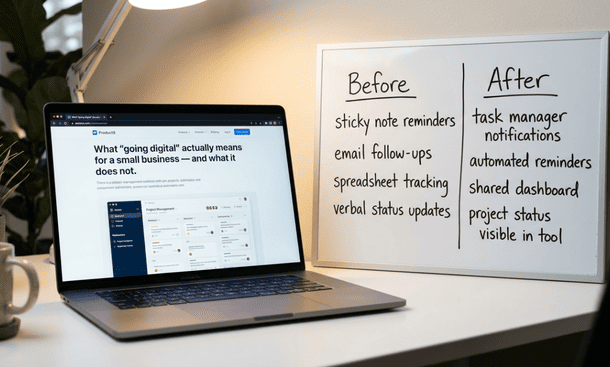
Going digital also involves three distinct layers that most founders address unevenly which explains why so many digital initiatives produce partial results despite genuine effort.
The operational layer covers the tools themselves project management, task tracking, file storage, communication. This is usually the first layer founders address and the one that gets the most attention during evaluation and setup.
The behavioral layer covers the habits, norms and practices that determine whether operational tools get used consistently or bypassed. Most founders skip this layer almost entirely. Choosing and configuring the tool is where the energy goes. Establishing the specific daily practices around it who updates what, when tasks get logged, what communication belongs in the tool versus in a text message is the part that determines whether the tool actually changes how the business operates.
The integration layer covers the connections between individual tools that allow information to flow across the stack without manual intervention. A CRM that does not connect to the project management tool means client information gets entered twice. A project management tool that does not connect to invoicing means billing milestones require manual initiation every time. The integration layer is what separates a coherent stack from a collection of subscriptions that each solve one problem while creating coordination overhead at every handoff point.
Most small businesses address the operational layer. Fewer address the behavioral layer with the same seriousness. Fewer still build the integration layer intentionally rather than discovering its absence after the tools are already in place.
Understanding what going digital genuinely requires at small business scale and how each of these three layers works together is the foundation that makes everything else in the going-digital process produce results rather than just produce effort.
the real reasons small businesses fail at digital adoption and it is not what you think
The failure almost never starts with the tool. It starts earlier and runs deeper than most post-mortems acknowledge and because the real causes stay invisible the cycle repeats with a different subscription and the same outcome.
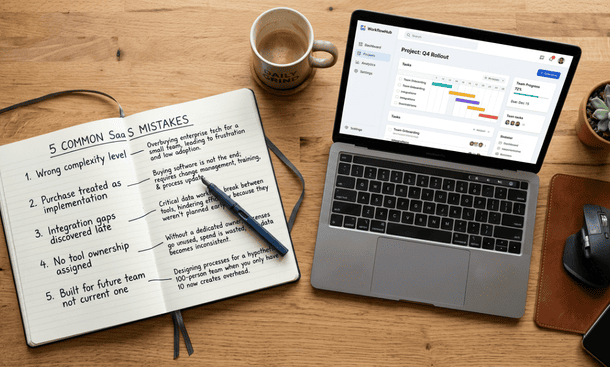
Five structural patterns drive the majority of small business digital adoption failures. They show up consistently across different industries and different tool categories because they are rooted in how small businesses approach software decisions rather than in the specific software they choose.
Choosing for complexity rather than fit. A founder evaluates a tool, sees a feature list that sounds capable and interprets capability as value. Every feature a team does not use is not neutral it is friction that compounds until the interface feels overwhelming and people stop opening it. The founders who get lasting value from their digital tools are almost never the ones using the most sophisticated platforms. They are the ones using the simplest tool that covers their actual workflow and using it every day.
Treating the purchase as the implementation. Buying a tool and implementing a tool are two separate events. Most small business owners treat them as one. The tool gets configured over a weekend. The team gets invited. An announcement goes out. The founder moves on to the next priority. What actually needed to happen establishing daily practices, running a structured team walkthrough, setting explicit norms, scheduling a two-week friction audit never gets done because it was never framed as part of the implementation.
Skipping the integration audit. Every new tool enters a stack of existing systems. When it cannot communicate cleanly with the tools already in place data gets duplicated, workflows break at handoff points and team members develop manual workarounds that eventually become the actual system. A pre-purchase integration audit that takes less than an hour prevents a problem that can absorb dozens of hours over the following year.
No ownership assigned. Every digital tool needs one named person responsible for keeping its configuration current, onboarding new team members and flagging when it is not delivering value. Without that designation tools drift from their initial configuration as the business evolves. Workarounds accumulate. The team works around the tool rather than through it.
Buying for the future business instead of the current one. A tool chosen for anticipated future scale creates complexity for the business that exists today and that complexity hits hardest during the adoption phase when unnecessary friction does the most damage.
The most valuable question to ask before the next tool decision: is this a tool problem or a process problem? A tool problem gets solved by a better tool. A process problem gets made worse by a new tool because tools enforce and amplify existing processes rather than creating new ones from scratch. Most small business digital adoption failures are process problems wearing tool-shaped disguises.
The full diagnostic of why digital transformation fails small businesses so consistently and what the structural causes look like in practice goes deeper on each pattern including the self-reinforcing cycle that makes each failed implementation harder to recover from than the one before it.
how to build a digital foundation for your small business without starting over every year
Most small businesses do not have a tool problem. They have a foundation problem.
A digital foundation is the set of connected tools and team practices that form the operational infrastructure of the business. It is not a specific list of software. It is a structure a way of organizing the tools so they work together rather than in parallel and that the people using them have clear enough practices around each one that the tools actually change how work flows.
A functional digital foundation has three characteristics. It is layered one strong tool per operational category rather than several overlapping ones. It is connected tools at each layer communicate with adjacent layers without manual intervention at handoff points. And it is maintained one named person per tool keeps the configuration current as the business evolves.
The five layers every small business foundation needs: communication, project management, customer and client management, finance and invoicing and marketing and lead generation. The coherence standard is the filter applied to every tool decision: does this tool connect cleanly to the tools in adjacent layers or does it require manual work at every handoff point? A tool that passes the coherence test adds compounding value. A tool that fails it carries a hidden cost ongoing manual work that does not appear on the subscription invoice but accumulates every week.
The most common mistake when building a foundation is addressing all five layers simultaneously. The result is partial setup at every layer rather than a complete functional setup at any of them. Build one layer at a time. Get each layer fully configured and adopted before adding the next. A realistic timeline is four to six weeks per layer enough time for configuration, adoption and the adjustments the two-week friction audit will surface.
The full framework for how to build a digital foundation that holds up as your small business grows rather than requiring a rebuild every time the team changes covers each layer in detail including the specific integration connections that deliver the most compounding operational value.
the SaaS stack every small business needs in 2026 layer by layer
The best SaaS stack for a small business is the most coherent one five layers, one strong tool per layer, connected at the critical handoff points and maintained by named owners who keep each platform current.
Layer one communication: Slack free plan for bootstrapped teams. Slack Pro at $7.25 per user per month for growing teams needing full message history. The key integration: Slack connected to the project management layer so conversations reference and update work without leaving the communication tool.
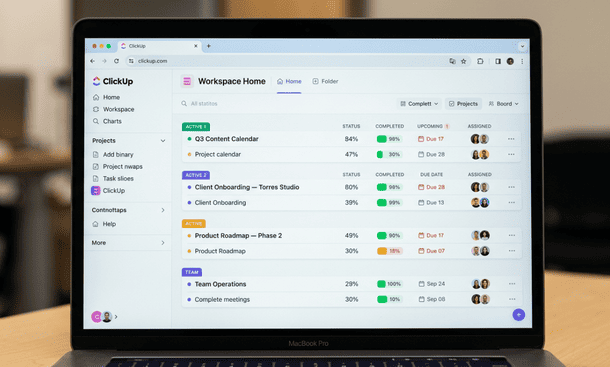
Layer two project management: ClickUp free or Trello free for bootstrapped teams. Asana Starter at $10.99 per user or Teamwork for agencies at the growing tier. The operational center of the stack every other layer feeds in or pulls from this one.
Layer three CRM: HubSpot CRM free tier is the strongest free option available. HubSpot Starter at $15 per seat or Pipedrive at $14 per user for the growing tier. The highest-value integration: connecting the CRM to the project management tool so a deal marked closed-won automatically creates a client project.
Layer four finance: Wave free for solo operators. QuickBooks Online Simple Start at $30 per month or FreshBooks at $17 per month for service businesses at the growing tier. The critical integration: connecting project milestones to invoicing so billing initiates automatically rather than when someone remembers to start it.
Layer five marketing: Mailchimp free for up to 500 contacts. ConvertKit Creator at $25 per month or Mailchimp Essentials at $13 for growing teams. The critical connection: marketing tool to CRM so leads flow into client management without manual entry.
| Layer | Bootstrapped | Growing | Scaling |
|---|---|---|---|
| Communication | Slack free | Slack Pro / Teams | Slack Business+ |
| Project Mgmt | ClickUp free / Trello | Asana / Teamwork | ClickUp Business |
| CRM | HubSpot free / Notion | HubSpot Starter / Pipedrive | HubSpot Pro |
| Finance | Wave / Paymo free | QuickBooks / FreshBooks | QuickBooks Plus |
| Marketing | Mailchimp free | ConvertKit / Mailchimp | Active Campaign |
The detailed breakdown of how to build this stack layer by layer with specific tool recommendations at three budget levels and the integration connections that make each layer worth having covers every tier in full.
how to actually implement new software in a small business without losing your team
Choosing the right tools is one decision. Getting a team to genuinely change how they work around those tools is the decision that determines whether the investment delivers anything.
Two conversations held before the launch transform a notification into a genuine implementation. The problem conversation a 20-minute discussion about the specific operational problem the tool is solving from the team’s perspective shifts adoption motivation from compliance to buy-in. The input conversation bringing at least one team member into setup decisions before configuration is finalized produces systems people adopt at a significantly higher rate than systems handed to them fully formed.
The rollout follows a week-by-week sequence. Week one the founder uses the tool alone with real work surfacing configuration problems that only appear under genuine operational pressure. Week two a 30 minute structured walkthrough covers three to four core actions in real time with real examples. Weeks three and four a 20-minute friction audit surfaces what is making the tool harder to use than whatever came before and the top two or three issues get fixed before week five.
The 90-day threshold is where implementations either become operational habits or background noise. Ignored friction compounds into workarounds. Workarounds become the actual system. Addressed friction produces a tool that is slightly easier to use every week until opening it is the path of least resistance rather than an obligation.
Three metrics tracked through the 90-day period tell you where the implementation stands: daily active users per tool, task creation rate relative to actual workload and clarification message volume declining week over week as the tools become the trusted source of truth.
The complete implementation sequence including how to handle team members who resist the new workflow and what to do when the implementation stalls before the 90-day threshold is covered in full in how to implement new software in a small business without losing your team in the process.
the SaaS mistakes that keep small businesses stuck in manual mode
Paying for software that was supposed to change how the business operates and watching the team work around it is one of the most frustrating experiences in small business ownership. It follows a predictable set of patterns that require only the absence of specific habits and decisions not bad tools or bad intentions.
Running parallel systems without deciding which one wins keeps teams split between the new digital system and the old informal one. The old system only retires when a specific decision names a date and holds it. Tools configured once and never maintained drift from operational reality until team members develop workarounds for the outdated structure. Integrations paid for but never configured produce manual data transfers that cost time every week for as long as the gap goes unaddressed.
Adoption theater where metrics show tools being used and operations show they are not is the most invisible failure mode. The signal that distinguishes real adoption from performance is whether information is generated by the tools or merely recorded in them after being managed elsewhere. Over-tooling creates coordination overhead that eventually makes the manual process the path of least resistance simply because it requires no decision about which digital system to use.
And the most sophisticated mistake: mistaking automation for adoption. Automations that keep data current are not a replacement for the team’s active daily engagement with the system. The businesses that get the most from automation pair it with consistent daily use.
The full pattern breakdown of the specific SaaS mistakes that keep small businesses operating manually despite having tools in place and the targeted fixes for each one goes deeper on every pattern above.
how to know if your SaaS stack is actually working the metrics that tell the truth
Five metrics tracked through normal management activity tell the truth about whether the SaaS investment is delivering operational leverage or consuming budget while the business continues running on manual processes.
Clarification message volume the number of direct messages per week asking questions the tools should already be answering. A declining trend confirms the tools are becoming the trusted information source. A flat trend after 60 days signals they are not being maintained currently enough to trust.
Manual data transfer frequency every instance per week where information is manually copied from one tool into another. Fewer than three per week is healthy. More than five to seven indicates the integration layer is significantly underperforming.
Task creation rate the ratio of tasks created in the project management tool to the actual volume of significant work completed. A healthy ratio is 70 percent or above. Below 50 percent means more than half of actual work is invisible to the system.
Daily active users per tool the percentage of expected users logging into each tool at least once per day. A rate of 80 percent or above within 60 days indicates genuine adoption. Below that threshold after 60 days identifies an implementation problem fixable through targeted friction audit.
Client response time the time between a client asking a status question and receiving an accurate confident answer. Declining response time as the stack matures confirms internal operational improvements are translating into external outcomes.

Reading the metrics together produces a diagnostic picture more actionable than any single number. All five moving in the right direction simultaneously confirms the stack is working as designed. When the picture is mixed the concerning metrics identify the specific layer that needs attention rather than suggesting the entire stack needs replacing.
The underlying question every metric is answering is whether the business is running through its systems or around them. A complete breakdown of how to track these five metrics in practice and what each combination of results tells you about which part of the stack needs adjustment covers the full measurement framework.
Going digital is one of the most consistently misunderstood investments a small business can make and one of the most valuable when it is done correctly.
The misunderstanding is almost always the same. Founders approach it as a technology decision rather than an operational design decision. They spend evaluation energy on features and implementation energy on configuration rather than behavioral change. The tools get set up. The team gets notified. Nothing fundamentally changes. The subscription renews. The cycle repeats.
The businesses that break that cycle are not the ones that found better tools. They are the ones that approached going digital with a different sequence starting with what the business actually needs to change operationally, building a layered foundation with coherence in mind, treating implementation as a behavioral change process and measuring results through specific observable metrics rather than general impressions.
That sequence is available to any small business regardless of budget, team size or technical sophistication. The compounding effect of getting it right shows up in specific ways: client questions answered faster, new team members productive sooner, the founder spending less time in reactive coordination and more time on the work that actually grows the business.
None of the sections in this guide require implementation all at once. The most useful starting point is wherever the current operational pain is most acute and for most small businesses that is understanding exactly why the previous digital attempts did not work rather than rushing into another tool evaluation that repeats the same patterns.
That diagnosis the structural reasons going digital fails for small businesses even when the tools are good and the intent is genuine is the clearest place to begin. Laid out in full in why digital transformation fails small businesses so consistently and what the real causes look like in practice, it is the foundation that makes every subsequent decision about tools, implementation and measurement produce a different outcome than the one the previous cycle produced.
About the Author

Pamela
Pamela is a dynamic professional with a deep passion for SaaS and emerging technologies. She provides valuable insights into software trends, digital innovation, and cutting-edge tools that empower businesses to thrive and expand.
Did you find this helpful?
Your feedback helps us curate better content for the community.