

I have used all three of these tools inside real business operations. Not during a demo. Not for a weekend exploration. For months at a time with actual teams managing actual client work and actual deadlines. That context matters for this comparison because the differences between Basecamp, Asana and ClickUp are not primarily about features they are about philosophy and fit, and those things only become clear under real operational pressure.
Most comparisons of these three tools read like a feature matrix with a conclusion attached. Tool A has this. Tool B has that. Tool C has the most. Pick accordingly. That framework misses the most important question entirely: which of these tools is most likely to get used consistently by your specific team in your specific operational context.
This comparison uses a Simplicity Score four dimensions rated one to five to evaluate each tool on the factors that actually determine whether a small business gets lasting value from its project management software. The four dimensions are setup speed, adoption ease, interface clarity and mobile usability.
But before the scores the most useful thing is understanding what each tool is genuinely built for because the right choice depends on that match more than on any feature comparison.
What each tool is actually designed to do
Basecamp is built around projects and communication. Its core assumption is that small teams need a shared space where everything related to a piece of work lives together messages, tasks, files, conversation and schedules all organized within a project boundary. It is opinionated about how work should be structured and rewards teams that adopt its logic. It is not designed for complex task hierarchies, dependency management or granular workflow customization.
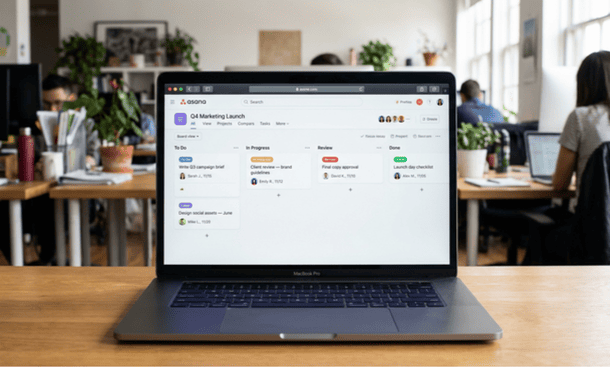
Asana is built around tasks and workflows. Its core assumption is that work can be broken down into discrete units with clear ownership and defined progression through stages. It is designed for teams that need visibility into who is doing what, when things are due and how work is moving through a defined process. It scales well as team complexity increases and offers significantly more structural flexibility than Basecamp.
ClickUp is built around everything. Its core assumption is that different teams have different needs and a project management tool should accommodate all of them. It is the most feature-rich and the most customizable of the three. It is also the most complex to set up and the most likely to overwhelm a team that simply needs something clean and fast to adopt.
Understanding those starting points changes how the comparison reads because you are not comparing three versions of the same product. You are comparing three different philosophies about what project management software should be.
The Simplicity Score
Each tool is rated across four dimensions on a scale of one to five. The maximum score is 20. A score of 16 or above means the tool genuinely earns the simple label for small business use.
Basecamp Simplicity Score: 16/20
Setup speed: 4/5 Basecamp is genuinely fast to get running. Creating projects, adding team members and populating to-do lists takes a fraction of the time that configuring a ClickUp workspace or building an Asana project structure requires. The product’s opinionated structure means fewer decisions during setup — which is either a strength or a limitation depending on how closely the default structure matches your workflow.
Adoption ease: 4/5 For teams new to project management software Basecamp’s interface is among the most approachable available. The project hub layout message board, to-dos, files, chat, schedule all visible from one screen is immediately understandable without a training session. The adoption challenge is not navigation but philosophy. Teams coming from Slack-heavy cultures sometimes resist the message board format initially. Once that resistance is resolved adoption tends to be stable.
Interface clarity: 4/5 Basecamp’s interface is clean, organized and visually calm. There is no dashboard overload, no competing notification systems and no deeply nested navigation. Everything lives in a predictable place. The tradeoff is that cross-project visibility seeing the status of all active projects in one consolidated view requires navigating to individual projects rather than reading a centralized dashboard.
Mobile usability: 4/5 Basecamp’s mobile app is one of the stronger ones in this category. The core actions checking tasks, reading messages, posting updates work well on a phone without feeling like a degraded version of the desktop experience. For team members working outside a desk environment the mobile experience is genuinely functional.
Total: 16/20

Asana Simplicity Score: 14/20
Setup speed: 3/5 Asana is faster to set up than ClickUp but slower than Basecamp. Creating a project, defining sections or stages and populating tasks with assignees and due dates is straightforward. The setup time increases meaningfully when you start using Asana’s more powerful features — custom fields, rules and automation, portfolio views which are where much of its value for growing teams lives but which require real configuration investment to use effectively.
Adoption ease: 4/5 Asana’s interface is polished and the default list and board views are intuitive enough that most team members can orient themselves quickly. The challenge is that Asana offers enough structural options that teams sometimes build overly complex workspaces during setup — too many custom fields, too many project templates, too much automation configured before the team has learned the basic workflow. Kept simple during the early stage Asana adopts well. Over-engineered from day one it becomes as complex as ClickUp without the same ceiling.
Interface clarity: 4/5 Asana’s interface is cleaner than ClickUp and more task-focused than Basecamp. The list view is immediately readable. The board view is well-executed. The timeline view — available on paid plans — is one of the better Gantt-style implementations available for small businesses. The main clarity limitation is that Asana’s notification system can become noisy as project complexity increases, creating an inbox that requires regular management.
Mobile usability: 3/5 Asana’s mobile app has improved significantly over recent years but still lags behind the desktop experience on complex workflows. Core actions creating tasks, checking due dates, updating status work well. Accessing the full range of project views and managing detailed task information is less seamless on mobile than it is on a laptop.
Total: 14/20
ClickUp Simplicity Score: 12/20
Setup speed: 2/5 ClickUp has the slowest setup of the three tools in this comparison and it is not close. The initial workspace configuration involves more decisions than most small business founders expect choosing between different hierarchy structures, understanding spaces versus folders versus lists, selecting which views to enable and configuring the notification preferences that will determine how the tool feels daily. A founder who goes in without a clear plan of how their business operates can spend a full day in setup that produces a workspace that still does not feel right.
Adoption ease: 3/5 ClickUp’s adoption challenge is real and it is rooted in the same thing that makes it powerful: the sheer number of options visible at any given moment. Team members new to the tool often feel uncertain about where things belong and how to navigate between views. The tool rewards teams that invest in setup and training upfront. It frustrates teams that need something immediately usable without a learning investment.
Interface clarity: 3/5 ClickUp’s interface is functional but visually busy compared to Basecamp and Asana. The left sidebar navigation is comprehensive but can feel overwhelming before you have customized it. The home dashboard is configurable and genuinely powerful once set up correctly but arriving at a well-configured home dashboard requires decisions that new users are not always equipped to make immediately.
Mobile usability: 4/5 ClickUp’s mobile app is actually one of its stronger elements. Core actions are accessible, the notification system works well on mobile and the simplified interface on a phone screen sometimes feels cleaner than the full desktop experience. For team members who primarily use the tool on a phone it is a better experience than Asana’s mobile offering.
Total: 12/20
The honest head-to-head
The Simplicity Score gives you a framework but the right choice depends on more than aggregate scores. Three specific scenarios clarify which tool wins for which type of business.
Choose Basecamp if: your work organizes naturally into discrete projects, your team is small and communication-heavy, you value fast adoption over feature depth and you want a single workspace where project context conversations, files, decisions, tasks lives together rather than scattered across platforms. Basecamp’s flat-fee pricing also tips the financial case in its favor for teams above 15 people.
Choose Asana if: your work is task-centric rather than project-centric, you need strong workflow automation as your team grows, you manage work that involves clear stage progression and you want a tool that scales well from a five-person team to a twenty-person team without requiring a migration. Asana’s free plan for up to 15 users also makes it financially compelling for early-stage teams watching overhead carefully.
Choose ClickUp if: you want one tool to replace several, you are comfortable investing real time in setup and configuration, your team has at least one person who enjoys building systems and you need the kind of workflow customization that neither Basecamp nor Asana can provide. ClickUp’s free plan is the most generous in the category and for teams willing to invest in the learning curve the ceiling is higher than either alternative.
What this comparison does not tell you
Feature comparisons and Simplicity Scores tell you what each tool is capable of. They do not tell you which one your specific team will actually use consistently three months after implementation.
That answer depends on workflow fit whether the tool’s structure mirrors how work actually moves through your business and on the implementation approach whether the rollout was designed to produce behavioral change rather than just provide access to a new platform.
A team that adopts Basecamp’s philosophy fully and uses it consistently will outperform a team that chose a theoretically superior tool and uses it inconsistently. Adoption wins every time.
Before making a final decision on any of these three tools it is worth grounding the comparison in the complete guide to whether Basecamp is the right project management tool for your startup or small business because the best comparison is one that starts with understanding what your business actually needs rather than what each tool can theoretically provide.
Basecamp wins on simplicity, adoption speed and communication integration. Asana wins on task management depth, workflow scalability and pricing flexibility for small teams. ClickUp wins on feature ceiling, customization and free plan generosity.
No single tool is objectively better. The right choice is the one that fits how your business actually operates and that your team will use without being reminded. Run all three through a structured trial with real work rather than sample projects and the answer will usually make itself clear.
Once you have made the decision the next challenge is not the tool it is getting your team to change how they work and building the adoption habit that makes any platform worth the investment. That challenge has its own specific solutions when the tool is Basecamp and getting your team to actually use Basecamp is a different problem from getting them to understand it in ways worth knowing before the rollout begins.
About the Author

Pamela
Pamela is a dynamic professional with a deep passion for SaaS and emerging technologies. She provides valuable insights into software trends, digital innovation, and cutting-edge tools that empower businesses to thrive and expand.
Did you find this helpful?
Your feedback helps us curate better content for the community.