

Feature lists are where most SaaS evaluations go wrong. A company publishes a list of everything their product can do and a founder reads it and tries to imagine how each item might be useful. That imagination exercise almost never produces an accurate picture of what daily use actually feels like.
Basecamp is particularly prone to this problem because its feature list looks deceptively simple. Message boards. To-dos. Docs and files. Campfire. Schedules. Card Table. Six things. Easy to read, easy to dismiss as basic and easy to misunderstand entirely if you have never actually run real work through each one.
The honest evaluation of Basecamp’s features is not about counting them. It is about understanding which ones deliver genuine operational value for a small business or startup team and which ones are either irrelevant at your stage or work differently than you expect.
That is what this breakdown covers.
The features that actually deliver value for small teams
Message boards the one that changes how your team communicates
The message board is the feature that surprises most founders the most. Coming from a Slack-heavy culture the idea of posting a message on a board rather than sending it instantly in a channel sounds archaic. In practice it is one of the most useful things Basecamp does for small business communication.
Here is why. Slack and similar tools are built for real-time exchange. That speed is useful for quick coordination but it produces a communication style where important information gets buried in a stream of fast-moving conversation that nobody can find later. A decision made in Slack on Tuesday is almost impossible to locate by Thursday.
Basecamp’s message board slows that down deliberately. When something important needs to be communicated a decision, a brief, a project update, a question that needs a considered response rather than a quick reaction it goes on the board as a named post. Everyone on the project can see it, respond to it and find it again three weeks later without scrolling through thousands of messages.
For a small business where important context needs to be accessible to everyone on the team not just the person who happened to be online when the conversation happened the message board format is genuinely valuable. It creates a searchable, organized record of project communication that instant messaging tools never produce.
To-dos simple but only if you work with them honestly
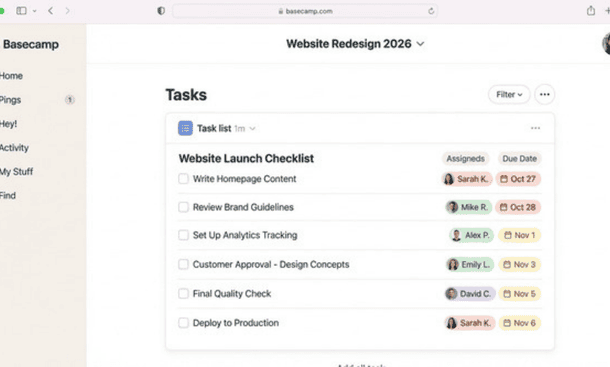
Basecamp’s to-do system is straightforward. You create lists, you add tasks to those lists, you assign them to people and you set due dates. Tasks can have descriptions and attachments. When something is done you check it off.
What it does not have is what some founders miss most: dependencies, priority levels, custom fields, subtask hierarchies and the kind of granular status tracking that tools like Asana and ClickUp provide.
For most small businesses with five or fewer people that absence is not a problem. The work is visible enough, the team is small enough and the communication layer is strong enough that complex task architecture creates more overhead than it resolves.
The founders who struggle with Basecamp’s to-dos are almost always the ones who need that granularity technical teams managing complex development workflows, operations managers tracking multi-stage processes with conditional steps, businesses running work that genuinely requires a more sophisticated task structure.
If your to-do needs are straightforward assign, date, complete Basecamp’s implementation is clean and fast. If your to-do needs are complex, be honest about that before signing up.
Campfire useful if your team uses it right, noise if they don’t
Campfire is Basecamp’s built-in group chat. Each project has its own Campfire and there is a company-wide Campfire called HQ for general team communication.
The intention behind Campfire is clear and sensible. Keep casual, quick conversation inside Basecamp rather than requiring a separate messaging tool. Reduce context switching. Keep project-related chat visible alongside the project work it relates to.
In practice Campfire works well for teams that have the discipline to use it as intended quick questions, brief updates, casual coordination. It becomes a liability when teams use it as a replacement for the message board. When important decisions and project updates start happening in Campfire they get lost exactly as they would in Slack fast-moving, unstructured and unsearchable in any practical sense.
The teams that use Campfire effectively tend to be ones where the message board versus Campfire distinction has been explicitly discussed and agreed upon. Campfire for quick things. Message board for anything that needs to be findable later. Without that clarity Campfire often ends up doing exactly what it was designed to prevent.
Docs and files underrated and genuinely useful
This is the feature most evaluation articles spend the least time on and it is one of the most consistently useful for small business operations.
Docs and files in Basecamp gives every project a shared space for documents, reference materials, assets and any file that the team needs to access in the context of that project. The document editor is basic not a Google Docs replacement but it handles meeting notes, project briefs, SOPs, client feedback summaries and most common small business document types without friction.
What makes it genuinely valuable is that the documents live inside the project they belong to. A brief for a client project lives in that client’s project. The onboarding checklist for a new team member lives in the onboarding project. Nobody has to maintain a separate filing system or remember which Google Drive folder holds which document. The project is the filing system.
For a small business that has ever lost time searching for a document that should have been easy to find this feature alone justifies a serious look at Basecamp.
The schedule useful for visibility, limited for planning
Basecamp’s schedule view pulls all tasks with due dates into a calendar format so the team can see what is coming up across all projects in one view.
It is useful for basic deadline visibility. It is not a planning tool. There is no drag-and-drop rescheduling, no resource view showing who is overloaded and no timeline visualization connecting related tasks across a project. For teams that need serious capacity planning or project scheduling it falls short.
For teams that need a simple answer to “what is due this week” it works fine.
Card Table the feature that changed things for visual teams
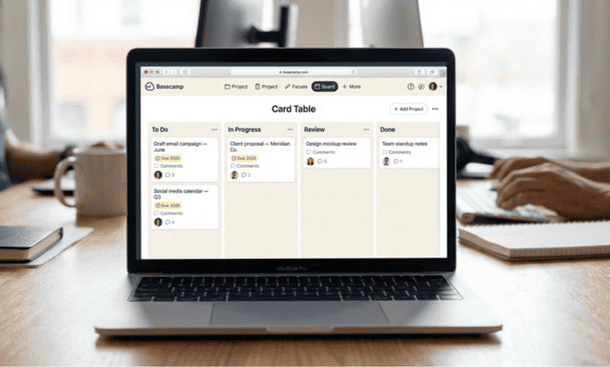
Card Table is Basecamp’s Kanban board a relatively recent addition that significantly expanded what the product can do for teams that think visually about workflow.
It gives each project a drag-and-drop board where work can be organized into columns representing stages of a workflow. For teams managing content production, sales pipelines, design review cycles or any work that moves through defined stages Card Table provides the visual workflow clarity that the to-do list format does not.
This is the feature that moved Basecamp from a “not quite right” to a “genuinely works” tool for several types of businesses that previously found it too linear. If you are evaluating Basecamp and visual workflow management matters to your operation Card Table is worth spending real time with during the trial.
The features that matter less at early stage
Two features get prominently mentioned in Basecamp marketing that deliver less practical value for most early-stage small businesses.
The Hill Chart is a visual metaphor for project progress tasks are plotted on a hill shape to show whether they are in the “figuring things out” phase or the “execution” phase. The concept is thoughtful. In practice most small business founders find it too abstract to use consistently and too manual to maintain accurately under real operational pressure. It is the feature that gets explored during the trial and quietly abandoned by month two.
Client access allows you to invite external clients into specific projects with limited visibility they can see certain messages and files but not your internal team communication. The feature is well-designed and genuinely useful for agencies and consultants managing client-facing projects. For businesses that do not work directly with external clients it is simply not relevant.
What the feature set tells you about who Basecamp is for
Taken together Basecamp’s features describe a very specific product for a very specific kind of team. Small, project-based, communication-heavy, distributed or semi distributed and more concerned with shared clarity than with granular task architecture.
If that description matches your business the feature set will feel well-suited to how you work. If it does not — if your work is task-centric rather than project-centric, if you need dependency management or capacity planning or time tracking the feature gaps will create friction that the product’s genuine strengths cannot compensate for.
That honest assessment is more useful than a feature count and it is the kind of evaluation that a complete guide to whether Basecamp is the right project management tool for your startup or small business is built around from the start.
Basecamp’s features are not numerous. They are deliberately chosen to serve a specific operational philosophy and within that philosophy they work consistently and well.
The message board changes how team communication gets organized. The to-dos handle straightforward task management cleanly. Docs and files eliminate a persistent small business frustration. Card Table adds the visual workflow layer that many teams need. Campfire works well with the right team norms in place.
The gaps — dependencies, time tracking, advanced reporting are real and deliberate. Whether they matter depends entirely on what your specific workflow requires.
Once the features make sense the next honest question is whether the pricing justifies the investment and that math looks different depending on where your team sits today. That calculation is exactly what Basecamp pricing in 2026 and whether the flat fee is worth it for a small business breaks down in full.
About the Author

Pamela
Pamela is a dynamic professional with a deep passion for SaaS and emerging technologies. She provides valuable insights into software trends, digital innovation, and cutting-edge tools that empower businesses to thrive and expand.
Did you find this helpful?
Your feedback helps us curate better content for the community.