

Picking an ERP system for your small business shouldn’t feel like you’re gambling with your company’s future, but that’s exactly how most California entrepreneurs describe the experience. I’ve spent the last decade watching startups and growing companies in our state make the same selection mistakes over and over, and honestly, it’s painful because these errors are totally avoidable.
The thing is, small business ERP selection operates under different rules than enterprise software buying. You don’t have unlimited budgets, huge IT teams, or months to dedicate to vendor evaluations. You need a system that works now, scales with you, and doesn’t require a computer science degree to manage.
Let me walk you through what actually matters when you’re shopping for an ERP solution that fits your business.
Understanding why small businesses choose the wrong ERP
Most entrepreneurs start their ERP search backward. They jump straight into vendor demos without understanding their own requirements first. It’s like walking into a car dealership saying “I need a vehicle” without knowing if you’re hauling equipment, commuting solo, or carpooling a soccer team.
The pressure to modernize pushes business owners toward quick decisions. Your competitors just implemented a new system, your accountant keeps complaining about manual processes, and your operations manager swears the current software is holding back growth. So you schedule demos with three vendors, sit through presentations, and pick whoever had the slickest pitch.
That approach burns through capital faster than a wildfire through dry brush.
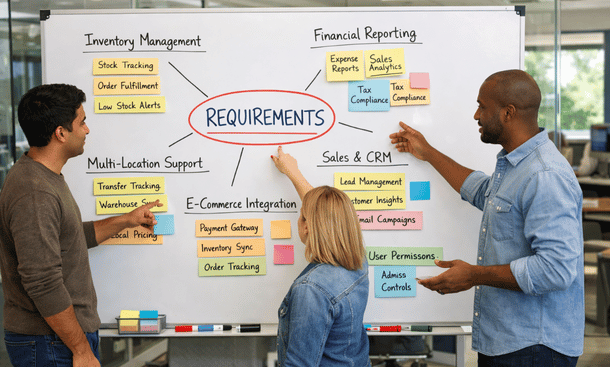
Collaborative Office Planning
The requirements discovery phase nobody talks about
Before you talk to a single vendor, spend two weeks documenting exactly what you need. Not what would be cool to have, but what your business absolutely requires to operate.
Grab your operations manager, your head of finance, and anyone who touches your current systems daily. Ask them what breaks, what takes too long, and what keeps them working late. Write down every painful process, every manual workaround, and every report they build in spreadsheets because your current software can’t generate it.
This isn’t busy work. This documentation becomes your filter for evaluating vendors. When a sales rep shows you a fancy feature you didn’t ask for, you’ll know whether it solves an actual problem or just looks impressive.
California businesses operate differently than companies in other states. We move faster, we embrace remote work, we integrate with more third-party tools, and we scale unpredictably. Your requirements list needs to reflect that reality.
Industry-specific versus generic solutions
Here’s where small businesses split into two camps that often make opposite mistakes.
Some entrepreneurs assume they need industry-specific software because their business is unique. They’re running a craft brewery, managing a cannabis operation, or coordinating multi-location retail, and generic ERP systems seem too broad. So they pick niche software built specifically for their industry.
Other business owners assume industry-specific means limited and expensive. They want maximum flexibility and choose a horizontal platform that theoretically works for everyone.
Both groups can be right or totally wrong depending on their specific situation.
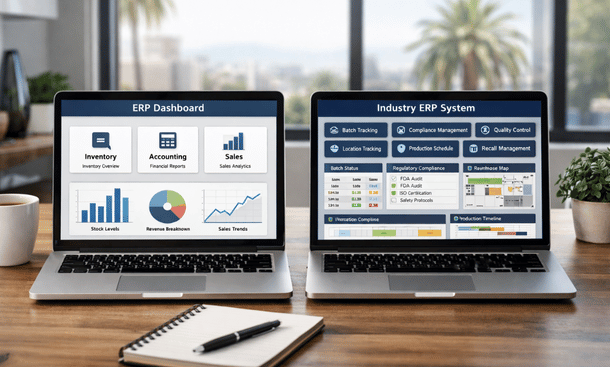
Industry-specific ERP makes sense when regulations, compliance requirements, or operational workflows in your field are dramatically different from standard business processes. Cannabis businesses in California face regulatory tracking requirements that generic systems simply can’t handle. Food manufacturers need lot tracking and expiration date management built into the core system, not bolted on afterward.
But industry-specific software often costs more, offers fewer integration options, and locks you into a smaller vendor with limited resources. If your industry processes aren’t that unusual, you’re paying a premium for specialization you don’t need.
Generic ERP platforms give you flexibility and typically offer more robust feature sets because they serve larger markets. The trade-off is configuration complexity. You’re building your solution from modular components, which requires more planning and often more implementation time.
The smart play is evaluating how different your operations truly are. If 80 percent of what you do matches standard business processes, generic ERP with good customization options probably fits better. If your core operations require specialized functionality that generic systems handle through clunky workarounds, industry-specific makes sense.
Cloud deployment isn’t optional anymore
Ten years ago, the cloud versus on-premise debate had legitimate arguments on both sides. Today, for small businesses, that debate is over. Cloud wins for California companies almost every time.
On-premise ERP requires server infrastructure, IT staff to maintain it, backup systems, security updates, and physical space. Small businesses don’t have those resources sitting around, and building that capability costs way more than the software itself.
Cloud ERP gives you enterprise-grade infrastructure, automatic updates, built-in redundancy, and mobile access without capital expenditure. You pay monthly, scale up or down as needed, and somebody else handles the technical heavy lifting.
The only remaining argument for on-premise deployment is data sovereignty for companies with unusual security requirements. Even then, private cloud hosting usually solves that concern without the maintenance burden.
Scalability mistakes that cost you later
Small business owners naturally focus on current needs. You’ve got 15 employees, two locations, and you’re doing about three million in revenue. You need a system that handles that reality today.
But here’s what happens: you pick an ERP that works perfectly for your current size. Two years later, you’ve doubled your team, opened three more locations, and revenue hit eight million. Suddenly your ERP is creaking under the load, missing features you need, and the vendor says you’ve outgrown their platform.
Now you’re shopping for a replacement, which means another implementation, more data migration, more training, and another chunk of capital spent on software instead of growth.
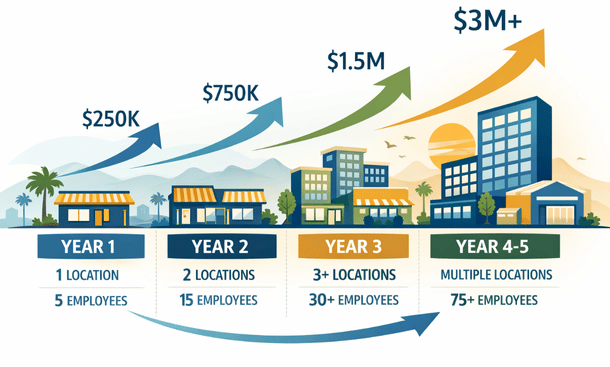
Ask vendors about scalability during selection. Not vague promises, but specific limitations. How many users can the system handle? How many concurrent transactions? How many locations? What happens when you hit those limits – do you upgrade within the same platform or migrate to something different?
Good ERP vendors build platforms that grow with you. You might start on a basic tier with limited features, but when you need advanced capabilities, you upgrade your subscription instead of replacing your entire system.
Integration capabilities make or break daily operations
Your ERP doesn’t exist in isolation. It needs to talk to your e-commerce platform, your CRM, your payment processor, your shipping software, and probably a dozen other tools you rely on daily.
Small businesses typically run leaner technology stacks than enterprises, but integration requirements are just as critical. Every manual data transfer between systems creates opportunities for errors, delays, and frustrated employees.
During vendor evaluation, map out every system you currently use. Then ask vendors specifically how their ERP integrates with each one. Native integrations are best because they’re built, tested, and maintained by the vendor. Third-party integration platforms like Zapier work but add another subscription cost and potential failure point.
Watch out for vendors who claim they integrate with everything through APIs. Having an API doesn’t mean integration is easy or reliable. Ask to see working examples, talk to customers who use the same integrations you need, and get clarity on who builds and maintains those connections.
California’s business environment pushes us toward more software tools, not fewer. Your ERP needs to play nice with others.
The total cost conversation vendors avoid
ERP pricing isn’t just the monthly subscription or annual license fee. That’s merely the starting point.
Implementation costs typically run between one and three times your annual software cost. You’re paying for data migration, system configuration, custom development, testing, and training. Vendors love to downplay this during sales conversations because sticker shock kills deals.
Then you’ve got ongoing costs: additional user licenses as you hire, premium support contracts, customization updates, integration maintenance, and periodic consultant fees when you need help with complex changes.
Some vendors charge separately for modules. You buy the core ERP, then pay extra for advanced inventory management, then pay again for manufacturing capabilities, then pay more for multi-location support. By the time you’ve added everything you actually need, the cost has tripled.
Others bundle features but charge based on transaction volume. Looks cheap when you’re small, gets expensive as you grow.
Get complete pricing documentation before you start comparing vendors. Include implementation, training, support, and a realistic projection of costs over three years. That’s the only way to make honest comparisons.
Understanding these common ERP implementation mistakes helps you approach vendor selection with the right mindset and questions.
Moving forward with confidence
Small business ERP selection doesn’t need to be a gamble if you approach it systematically. Document requirements first, evaluate based on your actual needs rather than impressive demos, and look three years ahead instead of just solving today’s problems.
The entrepreneurs who get this right spend more time planning and less time second-guessing. They pick systems that grow with them, integrate smoothly, and deliver ROI instead of regret.
Your next step should be understanding the real financial commitment you’re making. Check out our detailed breakdown of ERP implementation costs to build a realistic budget that covers everything from software licenses to training expenses.
About the Author

mike
Mike is a tech enthusiast passionate about SaaS innovation and digital growth. He explores emerging technologies and helps businesses scale through smart software solutions.
Did you find this helpful?
Your feedback helps us curate better content for the community.