

There is a specific evaluation mistake most founders make when they look at a project management tool for the first time. They open the feature list and try to imagine how each item might be useful. That imagination exercise feels productive and it almost never produces an accurate picture of what the tool is actually like to use under real operational pressure.
ProofHub has a long feature list. Some of those features deliver genuine time savings for small teams. Others are theoretically useful but rarely used in daily operations. A few are less capable than what specialized competitors offer in the same area. Understanding which is which before committing to a subscription is what makes the evaluation useful rather than just comprehensive.
This breakdown is based on what actually changes about how a small business operates once ProofHub is running not what the features are called but what problems they solve and where they fall short.
Task management solid foundation, not the deepest option
Task management is the core of any project management tool and ProofHub’s implementation is clean enough for most small business needs without being the most powerful option in the market.
Work is organized through projects containing task lists containing individual tasks. That three-layer hierarchy project, list, task is easy to navigate and easy to explain to a new team member without a training session. Each task supports assignees, due dates, labels, time estimates, priority levels, file attachments and threaded comments. Nothing about that feature set is surprising and nothing about it is confusing.
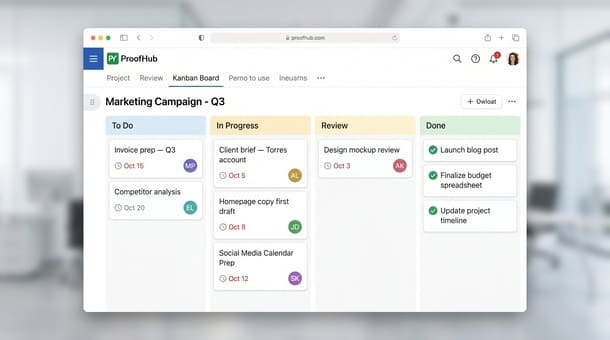
The multiple view options are one of the more genuinely useful aspects of ProofHub’s task management. The same tasks can be viewed as a list for founders who think linearly, a kanban board for teams that track work by stage, a Gantt chart for projects where timeline visibility matters and a table view for anyone who prefers a spreadsheet-style layout. Different team members working in different ways can use the view that fits them without anyone having to compromise.
Where ProofHub falls short compared to ClickUp is in task hierarchy depth and customization. You cannot create deeply nested subtask structures with multiple levels of parent-child relationships. You cannot build complex dependency chains where task B is blocked until task A is complete and the system enforces that relationship visually. Custom fields the ability to add metadata like client name, project type or priority tier to individual tasks are limited compared to what ClickUp and Asana provide on comparable plans.
For most small service businesses agencies, consultancies, content teams those limitations are not operational problems. The work does not require that level of structural complexity and the simpler interface is actually an adoption advantage. For software development teams managing sprint cycles or product teams building complex feature roadmaps the gaps are worth noting before signing up.
Gantt charts the feature most tools charge extra for
ProofHub includes Gantt charts on every plan including the entry-level Essential tier. That is worth naming directly because in most competing tools the Gantt view is a premium feature locked behind higher pricing tiers.
For a small agency or consultancy managing multi-phase client projects the Gantt view is not a nice-to-have. It is the difference between having a shared understanding of how a project is supposed to move and constantly reconstructing that understanding from a task list that does not show sequence or timeline relationships.
The ProofHub Gantt implementation shows tasks as bars on a timeline with start and end dates. Dependencies can be set between tasks so the visual relationship between phases is clear at a glance. Milestones can be marked to show critical delivery points. When a task slips the timeline adjusts visually so the downstream impact is immediately obvious rather than something the project manager has to calculate manually.
The Gantt is not as feature-rich as enterprise-grade project management platforms but for a small business managing three to eight simultaneous client projects it covers what matters shared timeline visibility, milestone tracking and early warning when a phase is running behind schedule.
Time tracking the feature that most directly saves money
Time tracking is where ProofHub delivers its most concrete operational value for service businesses and it is also the feature that most evaluation articles treat as an afterthought.
In most small businesses that have not yet consolidated their tool stack time tracking lives in a separate app Harvest, Toggl, Clockify that runs parallel to the project management system. Team members log time in one place and track tasks in another. The two systems never fully align. Hours get missed because someone completed a task without switching to the time tracking app. Monthly billing requires manually cross-referencing two systems and the reconciliation eats real hours every month.
ProofHub puts time tracking inside the task. A timer button lives directly on each task card. Click it when work starts, click it again when work stops. The time is logged against that specific task, attributed to the assigned team member and rolled up automatically into project-level and person-level time reports.
That sounds like a small convenience. The operational impact is larger than it sounds. When logging time requires switching to a separate app the habit breaks under pressure when a meeting runs long, when a client calls unexpectedly, when a team member is moving fast between tasks. When logging time is one click on the task that is already open the habit sticks because the friction is nearly zero.
For businesses billing by the hour the time savings from accurate time tracking more than covers the ProofHub subscription cost at almost any team size. For businesses tracking time for internal capacity planning rather than billing the consolidated reporting — hours per project, hours per person, hours per week gives visibility into where time is actually going versus where everyone thinks it is going.
Proofing and approval workflows the most underrated feature in the product
If you work in an agency, a design studio or any business that delivers creative work to clients and has ever tried to manage feedback via email you will understand immediately why this feature matters.
Email-based creative review is one of the most reliably painful processes in small business operations. Feedback arrives without reference to specific elements “the header feels off” attached to nothing. Multiple stakeholders send feedback in separate email chains. Version numbers get confusing. Someone approves a version that was superseded two days ago. The project manager spends hours consolidating feedback that should have taken minutes.
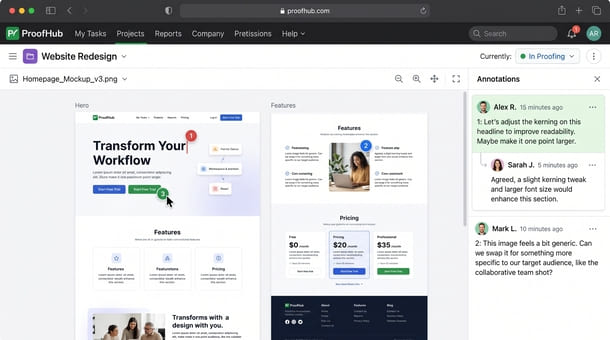
ProofHub’s proofing tool addresses that problem directly. Creative files images, documents, PDFs, videos are uploaded to the proofing interface where reviewers can place annotation markers directly on the element they are commenting about. The comment is attached to a specific location on the file. Everyone reviewing the same file sees each other’s comments in the same view. Approval status is tracked so it is always clear whether a version has been signed off and by whom.
The practical result is that a revision cycle that would previously take two days of email back-and-forth can happen in a single focused review session inside ProofHub. Feedback is clear because it is attached to a reference point. Nothing gets missed because everything is in one place. Approval is explicit rather than implied by silence.
For marketing agencies and design studios this feature alone frequently justifies the subscription cost. For businesses that do not manage creative deliverables through client review cycles the proofing tool simply does not apply and the evaluation should weight it accordingly.
Team chat and discussions functional but not Slack
ProofHub includes two types of built-in communication. Discussions are project-specific message threads organized posts with replies that keep communication contextually tied to the project they relate to. Direct messages handle one-to-one or small group conversations between team members.
The discussions feature is genuinely useful for keeping project-related communication inside the project. When decisions about a client project get made in a ProofHub discussion thread they are findable in the project weeks later which is not true of the same conversation in a Slack channel where it gets buried in the message stream within days.
The honest assessment is that ProofHub’s chat is functional but not as polished or feature-rich as Slack. There is no threading within messages at the granularity that Slack offers. The notification system is less sophisticated. Integration with external tools is limited compared to Slack’s extensive app ecosystem. Teams that have built deep operational habits around Slack will find ProofHub’s discussion feature a useful supplement but not a full replacement.
Teams that have not yet adopted a dedicated communication platform will find ProofHub’s built-in communication sufficient for most daily coordination needs without paying for a separate subscription.
Reporting useful visibility without enterprise depth
ProofHub’s reporting gives founders and project managers a consolidated view of what is happening across active projects without asking anyone to produce a status update on demand.
Available reports include project progress summaries showing task completion percentages, time reports showing hours logged per person and per project and workload views showing task distribution across team members. The reports are clean and immediately readable without requiring any configuration beyond the time tracking and task data that gets entered during normal use.
The reporting does not match the depth of ClickUp’s custom dashboard system where every metric can be arranged into a personalized operational view. For a founder managing five to ten active projects simultaneously ProofHub’s reporting covers what matters where are things, who is doing what and where is time going.
Before grounding any feature evaluation in specific scenarios it helps to understand what ProofHub is genuinely designed to accomplish for entrepreneurs and small businesses at the product level because features only deliver their promised value when they are being used for the type of work the tool was built to support.
ProofHub’s most time-saving features for small teams are the ones that eliminate the tool-switching and manual coordination that fragmented stacks create. Time tracking inside tasks. Proofing and approval workflows that replace email-based review. A Gantt view included at every plan level rather than locked behind a premium tier. Task management that is clean and fast to adopt without requiring a complex setup process.
The honest gaps task hierarchy depth, communication feature richness, custom reporting are real and worth knowing. They are also gaps that matter less than the consolidation value for the specific types of businesses ProofHub was built for.
Once the features make sense the next honest question is whether the pricing justifies the investment and that math looks different at different team sizes in ways worth running explicitly. That calculation is exactly what ProofHub pricing in 2026 and whether the flat fee is worth it for your business covers next.
About the Author

Pamela
Pamela is a dynamic professional with a deep passion for SaaS and emerging technologies. She provides valuable insights into software trends, digital innovation, and cutting-edge tools that empower businesses to thrive and expand.
Did you find this helpful?
Your feedback helps us curate better content for the community.