
Table of contents
- Why strategy comes before technical work
- Define the business outcomes
- Set a realistic migration scope
- Assign ownership across the company
- Map dependencies and risks
- Build a practical timeline
- Define success before launch
- Prepare the team for execution
- Conclusion
Why strategy comes before technical work
A data migration strategy gives your ERP project a clear direction before records begin moving.
Without that direction, teams often jump straight into field mapping, extraction tools, and system configuration. Technical work starts while important business questions remain unanswered.
Which records should move? Who decides whether data is accurate? How much history does the new ERP need? What happens if an integration is late? How will the team know the migration is ready for production?
Those decisions should not be made during a stressful cutover.
A strong strategy connects the migration to business outcomes. It defines scope, ownership, risks, timelines, controls, and success measures in language that technical and business teams can understand.
It also supports the wider process described in our complete ERP data migration guide, where planning, cleanup, testing, cutover, and stabilization work as one connected program.
Define the business outcomes
Start with the reason the business is replacing its legacy ERP.
The answer should go beyond getting newer software. A migration is expensive and disruptive. The expected business improvements need to justify that effort.
Your company may want to reduce manual order entry, improve inventory visibility, shorten the financial close, connect ecommerce with operations, or give leaders access to current reports.
Turn those goals into measurable outcomes.
Instead of saying “improve reporting,” define a target such as producing a daily inventory dashboard without manual spreadsheet work.
Instead of saying “clean customer data,” aim to reduce duplicate active customer records by a specific percentage.
Useful outcomes may include:
- Reduce order-entry time
- Complete the monthly close faster
- Improve inventory accuracy
- Lower the number of invoice corrections
- Remove duplicate customer and vendor records
- Replace manual approval workflows
- Connect sales, finance, and operations data
- Reduce dependency on unsupported custom software
These outcomes help the team make better scope decisions. If a record or customization does not support an agreed result, it may not belong in the first migration release.
Set a realistic migration scope
Migration scope defines what will move, what will remain accessible elsewhere, and what will be left behind.
This is one of the most important parts of a data migration strategy because scope grows easily.
One department wants ten years of transaction history. Another wants every old report recreated. Someone remembers a custom field that has not been used in three years but still wants it included just in case.
Moving everything may sound safer. It often creates more risk.
Start by separating information into clear groups:
- Active master data
- Open transactions
- Required historical data
- Reference-only archives
- Obsolete or invalid records
Active master data includes current customers, vendors, products, locations, employees, accounts, and pricing rules.
Open transactions include unpaid invoices, active sales orders, open purchase orders, current inventory, and unresolved credits or returns.
Historical data may be required for legal, tax, audit, reporting, or customer service reasons. That does not always mean it must live inside the new ERP. A secure and searchable archive may be enough.
Document every scope decision. Include the reason, owner, retention requirement, and planned destination. This prevents old questions from returning every week.
Assign ownership across the company
Data migration is not only an IT responsibility.
Technical specialists can extract, transform, and load records. They cannot decide whether a vendor should be active, whether an inventory quantity is valid, or whether an account balance reflects the business correctly.
Each data domain needs a business owner.
Finance should own accounting definitions, opening balances, unpaid invoices, tax data, and financial validation.
Sales or customer operations should own customer records, account status, contact rules, and sales pipeline information.
Operations should own products, inventory, warehouses, units of measure, and fulfillment status.
Purchasing should own vendor records, terms, approved suppliers, and open purchase orders.
The migration team also needs clear project roles:
- An executive sponsor who protects priorities
- A migration lead who coordinates the program
- Data owners who approve rules and results
- Technical specialists who execute the migration
- Process owners who validate workflows
- Department champions who support training
- A decision group that resolves conflicts quickly
Ownership should be written into the plan. Avoid shared responsibility without a named decision-maker. When everyone owns a problem, it can become surprisingly easy for nobody to make the call.
Map dependencies and risks
An ERP does not operate alone.
It may exchange information with ecommerce platforms, customer relationship management software, payment services, warehouse systems, payroll tools, banks, shipping providers, and reporting platforms.
Your strategy needs to identify those dependencies before the migration schedule is locked.
For every integration, document:
- The system sending the data
- The system receiving the data
- The information exchanged
- How often the exchange happens
- Who owns the integration
- What happens if it fails
- How it will be tested
- Whether it must be ready for launch
Then create a risk register, a working list of events that could threaten the migration.
Common risks include poor source data, changing requirements, late integrations, unavailable data owners, slow testing, incomplete training, unsupported custom code, and a cutover window that is too short.
Each risk should have an owner, probability, business impact, preventive action, warning signal, and response.
For example, if a key integration may arrive late, the response might be a temporary controlled import process. If a data owner is unavailable during testing, a trained backup should already be named.
A risk register is useful only when the team reviews it regularly. It should guide action, not become a document that gets forgotten after kickoff.
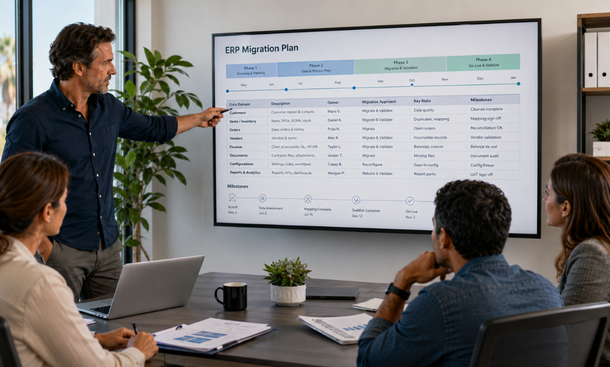
Build a practical timeline
A good migration timeline is built around evidence and decisions, not optimistic calendar dates.
The work usually moves through several stages:
- Discover systems, processes, and data sources
- Confirm scope and ownership
- Profile and clean legacy data
- Map source fields to the new ERP
- Build transformations and integrations
- Run sample migrations
- Complete a production-sized rehearsal
- Validate records and workflows
- Train users and prepare support
- Execute cutover and stabilization
Each stage should have entry and exit criteria.
For example, data mapping should not begin until scope and ownership are approved. A production-sized rehearsal should not begin until major cleanup rules are stable. Cutover should not begin until financial balances, integrations, permissions, and critical workflows pass testing.
Leave room for correction. The first full test load will find problems. That is its job.
A timeline with no space for fixing defects is not efficient. It is fragile.
Avoid placing every milestone on the most optimistic path. Build contingency around high-risk work, especially data cleanup, integration testing, user validation, and final reconciliation.
Define success before launch
Success needs to be measurable before the migration starts.
Otherwise, the team may reach cutover with different ideas about what “ready” means.
Technical success could include:
- Required records load without critical failures
- Source and destination record counts reconcile
- Integrations process transactions correctly
- System performance meets agreed limits
- Access permissions match employee roles
- Backups and recovery procedures are verified
Business success could include:
- Opening financial balances reconcile
- Active customer and vendor records are accurate
- Inventory matches approved counts
- Open orders and invoices are complete
- Users can perform critical daily workflows
- Reports produce trusted results
- Support coverage is ready for launch
Create formal go and no-go criteria from these measures.
The decision to launch should be based on evidence. A delayed launch can be frustrating. A failed launch that disrupts customers, invoicing, or fulfillment is usually much more expensive.
Prepare the team for execution
A strategy becomes useful when employees understand how it affects their work.
Communicate the reason for the migration early. Explain which problems the new ERP should solve and which processes will change. Avoid presenting it as a purely technical upgrade.
People may have strong feelings about the legacy system. They know its shortcuts. They have built personal workarounds around its limits. A new platform can make experienced employees feel like beginners again.
Bring real users into process reviews and testing. They can identify missing fields, confusing screens, and workflow problems before launch.
Training should be role-based. Finance needs to practice reconciliation and period close. Sales needs to create and update customer records. Operations needs to receive inventory and process orders. Managers need to use reports and approvals.
The strategy should also define post-launch support. Employees need one clear place to report problems, named department champions, response priorities, and guidance for known issues.
That preparation turns migration from something happening to the team into something the team is helping deliver.
A data migration strategy creates the structure needed to move from a legacy ERP without turning the project into a series of last-minute decisions.
Begin with measurable business outcomes. Set a controlled scope. Assign business owners to every data domain. Map integrations and risks. Build a timeline that includes testing and correction. Define launch criteria before pressure starts building.
The next step is preparing the records inside that scope. The guide to legacy data cleanup explains how to identify duplicates, invalid fields, obsolete records, and inconsistent formats before migration.
For the complete framework connecting strategy with migration methods, testing, cutover, and stabilization, continue with our ERP data migration guide.
About the Author

mike
Mike is a tech enthusiast passionate about SaaS innovation and digital growth. He explores emerging technologies and helps businesses scale through smart software solutions.
Did you find this helpful?
Your feedback helps us curate better content for the community.