

How I put this list together — and what I left out
There is no shortage of ERP software lists on the internet. Most of them read like vendor brochures stitched together — generic feature comparisons, suspiciously identical scores across every category, and zero acknowledgment of the real trade-offs involved in choosing one platform over another.
This list is built differently. Every platform included here has been evaluated specifically against the needs of remote-first small businesses in California — teams between five and one hundred employees, operating without large IT departments, dealing with the specific regulatory and operational complexity that comes with running a business in this state.
I have excluded platforms that are either too narrowly focused to qualify as genuine ERP, too enterprise-heavy to be realistic for an SMB without a significant implementation budget, or primarily designed for on-premise deployment rather than cloud access.
What remains is a short list of platforms that genuinely work for lean remote teams — each with a distinct profile, a different strength, and a different type of business it serves best.
What makes an ERP genuinely good for remote California SMBs
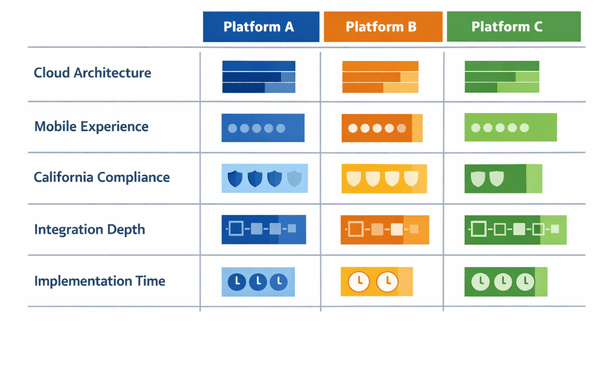
Before getting into specific platforms, it helps to establish the evaluation criteria. Not every ERP feature matters equally for a remote California team, and the platforms on this list were assessed against a specific set of priorities.
Cloud-native architecture matters more than cloud-compatible. A platform built from the ground up for the cloud behaves differently from a legacy system that has been adapted for online access. Cloud-native platforms tend to offer better mobile experiences, faster updates, and more reliable performance for distributed teams accessing the system from multiple locations simultaneously.
California-specific compliance support is a practical requirement rather than a nice-to-have. The state’s payroll rules, sales tax complexity, and employment record requirements create administrative overhead that the right ERP should reduce rather than ignore.
Implementation realism for lean teams is the filter that eliminates the most enterprise options. If a platform realistically requires six months and a dedicated consultant team to deploy, it does not belong on a list for California SMBs with remote teams and no internal IT staff.
Integration depth with the SaaS tools California businesses already use — Salesforce, Shopify, Gusto, Stripe, Slack — determines how much of the existing stack survives the transition and how clean the data environment becomes post-implementation.
Finally, total cost of ownership over three years, not just the monthly licensing fee, is the honest financial metric. Platforms with low entry pricing but high implementation costs, expensive add-on modules, or per-user fees that escalate quickly as the team grows often end up more expensive than platforms with higher base pricing.
NetSuite — the enterprise-grade option that scales with you
NetSuite, now owned by Oracle, is the most widely deployed cloud ERP for growing businesses globally, and it holds that position for legitimate reasons.
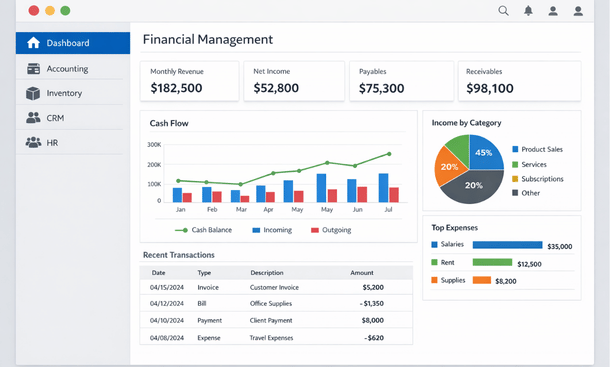
The platform covers financials, inventory, CRM, e-commerce, HR, and project management within a single unified system. For a California business that is scaling quickly and expects to move from fifty to two hundred employees in the next few years, NetSuite’s depth means you are unlikely to outgrow it anytime soon.
The mobile experience is solid for core functions — approvals, dashboards, and expense management work reliably on both iOS and Android. Real-time reporting is one of NetSuite’s genuine strengths, with a customizable dashboard system that gives every role a relevant view of business performance without requiring manual report assembly.
The honest trade-offs are significant, though. NetSuite is not a budget platform. Licensing starts around 1,000 dollars per month for a base configuration and climbs quickly as you add modules and users. Implementation is complex enough that most businesses engage either NetSuite’s professional services team or a certified implementation partner, adding meaningful cost to the total investment.
It is also worth noting that NetSuite’s interface, while functional, has a steeper learning curve than some newer platforms on this list. Remote teams without a dedicated internal champion tend to experience slower adoption.
Best fit: California SMBs with 30 or more employees, a clear growth trajectory, and the budget and patience for a thorough implementation. Not the right starting point for a ten-person team on a tight timeline.
Odoo — the flexible open-source contender
Odoo occupies a genuinely unique position in the ERP market. It is open-source at its core, meaning the base platform is free to use and modify, but the company offers a hosted cloud version with support and managed updates that functions much like a standard SaaS product.
The modular structure is one of Odoo’s most appealing characteristics for small businesses. You start with the modules you actually need — accounting, inventory, CRM, or HR — and add capability as the business grows without paying for functionality you are not using yet. This makes the entry cost significantly lower than most enterprise ERP options.
For California remote teams, the web-based interface and reasonably capable mobile app cover the daily workflow needs most SMBs require. The platform’s integration library has expanded substantially in recent years, with connections to Shopify, Stripe, PayPal, and various shipping providers that matter for California product businesses.
The trade-off with Odoo is implementation complexity relative to its apparent simplicity. The modular structure means more configuration decisions upfront, and the open-source foundation means the quality of implementation documentation varies widely. Remote teams without technical capacity sometimes struggle to get the configuration right without professional help.
The community edition — the free version — also lacks the dedicated support that most small businesses need during and after implementation. The enterprise cloud version resolves this but shifts the pricing into a more competitive range with other platforms on this list.
Best fit: California SMBs with some technical capacity on the team, a modular growth approach, and a preference for flexibility over polish. Particularly strong for businesses that want to start small and expand capability over time.
Acumatica — built for remote access from the ground up
Acumatica is the ERP on this list that most explicitly markets itself around remote and distributed work, and that positioning reflects genuine product decisions rather than just marketing language.
The platform’s licensing model is unusual and worth understanding. Acumatica charges based on resource consumption — the amount of computing power your usage requires — rather than per user. For California businesses with a large number of occasional users, such as field teams, part-time employees, or external contractors who need occasional system access, this model can be significantly more economical than per-user pricing.
The mobile experience is genuinely strong, with a purpose-built app that covers core workflows including approvals, time entry, project management, and financial reporting without requiring the desktop interface as a fallback. For a remote California team whose members work from phones and tablets as frequently as laptops, this matters practically.
Acumatica’s industry editions — manufacturing, distribution, construction, retail, and field services — provide pre-configured templates that reduce implementation time for businesses in those verticals. California’s strong manufacturing, construction, and distribution sectors make these editions particularly relevant.
The honest limitation is market presence. Acumatica is less widely known than NetSuite or SAP, which means fewer third-party implementation partners, a smaller community of users to learn from, and occasionally less depth in the integration library for less common SaaS tools.
Best fit: California SMBs in manufacturing, construction, distribution, or field services with variable team sizes, a mobile-heavy workflow, and a preference for consumption-based pricing over per-user fees.
SAP Business One — serious depth for product-based businesses
SAP Business One is the small business offering from SAP, one of the largest enterprise software companies in the world. It is a mature platform with deep functionality, particularly for businesses that manage complex inventory, manufacturing processes, or multi-entity financial structures.
The platform has been available in a cloud version for several years, though it retains some of the operational characteristics of its on-premise origins. The interface is functional rather than beautiful, and the learning curve is steeper than newer cloud-native competitors. For remote teams where self-directed learning is more necessary than in an office environment, this creates real adoption friction.
Where SAP Business One genuinely earns its place on this list is in the depth of its financial and inventory management capabilities. For California businesses in food and beverage production, medical device manufacturing, or complex wholesale distribution — industries with specific compliance and traceability requirements — the platform’s maturity in these areas is difficult to match at its price point.
The partner ecosystem is extensive, with a large network of certified implementation partners across California who specialize in specific industries and can provide local, ongoing support — a practical advantage for businesses that want a long-term implementation relationship.
Best fit: California product-based businesses in regulated industries or complex distribution environments where financial depth and compliance traceability matter more than implementation simplicity or interface modernity.
Microsoft Dynamics 365 Business Central — the Microsoft ecosystem play
If your California remote team already runs on Microsoft 365 — Outlook, Teams, Excel, SharePoint — Business Central is worth serious evaluation because the integration between these products is genuinely seamless rather than bolted on.
Business Central connects natively with Outlook for customer and vendor communication, Teams for workflow notifications and approvals, and Excel for financial reporting in a way that feels natural rather than technical. For remote teams that live in Teams for daily communication, having ERP data surface directly inside that environment reduces the friction of switching between platforms.
The platform covers the core ERP functions well — financials, inventory, purchasing, sales, and basic manufacturing — with a clean interface that tends to earn higher adoption marks than older ERP platforms. Microsoft’s regular update cadence means the product improves continuously, which matters for a platform you plan to use for years.
The limitations are real. Business Central’s depth in areas like advanced manufacturing, complex warehouse management, and multi-entity financials is thinner than NetSuite or SAP Business One at equivalent price points. And while the Microsoft ecosystem integration is a genuine advantage for Microsoft-heavy teams, it becomes less compelling if your stack is built around Google Workspace or other non-Microsoft tools.
Best fit: California remote teams that are deeply embedded in the Microsoft 365 ecosystem, prioritize a clean interface and fast adoption, and have operational needs that fall within the platform’s mid-market sweet spot rather than the complex end of the spectrum.
How to match the right platform to your specific situation
After walking through five platforms in detail, the practical question is how to use this information to make an actual decision.
Start with your non-negotiables. If California payroll compliance is your most pressing pain point, look at how each platform handles state-specific payroll rules before evaluating anything else. If mobile access is critical because your team works from job sites or client locations, test the mobile app of any platform you are seriously considering before you evaluate the desktop interface.
Be honest about your implementation capacity. If your remote team does not have a technically capable person who can dedicate meaningful time to configuration and data migration, platforms with lighter implementation requirements should rank higher regardless of their feature depth.
Request a pilot period before committing. Most cloud ERP vendors offer a trial or a sandbox environment. Use it to run one or two of your actual business processes through the system with two or three real team members. The friction points you discover in a two-week pilot are far cheaper to learn about than the ones you discover three months into a full deployment.
Finally, talk to other California SMBs using the platform you are considering. LinkedIn groups, industry associations, and vendor-hosted user communities are all places where real users discuss what works and what does not in a candid way that vendor sales teams never will.
Choosing an ERP for a remote California small business is not a decision you make based on a feature comparison chart. It is a decision you make based on a clear understanding of your operational priorities, your team’s technical capacity, your budget over a realistic time horizon, and an honest assessment of where your current tools are genuinely failing you.
The five platforms on this list each serve a distinct profile. NetSuite for growth-oriented businesses with the budget to match. Odoo for flexibility-first teams with some technical confidence. Acumatica for mobile-heavy and consumption-variable teams. SAP Business One for complex product businesses in regulated industries. Business Central for Microsoft-embedded teams that value ecosystem coherence.
None of them are perfect. All of them are meaningfully better than a fragmented SaaS stack for a remote team that has outgrown its current tools.
For the complete strategic foundation behind why remote businesses are making this investment — and what operational transformation actually looks like in practice — our guide on how ERP technology supports the full remote-work lifecycle in modern businesses is the place to start before you open a single vendor demo.
And if you are still in the early stage of understanding what cloud ERP actually is and why California SMBs are moving toward it, our piece on cloud ERP for remote teams and why California small businesses are making the switch gives you the foundational context that makes this comparison list significantly more useful.
About the Author

mike
Mike is a tech enthusiast passionate about SaaS innovation and digital growth. He explores emerging technologies and helps businesses scale through smart software solutions.
Did you find this helpful?
Your feedback helps us curate better content for the community.