
Table of contents
- Why go-live is not the finish line
- Reconcile migrated data
- Validate critical workflows
- Train employees by role
- Prepare the hypercare team
- Monitor performance and integrations
- Manage issues and improvements
- Retire the legacy ERP safely
- Conclusion
Why go-live is not the finish line
An ERP launch feels like the big moment. The data has moved, employees can sign in, and the legacy system is no longer handling new transactions.
The project is not finished.
The first days reveal how the ERP behaves with real users, real customers, and real transaction volume. Reports that passed testing may expose new edge cases. Employees may struggle with unfamiliar steps. Integrations may process ordinary transactions correctly while failing on exceptions.
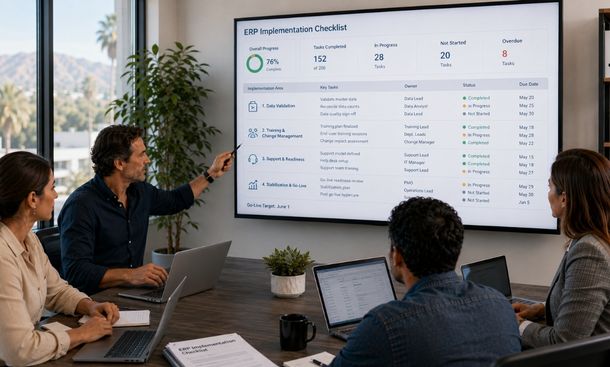
An ERP implementation checklist keeps post-launch responsibilities visible and owned.
It covers data reconciliation, workflow validation, training, support, monitoring, issue management, and legacy-system retirement.
This final stage completes our ERP data migration framework, where a migration is considered successful only after the new platform becomes stable and trusted.
Reconcile migrated data
Begin with the information that keeps the company operating.
Finance should verify:
- Opening account balances
- Customer balances
- Vendor balances
- Unpaid invoices
- Credits
- Tax totals
- Bank and payment records
- Current financial periods
Operations should reconcile inventory by product and location. A company-wide total can match while individual warehouses contain errors.
Sales should review active customers, contacts, price lists, open opportunities, and current orders.
Purchasing should validate vendors, payment terms, open purchase orders, and expected deliveries.
Record counts should explain what happened to every in-scope record. The team should know how many records were loaded, merged, archived, rejected, or removed.
Review individual samples too.
Choose normal records and difficult cases. Include customers with several addresses, partial orders, products with multiple units of measure, vendors with open credits, and transactions in different currencies.
Document the evidence and approval for each data domain. Verbal confirmation is not enough for financial or operational information that may later need an audit trail.
Validate critical workflows
Migrated records must support complete business processes.
Create a list of the workflows the company cannot afford to lose. Then run each one in production using controlled transactions.
Priority workflows may include:
- Create a customer
- Enter and approve a sales order
- Reserve inventory
- Fulfill and ship an order
- Generate an invoice
- Record a payment
- Create a purchase order
- Receive inventory
- Approve a vendor invoice
- Process a return or credit
Confirm that every workflow produces the expected financial and operational result.
Do not test only the normal path.
Try an out-of-stock product, rejected approval, canceled order, duplicate invoice, returned shipment, customer credit limit, and missing required field.
Exceptions reveal whether employees know what to do when the ERP blocks, redirects, or flags a transaction.
Check reports after the workflows run. An order may complete correctly while a management dashboard groups the revenue under the wrong category.
Assign each workflow to a business owner who can approve the result.
Train employees by role
ERP training should focus on tasks, not generic platform tours.
Finance employees need to practice invoicing, payment matching, reconciliation, approvals, reporting, and period close.
Sales teams need to manage customer records, quotes, orders, pricing, and account status.
Operations teams need to handle inventory, transfers, fulfillment, returns, and product records.
Managers need to approve requests, review dashboards, and understand exception alerts.
Create short role-based materials:
- Step-by-step job aids
- Short screen recordings
- Common error explanations
- Approval guides
- Report definitions
- Escalation contacts
- Frequently asked questions
Give employees a safe place to practice before and after launch.
Training should continue during stabilization. People often understand a demonstration but discover new questions when they perform the process under real pressure.
Department champions can help. A champion is a trained employee who supports colleagues and communicates recurring problems to the implementation team.
Champions should not replace formal support. They make it easier to catch confusion early.
Prepare the hypercare team
Hypercare is a period of elevated support after launch.
Its purpose is to resolve high-impact issues quickly while users and systems settle into normal operations.
Create one issue intake channel. Avoid letting employees report problems through private messages, scattered emails, and informal conversations.
Every issue should include:
- User name and department
- Time of the problem
- Business process
- Record or transaction number
- Expected result
- Actual result
- Screenshot when useful
- Business impact
- Workaround already attempted
Set clear priority levels.
A critical issue prevents an essential process, creates financial risk, exposes sensitive information, or affects many customers.
A high-priority issue seriously limits work but has a controlled temporary solution.
Medium and low issues can enter the improvement backlog when they do not threaten current operations.
Schedule short support reviews at first. Look for patterns rather than treating every ticket as isolated. Several users reporting the same problem may indicate a missing permission, unclear training, broken integration, or incorrect configuration.
Define exit criteria for hypercare. These may include low critical issue volume, stable integrations, completed financial reconciliation, acceptable system performance, and business-owner approval.
Monitor performance and integrations
A system that worked during testing may behave differently under real volume.
Monitor:
- Page and search response times
- Report generation
- Batch jobs
- Scheduled workflows
- Integration queues
- Failed transactions
- Duplicate records
- System availability
- User access errors
- Backup completion
Set thresholds for action.
If an integration queue grows beyond a safe limit, the responsible owner should receive an alert. If report performance slows during peak hours, the technical team should investigate before users create manual alternatives.
Review every launch-critical integration.
Confirm that customer records, orders, payments, shipping updates, inventory changes, payroll information, and reporting data move in the correct direction.
Test failure recovery too.
An integration may retry automatically after a temporary problem. Confirm that retries do not create duplicate orders, invoices, or payments.
Security monitoring matters as well. Review administrator activity, failed login attempts, unusual exports, excessive permissions, and access to sensitive financial or employee information.
Manage issues and improvements
Not every post-launch problem requires an emergency change.
Separate defects from improvement requests.
A defect means the ERP does not produce the approved result. An improvement request asks for a better layout, report, notification, or workflow after users gain experience.
Mixing the two makes prioritization difficult.
Keep one controlled backlog with:
- Issue number
- Type
- Description
- Business impact
- Priority
- Owner
- Workaround
- Target date
- Test result
- Approval status
Correct high-risk defects first.
Avoid making several untested configuration changes at the same time. A quick fix can affect another department or report.
Use a controlled change process. Document the proposed change, review its impact, test it, approve it, and schedule its release.
Track recurring questions too.
If many employees ask how to complete the same task, the problem may be training or interface design rather than software failure.
Early improvement requests can be valuable, but do not redesign the ERP during its first week. Give users time to build familiarity and gather enough evidence to distinguish real friction from temporary discomfort.
Retire the legacy ERP safely
Do not shut down the legacy system immediately after go-live.
Keep it available in read-only mode while the business confirms that required history, reporting, audits, and customer service needs are covered.
Before retirement, verify:
- Legal retention requirements
- Tax and audit access
- Historical reporting
- Customer service lookup
- Document attachments
- Custom report dependencies
- Integration shutdown
- User access removal
- Backup and restoration procedures
- Archive search capability
Decide where historical records will live.
Some information may remain in a secure archive. Other records may be exported into a reporting database or document system.
The archive should be searchable by authorized employees. Keeping data technically stored but practically inaccessible does not solve the business need.
Remove legacy access in stages.
Stop new transactions first. Then reduce general user access. Keep limited read-only access for approved roles until business owners sign off.
Preserve the migration documentation. Store mapping rules, reconciliation reports, approvals, issue logs, transformation logic, retention decisions, and final project outcomes.
That information will support audits, troubleshooting, and future system changes.
Measure whether the implementation succeeded
Return to the outcomes defined at the start of the migration.
Measure whether the new ERP has improved:
- Order-processing time
- Inventory accuracy
- Financial close duration
- Invoice corrections
- Duplicate records
- Report preparation
- Approval speed
- Integration reliability
- Support response
- User adoption
Compare performance with the legacy baseline.
Some benefits appear quickly. Others need several reporting cycles. Finance may need two or three month-end closes before the team can judge the improvement fairly.
Ask employees for structured feedback. Find out which tasks are easier, which remain confusing, and where manual work continues outside the ERP.
Share results with leadership and users.
Employees are more likely to support continued improvement when they can see that the difficult transition produced measurable value.
A stable ERP launch requires more than moving data and opening user access.
Reconcile every critical data domain. Validate complete workflows. Train employees by role. Provide structured hypercare. Monitor integrations, performance, security, and support demand. Manage changes carefully and retire the legacy ERP only after business owners approve the transition.
The most immediate preparation for this stage begins during cutover. Review the business continuity plan for ERP cutover to make sure backups, communications, rollback controls, and launch support are ready.
For the complete process connecting strategy, cleansing, testing, cutover, and stabilization, continue with our ERP data migration guide.
About the Author

mike
Mike is a tech enthusiast passionate about SaaS innovation and digital growth. He explores emerging technologies and helps businesses scale through smart software solutions.
Did you find this helpful?
Your feedback helps us curate better content for the community.