
Table of contents
- Why business continuity matters during cutover
- Identify the processes that cannot stop
- Choose the cutover window
- Protect data with backups and recovery
- Control final transactions
- Build the communication plan
- Define rollback triggers
- Prepare launch support
- Conclusion
Why business continuity matters during cutover
An ERP cutover changes the system responsible for orders, inventory, invoices, payments, purchasing, and reporting.
That makes it more than a technical event. It is an operational event that can affect employees, customers, suppliers, and cash flow.
A business continuity plan explains how the company will keep essential work moving while the legacy ERP becomes read-only and the new platform comes online.
The plan should cover temporary procedures, backups, communication, support, escalation, and recovery. It should also define what happens if the migration does not meet agreed launch standards.
True zero downtime is uncommon. A better target is controlled continuity with minimal disruption and no uncontrolled loss of data or service.
This approach supports our guide to ERP data migration without downtime, where continuity planning begins long before the final cutover window.
Identify the processes that cannot stop
Start with a business impact assessment.
A business impact assessment identifies the processes that would cause serious financial, operational, legal, or customer harm if they became unavailable.
Priority processes may include:
- Customer order entry
- Warehouse fulfillment
- Inventory movements
- Payment processing
- Invoicing
- Customer support
- Purchasing
- Payroll
- Regulatory reporting
- Financial controls
For each process, document how long the company can tolerate an interruption.
A customer service dashboard may be unavailable for a few hours if agents have another way to access urgent orders. Payment processing may require a much shorter recovery target.
Also identify dependencies.
Order fulfillment may depend on inventory, customer data, warehouse systems, shipping integrations, and payment status. Restoring one screen does not restore the process if those connections remain unavailable.
Name a business owner for every critical process. That person should approve temporary procedures and confirm when the process works correctly in the new ERP.
Choose the cutover window
The best cutover window is based on business activity, not only technical convenience.
Review order volume, shipment schedules, payroll dates, financial close, supplier activity, employee availability, and customer support demand.
Avoid major sales events, quarter-end reporting, inventory counts, payroll processing, and periods when key employees or vendors are unavailable.
Estimate the complete duration.
Include time for:
- Final backup
- Transaction freeze
- Data extraction
- Transformation
- Loading
- Integration restart
- Reconciliation
- Business validation
- User access
- Launch approval
- Communication
Do not plan only for the fastest previous test. Use the production-sized rehearsal and add controlled contingency.
Set checkpoints inside the window. The migration lead should know whether the project is on schedule after extraction, loading, reconciliation, and workflow validation.
If the team falls behind, leaders need enough time to adjust or roll back before normal business activity resumes.
Protect data with backups and recovery
Take complete backups before changing the production environment.
Back up the legacy ERP database, configuration, custom code, reports, integrations, documents, and any connected data required for recovery.
Do not assume a completed backup is usable.
Test restoration before cutover. Confirm where backups are stored, who can access them, how long restoration takes, and which systems must be recovered together.
Keep more than one protected copy when possible. A backup stored on the same infrastructure as the source system may not protect the company from every failure.
Document recovery objectives.
The recovery time objective is the maximum acceptable time to restore a system. The recovery point objective is the maximum amount of data the company can afford to lose.
Use plain language with business leaders. Explain how long recovery may take and which transactions might need manual reconciliation.
Back up the new ERP before the production load too. That gives the team a clean restoration point if a load or configuration change causes problems.
Control final transactions
The final data gap is the information created after the last migration extract.
Your cutover plan needs a clear way to capture those changes.
One option is a transaction freeze. The legacy ERP becomes read-only while the final extraction and load happen. Employees use approved temporary procedures for urgent work.
Another option is incremental migration. Incremental migration moves only records created or changed since the previous extraction.
This can reduce the final load but requires reliable change tracking. The process must prevent missing or duplicating records.
Temporary procedures may include:
- Controlled order spreadsheets
- Numbered paper forms
- Transaction queues
- Limited emergency access
- Manual payment logs
- Read-only customer lookup
- Delayed noncritical processing
Assign someone to reconcile every temporary transaction after launch.
Employees need precise instructions about which system is authoritative. Allowing some users to update the legacy ERP while others work in the new platform can create conflicting records.
Keep the freeze as short as practical, but do not remove it before validation is complete.
Build the communication plan
Good communication reduces confusion during cutover.
Create messages for employees, customers, suppliers, implementation partners, and support providers based on what each group needs to know.
Employees should understand:
- When the legacy ERP becomes read-only
- Which tasks must pause
- Which temporary procedures to use
- When the new ERP is expected to open
- Where to report issues
- Who can approve exceptions
Customers may need advance notice if ordering, shipping, invoicing, or support could experience a planned delay.
Suppliers may need updated instructions for orders, invoices, or delivery confirmations.
Prepare messages before the cutover. Do not write them during a problem.
Use one source for official status updates. This may be an internal status page, a dedicated communication channel, or scheduled leadership updates.
Avoid conflicting messages from different departments.
Define rollback triggers
A rollback returns operations to the legacy ERP when the new platform cannot meet critical requirements.
The rollback plan must be executable, not theoretical.
Document how to:
- Stop the new ERP safely
- Restore or reopen the legacy system
- Reverse integration changes
- Recover required data
- Reconcile temporary transactions
- Inform employees and partners
- Reschedule the migration
- Preserve evidence for investigation
Define objective rollback triggers before cutover.
Triggers may include:
- Financial balances cannot be reconciled
- Critical records are missing
- Order processing fails
- Payment or shipping integrations are unavailable
- System performance is unacceptable
- Security permissions expose sensitive information
- The migration exceeds the safe time limit
- Priority defects cannot be corrected inside the window
Set a final decision point.
After employees begin creating large numbers of transactions in the new ERP, returning to the legacy system becomes more complex. The team should know when rollback is still safe and when another recovery method is required.
One named leader should own the final go, hold, or rollback decision, supported by business and technical evidence.
Prepare launch support
The first hours after launch need elevated support.
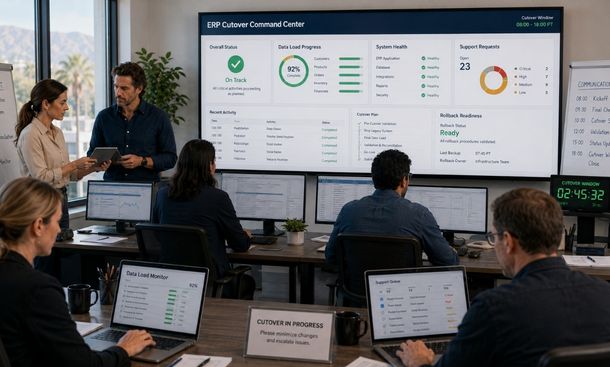
Create a command center with representatives from technical teams, finance, operations, sales, purchasing, customer service, and the implementation partner.
Use one issue intake channel.
Employees should not report problems through scattered emails, private messages, and phone calls. One controlled queue helps the team identify patterns and prioritize serious issues.
Classify issues by impact.
Critical issues prevent an essential process or create unacceptable financial, security, or customer risk. Lower-priority issues may have a safe workaround.
Track:
- Issue description
- Affected process
- Business impact
- Owner
- Workaround
- Resolution target
- Current status
- Validation result
Monitor integrations, data quality, system performance, user access, failed transactions, inventory differences, and financial balances.
Schedule regular status reviews during the first days. Keep them short and focused on decisions.
Continue heightened support until issue volume, system performance, and business metrics reach agreed stability targets.
A business continuity plan protects the company while its most important operating system changes.
Identify the processes that cannot stop. Choose a realistic cutover window. Verify backups and recovery. Control final transactions. Prepare communication, temporary procedures, rollback triggers, and launch support before the pressure begins.
The goal is not to pretend disruption is impossible. The goal is to make every likely situation manageable.
After launch, use the ERP implementation checklist to reconcile data, train users, monitor performance, resolve issues, and retire the legacy system carefully.
For the complete framework connecting continuity with migration strategy, testing, and stabilization, continue with our ERP data migration guide.
About the Author

mike
Mike is a tech enthusiast passionate about SaaS innovation and digital growth. He explores emerging technologies and helps businesses scale through smart software solutions.
Did you find this helpful?
Your feedback helps us curate better content for the community.