
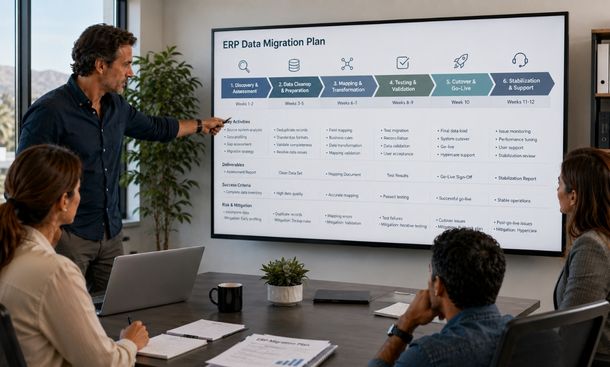
Featured image placeholder: create a realistic photo of a California ERP project team reviewing a detailed data migration plan in a bright modern office. Show a large screen with phases for discovery, cleanup, mapping, testing, cutover, and stabilization.
Table of contents
- Why every ERP project needs a migration plan
- Define scope and success measures
- Inventory your data sources
- Build the source-to-target map
- Clean and transform the data
- Run test migration cycles
- Prepare the cutover plan
- Stabilize the ERP after launch
- Conclusion
Why every ERP project needs a migration plan
A data migration plan turns a broad ERP strategy into work that people can assign, track, test, and approve.
Without one, important decisions become scattered across meetings, email threads, and spreadsheets. Technical teams may build mapping rules before business owners approve the definitions. Testing gets squeezed near launch. Cutover tasks depend on memory.
A useful plan answers practical questions.
What data is moving? Where does it come from? Who owns it? How will it change? What must be tested? When does the legacy system stop accepting transactions? Who decides whether the new ERP is ready?
The plan should be detailed enough to guide execution while remaining clear to employees outside the technical team.
It sits at the center of our complete ERP data migration framework, connecting strategy, data cleansing, migration methods, testing, business continuity, and post-launch support.
Define scope and success measures
Start by defining the exact boundaries of the migration.
List the business units, locations, modules, integrations, data domains, and historical periods included in the project.
Separate launch-critical information from records that can remain in an archive.
Launch-critical data may include:
- Active customers and vendors
- Current products and pricing
- Open sales orders
- Open purchase orders
- Unpaid invoices and credits
- Current inventory by location
- Financial opening balances
- Active employees and user accounts
- Required tax and compliance data
Historical information may still be important without needing to live in the active ERP. Closed transactions, old customer records, and prior reports can often remain in a secure searchable archive.
Define measurable success at the same time.
For example:
- All opening balances reconcile
- Every active customer has required billing fields
- Inventory matches approved counts by location
- Critical integrations complete transactions correctly
- Users can perform priority workflows
- No unresolved critical defects remain
- The final load fits inside the cutover window
These measures become go and no-go criteria. They protect the launch decision from schedule pressure.
Inventory your data sources
Most companies have more data sources than they expect.
The legacy ERP may be the main platform, but important information can also live in a customer relationship management system, ecommerce platform, payroll tool, warehouse application, accounting database, spreadsheets, and custom internal software.
Create a source inventory for every system involved.
Document:
- System name
- Business purpose
- Data owner
- Technical owner
- Record types
- Approximate volume
- Export method
- Update frequency
- Security classification
- Retention requirements
- Connected systems
This inventory reveals overlap.
The CRM and ERP may both contain customer addresses. The warehouse platform and ERP may both hold inventory quantities. Finance may maintain payment terms in a separate spreadsheet.
For every overlapping field, decide which source is authoritative.
An authoritative source is the system the business trusts as the official record for a particular type of information.
Do not choose the source based only on technical convenience. The business owner should confirm where the most accurate and current value lives.
Also identify undocumented sources. Employees may use personal spreadsheets or shared folders to complete work the ERP cannot handle. Those files can contain critical information that formal system diagrams miss.
Build the source-to-target map
The source-to-target map explains how every in-scope field will move into the new ERP.
For each field, record:
- Source system and table
- Source field
- Destination module
- Destination field
- Data type
- Transformation rule
- Default value if approved
- Validation rule
- Business owner
- Exception treatment
Some fields will map directly. A customer email address may move into a matching email field.
Other fields need transformation.
A single legacy address field may need to be divided into street, city, state, and ZIP code. Old product categories may need to convert into a new classification. Customer status values may need to change from internal codes into standardized labels.
Avoid using default values simply to make records pass validation.
A default can hide missing information. If the legacy ERP does not contain a tax category, assigning the most common category to every record could create serious billing problems.
Any default should have business approval and a clear reason.
Mapping should also preserve relationships. Customer orders must remain connected to the correct customers. Invoice lines must point to valid products and financial accounts. Inventory must connect to the right item and location.
Clean and transform the data
Data cleansing and transformation are related but different.
Cleansing corrects quality problems. It removes duplicates, fills approved required fields, standardizes formats, and archives obsolete records.
Transformation changes data so it fits the structure and rules of the new ERP.
For example, transformation may:
- Convert date formats
- Standardize state and country codes
- Translate legacy status codes
- Split combined fields
- Join related fields
- Convert units of measure
- Recalculate tax classifications
- Assign new account or product codes
Apply repeatable rules rather than making undocumented manual corrections during every test cycle.
Store transformation logic in scripts, mapping tools, or controlled configuration. Add version tracking so the team knows which rules produced each migration result.
Create an exception process for records that do not meet the rules.
Every exception should include the record, reason for failure, business impact, owner, required action, and resolution status.
Do not allow rejected records to disappear from the project totals. If the source contains 20,000 customer records, the team should be able to explain how many were loaded, merged, archived, rejected, or removed.
Run test migration cycles
Production should never be the first complete data migration.
Begin with a small sample that includes normal records and difficult cases. Use it to validate access, basic mappings, transformations, and load procedures.
Then run a complete test migration with realistic volume.
Measure how long extraction, transformation, loading, reconciliation, and correction take. These numbers are needed to build the final cutover schedule.
A strong migration usually includes several cycles:
Sample migration
A limited set of records tests the basic process and mapping logic.
Full test migration
A complete data set exposes volume problems, unexpected values, and relationship failures.
Dress rehearsal
A production-like migration follows the planned cutover sequence with the real team, timing, validation steps, and communication process.
Every cycle should produce:
- Record counts
- Reconciliation totals
- Defect reports
- Timing results
- Rejected record lists
- Updated mapping rules
- Business validation evidence
- Approval or rejection decisions
Retest corrected defects. A problem is not closed because someone changed the rule. It is closed when the expected result appears in the new ERP.
Prepare the cutover plan
The cutover plan should be a timed runbook.
A runbook is a detailed sequence of tasks, owners, dependencies, expected durations, validation points, and escalation steps.
Include:
- Final backup
- Legacy transaction freeze
- Final data extraction
- Transformation and load sequence
- Integration shutdown and restart
- Record reconciliation
- Business workflow validation
- User access activation
- Launch communication
- Support handoff
- Rollback decision point
Set clear communication rules.
Employees should know when the legacy ERP becomes read-only, where temporary transactions should be recorded, when the new ERP becomes available, and where to report problems.
Customers and suppliers may need advance notice if the cutover could affect orders, shipping, invoices, or support.
Define rollback triggers before the window opens.
Possible triggers include unreconciled financial balances, missing priority records, failed payment or shipping integrations, unacceptable system performance, or an inability to complete a critical workflow.
A rollback plan must explain how to restore the old environment, reverse temporary integration changes, reconcile transactions, and communicate the decision.
The plan should be rehearsed. A document that nobody has practiced offers limited protection under pressure.
Stabilize the ERP after launch
The migration plan should continue beyond go-live.
The first days and weeks need a structured stabilization period, often called hypercare. Hypercare means elevated support and monitoring while users begin real work in the new ERP.
Create one issue intake process. Avoid scattering problems across email, chat, calls, and personal messages.
Classify issues by business impact:
- Critical: business cannot complete an essential process
- High: major process is limited or producing incorrect results
- Medium: workaround exists but needs correction
- Low: cosmetic or minor usability problem
Monitor data and system performance closely.
Check failed integrations, rejected transactions, inventory differences, slow reports, incorrect permissions, duplicate records, and financial reconciliation.
Hold short daily reviews while issue volume remains high. Assign owners and resolution targets. Publish known problems and approved workarounds so employees do not create their own fixes.
Do not retire the legacy ERP immediately.
Keep it available in read-only mode until retention, audit, reporting, and customer service needs are confirmed. Remove access in stages and preserve required historical information in a secure archive.
A data migration plan gives an ERP project the structure needed to move safely from preparation to production.
Define the scope and success measures first. Inventory every source. Build approved mappings. Clean and transform the records through repeatable rules. Run several migration cycles. Rehearse the cutover and continue support after launch.
The plan should make responsibilities and decisions visible. Nobody should have to guess who validates inventory, when the legacy system becomes read-only, or what conditions require rollback.
The next quality gate is proving that the migrated records and connected workflows behave correctly. Use the guide to data migration testing to build reconciliation, user acceptance, performance, integration, and security checks.
For the complete migration framework connecting the plan with strategy, cleanup, cutover, and stabilization, continue with our ERP data migration guide.
About the Author

mike
Mike is a tech enthusiast passionate about SaaS innovation and digital growth. He explores emerging technologies and helps businesses scale through smart software solutions.
Did you find this helpful?
Your feedback helps us curate better content for the community.