
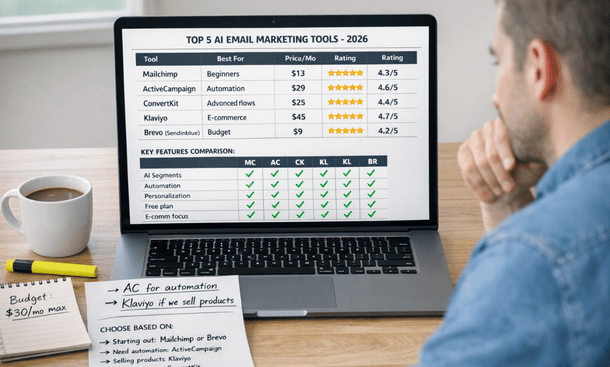
Choosing the right AI email marketing platform determines whether you’ll see measurable revenue growth or just add another underutilized subscription to your tech stack. The market floods with options claiming to revolutionize email marketing, but most platforms excel at specific features while failing at others. Some offer sophisticated automation builders but lack strong deliverability. Others provide excellent analytics but struggle with user-friendly design tools. Finding the right fit requires understanding what each platform actually does well, how much it costs, and whether its strengths match your specific email marketing needs and technical capabilities. Before diving into specific platforms, our comprehensive resource on how to automate email marketing with AI provides context for how these tools fit into your overall marketing strategy.
What separates great email platforms from mediocre ones
The difference between email tools that transform your marketing and those that waste money comes down to specific capabilities that matter in real-world execution. Marketing promises sound similar across platforms, but practical performance reveals significant gaps.
Deliverability rates determine whether your emails actually reach inboxes or get filtered to spam. The best platforms maintain strong sender reputations, provide authentication tools, monitor blacklists, and offer deliverability consulting. Poor deliverability makes every other feature irrelevant because nobody sees your messages.
AI sophistication varies dramatically between platforms calling themselves AI-powered. True AI capabilities include predictive analytics, behavioral segmentation, send time optimization, dynamic content personalization, and automated A/B testing. Many platforms just offer basic rule-based automation and call it AI.
Design flexibility affects whether you can create emails matching your brand without hiring designers. Some platforms provide beautiful templates but limited customization. Others offer complete design freedom but require coding knowledge. The right balance depends on your team’s skills and brand requirements.
Integration ecosystem determines how well the platform connects with your other tools. Email marketing works best when synced with your CRM, e-commerce platform, analytics, and advertising systems. Native integrations work better than third-party connectors that often break or create data sync delays.
Automation builder complexity ranges from simple to overwhelmingly complicated. The best builders let non-technical users create sophisticated workflows through visual interfaces while giving advanced users access to conditional logic, wait steps, and complex triggers.
Tool 1: Klaviyo for e-commerce revenue optimization
Klaviyo built its platform specifically for e-commerce businesses, making it the dominant choice for online stores that prioritize revenue over vanity metrics. The platform excels at turning email subscribers into repeat customers through sophisticated behavioral targeting and revenue attribution.
The predictive analytics engine forecasts customer lifetime value, identifies customers likely to churn, predicts next purchase timing, and recommends optimal products for each customer. These predictions power automated campaigns that reach customers with the right message at exactly the right moment in their buying cycle.
Revenue attribution connects email campaigns directly to sales, showing exactly how much revenue each campaign, automation, and segment generates. This granular tracking lets you optimize based on actual dollars earned rather than engagement metrics that don’t correlate with business results. You see which email sequences produce $10,000 monthly versus which generate $500.
Product recommendation engine analyzes purchase patterns across your customer base to suggest products each individual is most likely to buy next. The AI considers items frequently bought together, products purchased by similar customers, and individual browsing behavior to create personalized recommendations that significantly outperform generic suggestions.
SMS integration creates coordinated campaigns across email and text messaging. Klaviyo synchronizes these channels so customers don’t receive redundant messages and timing optimizes across both. This multi-channel approach increases revenue because you reach customers through their preferred communication method.
Segmentation depth allows creating segments based on predicted customer lifetime value, purchase frequency, average order value, product preferences, engagement patterns, and dozens of other behavioral signals. These granular segments enable targeting that feels personally relevant rather than broadly demographic.
Pricing reflects the platform’s enterprise-grade capabilities. Free tier supports up to 250 contacts and 500 monthly email sends, suitable only for testing. Paid plans start around $45 monthly for 1,000 contacts and scale based on list size. Businesses with 10,000 contacts typically pay $150 to $200 monthly. SMS adds additional per-message costs.
Klaviyo works best for e-commerce businesses selling physical products where customer purchase behavior provides rich data for AI optimization. It’s less suitable for service businesses, B2B companies, or businesses without transactional data to fuel the predictive models.
Tool 2: ActiveCampaign for sophisticated automation workflows
ActiveCampaign differentiates through its powerful automation builder that handles complex customer journeys requiring multiple triggers, conditions, and actions. The platform suits businesses with longer sales cycles and nurture sequences requiring sophisticated logic.
The visual automation builder uses an intuitive drag-and-drop interface where you map customer journeys as flowcharts. You see the entire automation logic at a glance, making it easy to identify bottlenecks, add branches, and optimize flows. The builder supports unlimited complexity with conditional splits, wait periods, goal tracking, and webhook integrations.
Lead scoring combines engagement tracking with predictive analytics to identify prospects most likely to convert. The system assigns points for various actions, but AI goes deeper by analyzing patterns across your customer base to weight actions accurately. A pricing page visit might be worth more points than a blog read if your data shows stronger correlation with conversions.
CRM integration includes a built-in CRM rather than requiring external connections. Sales teams see full contact history including email engagement, website visits, and automation triggers. This unified view helps sales reps personalize outreach based on exactly how each prospect has interacted with marketing.
Site tracking monitors website behavior and triggers automations based on specific actions. When someone visits your pricing page three times in a week, you can automatically send a personalized email addressing common concerns or offering a demo. This behavioral triggering converts interest into action while prospects are actively evaluating.
Attribution reporting tracks the customer journey from first touch through conversion, showing which emails, pages, and interactions contributed to sales. This multi-touch attribution reveals what’s actually driving revenue versus what gets last-click credit in simpler analytics.
Pricing starts at $29 monthly for 1,000 contacts with basic automation features. The Professional plan at $149 monthly includes predictive sending, split automations, and site messages. Enterprise features like custom reporting and dedicated account management start at $229 monthly.
ActiveCampaign excels for B2B companies, consultants, coaches, and service businesses with complex nurture sequences and longer sales cycles. It’s powerful but has a steeper learning curve than simpler platforms, requiring investment in learning the automation builder.
Tool 3: HubSpot for all-in-one marketing platform
HubSpot takes an ecosystem approach where email marketing integrates seamlessly with CRM, landing pages, forms, social media, ads, and analytics in one unified platform. This integration eliminates data silos and creates comprehensive customer views.
The unified database stores all contact information, interactions, and engagement across every channel in one place. When someone fills out a form, opens emails, visits specific pages, and attends webinars, all this data connects to their single contact record. Email campaigns can leverage this complete history for sophisticated targeting.
Smart content personalization adapts website content, landing pages, and emails based on contact properties and behavior. The same landing page might show different headlines, images, or calls to action depending on whether the visitor is a new prospect or returning customer, their industry, or their lifecycle stage.
AI features include send time optimization, subject line suggestions, content recommendations, and predictive lead scoring. The AI learns from your specific data rather than generic patterns, improving accuracy as your database grows.
Marketing automation workflows integrate email sequences with other marketing activities. A workflow might trigger based on form submission, send a series of emails, assign tasks to sales reps, update contact properties, and track goal completions all in one automated sequence.
Reporting dashboard provides comprehensive analytics showing email performance alongside other marketing channels. You see how email contributes to overall pipeline and revenue rather than viewing it in isolation. This holistic reporting helps optimize marketing mix across channels.
Pricing follows a freemium model where basic features are free for unlimited contacts. The Starter plan at $45 monthly adds basic automation and removes HubSpot branding. Professional at $800 monthly includes advanced automation, A/B testing, and smart content. Enterprise at $3,600 monthly adds predictive lead scoring and advanced reporting.
HubSpot suits businesses wanting an all-in-one platform to consolidate multiple tools. The integrated approach provides excellent data consistency but locks you into the HubSpot ecosystem. It’s cost-effective if you use multiple features but expensive if you only need email marketing.
Tool 4: Mailchimp for accessibility and ease of use
Mailchimp built its reputation on making email marketing accessible to non-technical users through intuitive design and straightforward functionality. While it’s added advanced features over time, ease of use remains its core strength.
The template library provides hundreds of professionally designed email templates organized by industry and purpose. Drag-and-drop editing lets anyone create attractive emails without design skills or coding knowledge. The simplicity means new team members start creating campaigns within hours rather than days.
Customer journey builder visualizes automation workflows similarly to ActiveCampaign but with simpler logic suitable for straightforward sequences. You map welcome series, abandoned cart recovery, and re-engagement campaigns without getting lost in complexity.
Audience segmentation uses tags, groups, and custom fields to target specific subscribers. While less sophisticated than Klaviyo’s behavioral segmentation, it handles basic targeting needs like location, purchase history, and engagement level. Pre-built segments for common scenarios speed up implementation.
Content optimizer analyzes your email content and provides suggestions for improving subject lines, preview text, and body copy based on best practices and your historical performance. This built-in coaching helps improve results without requiring external expertise.
A/B testing functionality lets you test subject lines, content, send times, and from names to optimize performance. The platform automatically sends the winning variation to remaining subscribers, making optimization automatic rather than requiring manual analysis.
Pricing starts with a free plan supporting up to 500 contacts and 1,000 monthly sends. Essentials at $13 monthly removes branding and adds basic automation. Standard at $20 monthly includes advanced audience insights and retargeting ads. Premium at $350 monthly adds advanced segmentation and multivariate testing.
Mailchimp works well for small businesses, content creators, and startups prioritizing ease of use over advanced capabilities. It’s grown more expensive and less competitive as other platforms have added sophisticated AI features, but remains popular for its accessibility.
Tool 5: ConvertKit for creators and course sellers
ConvertKit focuses specifically on creators, bloggers, podcasters, and course sellers with features tailored to content-based businesses rather than e-commerce or traditional B2B.
Visual automation builder designed for content businesses uses trigger-based sequences around content consumption rather than purchase behavior. Automations based on which lead magnet someone downloaded, what email links they clicked, or which tags they have create nurture sequences aligned with content journey.
Landing page builder includes templates optimized for growing email lists through lead magnets, webinar registrations, and course sign-ups. The pages integrate directly with email sequences so new subscribers automatically enter appropriate nurture flows.
Commerce integration allows selling digital products, courses, and subscriptions directly through ConvertKit. Purchasers automatically segment and enter post-purchase sequences, creating a complete funnel from subscriber to customer within one platform.
Subscriber scoring identifies engaged subscribers based on email opens, clicks, and content consumption. This simple scoring helps prioritize which subscribers to focus on for launches or special offers.
Tagging system provides flexible organization where subscribers can have multiple tags indicating interests, engagement levels, and behaviors. This tag-based approach works well for businesses with varied content topics and multiple products.
Pricing starts at $66 monthly for up to 1,000 subscribers. The Creator Pro plan at $133 monthly adds advanced reporting, newsletter referral system, and subscriber scoring. All plans include unlimited emails, landing pages, and forms.
ConvertKit suits content creators, online educators, membership site owners, and businesses built around content rather than traditional products. It lacks the e-commerce sophistication of Klaviyo or the automation complexity of ActiveCampaign but excels for its target audience.
Making your platform decision
No single platform wins for every business. The right choice depends on your business model, technical capabilities, budget, and specific email marketing priorities.
Start by identifying your primary use case. E-commerce businesses generating revenue through repeat purchases benefit most from Klaviyo’s predictive analytics and revenue attribution. B2B companies with complex nurture sequences need ActiveCampaign’s sophisticated automation builder. Businesses wanting all-in-one marketing platforms should consider HubSpot despite higher costs. Budget-conscious startups prioritizing ease of use might start with Mailchimp. Content creators and course sellers find ConvertKit purpose-built for their needs.
Consider your team’s technical skills honestly. Platforms with powerful features but steep learning curves create frustration if nobody has time to master them. Sometimes simpler tools that your team actually uses generate better results than sophisticated platforms that overwhelm everyone.
Factor in total cost of ownership beyond subscription fees. Implementation time, training investment, integration costs, and ongoing management effort all affect ROI. A more expensive platform that’s easier to use might cost less total than a cheaper option requiring consultants or extensive internal resources.
Test before committing by taking advantage of free trials. Spend a week building actual campaigns, importing real data, and testing workflows. This hands-on experience reveals whether the platform matches your needs better than reading marketing materials.
Selecting the right email platform gives you the foundation for effective automation, but the platform alone doesn’t generate results. How you use it matters more than which one you choose. Our guide on creating AI-powered email sequences shows you the specific frameworks for building welcome series, nurture campaigns, and conversion sequences that turn subscribers into customers regardless of which platform you’re using.
About the Author

Mateo
I’m Mateo, a SaaS blogger and digital strategist dedicated to helping startups accelerate growth through automation, data-driven decision-making, and performance-focused marketing systems. Over the past few years, I’ve worked with early-stage software companies to refine their go-to-market strategies, optimize conversion funnels, and implement scalable automation frameworks that drive measurable revenue growth. On my blog, I share proven insights from real-world SaaS cases, including actionable frameworks for churn reduction, onboarding optimization, and lead-to-customer conversion. My mission is simple: to empower founders and marketers with practical strategies that turn innovative software into sustainable, profitable success.
Did you find this helpful?
Your feedback helps us curate better content for the community.