

Three weeks before I committed to the project management tool my team still uses today I almost signed up for the wrong one. The demo was polished. The reviews were strong. The pricing was reasonable. Everything pointed toward a straightforward decision.
What stopped me was a single question I happened to ask myself before clicking the upgrade button: does this tool actually match how work moves through my business or does it match how I wish work moved through my business?
The answer was uncomfortable. The tool was built around a workflow that looked nothing like my actual operation. It assumed a level of process structure I had not built yet and would have required me to reshape how my team worked before the tool could deliver any of its promised value.
That question and the honest answer it produced saved me months of friction and a subscription fee I would have eventually canceled in frustration.
Most SaaS evaluation processes never get to that question. They stop at features, pricing and reviews the surface layer of a decision that runs much deeper. This guide is about what lies beneath that surface and how to evaluate it before the purchase rather than after.
Why free trials are not enough on their own
The free trial is the SaaS industry’s answer to the evaluation problem. Try it before you buy it. Spend two weeks inside the platform and decide whether it works for you.
In theory that is reasonable. In practice free trials are almost always evaluated under conditions that do not reflect real operational use. The founder explores the interface with genuine curiosity during a window of high motivation. Sample projects get created. Features get clicked through. The template library gets browsed. Everything feels promising because nothing is under real pressure yet.
Real operational use looks different. A client deadline arrives and the team is moving fast. A new team member needs to be onboarded without anyone having bandwidth to train them. A process that worked smoothly in the trial breaks down when five real projects are running simultaneously instead of one sample project populated with placeholder data.
The free trial tells you what the tool can do. It does not tell you whether the tool fits how your business actually operates under normal conditions. Getting that answer requires a structured evaluation process that starts before the trial and shapes how the trial gets used.
The four filters that matter before any trial begins
These four filters applied before signing up for any free trial will eliminate most of the tools that look appealing on the surface but would fail in your specific context.
Filter one: workflow fit
Map how work actually moves through your business before evaluating any tool. Not how you want it to move how it moves today. Where does work originate? How does it get assigned? What are the handoff points between team members? Where does it most commonly stall or fall through the cracks?
Once that map exists evaluate any potential tool against it directly. Does the tool’s structure reflect how your work flows or does it assume a different kind of workflow? A tool built around sprint cycles does not serve a business running continuous client retainers well regardless of how feature-rich it is. A tool built around individual task lists does not serve a business managing complex multi-phase projects well regardless of how clean the interface looks.
Workflow fit is the first filter because it is the one that eliminates the most tools the fastest. A tool that does not match how work actually moves through your business will create friction at every step of daily use regardless of its other qualities.
Filter two: team adoption potential
Every tool you adopt will be used or not used by real people with real habits and real preferences. The question is not whether those people are capable of learning new software. Most people are. The question is whether the tool asks enough of them to create resistance during the adoption phase.
Evaluate adoption potential by asking three honest questions about your team. How comfortable are they with new software in general? How much time do they have to invest in learning something new right now? And critically were they involved in identifying the problem this tool is supposed to solve?
A team member who participated in defining the problem is significantly more likely to adopt the solution than one who receives an announcement that the team is switching platforms on Monday. Involvement before the decision produces buy-in that no onboarding documentation can manufacture after it.

Filter three: integration compatibility
Before signing up for any tool open a list of every other tool your business currently depends on for daily operations. Email, calendar, communication platform, CRM, accounting software, file storage, invoicing every system that your team touches regularly.
Then check the new tool’s integration library against that list. Not the marketing page that says “integrates with 1,000+ apps” the actual integration documentation that tells you how deep the connection is and what data flows between the systems.
A shallow integration that syncs in one direction on a 24-hour delay is not the same as a native two-way integration that updates in real time. The difference matters enormously in daily use. Data that lives in two systems that do not agree creates manual reconciliation work. Manual reconciliation work creates errors. Errors erode trust in the system until team members stop relying on it.
If a critical integration does not exist or is significantly shallower than your workflow requires that information should influence the decision before the purchase not after.
Filter four: true cost of ownership
The subscription fee is the starting point of the cost calculation not the end point. True cost of ownership includes everything that surrounds the subscription.
Migration cost the time required to move existing data, projects and workflows from the current system into the new one. Setup cost the time required to configure the tool to reflect how the business actually operates. Training cost the time required to get team members to a functional level of proficiency. And the ongoing maintenance cost of keeping the system updated, onboarding new team members and adapting the configuration as the business evolves.
For a small business where time has a direct dollar value these costs are not abstractions. A tool with a $15 per user per month subscription that requires 20 hours of setup and migration time costs significantly more in its first month than a tool with a $30 per user per month subscription that requires 4 hours.
Run the full calculation before committing. The subscription line item in the budget is the visible cost. The invisible costs are where most small businesses get surprised.
How to use the free trial properly
Once the four filters have narrowed the shortlist to two or three genuine candidates the free trial becomes a structured test rather than an open exploration.
Set up the trial around real work. Take your three most active current projects and build them inside the tool exactly as they exist in your business today real task names, real owners, real deadlines. Do not use sample data or templates that were not designed for your workflow. The goal is to see how the tool handles your actual operational reality not a sanitized version of it.
Involve at least one other person from your team in the trial. Choose the person who is most representative of your average team member not the most tech-savvy person and not the least. Their experience during the trial is more predictive of long-term adoption than yours because you are motivated by the evaluation itself in a way that regular daily use will not sustain.
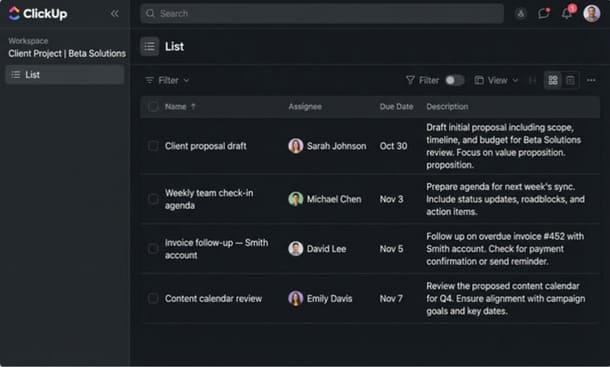
At the end of the first week of the trial ask two questions. Does the tool make the work feel clearer or more complicated than before? And can the person you involved in the trial find what they need without asking you where it is?
If the answer to both questions is positive the tool is worth continuing with. If either answer is negative that friction will compound over months of daily use and the trial result is telling you something important before you have spent anything beyond time.
The question that closes the evaluation
After the filters and after the trial there is one final question worth sitting with before making the decision.
If this tool disappeared tomorrow and the team had to go back to whatever they were using before would anyone be frustrated by that loss?
Not the founder who evaluated it. The team members who used it during the trial. Would they notice it was gone in a way that felt like genuine disruption to how they work?
If the answer is yes the tool has earned its place in the stack. It has changed something about how work moves through the business and that change was real enough that its absence would be felt.
If the answer is no if the tool could disappear without anyone particularly minding that is not a sign the team is resistant to change. It is a sign the tool did not fit closely enough to create genuine operational dependency. And a tool that does not create that kind of dependency is a tool that will quietly stop being used within months of the subscription starting.
That question is harder to answer than a feature comparison. It is also more honest about what the evaluation is actually trying to determine not whether the tool is capable but whether it fits closely enough to become part of how the business actually operates.
Understanding how to choose SaaS tools that work together as a coherent system rather than as isolated subscriptions is what transforms individual tool decisions into a stack that compounds value over time rather than draining it.
Evaluating SaaS tools properly is not complicated. It is just slower than most founders want it to be and more honest about the business’s actual workflow than most founders are comfortable being during the excitement of discovering a promising new tool.
The four filters workflow fit, team adoption potential, integration compatibility and true cost of ownership applied before any trial begins will eliminate most of the tools that would fail in your specific context. The structured trial approach will confirm or disqualify the remaining candidates based on real operational behavior rather than demo conditions.
And the final question would anyone miss this if it disappeared will tell you whether the tool actually belongs in your stack or whether it just looked like it did.
The evaluation process is where every SaaS implementation either succeeds or fails. Get it right and the tool has a genuine chance of delivering its promised value. Skip it and you are back in the pattern that most small business owners know too well another subscription, another abandoned workspace, another line item on the statement that should have been canceled three months ago.
Once the evaluation is done the next challenge is building a stack where the tools you have chosen actually work together rather than creating friction at every handoff. That is a different problem from choosing the right individual tools and it is the one that how to build a SaaS stack for your small business without overspending addresses directly.
About the Author

Pamela
Pamela is a dynamic professional with a deep passion for SaaS and emerging technologies. She provides valuable insights into software trends, digital innovation, and cutting-edge tools that empower businesses to thrive and expand.
Did you find this helpful?
Your feedback helps us curate better content for the community.