

Most entrepreneurs do not have a tool problem. They have an evaluation problem.
They open a comparison article, find fifteen tools ranked in a numbered list, sign up for three free trials simultaneously and spend two weeks clicking through dashboards without any clear criteria for what they are actually looking for. At the end of it they either pick the most familiar name or the one with the prettiest interface and wonder six weeks later why nobody on the team is using it.
The problem was never the tools. It was the absence of a filter before the evaluation started.
Choosing simple project management software is not about finding the one with the best marketing or the longest feature list. It is about matching a tool to how your business actually operates your team size, your workflow type, your clients, your budget and honestly your team’s tolerance for learning something new.
Start with your workflow before you look at any tool
This is the step most comparison guides skip entirely and it is the most important one.
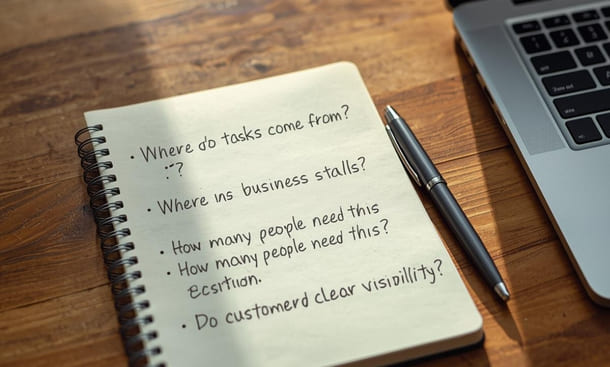
Before you open a single free trial sit down and answer four questions about how work actually moves through your business right now. Not how you want it to move. How it actually moves today.
Where do tasks come from? Do they arrive through client emails, internal meetings, Slack messages, phone calls? Understanding the entry point of your work tells you whether you need a tool with strong email integration, a client-facing portal or simply a fast way to capture tasks on the go.
Where does work most often break down? Is it at the handoff between team members? Is it tracking whether something was actually completed? Is it knowing what is coming up next week before it becomes urgent? The breakdown point tells you which core feature matters most for your specific situation.
How many people need to use this tool consistently? A solo operator has fundamentally different needs than a team of six. Some tools are genuinely built for individuals and become awkward with more users. Others shine with teams but feel unnecessarily complex for one person managing their own workload.
Do clients ever need visibility into your projects? If the answer is yes even occasionally that changes your requirements significantly. You need a tool that either has a clean client-facing view or makes it easy to share project status without exposing your entire internal workspace.
Write these answers down before you look at a single tool. They become your filter. Everything that does not pass through that filter is not worth your time regardless of how many five-star reviews it has.
The simplicity filter what it actually rules out
Once you have your four answers the simplicity filter does most of the work for you.
If your team is three people or fewer you do not need resource allocation features, capacity planning dashboards or advanced reporting. Those are enterprise-level capabilities solving enterprise-level problems. A tool built around them will charge you for complexity you will never use and ask your small team to navigate menus designed for operations managers at companies ten times your size.
If your workflow is relatively linear tasks move from one stage to the next in a predictable sequence you do not need a tool with fifteen different project views, nested subtask hierarchies and dependencies that require a diagram to understand. A clean Kanban board or a simple task list with due dates covers what you actually need.
If your budget is tight and for most early-stage businesses it is the pricing structure matters as much as the features. Some tools look affordable at the entry level and become expensive quickly when you add team members or unlock the features that make them worth using. A tool with a genuinely functional free plan or a flat monthly rate you can predict is worth prioritizing over one that scales unpredictably with usage.
This filter alone eliminates most of the tools you would otherwise spend weeks evaluating.
The five questions that separate good fits from bad ones
After the simplicity filter there are five practical questions worth asking about any tool you are still considering.
How long does it take to create a task? This sounds trivial but it matters enormously in daily use. If adding a task requires filling out a form with eight required fields your team will stop adding tasks. The fastest tools let you capture a task in under ten seconds and add detail later. That speed is what makes the habit stick.
Can a new team member be productive inside it within an hour? If the answer requires a qualification “after watching the onboarding videos” or “once they understand the folder structure” that is friction that will cost you during every future hire. The best simple tools are self-explanatory enough that someone can figure out what they are looking at and start contributing without a training session.
What does the mobile experience actually feel like? Open the app on your phone and try to create a task, update a status and find a project. If any of those three actions requires more than three taps something is wrong. For contractors and entrepreneurs who work outside of a desk environment a broken mobile experience means the tool gets used at the desk and nowhere else which limits its value significantly.
What happens at the pricing tier you can actually afford? Do not evaluate the tool at the premium tier and then sign up for the free plan. Evaluate it at the tier you will actually use. Some tools reserve their most important features timeline views, automations, integrations for plans that cost significantly more than the entry level. Know exactly what you are getting before you build a workflow around it.
How does it handle the work you do most often? Take your three most frequent work scenarios and run them through the tool during the trial. Not hypothetical scenarios real ones. If your most common workflow feels awkward or requires workarounds on day two of a trial it will feel worse on day sixty.
A practical framework for making the final call
After running your shortlist through the questions above you will typically have two or three tools that hold up. Here is how to make the final call without overthinking it.
Pick the one with the shortest path between signing up and having your real work inside it. Not test tasks. Not sample projects from a template library. Your actual current projects, with your actual team members assigned to real tasks with real deadlines.
If you can get your actual work into a tool within two hours of signing up and it feels immediately clearer than whatever you were using before that is your answer. Clarity on day one is the strongest predictor of consistent use at month three.
Run this test with at least one other person from your team. Not because you need their approval but because a tool that feels intuitive to you and confusing to the person who will use it alongside you every day is not actually a good fit. The person who is least comfortable with new software on your team is the one whose experience matters most during evaluation because they are the most likely to quietly stop using it.
Set a hard deadline for the decision. Two weeks maximum from the start of your first trial. After two weeks the additional information you gain from continued comparison is rarely worth the time you are spending not actually being organized. Make the call and commit to it for 90 days before deciding whether it is working.
What the right choice actually feels like?
When you have found the right simple project management software the evaluation process stops feeling like research and starts feeling like relief. The tool fits the way you think about your work. Your team gets it without an explanation. You stop second-guessing whether you should have picked something else.
That feeling is not accidental. It is what happens when a tool matches the actual shape of your operation instead of asking your operation to reshape itself around the tool.
Most small businesses that struggle with project management software are not struggling because good tools do not exist. They are struggling because they never defined what good meant for them specifically before they started looking.
The framework above gives you that definition. Use it and the comparison process becomes significantly shorter and significantly more likely to end with a tool your team actually uses.
Before committing to any platform it is worth seeing how the leading options perform when evaluated through exactly this lens which is what the 2026 honest comparison of the best simple project management tools for small business covers in detail, with a Simplicity Score for each tool based on real-world adoption rather than feature counts.
Choosing project management software is not about finding the most powerful option. It is about finding the one that fits the way your business actually operates and that your team will open every morning without being reminded.
The filter comes before the comparison. The workflow questions come before the feature lists. And the final call comes from running your real work through the tool not a demo and not a template.
Get the filter right and the rest of the decision takes care of itself.
Once you have made your choice the next challenge and the one where most small business owners stumble — is setting the whole thing up in a way that actually sticks. That is exactly what the best simple project management tools for small teams in 2026 covers next, with an honest breakdown of which platforms hold up under real operational pressure and which ones only look good in a demo.
About the Author

Pamela
Pamela is a dynamic professional with a deep passion for SaaS and emerging technologies. She provides valuable insights into software trends, digital innovation, and cutting-edge tools that empower businesses to thrive and expand.
Did you find this helpful?
Your feedback helps us curate better content for the community.