

Picking a project management tool is the easy part. I know that sounds backwards because the comparison process feels endless but trust me, the harder part comes after you’ve signed up.
The harder part is actually building something your team will use.
Most small business owners open their new tool, stare at a blank workspace, and either spend three days over-engineering a system that never gets adopted or give up after a week because it “didn’t work.” Neither of those outcomes is the tool’s fault. It’s a setup problem.
I’ve been through this enough times for my own business and helping others to know that a good setup follows a logical sequence. Skip steps and the whole thing wobbles. Follow them in order and you end up with something that actually runs your business instead of adding to your to-do list.
Here’s the sequence that works.
Step one: get clear on what you’re managing before you touch the tool
This sounds obvious but almost nobody does it. Before you create a single folder or task inside your new tool, spend 30 minutes mapping out what your business actually produces.
Think in terms of recurring work and project-based work. Recurring work is stuff that happens on a regular cycle weekly content, monthly reporting, client check-ins, invoicing. Project-based work has a defined start and end launching a new product, redesigning your website, onboarding a specific client.
Write these categories down on paper or in a simple doc. Don’t organize them yet, just list them. You want a realistic picture of the volume and variety of work your system needs to hold before you start building it.
This step takes 30 minutes and saves you hours of restructuring later. Do not skip it.

Step two: build your top level structure around how you work
Every project management tool organizes work into some version of the same hierarchy usually something like workspace, then spaces or folders, then projects, then tasks. The exact terminology varies by tool but the logic is the same.
Your top-level structure should reflect the main areas of your business. For most small businesses this lands somewhere between three and six categories. Something like client work, internal projects, marketing, operations and team management covers a lot of ground without getting complicated.
Resist the urge to create a folder for every possible thing upfront. Build for what you have now, not for the business you imagine having in two years. You can always add structure as the need arises. Starting with too much structure is just as paralyzing as starting with none.
One rule i follow: if i can’t explain the purpose of a folder to a new team member in one sentence it probably shouldn’t exist yet.
Step three: define how a task actually looks in your system
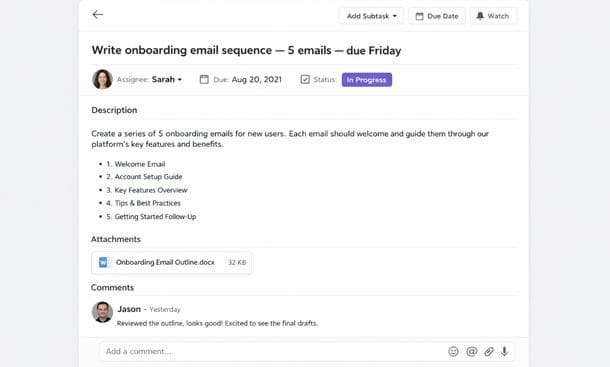
This is where most setups fall apart. People create tasks with names like “website stuff” or “follow up” and wonder why nothing gets done. A task in your system needs to carry enough information that anyone including future you at 4pm on a Friday can pick it up and know exactly what needs to happen.
A good task has four things at minimum.
A clear action-oriented name. Not “client proposal” but “write first draft of Q2 proposal for Smith Co.” The name should tell you what done looks like.
An owner. Every task needs one person responsible for it. Not two people, not “the team.” One person. Shared ownership usually means no ownership.
A due date. Even if it’s a soft deadline, putting a date on a task keeps it from living in the system indefinitely without progress.
Enough context to act on it. This might be a link to a brief, a note about what was discussed in the last meeting, or a reference file. Whatever someone needs to start working without having to ask three questions first.
Build this habit early and your team will follow it. Let it slide and your task list becomes a graveyard of vague intentions.
Step four: set up your recurring work as templates
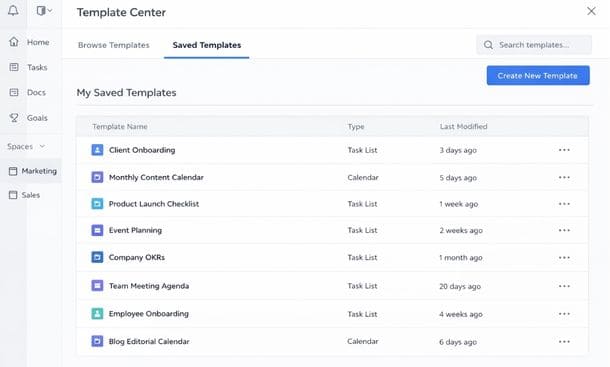
One of the most underused features in almost every project management tool is templates. And for small businesses with recurring work, templates are one of the highest-leverage things you can build.
A template is just a pre-built project structure you can duplicate every time a repeating cycle starts. If you onboard a new client every month, build an onboarding template once with every task, every owner, every checkpoint already defined and duplicate it when the next client comes in. Customize what needs to be customized and you’re ready to go in ten minutes instead of starting from scratch every time.
Same goes for content calendars, monthly reporting, product launches, or any other work that follows a predictable pattern. The time you invest building a good template pays back every single time you use it.
Start with your highest-frequency recurring work and template that first. Even one solid template will change how your week feels.
Step five: bring your team in before the system is “perfect”
Here’s a trap i see constantly. The founder spends two weeks building an elaborate system, organizing every folder, writing every task description, color-coding everything and then rolls it out to the team expecting immediate adoption. What actually happens is the team doesn’t understand the logic behind the setup, asks questions the founder finds obvious, makes changes that break the structure, and within a month the whole thing quietly gets abandoned.
The fix is to bring your team in earlier than feels comfortable.
Get one or two people involved during the setup phase. Let them see the structure while it’s being built. Ask them if it makes sense for how they actually work. Give them ownership over part of the setup. People adopt systems they helped create at a much higher rate than systems handed to them fully formed.
Then do a short walkthrough 20 to 30 minutes before you go live. Not a training session, just a walkthrough. Show how a task moves from creation to completion. Answer questions. Set a date for a check-in two weeks later to address whatever isn’t working.
That two-week check-in is important. No system survives first contact with reality completely intact. Plan for iteration from the start and you’ll be fine.
Step six: connect the tools you already use
Your project management system shouldn’t exist in isolation. If your team lives in Slack, connect Slack so notifications come through there. If you use Google Drive for files, connect it so documents can be linked directly inside tasks. If you’re on Gmail, check whether your tool can turn emails into tasks with one click.
The more friction there is between your project management system and the other tools your team uses daily, the less the system will get used. Integrations remove that friction.
Most major tools Asana, ClickUp, Monday, Notion have integration libraries that connect to dozens of other apps. Spend an hour on this during your setup week and you’ll eliminate a lot of the manual work that makes systems feel like a burden instead of a help.
Start with the two or three tools your team uses every single day and get those connected first. You can add more later.
What “done” actually looks like
A well-set-up project management system doesn’t need to be beautiful. It needs to be used.
If your team is logging in regularly, tasks are being created with clear names and owners, deadlines are being hit more often than before, and you can see the status of your projects without sending a single message to ask that’s a successful setup. Everything else is refinement.
Give yourself a realistic runway. Most small teams hit a comfortable rhythm with a new system somewhere between four and eight weeks in. Before that, expect some friction and some questions. That’s normal. It’s not a sign the tool is wrong or the system is broken.
Stay consistent, iterate based on what’s actually happening, and resist the urge to blow everything up and start over just because week two felt messy.
Understanding the bigger picture of what a healthy project management system for small business looks like will help you keep perspective when the setup phase gets bumpy because it always gets a little bumpy before it gets smooth.
And if you want to see what this kind of system looks like when it’s actually working — from founders who’ve been through the exact same setup process you’re navigating now the stories in our project management success stories from small business founders page are worth a read.
About the Author

Pamela
Pamela is a dynamic professional with a deep passion for SaaS and emerging technologies. She provides valuable insights into software trends, digital innovation, and cutting-edge tools that empower businesses to thrive and expand.
Did you find this helpful?
Your feedback helps us curate better content for the community.