
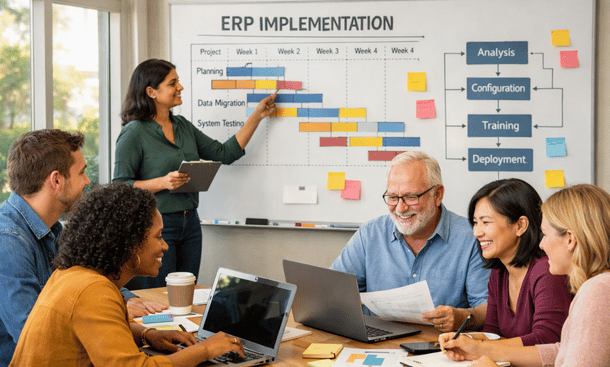
Real talk—implementing an ERP system can feel like climbing Half Dome without a map. I’ve seen California nonprofits nail their digital transformation, and I’ve watched others struggle through painful rollouts. The difference? A solid implementation roadmap that accounts for your team’s capacity, budget constraints, and change management realities. This step-by-step guide walks you through everything from stakeholder buy-in to go-live celebrations, with practical timelines and budget considerations. Before diving into the tactical steps, you might want to explore our strategic overview of why ERP systems are transforming how nonprofits operate—it’ll give you the big-picture context to rally your board and staff.
Pre-implementation olanning and assessment
You can’t implement what you haven’t planned. The pre-implementation phase determines whether your project succeeds or becomes a cautionary tale.
Start with a comprehensive needs assessment. Document your current pain points with brutal honesty. What processes are broken? Where does data get lost? Which reports take days to generate? Talk to staff across departments—finance, programs, development, operations—and capture their frustrations and wish lists.
Map your current workflows in detail. How does a donation move from receipt to acknowledgment to financial recording? How do grant expenses get tracked and reported? Understanding your as-is state helps you design better future-state processes and identify where your new ERP will create the most value.
Define success metrics early. What will be different six months after go-live? Faster month-end closing? Reduced errors in financial reports? Better donor retention? Specific, measurable goals keep the project focused and help you demonstrate ROI to skeptical stakeholders.
Assess your technical readiness. Do you have reliable internet connectivity? Are workstations capable of running modern cloud applications? What about mobile device policies if you want field staff accessing the system? Infrastructure gaps will derail implementation if you discover them too late.
Budget realistically for the total project. Software licensing is just the start. Implementation services, data migration, customization, training, temporary backfill staff to cover people pulled into the project, and contingency reserves all need funding. Most nonprofits underestimate costs by 30 to 50 percent, then scramble for additional resources mid-project.
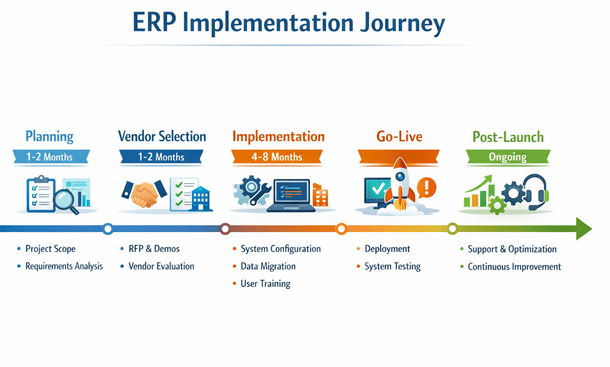
ERP Implementation Timeline
Secure executive sponsorship before moving forward. Your executive director and board need to actively champion the project, not just approve the budget. ERP implementation requires organizational commitment. When competing priorities arise, your sponsor ensures the project stays resourced and on track.
Create a realistic timeline. Small nonprofits with straightforward needs might implement in four to six months. Larger organizations with complex requirements, multiple entities, or significant customization easily need nine to twelve months. Rushing leads to poor configurations and frustrated users.
Building your implementation team
The right team makes all the difference. You need people with authority, expertise, and availability.
Identify an internal project manager who owns day-to-day execution. This person coordinates between your organization and the vendor, manages timelines, removes obstacles, and keeps everyone informed. They need project management skills, organizational credibility, and enough seniority to make decisions. Plan on this being 50 to 75 percent of their time for the duration of implementation.
Assemble department representatives with decision-making authority. You need someone from finance who understands your chart of accounts and reporting needs. Someone from development who knows fundraising workflows and donor data requirements. A programs person who can articulate case management and outcomes tracking needs. These aren’t just advisors—they’re core team members making configuration decisions.
Consider hiring external expertise. Unless you have staff who’ve implemented ERP systems before, bringing in an experienced consultant accelerates the project and avoids costly mistakes. This might be the vendor’s implementation team, an independent consultant, or a specialized nonprofit technology firm. Budget $50,000 to $150,000 for quality consulting support on a typical implementation.
Define roles and responsibilities clearly. Who makes final decisions when team members disagree? Who approves customizations? Who signs off on testing? Ambiguity creates delays and conflict. Document decision rights in a project charter that everyone reviews and accepts.
Establish governance structures. Weekly core team meetings keep workstreams coordinated. Bi-weekly steering committee meetings with executives ensure strategic alignment and resource commitment. Monthly board updates maintain leadership engagement and support.
Plan for staff capacity realistically. Your team members have day jobs. Implementation tasks compete with ongoing responsibilities. Either provide backfill support so people can focus on the project, or extend timelines to accommodate limited availability. Pretending people can do both at 100 percent guarantees burnout and delays.
Vendor selection and contract negotiation
Choosing your vendor partner is one of the most consequential decisions in the entire process.
Issue a request for proposal that clearly articulates your requirements. Include organizational background, current systems, functional needs, technical requirements, budget constraints, and timeline expectations. Good RFPs attract serious proposals. Vague RFPs waste everyone’s time.
Evaluate proposals systematically. Create a scoring rubric covering functionality, nonprofit expertise, implementation approach, pricing, references, and company stability. Resist the temptation to just go with whoever has the slickest presentation.
Conduct thorough demonstrations with your actual data. Prepare realistic scenarios covering your most complex processes. Ask vendors to show exactly how their system would handle these situations. Canned demos prove nothing. Live demonstrations with your data reveal how the system actually works.
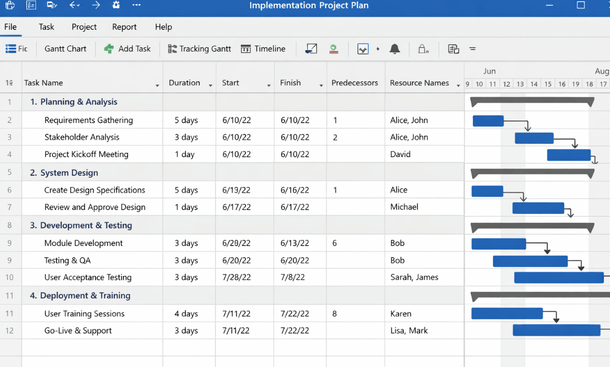
Check references thoroughly. Talk to at least three organizations similar to yours in size and complexity. Ask about implementation challenges, unexpected costs, how the vendor handled problems, and whether they’d choose the same solution again. Push past generic positive comments to understand real experiences.
Negotiate contract terms carefully. Understand exactly what’s included in the base price versus what costs extra. Clarify implementation scope—how many hours of configuration, training, and support are included? What triggers additional fees? What happens if the project runs over timeline or budget?
Pin down data ownership and exit rights. Your data belongs to you. Ensure contracts specify that you can export all data in usable formats if you ever switch vendors. Avoid long-term lock-in unless pricing discounts justify the commitment.
Clarify ongoing support terms. What’s included in annual maintenance fees? What’s the response time for critical issues? Is support available during your business hours, or just standard East Coast 9-to-5? For California nonprofits, West Coast support coverage matters.
Data migration strategy
Data migration makes or breaks implementation. Treat it as seriously as system configuration.
Inventory your current data sources comprehensively. You’re probably extracting data from accounting software, your CRM, maybe a separate grants database, spreadsheets, and who knows what else. List every system that contains data you need to migrate.
Assess data quality honestly. Legacy systems accumulate years of inconsistencies, duplicates, and errors. Migrating dirty data into a clean new system just moves your problems. Plan for data cleanup as a significant work effort.
Define migration scope carefully. Do you migrate five years of transaction history or just the current fiscal year? Do you bring over closed grants or only active ones? More historical data provides continuity but increases migration complexity and cost. Make conscious tradeoffs.
Create detailed data mapping documentation. Your old chart of accounts doesn’t match your new one. Your current fund structure needs to map to the new system’s dimensions. Donor records from your CRM need to align with constituent records in your ERP. Document every mapping decision so everyone understands the transformation logic.
Plan for multiple migration iterations. Your first attempt won’t be perfect. Testing reveals mapping errors, format issues, and business logic problems. Budget time for two to three migration cycles before go-live, each one improving quality and completeness.
Validate migrated data meticulously. Run reconciliation reports comparing source system totals to migrated data totals. Spot-check individual records for accuracy. Have subject matter experts review samples of migrated grants, donors, and transactions. Finding errors during testing is fine. Discovering them after go-live is a disaster.
Establish data freeze protocols. At some point before go-live, you freeze the old system and perform your final migration. Understanding when this happens and how you handle transactions during the cutover period is critical. Some organizations run parallel for a period. Others do hard cutovers over a weekend.
Configuration and customization
Configuring your ERP to match your nonprofit’s needs requires balancing standard functionality with customization.
Start with baseline configuration of core elements. Set up your chart of accounts, fund structure, location codes, departments, programs, and other organizational dimensions. These foundational elements drive everything else, so get them right.
Configure security and user roles based on your team’s needs. Finance staff need different access than program managers. Your executive director needs visibility across everything but shouldn’t be able to post transactions. Build role-based permissions that match your organizational structure and internal controls.
Design workflows that match your processes. Approval workflows for purchases over certain amounts, grant expense coding requirements, donation acknowledgment processes—configure the system to enforce your policies automatically.
Resist over-customization. Every custom modification increases implementation cost, complicates future upgrades, and creates technical debt. When your process conflicts with the system’s standard approach, question whether your process is actually better or just familiar. Sometimes adapting your workflow to best practices embedded in the software improves your operations.
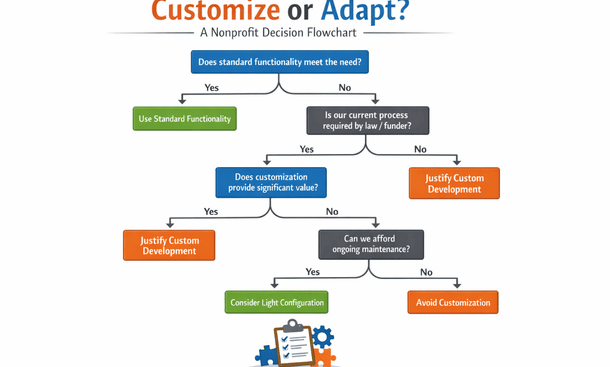
Document configuration decisions thoroughly. Six months after go-live, someone will ask why a particular setting was configured a certain way. Without documentation, that institutional knowledge disappears when team members move on.
Build templates for commonly used processes. Grant budget templates, standard journal entry templates, and common report formats save time and ensure consistency. Configure these during implementation rather than having users create them ad hoc later.
Integrate with other systems thoughtfully. Your ERP probably needs to connect with your website donation platform, banking systems, payroll provider, and email marketing tools. Design these integrations during implementation, not after go-live when you’re already stressed.
Testing and quality assurance
Thorough testing is the only way to catch problems before they impact operations.
Develop comprehensive test scenarios covering all major processes. Test complete workflows from start to finish. Enter a donation—does it create a constituent record properly? Does it post to the right fund? Does it trigger acknowledgment workflows? Can you generate a donor receipt? Test every step.
Conduct unit testing as configuration progresses. Don’t wait until everything is built to start testing. Test modules and features as they’re configured so you catch issues early when they’re easier to fix.
Perform integration testing across modules. Your finance module might work fine independently, but does grant data flow correctly into financial reports? Do constituent records sync properly between fundraising and accounting? Test the connections between components.
Run parallel testing comparing your old system to the new one. Process the same transactions in both systems and compare results. This validates that your new system produces accurate results and builds confidence in the migration.
Engage end users in user acceptance testing. The people who’ll actually use the system daily need to validate that it works for their real-world scenarios. Their testing often reveals usability issues that technical testing misses.
Test reporting extensively. Generate your most critical reports and verify accuracy. Month-end financial statements, board reports, grant reports, donor acknowledgments—if a report matters, test it thoroughly. Reports often reveal configuration problems that transaction testing misses.
Document and track issues systematically. Not every bug needs to be fixed before go-live. Categorize issues as critical (must fix before launch), high (fix within first month), or low (address later). A simple spreadsheet tracking issues, status, and ownership keeps testing organized.
Training and change management
Technology is easy. People are hard. Training and change management determine user adoption.
Develop training materials tailored to different user roles. Finance staff need deep training on month-end processes and reporting. Program managers need to understand how to track client services and outcomes. Development staff focus on donor management and gift entry. Customize training to what each group actually does.
Provide multiple training formats. Some people learn from formal classroom sessions. Others prefer hands-on practice with sample data. Video tutorials help people review processes later. Quick reference guides support users at their desks. Offer variety to accommodate different learning styles.
Schedule training close to go-live. Training people three months before they’ll actually use the system guarantees they’ll forget everything. Conduct intensive training in the two to three weeks before launch when information is immediately applicable.
Create a sandbox environment for practice. Users need a safe space to experiment without fear of breaking production data. A training instance loaded with realistic sample data lets people practice until they’re comfortable.
Identify super users within each department. These power users receive extra training and become first-line support for their colleagues. They answer basic questions, troubleshoot common issues, and escalate complex problems to IT or the vendor.
Communicate constantly about what’s changing and why. Staff resistance often stems from fear of the unknown. Regular updates explaining project progress, what’s coming next, and how changes will benefit daily work reduce anxiety and build buy-in.
Address the emotional aspects of change. People might mourn losing familiar systems and processes. Acknowledge these feelings while emphasizing the benefits of the new system. Celebrate small wins during implementation to build positive momentum.
Prepare for productivity dips immediately after go-live. Tasks that took five minutes in the old system might take twenty minutes initially as people learn new workflows. This is normal and temporary. Set realistic expectations with leadership so they don’t panic.
Go-Live preparation and launch
Go-live is simultaneously exciting and terrifying. Preparation reduces the terror part.
Develop a detailed cutover plan. Document every task that needs to happen during the transition from old system to new. When does data migration occur? When do users lose access to the old system? When does the new system open? Who does what and when? Hour-by-hour plans prevent chaos.
Prepare rollback procedures just in case. Hope for the best but plan for the worst. If go-live fails catastrophically, how do you get back to a functioning state? Having a rollback plan reduces risk and anxiety.
Choose your go-live timing strategically. Avoid month-end, year-end, audit season, or your biggest fundraising campaign. Many nonprofits go live at the start of a new fiscal year when historical data migration is simpler. Weekend or holiday launches give you time to stabilize before users return.
Staff a command center during go-live. Have your core team, vendor support, and consultants available and accessible. Users will have questions and encounter issues. Quick response time prevents small problems from becoming crises.
Monitor system performance closely in the first days. Watch for slow queries, failed integrations, or processes that don’t complete properly. Technical issues caught early are easier to resolve.
Collect user feedback systematically. Create simple channels for users to report problems or confusion. A dedicated email address or Slack channel where people can ask questions ensures issues surface quickly.
Celebrate the launch even if it’s imperfect. Going live with an ERP is a major organizational achievement. Acknowledge the team’s hard work and the milestone your nonprofit has reached. Small celebrations build morale during a stressful period.
Post-implementation support and optimization
Go-live isn’t the finish line. It’s the start of continuous improvement.
Maintain heightened support for the first month. Have internal team members and vendor resources readily available. Response times should be measured in minutes, not days. Users need confidence that help is available when they’re stuck.
Conduct daily standups in the first week. Brief morning meetings let the team surface overnight issues, coordinate responses, and ensure everyone knows the day’s priorities. As stability improves, shift to weekly check-ins.
Track outstanding issues to resolution. The issues list from testing doesn’t disappear at go-live. Continue managing fixes and enhancements through a structured process. Users need to see that their reported problems are addressed.
Schedule follow-up training sessions. After users work in the system for a few weeks, they’ll have questions and want to learn more advanced features. Plan refresher training about 30 and 60 days post-launch.
Optimize configurations based on actual usage. Things you thought would work great during implementation might prove clunky in practice. Be willing to adjust workflows, reports, and configurations based on real-world experience.
Measure performance against your success metrics. Remember those goals you defined during planning? Track progress. Are you achieving faster month-end closing? Better data quality? Improved donor retention? Demonstrate the value your implementation delivered.
Plan for ongoing governance. ERP systems need continuous care. Establish a process for requesting enhancements, prioritizing changes, managing user access, and keeping the system aligned with evolving organizational needs.
Implementing an ERP system transforms how your nonprofit operates, but only if you approach it with realistic planning, adequate resources, and commitment to change management. The technical aspects matter, but success ultimately depends on people embracing new ways of working. As you move from implementation into everyday operations, understanding the fundamental differences between ERP platforms and traditional accounting software helps you maximize your investment. Explore our analysis of ERP vs fund accounting software to ensure you’re leveraging your system’s full capabilities rather than just replicating old processes in new technology. For the complete strategic context on how implementation fits into your nonprofit’s digital transformation journey, revisit our comprehensive guide to ERP for nonprofits.
About the Author

mike
Mike is a tech enthusiast passionate about SaaS innovation and digital growth. He explores emerging technologies and helps businesses scale through smart software solutions.
Did you find this helpful?
Your feedback helps us curate better content for the community.