

Choosing an ERP system for your finance team is one of those decisions that keeps you up at night. Pick the wrong one and you’re stuck with expensive software that nobody wants to use. Pick the right one and suddenly your finance operations run like a well-oiled machine.
I’ve spent the last few months talking to finance leaders across California, from venture-backed startups in Silicon Valley to established mid-market companies in Orange County. What became clear pretty quickly is that there’s no single best option for everyone. Your ideal ERP depends on your size, industry, budget, and specific pain points.
That said, seven platforms keep coming up in conversations. These are the systems that California finance teams are actually using and recommending in 2026. Let me break down what makes each one worth considering.
NetSuite by Oracle
NetSuite dominates the cloud ERP space, especially among tech companies and fast-growing businesses. It’s a full-featured platform that handles financials, inventory, e-commerce, and CRM all in one system.
What makes NetSuite stand out is its flexibility. You can configure it to match your specific workflows without heavy customization. The financial management module is robust, with strong multi-currency support, revenue recognition, and consolidation features that matter for companies with complex structures.
The reporting and dashboards are solid. You can create custom reports without needing a developer, and the real-time visibility helps finance teams stay on top of metrics that matter. Integration with other business tools happens through a mature ecosystem of apps and APIs.
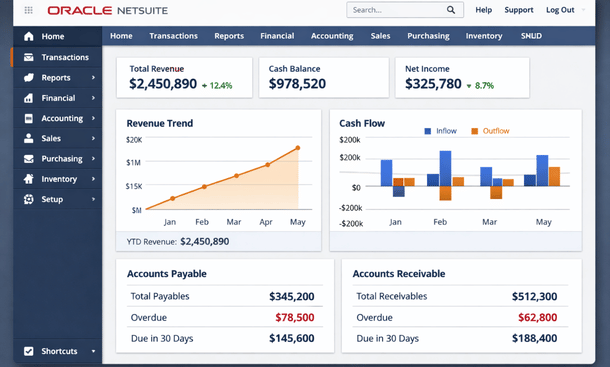
The downside is cost. NetSuite isn’t cheap, with most implementations starting around fifty thousand dollars per year for smaller companies and scaling up from there. Implementation can also take several months, though that’s pretty standard for enterprise systems.
Best for: Tech startups preparing for scale, e-commerce companies, businesses with international operations or multiple subsidiaries.
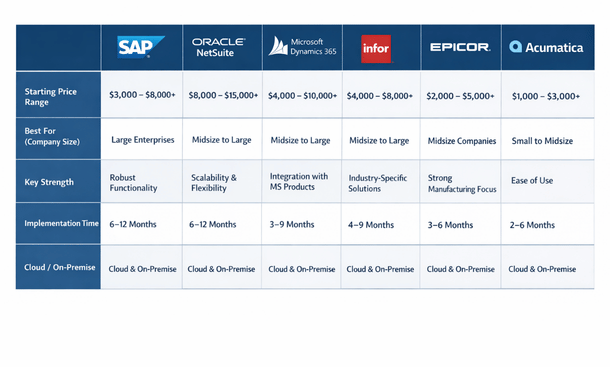
Pricing: Starts around four thousand dollars per month, varies significantly based on modules and user count.
Sage Intacct
Sage Intacct built its reputation specifically on financial management, and it shows. This platform feels like it was designed by accountants for accountants, in the best possible way.
The dimensional reporting is incredibly powerful. You can slice and dice your financial data by department, location, project, customer, or any custom dimension you create. For companies that need detailed visibility into profitability by segment, this feature alone makes Intacct worth considering.
The automation capabilities are excellent. Multi-entity consolidations happen automatically, intercompany transactions reconcile themselves, and the accounts payable automation can handle invoice processing from capture through payment with minimal human intervention.
Intacct also has strong vertical solutions. If you’re in nonprofits, healthcare, hospitality, or professional services, they’ve built industry-specific features that address common pain points in those sectors.
The interface feels a bit dated compared to some newer platforms, but it’s functional and most users adapt quickly. Integration options are good, with pre-built connectors to popular business applications.
Best for: Multi-entity businesses, companies needing sophisticated financial reporting, organizations in specific verticals like nonprofits or healthcare.
Pricing: Typically starts around twenty-five hundred dollars per month for small implementations.
Acumatica
Acumatica takes a different approach to pricing that appeals to growing companies. Instead of charging per user, they price based on resource consumption. This means you can give access to your entire team without worrying about per-seat costs.
The platform is genuinely flexible. Built on modern architecture, Acumatica lets you customize workflows, screens, and business logic without getting into complex coding. For California businesses with unique processes, this flexibility matters.
The financial management suite covers all the basics well. General ledger, AP, AR, cash management, and financial reporting all work smoothly. The project accounting module is particularly strong if you run a services business or do project-based work.
Mobile access is genuinely useful. The mobile app isn’t just a stripped-down version but actually lets you approve transactions, view dashboards, and perform meaningful work from your phone.
The main challenge with Acumatica is finding implementation partners. The ecosystem is smaller than NetSuite or Sage, which can make support and customization harder to source in some regions.
Best for: Mid-market businesses, companies with distributed teams, project-based service businesses, manufacturers.
Pricing: Starts around fifteen hundred dollars per month, scales based on usage rather than users.
Microsoft Dynamics 365 Finance
If your company already lives in the Microsoft ecosystem, Dynamics 365 Finance deserves serious consideration. The integration with Office 365, Power BI, and other Microsoft tools is seamless because it’s all the same company.
The platform is powerful and enterprise-grade. It can handle incredibly complex financial scenarios, multi-currency operations, and sophisticated compliance requirements. Large corporations use this system, which tells you something about its capabilities.
The reporting and analytics leveraging Power BI are excellent. You can create interactive dashboards and reports that non-finance stakeholders actually want to use. The AI-driven insights help surface trends and anomalies you might otherwise miss.
However, Dynamics 365 comes with enterprise complexity. Implementation typically requires experienced consultants and can take six months or more. The learning curve is steeper than some other options on this list.
The pricing model can also get complicated quickly. Between license types, modules, and add-ons, forecasting your true cost requires careful analysis.
Best for: Larger mid-market to enterprise companies, businesses already using Microsoft products, organizations with complex financial requirements.
Pricing: Starts around one hundred eighty dollars per user per month, increases with additional modules.
QuickBooks Enterprise
Before you roll your eyes, hear me out. QuickBooks Enterprise is not the same as QuickBooks Online. It’s a legitimate mid-market solution that many California businesses use successfully.
The biggest advantage is familiarity. If your team already knows QuickBooks, the transition to Enterprise is relatively painless. The interface feels comfortable, and the learning curve is minimal compared to switching to a completely different platform.
QuickBooks Enterprise handles up to forty users and can manage larger data files than the small business versions. It includes industry-specific editions for manufacturing, wholesale, retail, nonprofit, and professional services with relevant features built in.
The advanced reporting is decent, and the integration ecosystem is massive. Thousands of apps connect to QuickBooks, making it easy to extend functionality without complex custom development.
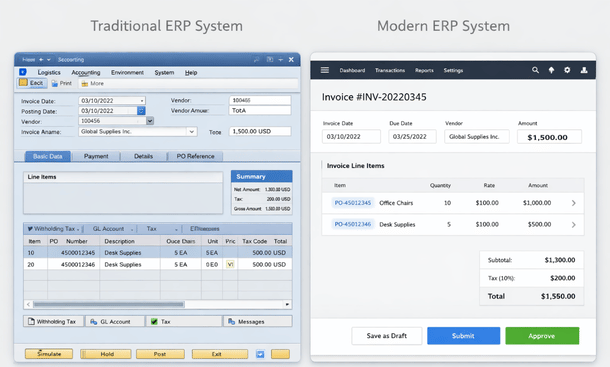
The limitations become apparent as you scale. The system can feel sluggish with large data volumes. Advanced features like multi-entity management and dimensional reporting are limited. It’s also desktop-based software, not truly cloud-native like other options here.
Best for: Companies outgrowing QuickBooks Online but not ready for full enterprise ERP, businesses wanting familiar software, organizations with straightforward financial needs.
Pricing: Starts around fifteen hundred dollars per year for the base package, increases with users and features.
SAP Business One
SAP Business One brings enterprise-level capabilities to mid-market companies. It’s essentially a scaled-down version of SAP’s enterprise software, which means you get powerful functionality without the massive complexity.
The system excels at integration across business functions. Financials connect seamlessly with inventory, purchasing, sales, and production. For manufacturers or distributors, this end-to-end visibility is incredibly valuable.
The financial management capabilities are comprehensive. Multi-currency handling, intercompany transactions, and financial reporting all work well. The compliance features help with audit trails and regulatory requirements.
SAP Business One can run in the cloud or on-premise, giving you deployment flexibility. The cloud version through hosting partners provides the benefits of cloud computing while maintaining the full functionality.
The challenge is finding the right implementation partner. SAP Business One requires specialized expertise to implement properly, and the partner you choose makes a huge difference in your success.
Best for: Manufacturing companies, distributors, businesses needing tight integration between financials and operations.
Pricing: Typically starts around three thousand dollars per user as a one-time license, plus annual maintenance fees.
Workday Financial Management
Workday approaches financial management differently. It’s built on a unified data model where HR and finance share the same core system. For companies that see workforce planning and financial planning as interconnected, this architecture makes sense.
The user interface is legitimately modern and intuitive. Workday invests heavily in user experience, and it shows. The mobile experience is particularly strong, making it easy for executives and managers to approve transactions and view reports from anywhere.
The analytics and reporting capabilities are impressive. Built-in dashboards provide real-time visibility, and the system makes it easy to drill down from high-level metrics into transaction details.
Workday is a true cloud system with no on-premise option. Updates happen continuously, so you always have the latest features without disruptive upgrade projects.
The major consideration is that Workday typically makes sense for larger organizations. The pricing reflects enterprise positioning, and implementations usually require significant investment in time and resources.
Best for: Large enterprises, companies wanting unified HR and finance systems, organizations prioritizing user experience and analytics.
Pricing: Enterprise pricing varies significantly, typically requires direct quotes from Workday.
Making your decision
Looking at this list, you might notice these systems overlap in capabilities. They all handle core accounting functions. They all offer reporting and analytics. They all integrate with other business tools.
The differences come down to specific strengths, user experience preferences, industry fit, and total cost of ownership. Your choice should align with where your company is headed, not just where it is today.
Start by defining your must-have requirements. Do you need strong multi-entity consolidation? Industry-specific features? Flexible user licensing? Advanced project accounting? Understanding your non-negotiables narrows the field quickly.
Consider your team’s technical comfort level. Some systems require more training and adjustment than others. If your finance team is small and already stretched thin, a more intuitive platform might be worth the premium.
Think about your implementation timeline. If you need to be live in three months, that eliminates some options. If you can invest six to nine months in a proper implementation, more choices open up.
Budget matters, but focus on total cost of ownership rather than just the monthly subscription fee. Implementation costs, training expenses, and ongoing customization needs can exceed the software costs over time.
Most vendors offer demos or trial periods. Take advantage of these. See how the system actually feels to use. Bring your finance team into the evaluation process since they’ll be the ones working in it every day.
The integration ecosystem deserves attention too. What other tools does your business depend on? Make sure your chosen ERP connects smoothly with your CRM, payroll system, expense management tool, and other critical applications.
Taking the next step
Choosing an ERP system is a big decision, but it doesn’t have to be overwhelming. The platforms on this list all serve California finance teams successfully. Your job is figuring out which one aligns best with your specific situation.
Remember that no system is perfect out of the box. Every implementation requires some configuration, training, and adjustment period. The goal is finding the platform that gets you closest to your ideal state with the least friction.
Once you understand how these systems actually work in practice, you’ll want to explore the automation capabilities that can transform your accounting workflows. Our guide on ERP accounting automation breaks down exactly how to implement these systems to eliminate manual processes and accelerate your close cycle. And if you’re still getting familiar with the fundamentals of financial ERP systems and why they matter for growing businesses, our complete ERP for finance guide provides the full context you need to make confident decisions.
About the Author

mike
Mike is a tech enthusiast passionate about SaaS innovation and digital growth. He explores emerging technologies and helps businesses scale through smart software solutions.
Did you find this helpful?
Your feedback helps us curate better content for the community.