

Your finance team is drowning in manual work. Every month, someone is staying late to close the books. Your accountants spend hours entering invoices, reconciling bank statements, and hunting down approval signatures. Month-end close takes two weeks when it should take two days.
This is exactly what ERP accounting automation fixes. Not with magic, but with smart workflows that eliminate repetitive tasks and connect your financial processes end to end.
I’ve watched dozens of California companies transform their finance operations through automation. The pattern is always the same. They start skeptical, worried about losing control or making mistakes. Three months later, they wonder why they waited so long.
Let me walk you through how this actually works and what you can expect during implementation.
Understanding what gets automated
ERP accounting automation touches almost every repetitive task your finance team handles. The goal is getting computers to do what computers do best, so your people can focus on analysis, strategy, and problem-solving instead of data entry.
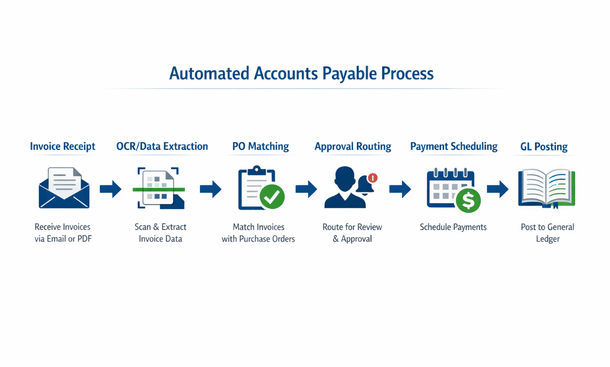
Accounts payable automation starts with invoice capture. The system can read invoices whether they arrive by email, through a supplier portal, or even as paper documents. Optical character recognition pulls out the vendor name, amount, date, and line items without anyone typing a single number.
The system then matches invoices to purchase orders automatically. If everything lines up within your tolerance thresholds, the invoice routes for approval based on rules you define. Department managers get notifications, can approve from their phone, and the transaction posts to your general ledger without finance touching it.
Accounts receivable automation works similarly. Customer invoices generate automatically based on contracts, project milestones, or shipping confirmations. The system sends invoices via email, tracks when customers view them, and can even send automatic payment reminders based on your preferences.
Bank reconciliation automation matches transactions from your bank feed to entries in your general ledger. Most matches happen automatically based on amounts, dates, and reference numbers. The system flags exceptions for review, but the bulk of reconciliation happens without manual intervention.
Journal entry automation handles recurring entries like depreciation, amortization, and accruals. You set up the rules once, and the system posts these entries automatically each period. Some systems can even suggest correcting entries when they detect errors or anomalies.
Financial close automation orchestrates your entire month-end process. The system can generate a checklist of tasks, assign them to team members, track completion, and run dependent processes in sequence. What used to require constant coordination happens automatically.
The ninety day implementation reality
Most California companies can implement meaningful accounting automation in roughly ninety days. That doesn’t mean everything is perfect on day ninety-one, but you’ll see substantial improvements by that point.
The first month focuses on setup and configuration. You’ll map your chart of accounts, define approval workflows, set up vendor and customer records, and configure rules for automated matching and posting. This phase requires input from your finance team since they understand the current processes and exceptions.
Expect to spend time cleaning your data during month one. Vendor records need standardization. Your chart of accounts might need restructuring. Historical transactions need proper classification. This isn’t glamorous work, but clean data makes automation work smoothly.
Month two is about testing and refinement. You’ll run parallel processes, comparing automated results against manual work to verify accuracy. You’ll discover edge cases and exceptions that need special handling. The system configuration gets adjusted based on real-world testing.
Training happens throughout month two. Your team learns the new workflows, understands where they need to intervene, and gets comfortable with the automated processes. Good training makes the difference between successful adoption and frustrated users.
Month three involves going live with increasing complexity. You might start with automating vendor invoice processing, then add customer invoicing, then bank reconciliation. Phased implementation reduces risk and lets your team adapt gradually.
By day ninety, most teams have automated sixty to seventy percent of their routine transactions. The remaining manual work typically involves exceptions, complex scenarios, or edge cases that require human judgment.
Building workflows that actually work
The difference between automation that helps and automation that frustrates comes down to thoughtful workflow design. You’re not just replicating existing processes in software. You’re rethinking how work should flow.
Start by mapping your current processes in detail. Where do invoices come from? Who needs to approve what? What exceptions occur regularly? Understanding the current state reveals opportunities for improvement.
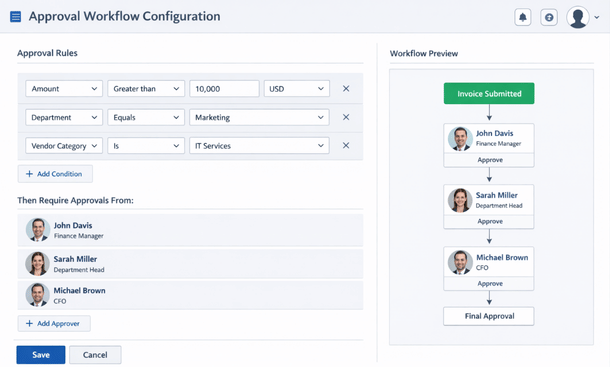
Define clear approval rules based on dollar thresholds, departments, vendors, or account codes. The system can route transactions automatically when rules are unambiguous. For example, invoices under five hundred dollars from approved vendors might not need approval at all, while anything over ten thousand dollars requires multiple sign-offs.
Build in exception handling from the start. What happens when an invoice doesn’t match a purchase order? When a customer disputes a charge? When a bank transaction doesn’t match anything in your system? Design clear paths for these scenarios so they don’t become bottlenecks.
Create visibility for everyone involved. Department managers should see what needs their approval. Finance teams need dashboards showing processing status. Executives want high-level metrics on cash flow and outstanding payables. Good automation includes reporting and notifications that keep everyone informed.
Test workflows with real data before going live. Run actual vendor invoices through the system. Process real customer orders. Reconcile actual bank statements. Testing reveals problems you didn’t anticipate during design.
Common obstacles and how to overcome them
Every implementation hits roadblocks. Knowing what to expect helps you navigate them without panic.
Data quality issues surface immediately. You’ll discover duplicate vendor records, inconsistent account coding, and incomplete customer information. Address these systematically rather than trying to fix everything at once. Focus on the data needed for your first automated processes, then expand from there.
Resistance from team members happens, especially if they feel threatened by automation. Be transparent about what’s changing and why. Involve people in the design process so they feel ownership. Emphasize that automation eliminates boring work, not jobs. Most finance professionals appreciate spending less time on data entry and more time on analysis.
Integration challenges occur when your ERP needs to connect with other systems. Your e-commerce platform, CRM, payroll system, and banking portal all need to exchange data with your ERP. Work with vendors or implementation partners who have experience with your specific integrations.
Process discipline becomes essential. Automation works best when processes are standardized. If every department handles things differently, automation gets complicated fast. Use implementation as an opportunity to standardize workflows across your organization.
Incomplete requirements cause delays and rework. Spend adequate time upfront documenting what you need. Talk to everyone who touches financial processes. Understand the exceptions and edge cases. Better requirements at the beginning prevent expensive changes later.
Measuring real impact
Automation should deliver measurable improvements. Track metrics before and after implementation so you can quantify the impact.
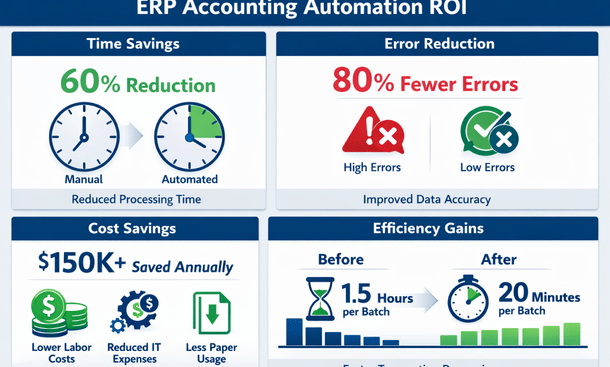
Time savings are usually the most obvious benefit. How long does month-end close take now versus before? How many hours per week does your AP team spend processing invoices? Most companies see fifty to seventy percent reduction in time spent on routine tasks.
Error rates should decrease significantly. Automated data entry eliminates typos. Automated matching catches discrepancies. Automated posting prevents misclassifications. Track errors per hundred transactions before and after to quantify improvement.
Processing costs drop when you need fewer people to handle the same volume of transactions. This doesn’t necessarily mean layoffs. It often means your existing team can handle growth without adding headcount, or can shift focus to higher-value activities.
Cash flow often improves because you’re processing things faster. Invoices get sent promptly. Customers pay sooner when billing is timely. You can take advantage of early payment discounts when AP processes efficiently.
Employee satisfaction typically increases. Nobody loves manual data entry. When your team spends less time on tedious tasks and more time on interesting work, engagement improves. Track this through surveys or informal feedback.
Compliance and audit readiness get stronger. Automated systems create complete audit trails. Every transaction has timestamps, user records, and supporting documentation. When auditors arrive, you can produce exactly what they need in minutes instead of days.
Advanced automation opportunities
Once you’ve automated the basics, additional opportunities emerge. These advanced automations deliver incremental improvements that add up over time.
Expense management automation captures receipts through mobile apps, enforces policy rules automatically, and reimburses employees without finance team involvement. Employees photograph receipts, the system extracts details, validates against policies, routes for approval, and processes payment.
Revenue recognition automation handles complex scenarios like multi-element arrangements, subscription billing, and performance obligations. The system applies accounting standards consistently and creates proper journal entries automatically.
Cash forecasting automation pulls data from accounts receivable, accounts payable, payroll, and other sources to project your cash position. The system updates forecasts daily based on actual transactions and can alert you to potential cash crunches before they happen.
Intercompany transaction automation matches transactions between related entities, creates elimination entries for consolidation, and maintains proper documentation for tax purposes. This is huge for companies with multiple subsidiaries or business units.
Audit support automation creates documentation packages for internal and external audits. The system pulls supporting documents for selected transactions, creates schedules, and produces reports auditors request without manual compilation.
Setting yourself up for success
The companies that get the most from ERP accounting automation share some common approaches. They treat implementation as a change management project, not just a technology project. They invest time in planning and design upfront. They involve end users throughout the process.
They also start with realistic expectations. Automation won’t fix broken processes. If your workflows are chaotic before automation, they’ll be chaotic faster after automation. Use implementation as an opportunity to improve processes, not just automate existing ones.
Commit adequate resources to implementation. Your finance team will need time to participate in setup, testing, and training. Skimping on implementation to save money usually costs more in the long run through delays and suboptimal configuration.
Plan for ongoing optimization. Your first implementation gets you to good. Over time, you’ll identify additional opportunities for automation, adjustment to workflows, and improvements to reporting. Treat automation as an evolving capability, not a one-time project.
Document everything as you go. Workflow rules, exception handling procedures, approval hierarchies, and system configuration should all be documented. When people change roles or new team members join, documentation makes onboarding much easier.
Moving from manual to automated
The transformation from manual accounting processes to automated workflows is significant, but completely achievable in ninety days. The key is approaching implementation methodically, involving your team, and staying focused on outcomes rather than just technology features.
Most California finance teams who complete this journey describe it as game-changing. The hours saved, errors eliminated, and visibility gained fundamentally change how finance operates. Your team shifts from transaction processors to strategic advisors, which is where you want them anyway.
The automation capabilities we’ve covered here work best when paired with the right ERP platform for your specific needs. If you haven’t selected your system yet, understanding how to build real-time financial dashboards and reporting from your automated data will help you evaluate which platforms deliver the visibility your leadership team needs. And for comprehensive guidance on choosing and implementing the right financial ERP foundation that makes all this automation possible, our complete ERP for finance guide walks through the entire decision-making and implementation process.
About the Author

mike
Mike is a tech enthusiast passionate about SaaS innovation and digital growth. He explores emerging technologies and helps businesses scale through smart software solutions.
Did you find this helpful?
Your feedback helps us curate better content for the community.