

Recommending a tool is easy. Telling someone honestly when a tool is the wrong fit for their business takes more confidence and it is more useful.
Basecamp is a genuinely good product for a specific type of business. The fact that it is good does not mean it is right for every business. The founders who get the most out of it are the ones who evaluated it honestly against their actual operational needs and found a genuine match. The ones who struggle with it are almost always the ones who adopted it based on its reputation or its pricing model without checking whether the product’s philosophy aligned with how their business actually works.
This article is for founders who are either mid-evaluation and starting to sense that Basecamp might not be the right fit or who are already using it and experiencing persistent friction that is not resolving. Both situations benefit from the same thing a clear set of disqualification criteria and honest alternative recommendations for each scenario.
The five situations where Basecamp is the wrong choice
Your work is highly task-centric rather than project-centric
Basecamp organizes everything around projects. Each project is a bounded workspace with its own communication, tasks, files and schedule. That structure works beautifully when your work naturally organizes into discrete projects with defined scope and a clear cast of people involved.
It works less well when your work is primarily a continuous flow of individual tasks that do not group neatly into projects or when the same task crosses multiple project boundaries simultaneously. Teams managing high-volume operational work, customer service queues, content production pipelines with dozens of individual items moving through stages or sales processes with many concurrent opportunities at different stages tend to find Basecamp’s project centric structure awkward to map their work onto.
If you spend more time trying to figure out which project a task belongs in than actually doing the task that friction is telling you something about the fit between your workflow and Basecamp’s structure.
Better alternative: Asana handles high volume task management with stronger organizational tools sections, custom fields, sorting and filtering that accommodate task-centric work more naturally. For sales pipelines and visual workflow management monday.com’s board structure is purpose-built for exactly this kind of continuous-flow operational work.
You need dependency management and complex task sequencing
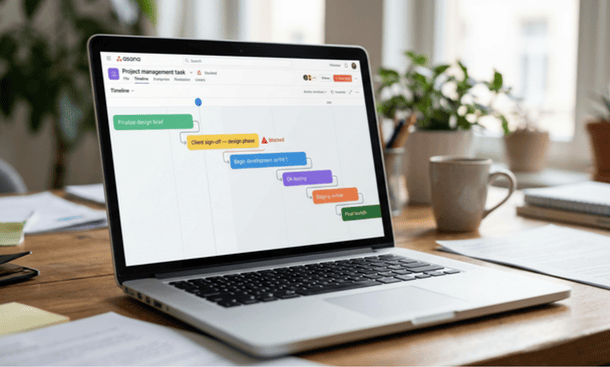
Basecamp’s to-do system is deliberately simple. Tasks have assignees and due dates. They do not have dependencies the ability to specify that task B cannot start until task A is complete and have the system enforce or visualize that relationship.
For most small businesses that simplicity is an asset rather than a limitation. But for businesses managing complex multi phase work where sequencing genuinely matters software development sprints, construction project phases, event production timelines with hard sequential dependencies the absence of dependency management creates a real operational gap that manual workarounds cannot adequately fill.
If your team regularly needs to understand not just what is due but what cannot start yet because something else has not been completed Basecamp will frustrate you in ways that gradually erode trust in the system.
Better alternative: Asana’s paid tiers include dependency management with timeline visualization. ClickUp handles dependencies at most pricing tiers and allows conditional task logic that goes significantly further than Asana’s implementation. For technical teams managing software development specifically Jira remains the strongest option for complex sprint and dependency management despite its steeper learning curve.
Your team needs granular reporting and workload visibility
Basecamp does not have robust reporting. You can see what tasks are assigned and what is overdue within a project. You cannot generate a view showing total workload across all team members across all projects simultaneously. You cannot pull a report showing how much work was completed in the last 30 days by whom. You cannot see at a glance which team members are overloaded and which have capacity.
For a very small team where the founder has direct visibility into everyone’s workload and communication is frequent enough that imbalances surface naturally this absence is manageable. For a team of eight or more or for a founder who works primarily in a strategic rather than operational role and needs data to manage effectively the reporting gap becomes a genuine management limitation.
If you find yourself regularly not knowing whether your team has capacity for new work or regularly surprised by who is overloaded that is a signal that you need reporting capabilities Basecamp was not designed to provide.
Better alternative: Asana’s paid tiers include workload views and portfolio-level reporting. ClickUp has one of the stronger reporting implementations in the small business category with customizable dashboards that surface team workload, project progress and completion rates. Monday.com’s dashboard features are particularly strong for visual workload monitoring across multiple projects simultaneously.
Your team is highly technical and expects workflow customization
Basecamp’s opinionated structure the same six tools in every project, organized the same way, with limited customization available is a deliberate product philosophy. The founders of Basecamp believe that the best project management software does not give teams endless configuration options. It makes sensible decisions on their behalf so they can focus on the work rather than the system.
That philosophy resonates strongly with some teams and creates friction with others. Technical teams in particular software developers, data engineers, product managers often expect a level of workflow customization that Basecamp simply does not offer. Custom statuses, custom fields, flexible hierarchies, automation rules, integration APIs these are table stakes for many technical workflows and Basecamp provides limited versions of most of them at best.
If your team regularly asks why the tool cannot be configured to match a specific workflow rather than adapting their workflow to the tool’s defaults Basecamp is probably not the right fit for your technical culture.
Better alternative: ClickUp is the strongest alternative for teams that want maximum customization without moving to enterprise grade software. Jira remains the standard for software development teams specifically. Notion is worth considering for teams that want to build a fully custom operational system from scratch and have the patience for the setup investment that requires.

You need deep time tracking and billing integration
Basecamp has no native time tracking. If your business bills by the hour consulting, legal, accounting, design, development and you need time tracked against specific projects and tasks and connected to client invoices Basecamp will require a third party integration that adds cost, complexity and a context switch every time someone needs to log time.
For a solo consultant managing a handful of clients that third-party integration is manageable. For a small agency billing multiple clients across multiple projects simultaneously the absence of native time tracking creates a recurring operational friction that a tool with integrated time tracking would eliminate entirely.
Better alternative: Paymo is the strongest recommendation for businesses where time tracking and project management need to work together in a single workflow. It handles task management, time tracking and client invoicing in one platform with a learning curve significantly shorter than managing three separate tools. Harvest is also worth considering as a dedicated time tracking tool that integrates well with several project management platforms if you want to keep project management and billing in separate systems.
You are managing a large client portfolio with complex permissions
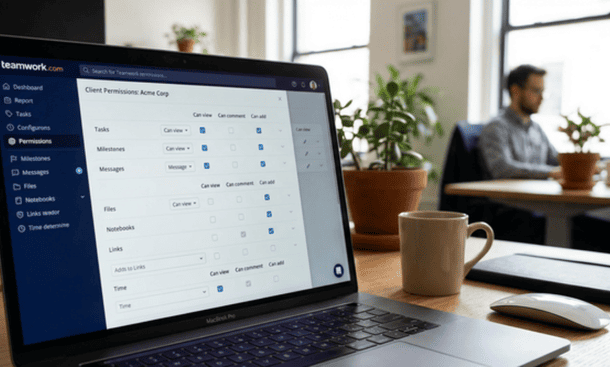
Basecamp’s client access feature which lets you invite clients into specific projects with limited visibility works well for small agencies managing a handful of active client engagements simultaneously. It works less well when the client portfolio is large, the permission requirements are granular or the client-facing experience needs to be more polished than Basecamp’s default client view provides.
If your business regularly needs to configure different levels of access for different client stakeholders within the same project, or if clients consistently request a more sophisticated reporting or status view than Basecamp’s client portal provides that operational need has outgrown what the product was designed to handle.
Better alternative: Teamwork is purpose-built for agency client management with significantly more granular client permission controls and a more polished client portal experience. For larger client portfolios Agency Handy and similar agency-specific platforms are worth evaluating despite their more specialized scope.
A quick reference for common scenarios
For founders who want a direct answer without reading through every scenario above the recommendations by business type are as follows.
High-volume task management, sales operations or continuous workflow: monday.com or Asana Complex dependencies and multi-phase technical projects: Asana paid tier or ClickUp Software development teams: Jira or ClickUp Maximum workflow customization: ClickUp or Notion Time tracking and client billing integration: Paymo or Basecamp plus Harvest Large agency client portfolios with complex permissions: Teamwork General small business with project-centric work and communication focus: Basecamp
When to stay with Basecamp despite its limitations
It is also worth being honest about the other direction. Some founders experience friction with Basecamp that is not a product fit problem it is an adoption problem. If the frustration is general rather than specific to a capability Basecamp genuinely does not have the right move is usually to revisit the implementation rather than the tool choice.
Switching tools to solve an adoption problem is expensive. It resets the implementation clock entirely while leaving the root cause intact. Before concluding that Basecamp is the wrong tool ask whether the friction would be resolved by a tool with different features or by a team that has fully internalized Basecamp’s communication philosophy and uses the message board consistently.
If the honest answer is the latter the tool fits but the adoption has not fully formed the investment is in implementation rather than migration. That investment is almost always shorter and less disruptive than a full platform switch and it delivers the operational clarity that a new tool promises but cannot guarantee.
Understanding what Basecamp is genuinely designed to accomplish as a complete project management system for U.S. startups and small businesses is the foundation for both decisions whether to stay with it and invest in adoption or to move to something that fits the business’s actual workflow more naturally.
Basecamp is the wrong choice when your work is task-centric rather than project-centric, when you need dependency management or granular reporting, when your team expects workflow customization, when time tracking and billing need to be integrated or when your client portfolio has outgrown simple permission structures.
In each of those scenarios there is a better alternative and knowing which one fits depends on the specific gap Basecamp is not filling rather than a general preference for more features.
The best tool for any small business is the one that fits how the business actually operates and that the team will use without being reminded. For businesses where Basecamp fits that description it remains one of the most adoption-friendly, communication integrated options available. For businesses where it does not a honest evaluation of the alternatives above will produce a better outcome than trying to make an opinionated product behave like something it was never designed to be.
The full picture what Basecamp is, when it works, when it does not and how to evaluate whether it belongs in your stack starts with understanding what the product actually does and who it was genuinely built for before any other comparison or pricing decision makes sense.
About the Author

Pamela
Pamela is a dynamic professional with a deep passion for SaaS and emerging technologies. She provides valuable insights into software trends, digital innovation, and cutting-edge tools that empower businesses to thrive and expand.
Did you find this helpful?
Your feedback helps us curate better content for the community.