
Table of Contents
- Understanding ERP Customization Basics
- Why Standard ERP Systems Fall Short
- The Core Benefits of ERP Customization
- Common Customization Scenarios for Small Businesses
- When Customization Makes Sense (And When It Doesn’t)
- Getting Started With Your First Customization
- Key Takeaways
Hey there! So you’re thinking about customizing your ERP system but not totally sure where to start? You’re definitely not alone—tons of California entrepreneurs hit this same crossroads. ERP customization is basically the process of modifying your enterprise resource planning software to match your unique business workflows, rather than forcing your team to adapt to rigid, out-of-the-box features. Before diving into specific customization strategies, it helps to understand how these modifications fit into your overall ERP customization strategy for maximum ROI. Let’s break down exactly what this means for your growing business.
Understanding ERP Customization Basics
ERP customization refers to any modification made to your enterprise resource planning software beyond its standard configuration options. Think of it this way: when you buy an ERP system, you’re getting a powerful framework designed to handle core business processes like accounting, inventory management, human resources, and customer relationship management. But here’s the thing—that framework is built for the masses, not specifically for your unique business model.
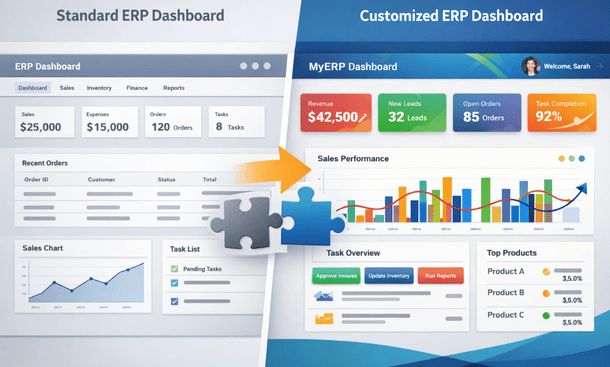
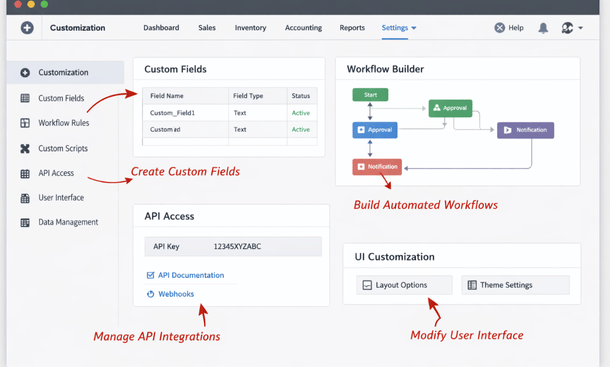
Customization allows you to mold that framework into something that actually fits how your team works. This could mean adding new fields to capture data specific to your industry, building custom reports that surface the exact metrics you care about, or creating automated workflows that eliminate repetitive manual tasks your staff currently handles.
The key difference between customization and basic system setup is depth. Setup involves choosing which modules to activate, setting user permissions, and inputting your company data. Customization goes deeper—it changes the actual functionality, interface, or data structure of the software itself.
Why Standard ERP Systems Fall Short
Most ERP vendors design their products to serve the broadest possible market. That’s smart business for them, but it creates gaps for you. A manufacturing company in San Diego has completely different operational needs than a tech startup in San Francisco, yet they might both be looking at the same base ERP product.
Standard systems typically struggle with industry-specific requirements. If you’re running a food distribution business, you need lot tracking and expiration date management built into every transaction. If you’re managing a creative agency, you need project-based billing with complex time tracking and approval workflows. These aren’t standard features in most general ERP platforms.
Another common pain point is integration with existing tools. Maybe your sales team lives in a specific CRM that isn’t natively supported, or you have legacy systems containing years of historical data that need to communicate with your new ERP. Out-of-the-box solutions rarely handle these scenarios gracefully.
Then there’s the reporting gap. Standard ERP systems come with dozens of pre-built reports, but somehow none of them show exactly what you need to see. You end up exporting data to spreadsheets and rebuilding analyses manually every week. That’s not just frustrating—it’s a massive waste of time that customization can eliminate.
The Core Benefits of ERP Customization
The biggest advantage of customization is alignment between your software and your actual business processes. When your ERP system mirrors how your team naturally works, adoption becomes way easier. Instead of training employees to follow unfamiliar workflows dictated by the software, you’re giving them tools that support their existing expertise.
Productivity gains can be substantial. I’ve seen California businesses cut their month-end close process from ten days to three simply by customizing their financial reporting workflows. When you eliminate manual data entry, reduce duplicate work, and automate routine decisions, those hours add up quickly across your entire organization.
Competitive advantage is another often-overlooked benefit. Your competitors using the same ERP platform in its standard form are operating with the same limitations you’d have without customization. When you tailor your system to execute your unique value proposition more efficiently, you’re creating an operational moat that’s hard for others to replicate.
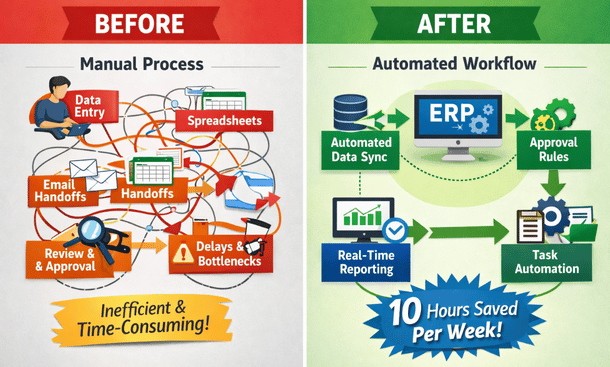
Data accuracy improves dramatically when you customize validation rules and automation. Instead of relying on employees to remember complex business rules or manually check for errors, you build that logic directly into the system. The software enforces consistency automatically, reducing mistakes that could cost you money or damage customer relationships.
Common Customization Scenarios for Small Businesses
Let’s talk about what customization actually looks like in practice. One of the most frequent requests I see is custom dashboard creation. Every role in your company needs different information at their fingertips. Your warehouse manager cares about inventory levels and pending shipments, while your CFO wants real-time P&L visibility and cash flow projections. Customizing dashboards ensures everyone sees their critical metrics without digging through irrelevant data.
Workflow automation is another huge area. Maybe your purchase approval process requires sign-off from three different managers based on dollar thresholds and department budgets. Or perhaps you have a complex commission calculation that depends on product categories, customer types, and quarterly targets. These business rules can be coded directly into your ERP through customization, turning what used to be a manual coordination nightmare into an automatic background process.
Integration customization connects your ERP with other business systems. This might mean building a two-way sync between your ERP and your e-commerce platform so orders flow in automatically and inventory updates push back out in real time. Or creating connections to shipping carriers for automatic label generation and tracking updates.
Custom fields and data structures let you capture information unique to your business model. A property management company might need custom fields for lease terms, tenant move-in dates, and maintenance schedules. A consulting firm might need project phases, billable rates by role, and client-specific billing rules. Adding these data points to your ERP creates a single source of truth for your entire operation.
When Customization Makes Sense (And When It Doesn’t)
Not every business needs extensive ERP customization, and that’s perfectly fine. If you’re running a straightforward retail operation or service business where industry-standard processes work well, you might get 90% of what you need from good configuration alone.
Customization makes the most sense when you have truly unique business processes that create competitive advantage. If the way you do things is a core part of why customers choose you over competitors, building that into your ERP protects and scales that advantage.
Volume matters too. If a manual workaround takes five minutes per transaction and you process ten transactions per month, spending thousands on customization probably doesn’t pencil out. But if that same workaround happens fifty times per day, the math changes dramatically.
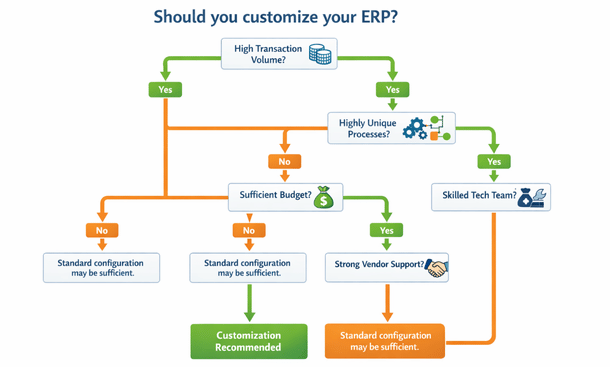
Consider your technical resources as well. Some customizations require ongoing maintenance, especially when your ERP vendor releases updates. If you don’t have internal IT staff or a relationship with a reliable implementation partner, complex customizations might create more problems than they solve down the road.
Getting Started With Your First Customization
If you’ve decided customization makes sense, start small and focused. Identify one painful process that’s costing you significant time or money. Maybe it’s your inventory reordering process, your customer onboarding workflow, or your financial reporting cycle. Pick something with clear ROI where success will be obvious.
Document your current process in detail before touching the software. Map out every step, every decision point, and every piece of data that moves through the workflow. This documentation becomes your requirements specification and helps you evaluate whether your customization actually solved the problem.
Work with your ERP vendor or an experienced implementation partner for your first few customizations. Yes, it costs more than trying to figure it out yourself, but you’ll learn the right way to approach customization in your specific platform. You’ll also avoid common mistakes that can make your system harder to upgrade or maintain later.
Test thoroughly before rolling customizations out to your whole team. Create a sandbox environment where you can break things without affecting daily operations. Get feedback from actual end users during testing—they’ll catch issues you never thought of and often suggest improvements that make the final result even better.
Key Takeaways
ERP customization transforms generic business software into a tailored tool that matches your specific operational needs. While it requires investment and thoughtful planning, the productivity gains and competitive advantages can be substantial for growing businesses.
The key is approaching customization strategically rather than reactually. Focus on high-impact areas where your unique processes create value, and avoid over-customizing features that work fine in their standard form.
Want to dive deeper into specific types of customization you can implement? Check out our guide on the 5 types of ERP customization every business should know. And when you’re ready to develop a comprehensive strategy, our complete resource on how to tailor your system to your business covers everything from planning through implementation.
The right customizations can turn your ERP from a necessary evil into a genuine competitive advantage. Take the time to get it right, and you’ll be building operational efficiency that scales with your business for years to come.
About the Author

mike
Mike is a tech enthusiast passionate about SaaS innovation and digital growth. He explores emerging technologies and helps businesses scale through smart software solutions.
Did you find this helpful?
Your feedback helps us curate better content for the community.