
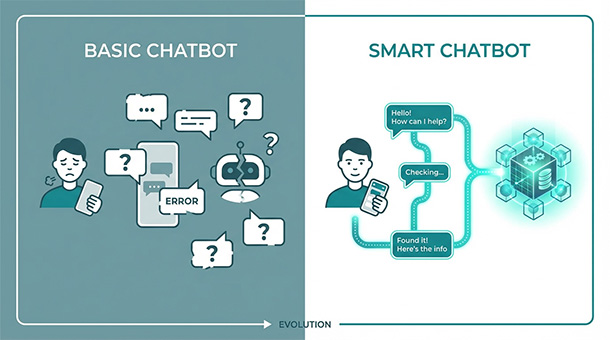
Your chatbot forgets what users said two messages ago. Your search feature returns irrelevant results even when users type exactly what they want. Both problems stem from the same issue: your app has no memory for context. Vector databases solve this by storing information the way AI models understand it, turning your features from frustratingly dumb to surprisingly smart. BaaS platforms let you add vector storage in hours, not months, so your app can remember conversations, understand meaning, and feel intelligent without building infrastructure from scratch.
The memory problem that kills AI features
You build a chatbot for your SaaS app. A user asks “what’s your refund policy?” and the bot answers perfectly. Two messages later, the same user asks “how long does that process take?” and the bot responds with “what process are you referring to?” as if the previous conversation never happened.
Traditional databases store data in rows and columns, like a spreadsheet. They’re excellent for looking up exact matches: find the user with email “[email protected]” or retrieve order number 12345. But they’re terrible at understanding meaning, context, or similarity.
When someone searches for “affordable project management tools,” a traditional database looks for those exact words. If your content says “budget-friendly collaboration software,” the database misses it entirely even though a human would recognize them as nearly identical concepts.
Vector databases fix this by storing information as numbers that represent meaning rather than just text. When AI processes “affordable project management tools,” it converts that phrase into a list of numbers, a vector, that captures the concept. The database then finds other vectors that are mathematically similar, surfacing “budget-friendly collaboration software” because the underlying meaning matches.
How vectors turn words into searchable concepts
Think of vectors like coordinates on a map. If “affordable” is at coordinates 2,5 and “budget-friendly” is at coordinates 2.1,5.2, they’re neighbors. The database measures distance between points to find related concepts, even when the exact words differ.
This happens automatically when you connect your BaaS platform to an AI model like OpenAI’s embeddings API. You send a sentence, the API returns a vector, and your vector database stores it. When users search later, their query gets converted to a vector, and the database finds the closest matches.
The entire process takes milliseconds. A user types a question, your app converts it to a vector, searches your database for similar vectors, and returns relevant content before the user notices any delay.
You’re not building the mathematics yourself or training models. The AI provider handles vectorization, and your BaaS platform stores and searches the results. You just connect the pieces and define what content gets vectorized.
Real use cases that justify adding vector storage
Customer support chatbots need to remember conversation history to avoid asking users to repeat themselves. Vector databases store previous messages as context, so when a user says “I tried that already,” the bot knows what “that” refers to.
E-commerce search benefits massively from semantic understanding. Users search for “running shoes for flat feet” and your vector database surfaces products described as “athletic footwear with arch support” because the meaning aligns, not because the keywords match.
Knowledge bases and documentation become actually useful when vector search powers them. Instead of forcing users to guess the right keywords, they describe their problem in plain language and find relevant help articles even if the wording differs completely.
Recommendation engines get smarter without complex algorithms. Store user preferences and behavior as vectors, then find similar users or products based on mathematical proximity. Users who liked product A automatically see suggestions for products with similar vector representations.
Content moderation works faster when you vectorize flagged content. New uploads get compared against vectors of known violations, catching similar problems even when the exact phrasing changes to evade filters.
Vector databases are just one piece of the complete AI stack that founders need to understand. Memory, processing, automation, and cost management all work together to create intelligent features that users actually value. The founder’s guide to AI: how to give your app “brains” using BaaS walks through the entire system, showing how vector storage connects to chatbots, multimodal features, and business automation into one coherent architecture you can build without a research team.
Adding vector storage through your BaaS platform
Supabase supports pgvector, an extension that adds vector capabilities directly to your PostgreSQL database. You enable the extension in your dashboard, create a table with a vector column, and start storing embeddings alongside your regular data.
Other BaaS platforms integrate with specialized vector databases like Pinecone or Weaviate through APIs. You send data to the vector service, it stores and indexes the vectors, and your app queries it when needed. The vector database sits next to your primary database, handling semantic search while your main database manages structured data.
The setup process takes an afternoon if you follow documentation. Create an account with an embeddings provider like OpenAI, grab your API key, write a function that converts text to vectors, and store the results in your vector-enabled database.
Testing starts small. Vectorize ten help articles, try searching with different phrasings, and verify the results make sense. If “how do I reset my password” returns your password reset guide, the system works. Scale up by vectorizing more content and monitoring search quality.
Performance and cost considerations
Vector searches are slower than exact matches because the database calculates mathematical distances between potentially thousands of vectors. Indexing helps tremendously. Your vector database builds an index that organizes vectors spatially, allowing searches to skip irrelevant regions and focus on likely matches.
Most BaaS platforms charge for storage and compute separately. Storing a million vectors might cost a few dollars monthly, while searching those vectors costs fractions of a cent per query. Embeddings API calls cost based on tokens processed, typically pennies per thousand conversions.
For a startup with 10,000 users and moderate search volume, expect total vector database costs under fifty dollars monthly including storage, search, and embeddings. That’s negligible compared to the value of actually useful search and context-aware features.
Optimize by vectorizing only searchable content, not every database row. Your user table doesn’t need vectors, but your blog posts, help articles, and product descriptions do. Batch vectorization during off-peak hours instead of converting content on every request.
When vector databases aren’t necessary
If your app only needs exact lookups, user authentication, order tracking, or structured reporting, traditional databases handle everything perfectly. Vector storage adds complexity you don’t need.
Small content libraries under a hundred items work fine with basic search. The accuracy improvement from vectors doesn’t justify the setup time when users can manually scan results anyway.
Static content that never changes can use pre-computed search indexes instead of vectors. Documentation sites with fixed pages benefit more from tools like Algolia or Meilisearch that index content once and serve fast results without ongoing vectorization costs.
Save vector databases for scenarios where semantic understanding creates measurable value: conversational interfaces, large content libraries, personalization engines, or anything requiring context awareness. Otherwise, stick with simpler solutions until the pain justifies the upgrade.
Once you understand how vector databases give your AI features memory and context, the next logical step is putting that capability to work. Building a customer helper without hiring a team with BaaS shows you how to connect vector storage to chatbots that actually understand what users are asking, turning your support load into automated conversations that feel surprisingly human.
About the Author

AISalah
Bridges linguistics and technology at PointOfSaaS, exploring AI applications in business software. English Studies BA with hands-on back-end and ERP development experience.
Did you find this helpful?
Your feedback helps us curate better content for the community.