
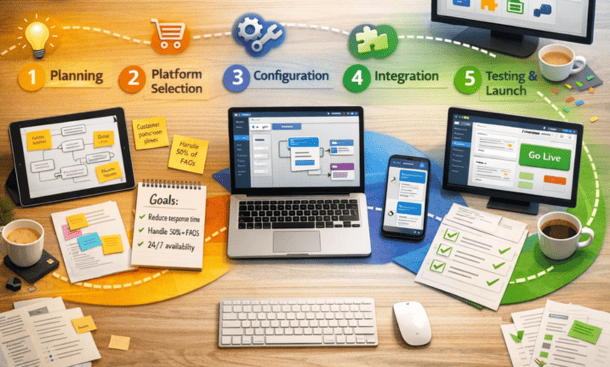
Deploying your first chatbot feels overwhelming when you’re staring at empty conversation builders and integration settings. The process becomes manageable when you break it into discrete steps: defining use cases, mapping conversation flows, connecting data sources, testing scenarios, and monitoring performance. Most platforms let you launch a functional bot within a few hours, even without coding experience. The key is starting with a narrow scope and expanding as you learn what works. This implementation process fits into the larger framework we outline in our comprehensive approach to automating customer service operations.
Start by identifying your highest-impact use cases
The biggest mistake entrepreneurs make is trying to automate everything at once. You build a complex bot that attempts to handle every possible customer inquiry, spend weeks on configuration, and launch something that confuses customers and creates more work for your team.
Begin with a single, high-volume use case. Look at your support tickets from the past 30 days and identify which question appears most frequently. For e-commerce businesses, this is usually order status inquiries. SaaS companies typically see password reset requests or billing questions dominate their ticket volume.
Choose something straightforward for your first automation. Order tracking works well because it follows a predictable pattern: customer provides order number, system checks shipping status, bot delivers update. The interaction has clear inputs and outputs without requiring human judgment.
Quantifying the opportunity
Count how many tickets fit your target use case each month. If you’re handling 500 order status inquiries monthly and each takes 5 minutes of agent time, that’s 2,500 minutes or roughly 42 hours. At $25 per hour, you’re spending $1,050 monthly on this single query type.
A chatbot handling even 70 percent of these inquiries saves approximately 29 hours monthly. That frees up time for your team to handle complex issues or allows you to serve more customers without hiring additional staff.
Document the current process step by step. What information does an agent need to look up order status? What questions do they ask to verify the customer’s identity? What happens if the order shows a problem? This documentation becomes your blueprint for building the automated flow.
Map out your conversation flow on paper first
Don’t start building in the platform immediately. Sketch your conversation flow on paper or in a simple tool like Google Docs. This planning prevents you from getting lost in the platform’s interface while you’re still figuring out the logic.
Start with the happy path where everything goes smoothly. The customer says “where’s my order,” the bot asks for the order number, the customer provides it, the system finds the order, and the bot shares the tracking information. This represents maybe 60 percent of interactions.
Then map out the common failure points. What happens if the customer doesn’t have their order number? What if they provide an invalid order number? What if the tracking shows a delivery exception? Each of these scenarios needs a defined response.
Building conversation branches
Every question your bot asks creates a decision point. If you ask “do you have your order number” and the customer says yes, you follow one path. If they say no, you need an alternative like looking up orders by email address.
Keep each branch focused on a single objective. Don’t try to handle order tracking and return requests in the same conversation flow. When a customer mentions returns while tracking an order, acknowledge their request and either route them to a human agent or provide a link to start a separate return conversation.
Limit the depth of your conversation trees. Research shows customer patience drops significantly after three or four exchanges. If your bot can’t resolve the inquiry within four turns, it should escalate to a human agent rather than continuing to ask questions.
Plan your escalation triggers carefully. The bot should hand off to a human when it encounters angry language, repeated failed attempts to get information, or requests outside its programmed capabilities. Nothing frustrates customers more than a bot that keeps trying to help when it clearly can’t.
Build and configure your bot in the platform
Now you’re ready to translate your paper flow into the actual platform. Most chatbot builders use a visual interface where you add message blocks, decision points, and actions.
Create your greeting message first. Keep it concise and set clear expectations. Something like “Hi, I’m the order tracking assistant. I can check your order status in seconds. To get started, please share your order number” tells customers exactly what the bot does and what they need to provide.
Add your question blocks, making sure each one is specific and unambiguous. Instead of “how can I help you today,” ask “what’s your order number? You can find it in your confirmation email.” The more specific your prompts, the better responses you’ll get from customers.
Connecting to your data sources
Your bot needs access to order data to provide useful information. Most platforms offer pre-built integrations with popular e-commerce systems like Shopify, WooCommerce, and BigCommerce. These integrations let your bot query order status without custom development.
For systems without pre-built connectors, you’ll need to use the platform’s API capabilities. This typically requires developer help unless you’re comfortable working with APIs. The integration pulls order details based on the order number the customer provides.
Set up your authentication carefully. The bot should verify customer identity before sharing order information. This might involve checking the email address associated with the order or asking for a ZIP code. Balance security with convenience because too many verification steps frustrate legitimate customers.
Configure your response templates to be helpful and human-sounding. Instead of “order 12345 status: shipped, tracking: 1Z999AA10123456784,” write “Great news! Your order shipped yesterday and should arrive by Thursday. Here’s your tracking link: [link]. Is there anything else I can help with?”
Test thoroughly before launching
Testing reveals issues you missed during planning and configuration. Run through every possible conversation path multiple times with different inputs.
Test the happy path first to confirm the basic flow works. Provide valid order numbers and verify the bot retrieves and displays correct information. Check that links work and formatting displays properly.
Then deliberately try to break things. Enter invalid order numbers, refuse to provide information the bot requests, switch topics mid-conversation, and use misspellings or abbreviations. Each of these tests uncovers edge cases you need to handle.
Getting feedback from real users
Before full launch, run a beta test with a small group. Add the bot to your website but only make it visible to 10 percent of visitors. Monitor these conversations closely to see where customers get confused or frustrated.
Pay attention to common patterns in how people phrase their questions. You might discover that customers say “track my package” more often than “check order status.” Update your bot’s natural language understanding to recognize these variations.
Watch for conversation abandonment. If people consistently drop out after a specific bot question, that question is probably confusing or asking for information customers don’t have readily available. Revise it or provide more context.
Collect feedback directly by having your bot ask “was this helpful?” at the end of successful interactions. Simple yes/no responses give you quantitative data on satisfaction rates.
Monitor performance and iterate continuously
Launch doesn’t mean you’re done. The first few weeks are critical for identifying improvements and building on your initial success.
Review conversation logs daily during the first week. Most platforms provide transcripts showing every interaction. Look for patterns in where conversations succeed or fail. When multiple customers ask variations of the same question your bot doesn’t understand, add that to your training data.
Track your key metrics from day one. Measure containment rate, which shows what percentage of conversations the bot resolves without human escalation. Track resolution time and customer satisfaction scores. These numbers tell you whether automation is actually helping.
Expanding to additional use cases
Once your first use case runs smoothly for a month, add a second automation. Apply what you learned from the first implementation to move faster. Maybe you started with order tracking and now you’re ready to automate return requests or password resets.
Use the same methodical approach: identify the use case, map the flow, build and test, launch to a subset, then roll out fully. Each additional use case compounds your time savings and improves your overall support efficiency.
Don’t neglect your initial automation while building new ones. Customer needs change, products evolve, and policies update. Schedule monthly reviews of your bot’s performance and make adjustments as needed.
Successfully implementing your first chatbot builds confidence and demonstrates ROI to justify expanding your automation efforts. As your needs grow more sophisticated, you might find that basic scripted responses aren’t enough. Our guide on training AI agents for customer support covers how to move beyond simple chatbots into more intelligent automation that handles complex, multi-step customer interactions.
About the Author

Mateo
I’m Mateo, a SaaS blogger and digital strategist dedicated to helping startups accelerate growth through automation, data-driven decision-making, and performance-focused marketing systems. Over the past few years, I’ve worked with early-stage software companies to refine their go-to-market strategies, optimize conversion funnels, and implement scalable automation frameworks that drive measurable revenue growth. On my blog, I share proven insights from real-world SaaS cases, including actionable frameworks for churn reduction, onboarding optimization, and lead-to-customer conversion. My mission is simple: to empower founders and marketers with practical strategies that turn innovative software into sustainable, profitable success.
Did you find this helpful?
Your feedback helps us curate better content for the community.