
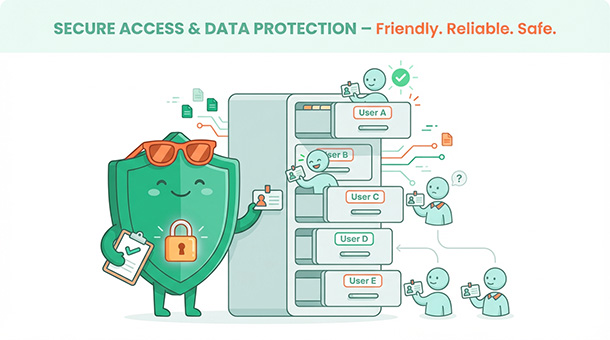
Imagine building a fitness app where users can see each other’s workout data, or a project management tool where one client accesses another client’s files. That’s the nightmare scenario when your database has no privacy rules. Most founders assume security is something developers handle later, but “later” usually means after a panicked user complaint or worse, a data breach. Supabase gives you something called row-level security, which is essentially a bouncer for your database. Understanding how Supabase protects your startup’s data means you can sleep better at night knowing your users’ information stays private.
Why database security matters more than you think
Your database is wide open by default
Here’s something most tutorials won’t tell you upfront: when you create a Supabase database, it starts with zero security rules. Every table is technically accessible to anyone who knows your project URL and API key. That sounds terrifying, but it’s intentional.
Supabase assumes you’ll configure security rules based on your specific business needs. A public blog needs different rules than a healthcare app or a financial dashboard. Instead of guessing what you need and locking everything down, Supabase gives you a blank canvas.
The problem is that many founders don’t realize this until they’re ready to launch. They build their entire app, load it with real user data, and then discover that anyone with basic technical knowledge could potentially read everything. That’s when panic sets in.
Data breaches destroy trust instantly
Think about the apps you use daily: your banking app, your email, your project management tools. You trust them with sensitive information because you assume they’ve secured it properly. The moment one of those apps leaks your data, that trust evaporates.
For a startup, a data breach isn’t just a technical problem. It’s a reputation killer that can end your business before it starts. Users will forgive bugs, slow performance, or missing features. They won’t forgive you exposing their personal information to strangers.
The good news is that Supabase makes database security approachable, even if you’ve never written a security rule in your life. You just need to understand the basic concept and apply it consistently.
What row-level security actually does
It’s like having a bouncer for every table
Row-level security, often abbreviated as RLS, controls who can read, insert, update, or delete specific rows in your database. The key word is “rows,” not tables. You’re not just locking down entire tables, you’re controlling access to individual records.
Imagine a customer database with 10,000 user accounts. Without RLS, anyone accessing that table could see all 10,000 records. With RLS enabled, each user can only see their own record. User A sees their profile, User B sees theirs, and neither can peek at anyone else’s data.
This works because RLS checks the identity of whoever is making the request. When User A asks for their profile, Supabase verifies their identity using their login session and only returns rows where the user ID matches. It’s automatic, happens in milliseconds, and requires zero effort from your app’s code.
Rules are written in plain logic
RLS rules are written in a language that looks intimidating but reads like plain English once you understand the pattern. A basic rule might say: “users can read rows where the user_id column equals their own ID.” Another rule might say: “users can update rows they created, but only if those rows aren’t marked as archived.”
You’re essentially teaching your database to ask questions before allowing access. Is this person logged in? Do they own this record? Are they an admin? Does this row meet certain conditions? If the answer is yes, access granted. If no, access denied.
Supabase provides a visual policy editor that helps you build these rules without memorizing syntax. You pick the table, choose the action (read, insert, update, delete), and define the condition. The editor generates the technical code behind the scenes.
Setting up your first security policy
Start with the most sensitive data first
Open your Supabase dashboard, navigate to the table editor, and pick your most sensitive table. For most apps, that’s the users table or anything containing personal information like emails, addresses, or payment details.
Click on the table, look for the “RLS” toggle or “policies” tab, and you’ll see an option to enable row-level security. When you toggle it on, Supabase immediately blocks all access to that table until you define at least one policy. This might feel extreme, but it’s the safest default.
Now your app is probably broken because it can’t read user data anymore. That’s expected. The next step is creating policies that restore access in a controlled way.
Writing a simple “users see only their own data” policy
Click “new policy” and you’ll see a template selector. Choose “enable read access for users based on their user ID” or something similar. Supabase will pre-fill most of the logic for you.
The policy will look something like this in plain language: “allow users to select rows from the users table where the user_id column matches their authenticated user ID.” That’s it. You’re not writing encryption algorithms or configuring firewalls. You’re just defining a simple rule.
Save the policy, go back to your app, and test it. Your app should now be able to fetch user data again, but only for the logged-in user. If User A logs in, they see their own profile. If User B logs in, they see theirs. Nobody sees everyone else’s data.
Adding policies for inserts and updates
Reading data is one thing, but users also need to create and update their own records. Create a second policy that says: “allow users to insert rows into the users table where the user_id matches their authenticated ID.”
This prevents someone from creating fake accounts or inserting data on behalf of another user. A third policy might say: “allow users to update rows in the users table where the user_id matches their own.”
Most apps need three to five policies per table: one for reading, one for inserting, one for updating, and sometimes one for deleting. Admin users might have a separate policy that bypasses these restrictions, but that’s something you configure later.
Common security patterns for startups
Public read, private write
Some data should be visible to everyone but only editable by its owner. Think of a public blog where anyone can read articles, but only the author can edit or delete them. You’d create one policy allowing public read access and another restricting write access to the content creator.
This pattern works for product listings, portfolio items, or any content meant for public consumption. You’re balancing openness with control, letting users browse freely while protecting against vandalism or data corruption.
Supabase makes this easy with checkbox options like “allow anonymous access” for read policies and “require authentication” for write policies.
Team-based access
If you’re building a B2B app where users belong to companies or teams, you need policies that check team membership. A rule might say: “users can read rows where the team_id column matches any team they’re a member of.”
This gets slightly more complex because you need a separate table tracking team memberships, but the logic remains straightforward. Before granting access, Supabase checks if the requesting user belongs to the relevant team.
This pattern powers every SaaS tool you’ve ever used: Slack, Notion, Asana, Trello. Users see data from their workspace, not from everyone else’s workspaces. The concept scales from two-person startups to enterprise companies with thousands of teams.
Admin overrides
Every app eventually needs admin users who can see and edit everything for support, moderation, or debugging purposes. You create a separate policy checking if the user has an “admin” or “superuser” flag in their profile.
The policy might say: “allow users to read all rows if their role column equals ‘admin’.” This bypasses normal restrictions, but only for users you’ve explicitly marked as admins.
Be careful with admin access. It’s tempting to give yourself and your co-founders admin privileges, but that increases risk. The fewer people with unrestricted access, the safer your data remains.
Testing your security setup before launch
Never assume your policies work correctly
The biggest mistake founders make is writing security policies, seeing their app work, and assuming everything is locked down. You need to actively test that unauthorized access actually gets blocked.
Create a test user account, log in as that user, and try accessing data they shouldn’t see. Try editing records they don’t own. Try deleting content created by others. If any of these actions succeed, your policies have gaps.
Supabase provides tools to test policies directly in the dashboard without building test scenarios in your app. You can simulate requests as different users and see whether they’d be allowed or denied.
Use Supabase’s built-in policy checker
In the policy editor, look for the “test policy” or “validate” button. This runs your policies against sample data and shows you which operations would succeed or fail. It’s like a security audit in a single click.
If you discover gaps, don’t panic. Adjust the policy, save it, and test again. Security rules are iterative, not set-in-stone. As your app grows and your data model evolves, you’ll revisit and refine these policies regularly.
The goal isn’t perfection on day one. The goal is ensuring your users’ data is protected before real users start trusting you with sensitive information.
What happens when you skip security
Real-world consequences of unsecured databases
There are countless stories of startups launching with open databases and discovering the mistake weeks later. In some cases, competitors scraped their entire user list. In others, malicious actors deleted data or inserted spam. The lucky ones caught it before major damage occurred.
The unlucky ones faced lawsuits, regulatory fines, or complete business failure. Data protection laws like GDPR in Europe and CCPA in California impose serious penalties for exposing user data, even accidentally. Ignorance isn’t a defense.
Beyond legal risk, there’s the practical nightmare of cleaning up after a breach. You’ll spend days resetting passwords, notifying users, investigating how much data leaked, and rebuilding trust. That’s time you could’ve spent growing your business.
The 30 minutes that saves your startup
Setting up row-level security properly takes about 30 minutes for a simple app. You enable RLS on your tables, write three to five policies per table, and test that they work. That’s it.
Compare 30 minutes of work to the weeks or months of recovery after a data breach. Compare the cost of doing it right upfront to the legal fees, customer compensation, and reputation damage that follow a security incident.
Most founders resist security because it feels like a distraction from building features. But security isn’t a distraction, it’s the foundation that lets you build confidently without constantly worrying about what could go wrong.
If you’re ready to explore other ways Supabase helps you build smarter, learning how edge functions automate repetitive tasks means you can focus on growth instead of maintenance.
About the Author

AISalah
AISalah bridges linguistics and technology at PointOfSaaS, exploring AI applications in business software. English Studies BA with hands-on back-end and ERP development experience.
Did you find this helpful?
Your feedback helps us curate better content for the community.