

Basecamp gets recommended constantly in startup communities. It comes up in founder Slack groups, in SaaS tool threads, in conversations between entrepreneurs trying to get their operations under control without spending a fortune on software. The name has real staying power and a reputation that most tools in this category would trade anything for.
But reputation and fit are different things. And for a U.S. startup or small business making a serious operational decision about project management the relevant question is not whether Basecamp is well regarded it clearly is but whether it is the right tool for the specific way your business operates today.
That question is harder to answer than most comparison articles acknowledge because Basecamp is not a neutral platform that adapts to every workflow. It is an opinionated product built around a specific philosophy about how small teams should organize work and communicate. That philosophy is either a near-perfect match for your business or a source of persistent friction that no amount of good intention will fully resolve. The founders who get the most out of Basecamp are almost always the ones who understood that distinction before committing not after.
This guide covers the full picture. What Basecamp actually is and what it is not. Which features deliver genuine value for small teams at an early stage. Whether the flat-fee pricing model makes financial sense for your operation. How to set it up in a way that gives it a real chance of sticking. How it compares honestly against Asana and ClickUp. What it takes to get a team to actually adopt it. And the specific scenarios where Basecamp is the wrong choice and a different tool would serve the business better.
The goal is not to sell you on Basecamp or talk you out of it. The goal is to give you the honest evaluation that makes a confident decision possible.
what Basecamp actually is and what it is not
Most founders who evaluate Basecamp project management for small business do so without a clear picture of what the product fundamentally is and that gap produces more failed implementations than any feature limitation or pricing concern.
Basecamp is a project-centric workspace. Not a task manager. Not a workflow automation platform. Not a reporting tool. A shared space where everything related to a piece of work the conversations, the tasks, the documents, the decisions, the files lives together inside a project boundary rather than scattered across a communication app, a separate task manager and someone’s email inbox.
Each project in Basecamp is a self contained hub with six tools: a message board for organized project communication, a to-do section for task management, a Campfire for quick group chat, a Docs and Files section for documents and assets, a schedule for deadline visibility and a Card Table for visual Kanban-style workflow management. Every project has the same structure. Nothing bleeds between projects unless you move it intentionally.
That structure represents a genuinely different way of thinking about operational software. Where tools like Asana and ClickUp organize work around tasks individual units with owners, due dates and status Basecamp organizes work around projects as complete entities. The task is not the primary unit. The project is.

That distinction matters because it determines whether Basecamp’s structure mirrors how your business operates or requires you to adapt your workflow to fit the tool. Businesses that run project based work defined engagements with a scope, a timeline and multiple people contributing tend to find the structure immediately intuitive. Businesses that run continuous operational workflows with high volumes of individual tasks moving through stages tend to find it awkward.
What Basecamp is not is equally important to establish clearly. It does not have task dependencies. It does not have native time tracking. It does not have granular workload reporting or capacity planning views. It does not offer the level of workflow customization that tools like ClickUp provide.
These are deliberate decisions made by a company with a clear philosophy: most project management software over-complicates work rather than simplifying it and the right response is to provide less done better rather than more done broadly. Whether you agree with that philosophy shapes how you experience the product.
The businesses that get the most out of Basecamp are small agencies, remote and distributed teams, early-stage startups running product development cycles and any operation where communication clarity and shared project visibility matter more than task architecture complexity. The businesses that struggle with it are those whose work does not organize naturally into discrete projects or who need operational capabilities the product was never designed to provide.
Understanding what Basecamp is genuinely used for and who it was built to serve at this structural level is what makes every subsequent evaluation decision features, pricing, comparison, setup genuinely useful rather than built on assumptions that do not match the product.
Basecamp features that matter for startups and small teams and the ones that do not
Feature lists are where most SaaS evaluations lose their usefulness. A company publishes everything their product can do and a founder tries to imagine how each item might be relevant. That imagination exercise rarely produces an accurate picture of what daily use actually feels like and with Basecamp specifically it tends to either undersell the product or oversell it depending on which features get the most attention.
The honest evaluation is not about counting features. It is about understanding which ones deliver genuine operational value for a small business at an early stage and which ones are either irrelevant right now or work differently than expected.
The message board is the feature that changes everything if the team uses it correctly. Coming from a Slack-heavy communication culture the idea of posting a named message on a board rather than sending it instantly in a channel sounds like a step backward. In daily practice it is one of the most operationally valuable things Basecamp does. Slack and similar tools produce fast communication that buries important context in a stream nobody can search effectively. A decision made on Tuesday in a Slack channel is nearly impossible to find by Thursday. Basecamp’s message board slows communication down deliberately important updates, decisions, briefs and project context go on the board as named posts that are organized, searchable and readable in context weeks or months later. For a small business where shared operational memory matters that difference is significant.
The to-do system is clean and fast within its limits. Tasks in Basecamp have assignees, due dates, descriptions and attachments. What they do not have is dependencies, custom fields, priority levels, subtask hierarchies or the granular status tracking that tools like Asana provide. For most small businesses with five or fewer people that absence is not a problem. For businesses that genuinely need those capabilities the gap is real and should be evaluated honestly before committing.
Campfire works well with the right norms and becomes noise without them. Campfire is Basecamp’s built in group chat one per project and a company wide HQ version. The challenge is that teams coming from instant messaging cultures tend to use Campfire for everything including content that should go on the message board. The distinction between what belongs in Campfire versus on the message board is the single most important behavioral norm in any Basecamp implementation.
Docs and Files is consistently underrated. Every project has a shared document and file space where materials live in the context of the project they belong to. Documents live inside the project rather than in a separate filing system which eliminates the recurring small business frustration of knowing a document exists and spending ten minutes finding it.
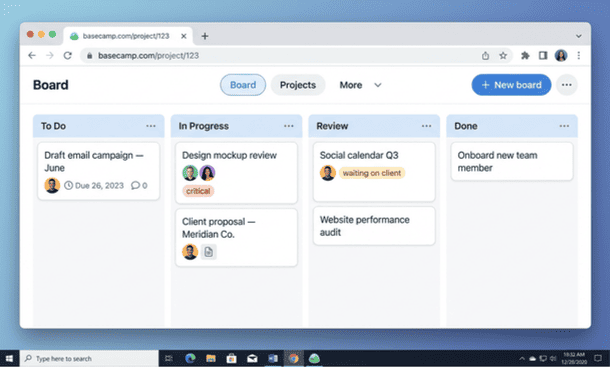
Card Table expanded what Basecamp can do for visual thinkers. Added more recently than the other tools, Card Table is Basecamp’s Kanban board a drag and drop column view for organizing work through defined stages. For teams managing content production, design review cycles or any work that moves through sequential phases Card Table provides the visual workflow clarity that the to-do list format does not.
Two features worth less attention than they receive. The Hill Chart is thoughtful in concept and rarely used consistently in practice by small business teams. Client access is genuinely well designed and valuable for agencies managing client-facing engagements less relevant for businesses that do not work directly with external clients.
A deeper evaluation of which Basecamp features deliver real value for small business operations and which ones matter less at the early stage covers each tool in detail including the adoption nuances around Campfire and the message board that determine whether the product functions as designed or below its potential.
Basecamp pricing in 2026 is the flat fee worth it for a small business?
Pricing is where Basecamp becomes one of the more interesting conversations in the project management market. While almost every competitor charges per user Basecamp offers a flat-fee option that charges the same amount regardless of how many people are using it.
Two plans are currently available. The standard plan charges $15 per user per month and includes the full feature set. The Pro Unlimited plan charges $299 per month billed annually and covers unlimited users, unlimited projects and priority support.
The math at three team sizes tells the honest story. At five people the standard plan costs $75 per month Pro Unlimited at $299 is roughly four times more expensive. At ten people the standard plan costs $150 per month Pro Unlimited is approximately double. The tipping point arrives at approximately twenty users where the standard plan costs $300 per month and Pro Unlimited becomes financially equivalent after which every additional team member is effectively free under the flat fee model.
Below twenty users the standard per user plan is almost always the financially smarter choice. The flat fee model benefits growing teams with a concrete and near term path to that threshold not aspirational ones.

Competitively Basecamp is not the cheapest option at any team size ClickUp’s free plan and Notion’s entry tier both offer meaningful functionality at lower cost. What Basecamp offers in exchange is a more communication integrated, adoption friendly product that some businesses find worth the premium and others do not depending on whether the product’s philosophy matches their workflow.
The complete breakdown of whether Basecamp’s 2026 pricing makes financial sense for your specific team size and growth trajectory runs the math at each scenario in detail including the supplementary tool costs worth factoring into the full stack expense.
how to set up Basecamp for your startup in the first 48 hours
Most Basecamp setups fail not because the product is difficult but because founders open the account, create a couple of vaguely named projects and invite the team before making any of the structural decisions that determine whether the workspace reflects how the business actually operates.
The right approach is sequential. Start with a 20 minute clarity session on paper before opening Basecamp listing every active project, what done looks like for each one and who is involved. This produces a realistic inventory of what the system needs to hold before any structure gets built around it.
In hour one create three real projects with specific descriptive names. Not “Client Work” but “Brand Refresh Coastal Creative.” Activate all six tools by default. Add one message to each project’s message board introducing the project its current status and the context the team needs. That first message establishes the message board as the place where important project communication lives before the team ever logs in.
In hours two and three populate each project with actual tasks specific, action-oriented names that describe what done looks like, one assigned owner per task and a due date for each. In hour four set up HQ with a clear statement of how the team will use Basecamp specifically the distinction between what belongs on the message board versus in Campfire.
Invite the team after the workspace is built not before. When the invitation goes out the workspace should hold enough real work that logging in makes immediate sense. Include a brief personal message with the invitation explaining why you chose Basecamp and what you need from the team in the first week.
On day two run a 20 minute walkthrough covering three core actions finding assigned tasks, posting on a message board and marking a task complete. End with one explicit norm: for the next 30 days all task updates and project communication happen inside Basecamp. Schedule a two week checkpoint to surface friction and make targeted adjustments before it accumulates.
The full step-by-step walkthrough of how to set up Basecamp for your startup and navigate the critical first 48 hours covers each phase in detail including the specific adjustments that typically need to happen at the two week checkpoint.
Basecamp vs. competitors how it stacks up against Asana, ClickUp and monday.com
This comparison uses a Simplicity Score four dimensions rated one to five for a maximum of 20 to evaluate each tool on setup speed, adoption ease, interface clarity and mobile usability. These are the factors that determine whether a small business gets lasting value from its project management software not which tool has the longest feature list.
Basecamp scores 16/20. Fast setup, strong adoption ease once the message board philosophy is internalized, visually calm interface and a genuinely functional mobile app. The main limitation is the absence of a consolidated cross-project dashboard seeing the status of all active projects simultaneously requires navigating to individual projects.
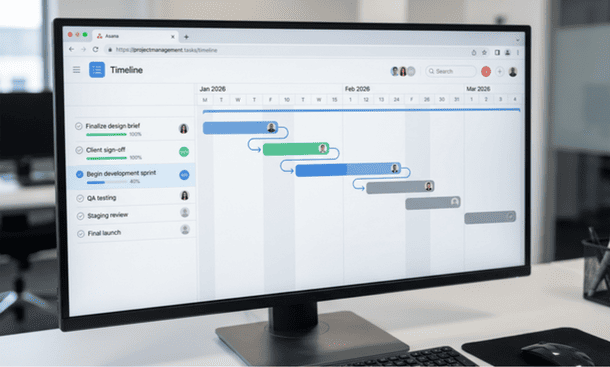
Asana scores 14/20. Slightly slower setup, strong adoption when the workspace is kept appropriately simple, clean task-focused interface and a mobile app that handles core actions well but lags on complex workflows. Asana’s paid tiers add dependency management and timeline visualization that Basecamp does not offer. The free plan for up to 15 users makes it financially compelling for early stage teams.
ClickUp scores 12/20. The slowest setup of the three by a significant margin, real adoption friction from the number of options visible at any moment and a visually busy interface before customization. ClickUp’s strongest argument is its free plan generosity and its ceiling for teams willing to invest in setup the operational flexibility is higher than either Basecamp or Asana.
Choose Basecamp if your work organizes naturally into discrete projects and you value communication clarity and fast adoption over feature depth. Choose Asana if your work is task centric and you need workflow progression visibility that scales. Choose ClickUp if you want one tool to replace several and are comfortable with a meaningful setup investment.
The full head to head of how Basecamp compares against Asana and ClickUp for small business use in 2026 applies this framework across more specific scenarios including the use cases where each tool’s Simplicity Score understates or overstates its real world value.
getting your team to actually use Basecamp an adoption guide for small business owners
Signing up for Basecamp and getting your team to genuinely use it as designed are two different things. The gap between them is where most Basecamp implementations quietly fail not because the product stops working but because the behavioral change required never fully happens.
The most reliable adoption accelerator is a 15 minute conversation with your team before anyone logs in for the first time about the specific operational problem Basecamp is solving, not the features. Connect the tool to a frustration your team has already felt lost decisions, buried project context, a client brief that exists somewhere in a DM chain nobody can find and adoption motivation shifts from compliance to genuine buy-in.
The central behavioral norm that must be established clearly is the message board versus Campfire distinction. Campfire is for quick ephemeral coordination. The message board is for anything that needs to remain accessible in context decisions, briefs, status updates, anything a team member who missed the original conversation would need to find independently. Post this distinction in HQ before the team joins. Model it yourself during the first two weeks. The pattern established in the first two weeks tends to persist for months.
Resistance to the message board format the perception that writing a named post requires more effort than a quick Slack message is the most common adoption friction. Address it through a specific example from your own business where important context was lost in a chat thread. Making the cost of instant messaging visible rather than theoretical is more persuasive than any abstract argument about communication hygiene.
Inconsistent task updates are the second most common friction. Address them at the creation stage specific action oriented task names that describe what done looks like make marking completion obvious rather than ambiguous. A short daily practice of reviewing assigned tasks at the end of each workday builds the habit more reliably than any notification system.
Schedule a structured check-in at week four. Ask three direct questions: what are you still doing outside Basecamp, what part of the setup feels wrong and what one change would make you more likely to open the tool first. Address the top two issues before week five.
The complete guide to getting your small business team to genuinely adopt Basecamp and maintain consistent use over time covers each of these adoption dynamics in full including the specific signals that indicate drift is happening before it becomes an established workaround.
when Basecamp is the wrong choice and what to use instead
Five specific scenarios make Basecamp the wrong choice for a small business or startup.
Task-centric rather than project-centric work. If your work is primarily a continuous flow of individual tasks that do not group neatly into projects high volume operational work, sales pipelines, content production queues Basecamp’s project-centric structure creates friction at every step. Better alternative: monday.com or Asana for high-volume task management.
Dependency management and complex task sequencing. Basecamp’s to-do system has no dependencies. For businesses managing multi-phase work where sequencing genuinely matters the gap creates real operational friction that workarounds cannot fill. Better alternative: Asana paid tiers or ClickUp for dependency management with timeline visualization.
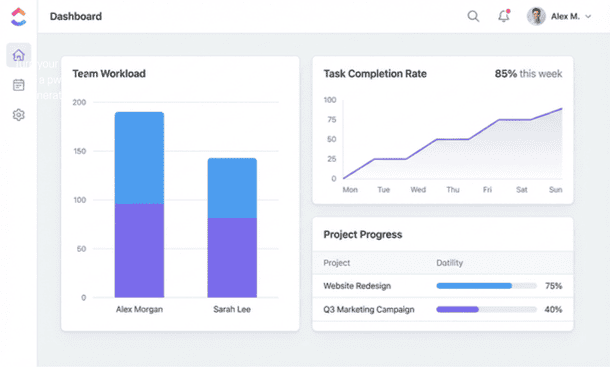
Granular reporting and workload visibility. Basecamp does not have cross project workload views or completion rate reporting. For a team of eight or more where the founder manages in a strategic rather than operational role the reporting gap becomes a real management limitation. Better alternative: Asana paid tiers, ClickUp or monday.com for workload monitoring and project reporting.
Technical teams expecting workflow customization. Basecamp’s fixed project structure creates persistent frustration for technical teams that expect custom statuses, custom fields, automation rules and flexible hierarchies. Better alternative: ClickUp for maximum customization without enterprise complexity, Jira for software development teams specifically.
Time tracking and billing integration as core operations. Basecamp has no native time tracking. For businesses billing by the hour the absence requires a third party integration that adds cost and context switching. Better alternative: Paymo for integrated project management, time tracking and client invoicing in a single workflow.

Before concluding that Basecamp is the wrong tool it is worth asking honestly whether the friction is a product fit problem or an adoption problem. If the feedback is general rather than specific to a capability the product genuinely does not have the right move is revisiting the implementation rather than switching platforms. Switching to solve an adoption problem resets the entire implementation clock while leaving the root cause intact.
The complete guide to when Basecamp is genuinely the wrong fit and which alternatives serve those specific needs better covers each disqualification scenario in detail with concrete alternative recommendations.
Basecamp is not the right project management tool for every U.S. startup or small business. It is the right tool for a specific kind of operation project-based, communication-heavy, small enough that shared visibility matters more than granular reporting and willing to adopt the product’s philosophy rather than fight against it.
That specificity is not a weakness. It is what makes Basecamp genuinely excellent for the businesses it was built for rather than mediocre for everyone. The founders who thrive with it are not the ones who chose it because it was popular or because the flat-fee pricing sounded appealing. They are the ones who evaluated it honestly against how their business actually operates and found a real match and then committed to the setup and adoption process with enough consistency to let the tool deliver on its promise.
The evaluation across every section of this guide points toward the same conclusion. Basecamp’s value is not in its feature count. It is in what those features accomplish together a shared operational clarity where project communication is organized and findable, work is visible to everyone involved and the team spends less time wondering where things stand and more time moving them forward.
Getting there requires more than signing up. It requires a setup that reflects real workflows rather than imagined ones. A team that understands the message board versus Campfire distinction from day one. A rollout designed to produce behavioral change rather than just provide access to a new platform. A two week checkpoint that addresses friction before it becomes an established workaround. And the honest judgment to recognize when persistent problems signal a product fit issue rather than an adoption issue.
For businesses where the fit is genuinely wrong there are better alternatives and being honest about that early saves months of friction and a failed implementation that wastes everyone’s time. For businesses where the fit is right the payoff is real a team that knows where everything lives, a founder who can see project status without sending a single status request and a business that runs on information rather than on whoever happened to be in the last conversation.
If there is one place to start before anything else in this evaluation it is with a clear picture of what Basecamp is actually designed to do and whether that design matches how your business operates at a structural level. That foundation changes how every subsequent decision gets made. That honest starting point is laid out in full in what Basecamp is actually used for and who the product was genuinely built to serve.
About the Author

Pamela
Pamela is a dynamic professional with a deep passion for SaaS and emerging technologies. She provides valuable insights into software trends, digital innovation, and cutting-edge tools that empower businesses to thrive and expand.
Did you find this helpful?
Your feedback helps us curate better content for the community.