
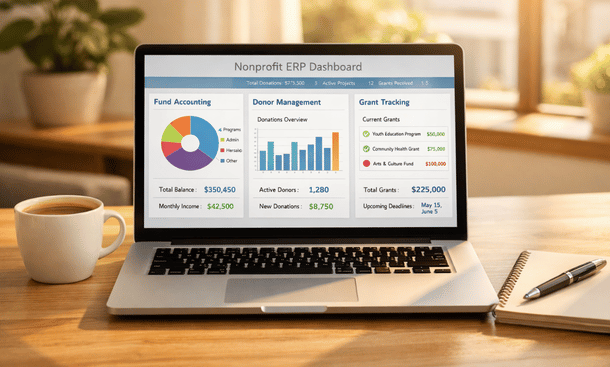
Choosing the right ERP system for your nonprofit isn’t just about flashy dashboards—it’s about finding features that actually support your mission. After working with dozens of California-based organizations, I’ve seen what separates game-changing platforms from overhyped software. Fund accounting, compliance reporting, and integrated donor management aren’t just nice-to-haves; they’re essential for sustainable growth. In this breakdown, we’re diving deep into the capabilities that matter most for nonprofits of all sizes. For context on how these features fit into your broader technology strategy, check out our detailed analysis of ERP systems built specifically for nonprofit operations.
Fund accounting capabilities that actually work
Let’s start with the foundation—fund accounting. This is where most generic business software completely falls apart for nonprofits.
Your ERP needs to handle multiple fund types without breaking a sweat. Unrestricted general funds, temporarily restricted grants, permanently restricted endowments, and board-designated reserves all need to exist simultaneously in your system. When someone asks what your cash position is, the answer isn’t a single number—it depends on which fund you’re asking about.
The system should track restrictions automatically. When you receive a $25,000 grant for environmental education, that money gets tagged with the funder, program, time period, and allowable expense categories. Six months later when you’re spending from that grant, the ERP should only let you charge expenses that match those restrictions. This prevents the nightmare scenario of accidentally spending restricted funds on the wrong activities.
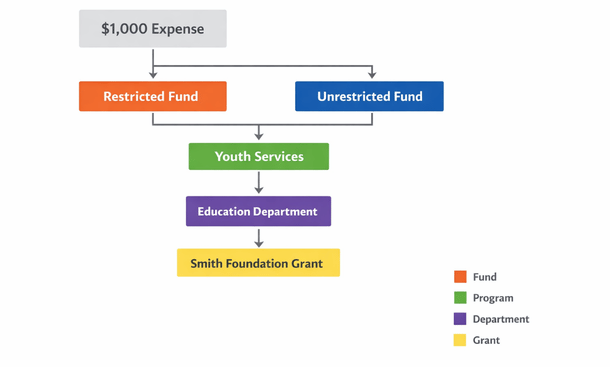
Multi-dimensional accounting is crucial. You need to track expenses by fund, program, department, location, and grant simultaneously. A single expense—say paying an instructor—might need to be allocated across three different grants, two programs, and attributed to your Oakland office. Your ERP should handle this complexity without requiring a PhD in accounting.
Budget management features need to support multiple budget versions. You’ll have your board-approved annual budget, but also grant-specific budgets, department budgets, and scenario planning budgets. The ability to compare actual spending against any of these budgets in real-time keeps programs on track and prevents overspending.
Period and year-end closing functionality matters more than you might think. Your system should let you close monthly periods while still allowing adjustments to prior months when necessary. Year-end closing should be a controlled process that locks historical data while rolling balances forward to the new fiscal year.
Donor management beyond basic CRM
Generic customer relationship management systems don’t understand donors. Your ERP needs purpose-built donor management that recognizes the unique nature of philanthropic relationships.
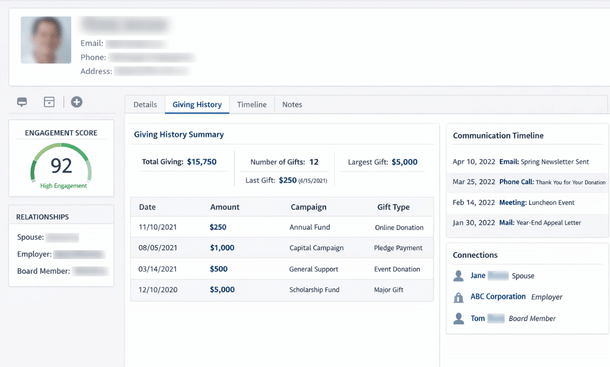
Comprehensive constituent profiles go way beyond name and address. You need to track giving history with full detail—every gift amount, date, campaign, fund designation, payment method, and acknowledgment status. But also soft credits for couples, tribute gifts, matching gift employers, and planned giving commitments.
Household and relationship mapping is essential. When John and Mary Smith are both in your database, the system needs to recognize they’re married, track individual and joint gifts appropriately, understand who gets tax receipts, and manage communication preferences for each person while recognizing the household relationship.
Engagement scoring helps prioritize outreach. Your ERP should track not just donations but also event attendance, volunteer hours, email opens, website visits, and program participation. Automated scoring identifies major donor prospects, lapsing donors, and highly engaged supporters who deserve personalized attention.
Campaign and appeal tracking lets you measure fundraising effectiveness. You need to know which campaigns drove donations, what your cost per dollar raised was, and how different segments responded. This data should feed directly into your financial system so development revenue reconciles automatically with accounting records.
Automated acknowledgment workflows save massive amounts of time. When a gift comes in, the system should trigger thank-you letters, tax receipts, and internal notifications based on gift amount, donor type, and fund designation. Major gifts might trigger personal email alerts to your development director, while smaller online donations get immediate automated receipts.
Pledge and recurring gift management needs to be rock solid. The system should track outstanding pledge balances, send automated payment reminders, process recurring credit card gifts automatically, and flag failed payments for follow-up. Being able to see projected revenue from pledges and recurring gifts improves cash flow forecasting dramatically.
Grant tracking and compliance tools
Grant management separates nonprofit ERPs from everything else. The complexity of tracking multiple grants with different requirements, reporting schedules, and compliance rules requires specialized functionality.
Your system needs a complete grant lifecycle view. From the prospecting and application stage through award, active management, reporting, and closeout, everything should live in one place. You should see at a glance which grants are pending, active, or completed, with key dates and deliverables clearly visible.
Budget versus actual tracking by grant is non-negotiable. Every grant has a budget, and you need real-time visibility into spending against that budget. The system should alert you when a grant is approaching its budget limit or when spending is falling behind projections, which might indicate program implementation issues.
Deliverable and milestone tracking keeps grants on schedule. Your ERP should let you define required reports, site visits, outcome metrics, and other deliverables for each grant, then track completion and flag upcoming deadlines. Automated reminders ensure nothing falls through the cracks.
Indirect cost allocation is where things get technical but incredibly important. Most grants allow you to charge a portion of shared overhead costs—rent, utilities, executive salaries, accounting services. Your ERP needs to calculate these allocations based on approved methodologies, whether that’s a negotiated indirect cost rate or a simplified de minimis rate.
Compliance documentation and audit trails matter enormously. The system should track every change to grant budgets, amendments to agreements, approval workflows for grant expenses, and maintain a complete history for auditors and program officers to review.
Financial reporting for multiple stakeholders
Nonprofits answer to everyone—boards, donors, government agencies, auditors, and the public. Your ERP needs to generate reports that satisfy all these different audiences.
Standard nonprofit financial statements must be easy to produce. Statements of financial position, activities, functional expenses, and cash flows following GAAP and FASB standards should be standard reports, not custom projects. The system should handle net asset classifications correctly and present expenses by both nature and function.
Board reporting packages need to be executive-friendly. Monthly financial summaries, cash flow projections, fundraising dashboards, and program performance metrics should be available in formats that board members without accounting backgrounds can understand. Visual dashboards with charts and graphs work way better than dense spreadsheets.
Funder-specific reports are inevitable. Whether it’s a foundation requiring quarterly financial reports in their custom format or a government contract with specific line-item reporting, your ERP should let you create and save custom report templates that pull live data. Even better if the system can automatically generate and email these reports on schedule.
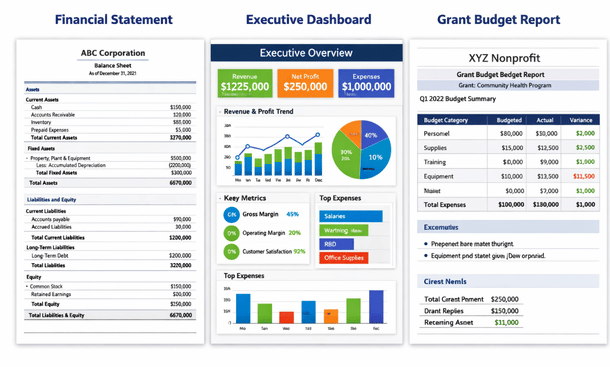
Form 990 preparation support can save you weeks. The best nonprofit ERPs either generate IRS Form 990 schedules directly or export data in formats that tax preparation software accepts without manual manipulation. Having your financial data already organized in the categories the 990 requires is a massive time-saver.
Real-time dashboards give you current visibility. Instead of waiting for month-end reports, you should be able to check current cash position, fundraising progress toward goals, program expenses, and key metrics anytime from any device. This shift from historical reporting to real-time monitoring changes how organizations operate.
Program management and outcomes tracking
Your ERP should help you manage and measure program impact, not just track finances.
Client and participant management lets you maintain records for everyone your programs serve. Whether you’re tracking students in an education program, clients receiving social services, or participants in community events, this data should integrate with your financial and reporting systems.
Service delivery tracking documents what you actually do. Case notes, service hours, program attendance, milestone achievements, and other activity data proves you’re delivering on your mission. This is especially critical for government contracts and outcome-focused grants.
Outcomes measurement capabilities let you track the impact you’re creating. If your job training program aims to place 100 people in employment, your ERP should track participant progress, job placements, retention rates, and wage levels. Connecting outcomes to program costs shows funders the return on their investment.
Waitlist and enrollment management helps programs run efficiently. The ability to manage application processes, waitlists, enrollment slots, and participant communication through your ERP eliminates yet another separate system to maintain.
Integration and automation features
Your ERP shouldn’t be an island. Integration capabilities determine whether you have a connected technology ecosystem or a bunch of disconnected tools.
Payment processing integration is table stakes. Your ERP should connect directly with credit card processors, ACH systems, and online donation platforms. When someone makes a gift through your website, it should create a transaction in your ERP automatically with all the proper coding.
Email and marketing platform connections let you segment constituents in your ERP and push those lists to your email platform. Campaign responses should flow back into your ERP to update engagement scores and track attribution. Popular integrations include Mailchimp, Constant Contact, and HubSpot.
Banking integrations enable automatic transaction downloads and even automated reconciliation in some cases. Instead of manually downloading bank files and importing them, your ERP connects to your bank accounts and pulls transactions daily.
API access and custom integrations matter for unique situations. Your ERP should have a well-documented API that lets you connect custom applications, specialized program databases, or industry-specific tools that your organization requires.
Workflow automation reduces manual work. Approval workflows for expenses over certain thresholds, automated journal entries for monthly accruals, scheduled report generation and distribution, and triggered communications based on data changes all add up to significant time savings.
Security and audit trail functionality
The last thing you want is a data breach or compliance issue because your ERP lacks proper security features.
Role-based access controls let you define exactly what each user can see and do. Your program staff shouldn’t access payroll data. Finance team members might not need to see individual donor records. Board members need financial visibility but shouldn’t be able to edit transactions. Granular permission settings make this possible.
Audit trails track every change to critical data. Who entered a transaction, when they entered it, who approved it, and if anyone later modified it—all of this history should be automatically logged and preserved. This is essential for both internal controls and external audits.
Data encryption in transit and at rest protects sensitive information. Donor credit card numbers, social security numbers for program participants, and employee personal data all need robust encryption. Cloud-based ERPs should maintain SOC 2 compliance and other security certifications.
Backup and disaster recovery features ensure you never lose data. Automated daily backups, geographically distributed data centers, and tested recovery procedures mean you can restore operations quickly if something goes wrong.
Multi-factor authentication adds an extra security layer beyond passwords. Especially for users accessing sensitive financial or donor data remotely, requiring a second authentication factor significantly reduces the risk of unauthorized access.
These features represent the core capabilities that separate nonprofit ERPs built for mission-driven organizations from generic business software. Understanding what to look for is one thing, but evaluating actual platforms and making a selection decision is another challenge entirely. To see how leading nonprofit ERP solutions compare in terms of features, pricing, and real-world user experiences, dive into our detailed review of the best ERP software for nonprofits in 2026. You’ll also find it helpful to reference our complete guide to ERP for nonprofits, which provides strategic context on how these features support your organization’s long-term growth and impact.
About the Author

mike
Mike is a tech enthusiast passionate about SaaS innovation and digital growth. He explores emerging technologies and helps businesses scale through smart software solutions.
Did you find this helpful?
Your feedback helps us curate better content for the community.