

Running a business in California means constant movement. You’re meeting clients in San Francisco one day, checking on your warehouse in San Diego the next, and somehow squeezing in vendor negotiations from a coffee shop in between. The traditional model of managing everything from an office desk doesn’t match how we actually work anymore.
Mobile ERP apps changed the game completely. Your entire business operations sitting in your pocket. Check inventory while standing in your warehouse. Approve purchase orders from the airport lounge. Review financial performance during your morning surf check. This isn’t some futuristic vision. It’s how California entrepreneurs run their businesses right now in 2026.
The shift toward mobile ERP happened fast over the past few years. Cloud technology matured. Smartphones became powerful enough to handle serious business applications. Security improved to the point where you can trust sensitive data on mobile devices. These pieces came together and suddenly mobile ERP made sense for businesses of all sizes.
But here’s what most articles about mobile ERP miss. The technology is just the starting point. What really matters is understanding which platforms actually deliver on their promises, which features genuinely improve your operations, how to implement mobile access without creating security nightmares, and how to get your team actually using these tools effectively.
I’ve spent years working with California small businesses implementing mobile ERP systems. I’ve seen what works and what doesn’t. The businesses that succeed with mobile ERP don’t just pick a platform randomly and hope for the best. They understand what they’re getting into. They choose thoughtfully. They implement deliberately. They support their teams properly.
This guide walks you through everything you need to know about mobile ERP apps. The platforms worth considering. The features that actually matter versus marketing fluff. The architecture decisions that affect your mobile experience. The security practices that protect your data. The implementation approach that gets you live in 90 days instead of dragging on for months.
Whether you’re evaluating mobile ERP for the first time or looking to replace a system that isn’t working, this guide gives you the framework to make smart decisions and avoid expensive mistakes.
Section 1: Best ERP Mobile Apps for Small Business Owners in California
Choosing the right mobile ERP platform determines whether mobile access becomes a competitive advantage or a constant source of frustration. The market offers dozens of options. Most claim to provide excellent mobile functionality. The reality varies dramatically.
Your platform choice affects everything that follows. Features, user experience, cost, implementation complexity, security, scalability. Pick wrong and you’re stuck with a mediocre solution for years. Pick right and you transform how your business operates.
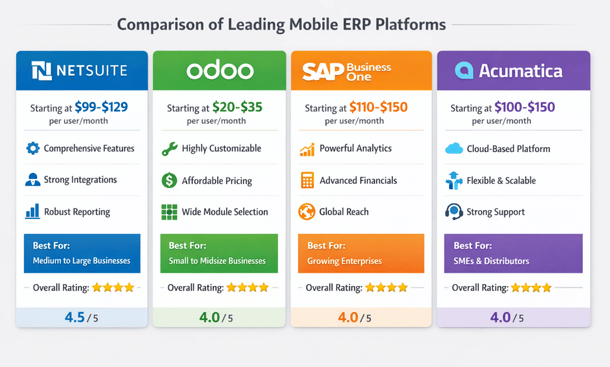
NetSuite Mobile dominates the enterprise-level mobile ERP space. The platform provides legitimate access to almost everything you can do on desktop, redesigned for mobile workflows instead of just shrinking the interface. The dashboard surfaces the metrics that actually matter for decision-making. Revenue trends, outstanding invoices, inventory alerts, and pending approvals all sit right there when you open the app.
What sets NetSuite apart is how thoughtfully they designed approval workflows for mobile. Purchase orders, expense reports, time-off requests all get handled in seconds. The app shows relevant context like budget impact or historical spending right alongside the approval request. This design intelligence saves hours every week. Inventory management works beautifully for retail and wholesale businesses. Scan barcodes, update stock levels, create purchase orders, transfer inventory between locations. All from your phone. The financial reporting on mobile impresses consistently with profit and loss statements, balance sheets, and cash flow reports formatted perfectly for phone screens.
Pricing sits around 99 dollars per user per month for basic packages, scaling up based on modules and customization needs. The learning curve is real though. NetSuite packs in substantial functionality that requires dedicated training time. Plan on several weeks for your team to reach proficiency. For California businesses needing enterprise-grade capabilities that genuinely work on mobile, NetSuite delivers despite the investment required.
Odoo brings surprisingly robust mobile capabilities at a fraction of NetSuite’s cost. This open-source platform takes a modular approach. Start with core ERP functions and add modules as needed. Sales, inventory, accounting, project management each have mobile-optimized interfaces. The modularity means you’re not paying for features you’ll never use.
The mobile app feels responsive and snappy. Creating sales orders, checking product availability, and processing payments happen quickly. Barcode scanning works reliably for inventory counts and receiving shipments. Where Odoo really shines is customization. The open-source nature means you can modify it to match exact workflows. This flexibility appeals to California’s creative businesses and startups doing things differently.
Pricing starts around 24 dollars per user per month for the online version. Self-hosted options run cheaper but require technical expertise. For most small businesses, the online version hits the sweet spot of affordability and ease of use. The trade-off is polish. Odoo doesn’t feel as refined as NetSuite. Some features feel clunky on mobile. But at less than a quarter of NetSuite’s price, many businesses accept that compromise gladly.
SAP Business One brings big company capabilities to small business budgets. The mobile app focuses on core workflows small business owners actually need away from their desks. Financial reporting impresses every time. You can drill down into specific accounts or transactions without squinting at tiny numbers. This capability alone makes SAP Business One worth considering if financial visibility matters to your business operations.
The approval workflows rival NetSuite’s functionality. Review and approve documents with full context about business rules and thresholds. Add notes or request changes before approving, speeding up communication with your team. Inventory and warehouse management tools work well for businesses with physical products. The app handles receiving, picking, packing, and shipping workflows with smooth barcode scanning integration.
Pricing typically runs 60 to 100 dollars per user per month depending on specific needs and implementation partner. Factor in implementation costs which can add up. The main limitation is mobile-specific innovation. SAP Business One’s mobile app provides access to core functionality but lacks some mobile-first features you’ll find in newer platforms. It’s more about accessing your ERP on mobile than being designed for mobile workflows from the ground up.
Acumatica built their entire platform for cloud and mobile from day one. That cloud-native approach shows in how smoothly the mobile experience works. The interface adapts intelligently to your screen size. Everything scales and rearranges automatically. Dashboards that show six widgets on desktop might show two on your phone, but you’re seeing the most relevant information first.
Role-based dashboards mean your sales team sees different information than warehouse staff. Acumatica automatically presents tools and data each person needs based on job function. This cuts training time and reduces errors. The offline mode works reliably. Access recent data, create transactions, and make updates without internet connectivity. When you reconnect, everything syncs automatically. This feature saves the day when working in areas with spotty coverage.
Pricing varies widely based on specific needs and transaction volume. Expect somewhere between 50 to 150 dollars per user per month. Acumatica uses consumption-based pricing for some modules instead of per-user pricing, which can work out cheaper for small teams processing lots of transactions. The learning curve sits between Odoo and NetSuite in terms of complexity.
Choosing between these platforms comes down to your specific situation. NetSuite makes sense for comprehensive functionality when you can afford the investment. Odoo works great for budget-conscious businesses willing to trade polish for flexibility. SAP Business One fits established small businesses wanting enterprise capabilities without enterprise complexity. Acumatica suits businesses prioritizing true cloud-native architecture and mobile-first design.
Think about your team’s technical comfort level. Some platforms require more training than others. Consider who will actually use the mobile app daily and what capabilities they need. A warehouse manager needs different tools than a sales rep or CFO. Also consider your growth trajectory. Will you outgrow this platform in two years? Switching ERP systems is painful and expensive. Choose something that scales with your business even if it costs more upfront.
For deeper analysis of specific platforms and real user experiences, our detailed review of the best mobile ERP apps for small business breaks down pricing, features, and ideal use cases for California entrepreneurs making this critical decision.
Essential Mobile ERP Features Every Entrepreneur Needs
Features make or break mobile ERP experiences. Sales teams throw around impressive terminology during demos. Real-time synchronization. Role-based dashboards. Multi-tier approval workflows. Half the time you’re nodding along wondering which features actually matter for your business versus which ones are just expensive distractions.
The gap between essential features and nice-to-have additions determines whether you spend money wisely or waste budget on capabilities you’ll never use. Understanding this distinction saves you from both overspending on unnecessary complexity and underspending on critical functionality.
Real-time data synchronization forms the non-negotiable foundation. Changes made on mobile instantly update your main system and vice versa. This isn’t optional. Picture your warehouse manager updating inventory levels on their phone during a physical count while simultaneously your sales rep creates a quote for a customer. Without real-time sync, that sales rep might promise products you don’t actually have in stock. That’s how you get angry customers and embarrassing backorder conversations.
Good real-time synchronization happens invisibly. You update a record and it’s immediately available everywhere. No manual syncing, no waiting periods, no refresh buttons you need to remember hitting. The technology involves continuous data exchange between your mobile app and cloud servers. Most modern platforms handle this seamlessly over wifi or cellular connections in milliseconds.
Watch out for platforms claiming real-time sync but actually batching updates every few minutes. That delay creates the exact problems you’re trying to avoid. Test this during demos by making a change on mobile and immediately checking if it appears on desktop. Some systems struggle with sync when you have poor connectivity. The best platforms queue changes locally and push them through as soon as connection improves.
Offline functionality serves as your safety net. This feature lets you keep working even without internet connectivity. California might have decent connectivity most places, but you’ll eventually find yourself in a dead zone. Trade shows with overloaded wifi. Warehouses with concrete walls blocking cell signals. Rural client locations. Flying between San Francisco and Los Angeles. These situations happen constantly in real business operations.
The best offline functionality gives you access to recently viewed records and lets you create new transactions. When connectivity returns, everything syncs automatically. You shouldn’t need to remember what you did offline or manually transfer data. Different platforms handle offline mode with varying sophistication. Basic implementations might let you view cached data but not create new records. Advanced systems let you take orders, update inventory, and approve requests completely offline.
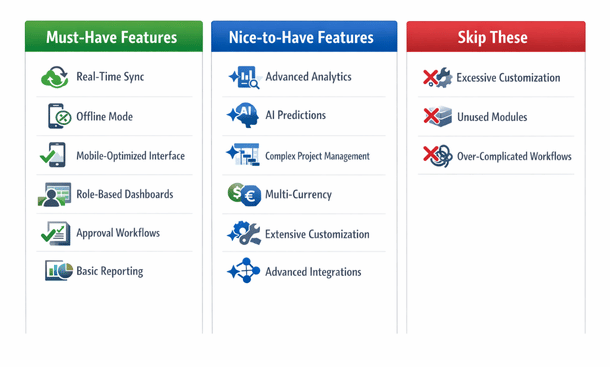
Intuitive mobile interface design determines whether your team actually uses the system or finds workarounds. A mobile ERP interface needs design specifically for phones, not just squeezed onto a smaller screen. Navigation should work with thumbs, not require a stylus or precise finger placement. Buttons need size for accurate tapping. Text should be readable without zooming. Forms should minimize typing through dropdown selections, date pickers, and smart defaults.
The information hierarchy matters enormously on small screens. Desktop interfaces can show dozens of data points simultaneously. Mobile screens force prioritization. The most important information should be immediately visible. Secondary details should be one tap away. Rarely needed information can be buried deeper in navigation. Context-sensitive menus reduce clutter by showing actions that match what you’re viewing.
Role-based dashboards and permissions ensure each team member sees relevant information based on their job function. Your warehouse staff needs inventory levels, picking lists, and receiving functions. They don’t need access to financial reports or customer payment history. Your sales team needs customer data, pricing, and order creation. They probably shouldn’t see detailed cost breakdowns or employee payroll information.
Good role-based design goes beyond hiding sensitive data. It actively surfaces the information each person needs to do their job effectively. A warehouse manager’s dashboard might highlight low stock items and pending receiving tasks. A sales rep’s dashboard shows pipeline value, upcoming follow-ups, and this month’s quota progress. Permissions control what actions people can take with granular detail preventing accidental changes and maintaining data integrity.
Approval workflows let managers review and authorize transactions from their phones. This feature dramatically speeds up business processes that traditionally created bottlenecks. Purchase order approvals showcase this perfectly. A team member creates a purchase request. The system routes it to the appropriate manager based on business rules determined by dollar amount or department. The manager gets a notification on their phone, opens the app, and sees the request with full context including budget impact, vendor history, and whether similar items were purchased recently. They approve or reject with one tap, optionally adding comments.
This process that might have taken days when managers needed desk access now happens in minutes. Multi-level approvals work the same way but route through multiple people sequentially or in parallel. The notification system makes or breaks approval workflows. Push notifications alert managers immediately when their approval is needed. In-app notification centers show all pending approvals in one place.
Barcode and QR code scanning turns your phone into a powerful data collection tool. Instead of manually typing product codes or serial numbers, you scan them instantly and accurately. Inventory management benefits enormously from scanning. Receiving shipments becomes a matter of scanning items as you unpack them. Physical counts involve walking through your warehouse scanning products. Picking orders means scanning items to verify you’re grabbing the right products. The reduction in errors alone justifies this feature.
Financial visibility and reporting give you business intelligence wherever you are. This doesn’t mean recreating complex financial analysis on a phone screen. It means surfacing key metrics that help you make decisions throughout your day. Cash flow visibility tops the list for most small business owners. How much money is actually available right now? What’s coming in this week? What’s going out? These questions shouldn’t require waiting until you’re back at your desk.
Document management and attachment support integrate your physical and digital workflows seamlessly. The ability to capture and attach documents from your phone eliminates the awkward process of taking photos then emailing them to yourself to upload later. Receipt capture exemplifies this functionality. You’re at lunch with a client. The meal ends and you get the receipt. Instead of stuffing it in your wallet to deal with later, you open your ERP app, snap a photo, and attach it directly to the expense record.
Integration with other business tools multiplies mobile ERP value by creating seamless workflows across your technology stack. Email integration is foundational. View customer communication history within their ERP record. Send quotes and invoices through your regular email client while the ERP tracks delivery and opens. Calendar sync ensures your schedule stays current everywhere. Payment processing integration lets you collect money through mobile. Shipping carrier integration provides real-time tracking.
Security features protect your data without making the app painful to use. Multi-factor authentication adds crucial protection beyond passwords. Biometric login using fingerprint or face recognition balances security with convenience. Remote wipe capabilities protect you if a device goes missing. Encryption protects data both in transit and at rest. Granular permissions ensure people only access what they need.
Not every feature deserves your attention or budget though. Advanced analytics and artificial intelligence often fall into the “sounds impressive but rarely delivers value” category for small businesses. Predictive demand forecasting using machine learning requires historical data volume most small businesses lack. Simple reorder point calculations work fine for most situations. Complex project management features may be overkill if your business isn’t project-based. Multi-currency and multi-language support only matters if you actually do international business.
Choosing which features matter for your business requires honest assessment of how your team actually works. Shadow your employees for a day. Watch what they do, where they do it, and what information they need. Prioritize features that eliminate current pain points. If approval bottlenecks slow everything down, prioritize approval workflows. If inventory accuracy is a constant problem, focus on mobile inventory management with barcode scanning.
For a comprehensive breakdown of which mobile capabilities drive the most value for different business types and how to evaluate features during platform selection, our guide on essential mobile ERP features walks through the decision framework California entrepreneurs need.
Cloud ERP vs Traditional ERP for Mobile Access
The cloud versus traditional ERP debate has raged for years. Most articles miss the real question though. It’s not which architecture is theoretically better. It’s which one actually lets you run your business from wherever you happen to be.
The architectural difference between these approaches creates cascading effects on mobile access that most people don’t understand until they’re already committed to a platform. This choice affects performance, cost, security, and how well mobile functionality actually works in daily operations.
Traditional ERP systems, sometimes called on-premise ERP, run on servers physically located in your office or data center. Your data lives on hardware you own or lease. You install software on those servers and maintain everything yourself or hire IT staff to handle it. These systems were designed when everyone worked at desks with desktop computers. Mobile access got bolted on later as an afterthought.
Cloud ERP systems run on servers owned and maintained by the software vendor. Your data lives in massive data centers run by companies like Amazon Web Services, Microsoft Azure, or Google Cloud. You access everything through a web browser or mobile app. The vendor handles all technical infrastructure. These systems were built during the smartphone era with mobile access as part of the core design from day one.
Traditional ERP mobile access typically requires virtual private network connections. You install a VPN app on your phone. When you need to access the ERP, you connect to the VPN first, then open your ERP mobile app or browser. The VPN creates an encrypted tunnel between your phone and your office network. This setup works sort of, but it creates friction at every step.
VPN connections drop randomly, especially on cellular networks. You waste time reconnecting. The VPN adds latency so every action feels sluggish. Loading a simple report might take ten seconds instead of two. Security becomes complicated with VPNs. Your IT team needs to configure firewall rules, manage VPN certificates, and troubleshoot connection issues. Each remote user represents a potential security hole needing careful management.
The mobile apps themselves often feel clunky with traditional ERP. Many vendors literally just shrunk their desktop interface to fit phone screens. Tiny buttons, microscopic text, excessive scrolling. You’re constantly zooming in and out just to read information or tap the right button. Offline functionality barely exists with most traditional ERP mobile solutions. Everything requires that VPN connection back to your office servers. Lose your internet connection and you lose access to everything.
Cloud ERP mobile access works completely differently. You open the mobile app on your phone. You log in. That’s it. No VPN. No complicated connection setup. The app communicates directly with cloud servers using standard internet connections. The experience feels fast and responsive. Cloud providers build massive infrastructure specifically optimized for this type of access.
The mobile apps themselves are designed specifically for smartphones and tablets. Large touch-friendly buttons. Text sized for reading without zooming. Forms optimized for quick data entry. Navigation that makes sense on small screens. These apps feel like consumer apps you use every day, not business software from 2005. Offline functionality works properly in quality cloud ERP systems. The app intelligently caches data you recently accessed. You can view that cached data without connectivity. Many systems let you create new records offline that queue on your device and sync automatically when connection returns.
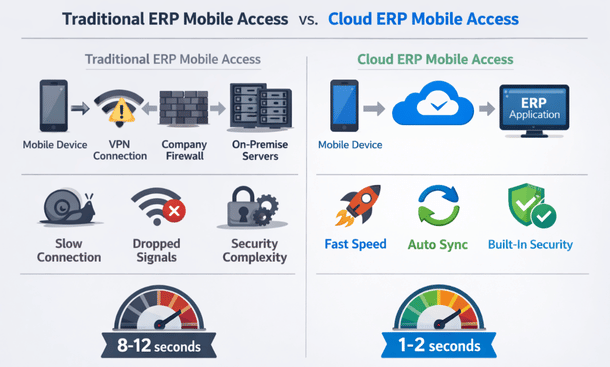
The performance difference becomes obvious in real-world scenarios. Your sales rep is meeting a customer in San Diego. They need to check inventory and create a quote. With traditional ERP, they connect to VPN, wait for it to establish, open the app, navigate through multiple screens, and finally check inventory. The whole process takes three to four minutes. With cloud ERP, they open the app, search the product, see availability instantly, and create the quote. Total time maybe 45 seconds.
Your warehouse manager doing physical inventory count walks through the warehouse scanning barcodes and updating quantities. With traditional ERP over VPN, each scan and update takes several seconds as data travels through the VPN tunnel to your office servers and back. They might process 30 items per hour. With cloud ERP, scans and updates happen almost instantly. They can easily handle 60 items per hour. That’s double the productivity from just removing connection latency.
Cost implications differ substantially between these architectures. Traditional ERP typically requires large upfront license fees. You might pay 50 thousand dollars or more just for software licenses. Then you buy servers, maybe 15 thousand dollars. Network equipment and security appliances, another five thousand. You haven’t even started implementation yet and you’re 70 thousand dollars in. Mobile access often costs extra with traditional ERP as additional license fees per user.
Cloud ERP uses subscription pricing. You pay monthly or annually per user. Maybe 100 dollars per user per month for a full-featured system. Twenty users means 2,000 dollars per month or 24,000 dollars per year. Mobile access is included in that subscription. Everyone gets mobile apps at no additional cost. The subscription includes infrastructure, maintenance, updates, and support. The vendor handles server management, security patches, backups, and monitoring.
Total cost of ownership calculations often favor cloud ERP despite higher annual costs. You avoid the massive upfront investment. You get better mobile functionality included. You save on IT labor. Over five years, cloud ERP frequently costs 30 to 40 percent less than traditional ERP when you account for everything. Cash flow improves with cloud ERP too. Instead of 70 thousand dollars upfront, you spread costs over time. That capital stays available for other business investments.
Security arguments go both ways depending on who you ask. Traditional ERP advocates claim on-premise is more secure because you control the infrastructure. Your data never leaves your building. This sounds reassuring until you examine it critically. Most small businesses lack the expertise and resources for truly robust security. Your office servers probably don’t have the same security monitoring as major cloud providers.
Cloud ERP providers undergo extensive security audits and certifications. They comply with SOC 2, ISO 27001, and industry-specific standards. They can afford security tools most small businesses can’t justify. Intrusion detection systems, advanced firewalls, security information and event management platforms. This enterprise-grade security protects your data better than typical small business infrastructure. The honest assessment is that cloud ERP provides better security for most small businesses.
Scalability and growth considerations favor cloud architecture strongly. Traditional ERP scaling requires hardware upgrades. Add more users and you might need bigger servers. Each upgrade involves purchasing equipment, scheduling downtime, and migrating to new hardware. Mobile access performance degrades as traditional ERP systems grow. Those office servers that handled 20 remote users adequately start struggling with 40 users.
Cloud ERP scales elastically. Need to add 20 users? Just purchase additional subscriptions. The cloud infrastructure automatically allocates more resources. No hardware purchases. No downtime. Mobile access performance stays consistent regardless of how many users you add. Geographic expansion creates challenges for traditional ERP but cloud ERP serves all locations efficiently through geographically distributed data centers.
The decision between cloud and traditional depends on your specific situation, but mobile access requirements increasingly tip the scales toward cloud. If mobile access is critical to your operations, cloud ERP delivers dramatically better experiences. Sales teams working remotely, warehouse staff managing inventory, managers approving transactions from anywhere, field service technicians accessing customer data all work better with cloud architecture.
Consider your IT resources honestly. Do you have skilled IT staff with time to manage on-premise infrastructure? Cloud ERP frees up IT resources for strategic work instead of maintaining servers. Think about your internet connectivity reliability. Cloud ERP requires good internet connections though good mobile apps with offline functionality mitigate many connectivity concerns.
For most California small businesses evaluating ERP options today, cloud architecture delivers superior mobile access at lower total cost with better security. The traditional model made sense when it was the only option. Now you have better choices. Our detailed comparison of cloud versus traditional ERP systems examines how architecture affects mobile performance, security, and long-term costs for entrepreneurs making this critical decision.
How to Keep Your Business Data Safe on Mobile ERP Apps
Your phone holds everything about your business. Customer data. Financial records. Employee information. Inventory details. Vendor contracts. All of it sitting in your pocket while you grab coffee in Santa Monica or meet clients in San Francisco.
That’s incredibly powerful. It’s also incredibly risky if you don’t handle security properly.
Mobile devices create security challenges that don’t exist with desktop computers. You don’t leave your office computer at Starbucks. You don’t lose your desktop on the train. Nobody pickpockets your server from the back of your pants. Phones go everywhere. They get left on restaurant tables. They fall out of pockets. They get stolen from cars. Each time your phone leaves your hand, your business data potentially falls into the wrong hands.
Public networks compound the risk. Your office network probably has firewalls, intrusion detection, and security monitoring. The wifi at that Venice Beach coffee shop has none of that. When you access your ERP on public networks, your data travels through infrastructure you don’t control and can’t trust. Personal and business use blend on mobile devices too. Your team uses the same phone for Instagram, personal email, and business ERP access. A malicious app installed for fun might harvest data from your business apps.
California’s data privacy laws raise the stakes considerably. The California Consumer Privacy Act creates serious liability for businesses that don’t protect customer data properly. A mobile security breach can trigger regulatory penalties on top of direct business damage. Mobile ERP security doesn’t require a PhD in cybersecurity though. You just need to implement the right protections systematically.
Authentication forms your first line of defense. If someone can’t log into your ERP, they can’t access your data. Passwords alone don’t cut it anymore. People choose weak passwords. They reuse passwords across multiple services. They write passwords on sticky notes. Multi-factor authentication adds crucial security. Even if someone steals a password, they can’t access the system without the second authentication factor.
Time-based one-time passwords through authenticator apps provide solid security. Apps like Google Authenticator or Microsoft Authenticator generate six-digit codes that change every 30 seconds. You enter your password plus the current code from the app. Nobody can log in without physical access to your phone. Biometric authentication balances security and convenience beautifully. After the initial login with password and second factor, you can configure fingerprint or face recognition for subsequent access.
Single sign-on integration reduces password fatigue. If your business uses Google Workspace or Microsoft 365, configure your ERP to authenticate through those systems. Employees use one set of credentials they already know. You manage access centrally. When someone leaves the company, disabling their Google or Microsoft account automatically revokes ERP access too. Automatic logout after inactivity prevents unauthorized access if someone walks away from their phone. Configure a timeout period that balances security and convenience, maybe 15 minutes.
Encryption protects your data even if other security measures fail. If someone intercepts encrypted data, they get meaningless gibberish without the decryption keys. Data in transit must be encrypted. Every communication between your mobile app and ERP servers should use TLS encryption, the same technology protecting online banking. Modern cloud ERP platforms do this automatically.
Data at rest encryption protects information stored on your phone. Modern smartphones encrypt storage by default, but this only works if you set a passcode or use biometric unlock. A phone without a passcode isn’t encrypted. Require your team to use device passcodes as basic security hygiene. The ERP app should encrypt any data it stores locally. Cached records, offline data, attached documents all need encryption.
Access control with granular permissions ensures each team member sees only data they need for their job. Role-based access control groups permissions by job function. Create roles like warehouse staff, sales rep, manager, accountant. Assign specific permissions to each role. Then assign employees to appropriate roles. This approach scales better than managing permissions individually for each person.
Financial data requires particularly careful access control. Your sales team doesn’t need to see detailed cost breakdowns or profit margins. Warehouse staff don’t need access to employee salary information. Field-level permissions provide fine-grained control. Perhaps everyone can see customer names and contact information. Only managers can see credit limits. Only accounting can see payment terms. Transaction approval hierarchies implement business controls through permission structure.
Device loss and theft protection is essential because phones get lost and stolen. Remote wipe capability is non-negotiable. If an employee reports a lost or stolen phone, your IT admin should be able to remotely erase all business data from that device. The device becomes useless to whoever has it. Your data stays protected.
Mobile device management platforms provide centralized control. Solutions like Microsoft Intune, VMware Workspace ONE, or Google Workspace mobile management let you configure security policies, deploy apps, and remotely wipe devices. Container or sandbox approaches separate business and personal data. Business apps and data live in an encrypted container on the phone. Personal apps remain completely separate. If you need to wipe business data, the personal side stays untouched.
Automatic wipe after failed login attempts provides protection if someone tries to crack the device passcode. Configure the phone to erase itself after ten failed attempts. This defeats brute force attacks. Jailbroken or rooted device detection blocks compromised phones. These modified devices bypass normal security protections. Quality ERP apps detect these devices and refuse to run.
Network security determines whether your connections can be intercepted. VPN usage should be mandatory on untrusted networks. Virtual private networks encrypt all traffic between your device and the VPN server. Someone monitoring the network sees encrypted gibberish instead of your actual data. Automatic VPN connection on public networks removes the human element. Configure the VPN to activate automatically when connecting to any network except your trusted office and home networks.
Cellular connections are generally safer than public wifi. LTE and 5G networks include built-in encryption. If you’re choosing between sketchy coffee shop wifi and your cellular hotspot, use cellular. The data charges are worth the security improvement.
Team training on security best practices matters as much as technology. Your team needs to understand security and make good decisions daily. Security awareness training should cover mobile-specific risks. Explain why security matters. Show real examples of breaches and consequences. Make it relevant to their daily work instead of abstract concepts.
Phishing awareness is critical. Attackers frequently use phishing emails or text messages to steal credentials. Train your team to recognize suspicious messages. Verify requests through a different communication channel before clicking links or providing information. Password hygiene deserves reinforcement. Use unique passwords for different services. Don’t share passwords. Change passwords if you suspect compromise.
Physical security awareness reminds people to guard their devices. Don’t leave phones unattended. Be aware of shoulder surfing in public places. Lock your screen when stepping away. Incident reporting procedures must be clear and non-punitive. Employees should report security concerns immediately without fear of blame. A lost phone reported quickly can be wiped before data compromise.
Monitoring and responding to security events catches problems before they become disasters. Login monitoring tracks authentication patterns. Where are people logging in from? When? Which devices? Unusual patterns might indicate compromised credentials. Failed login alerts warn about potential brute force attacks. Multiple failed login attempts on an account might mean someone is trying to crack the password.
Software updates close security holes before they can be exploited. Mobile app updates should be applied promptly. Enable automatic updates in your app store settings. Operating system updates matter as much as app updates. iOS and Android regularly release security patches. Devices running outdated operating systems are vulnerable to known exploits. End-of-life devices need replacement because manufacturers stop supporting them eventually.
Platform selection affects security fundamentally. Not all ERP platforms provide equal security capabilities. Security certifications indicate serious vendor commitment. Look for SOC 2 Type II compliance which verifies security controls. ISO 27001 certification demonstrates comprehensive information security management. Regular security audits by independent third parties provide validation.
Compliance with data protection regulations adds requirements. The California Consumer Privacy Act gives consumers rights over their personal data. Your ERP needs capabilities to identify, retrieve, and delete specific individuals’ data on request. Industry-specific regulations add requirements too. Healthcare businesses need HIPAA compliance. Financial services face various regulatory frameworks.
Building a security culture makes technology and policies actually work in daily operations. Leadership commitment makes security a priority. When executives take security seriously and follow the rules themselves, everyone else does too. Making security convenient encourages compliance. If security measures are painful, people will find workarounds. Biometric authentication, single sign-on, and automatic VPN connection make security easy.
Mobile ERP security isn’t optional and doesn’t have to be overwhelming. Implement these protections systematically. Train your team properly. Choose platforms with strong security. Monitor continuously. For comprehensive guidance on implementing each layer of mobile security and protecting your California business from the specific threats facing mobile ERP users, our detailed security checklist walks through every protection you need.
Mobile ERP Implementation: From Selection to Team Adoption in 90 Days
You’ve decided to implement mobile ERP. Smart move. But now comes the hard part. Getting from signed contract to productive team using the system effectively without the chaos that usually accompanies major system changes.
The difference between implementations that finish in 90 days with teams loving the new system and those that drag on for six months while employees complain isn’t the software. It’s the implementation approach. Understanding this distinction saves you months of frustration and tens of thousands of dollars in wasted effort.
90 days provides the sweet spot for implementation timeline. Faster implementations sacrifice quality. You rush through planning, skip important configuration, provide inadequate training. Your team launches on a half-baked system and struggles for months fixing problems that should have been addressed upfront. Slower implementations lose momentum. Six-month projects drag. Enthusiasm fades. Requirements change mid-stream. You spend more money and still end up with a system that doesn’t quite fit.
The first 30 days establish the foundation everything else builds on. Rush this phase and problems compound throughout the remaining timeline. Start by assembling your implementation team. Success requires dedicated people focused on implementation. You can’t treat this as something people handle between their regular jobs.
Identify your project champion who drives the implementation forward. This person removes obstacles, makes decisions, and keeps everyone accountable. Usually an operations manager or business owner with authority and deep understanding of your business processes. Select department representatives from sales, warehouse operations, accounting, and any other area that will use the system heavily. These people understand how work actually happens and identify requirements.
Assign a technical lead comfortable with technology who handles technical setup, coordinates with the vendor, and troubleshoots issues. Define time commitments upfront. Your implementation team needs dedicated hours, maybe 10 to 15 hours per week during planning, more during configuration and testing. Establish communication cadence with weekly implementation meetings to keep everyone aligned.
Document current processes before designing how work should happen in the new system. Map your order-to-cash process from how sales orders enter the system through fulfillment, invoicing, and payment tracking. Document your procure-to-pay workflow from purchase requests through approvals, purchase orders, receiving, and vendor payment. Understand inventory management practices around stock tracking, reordering, multiple locations, and returns. Identify pain points in current processes that the new system should eliminate.
Define requirements that translate business needs into system configuration. List must-have mobile capabilities that people absolutely need to do from their phones. Approve orders, check inventory, create quotes, update project status. These core functions get priority. Define nice-to-have features that would be convenient but aren’t critical for phase two. Document integration requirements for other systems that need to connect.
Establish user roles and permissions based on current processes. Define who needs access to what. Create role templates for common job functions. Plan your data migration, deciding what existing data needs transfer to the new system. Clean the data before migration because bad data in the old system becomes bad data in the new system.
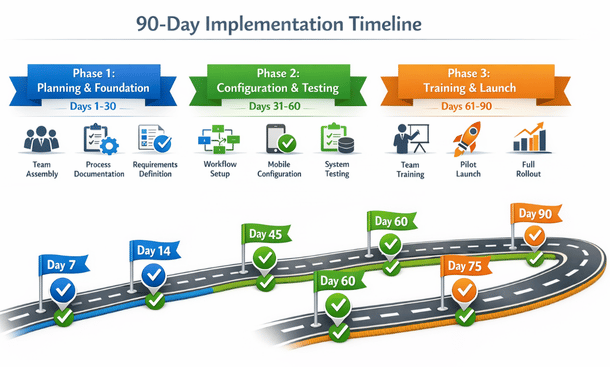
Month two focuses on getting the system configured exactly right and testing thoroughly. Configure core workflows translating documented processes into actual system configuration. Set up order management, purchasing, inventory management, and financial workflows. Build custom reports and dashboards creating the views people need for daily work. Configure mobile dashboards for different roles and test reports to ensure they show accurate data.
Configure mobile-specific features with careful attention. Optimize mobile dashboards that show too much information on small screens. Configure mobile versions that surface the most critical information for different roles. Set up mobile notifications determining what alerts people need on their phones without overwhelming users. Configure mobile approval workflows and test the complete process from mobile device. Set up offline functionality determining what data should cache on devices for offline access.
User acceptance testing verifies the system works as designed before training your whole team. Create test scenarios covering common workflows with specific step-by-step procedures. Have department representatives test their areas because they know the nuances and can spot problems. Test mobile functionality extensively under various conditions, on different devices, with poor connectivity, and offline scenarios. Document every issue discovered and retest after fixes.
Training preparation and data migration happen in the final weeks of month two. Finalize training materials as simple guides for common tasks focusing on daily activities. Record video walkthroughs as short videos showing specific tasks. Three-minute videos on single topics beat 30-minute comprehensive videos nobody watches. Complete full data migration of all historical data and verify accuracy. Configure production environment copying tested configurations from sandbox.
Month three focuses on getting your team comfortable with the system and launching successfully. Start with training for trainers who become your first line of support after launch. Conduct role-based training sessions where sales reps get sales training and warehouse staff get inventory training. Make training hands-on where people complete actual tasks in the system during training using real scenarios from your business.
Keep sessions short and focused. 45-minute sessions work better than three-hour marathons. Cover one area thoroughly rather than rushing through everything. Provide immediate support during training with knowledgeable people available to answer questions. Record training sessions for people who miss sessions and for ongoing reference.
Pilot launch with a small group first rather than risky full company-wide launches. Select pilot users carefully choosing people who are tech-savvy and patient. Launch pilot users on production system where they use real data and complete actual work. Monitor pilot users closely with daily check-ins. Collect feedback systematically using surveys or structured interviews. Refine based on pilot feedback making configuration adjustments and updating training materials.
Full launch happens after pilot success. Communicate launch plans clearly so everyone knows when cutover happens, what they need to do, and where to get help. Choose launch timing strategically, not during your busiest period. Monday morning launches give you the full week to support. Provide extra support during launch week with your implementation team available for questions.
Stabilization happens in the first few weeks after launch. Hold daily standups during week one as quick 15-minute meetings to surface issues and share solutions. Document workarounds and fixes creating your knowledge base for ongoing support. Identify quick wins like dashboard tweaks or simplified workflows that maintain momentum. Plan phase two enhancements for capabilities deferred from phase one.
Critical success factors determine outcomes regardless of which phase you’re in. Executive sponsorship provides authority to make decisions quickly and prioritize implementation work. Change management helps people through the transition by explaining why you’re implementing mobile ERP and addressing concerns proactively. Clear communication prevents confusion through frequent updates using multiple channels. Adequate resources including time, money, and dedicated people make implementation possible.
Common pitfalls to avoid include scope creep where continuously adding features delays everything. Defer nice-to-have features to phase two and launch core functionality on time. Inadequate testing causes launch disasters. Every hour saved on testing costs ten hours fixing problems after launch. Insufficient training means people struggle for months. Invest in comprehensive training for immediate payoff.
Post-launch optimization continues improvement after launch. Gather user feedback one month post-launch about what’s working and what’s frustrating. Monitor system usage to show what features people actually use. Address pain points quickly because small fixes maintain goodwill. Expand capabilities gradually after core functionality works smoothly.
90 days from now your team can be confidently managing your business from their phones. Approving orders from the beach. Checking inventory from client meetings. Reviewing financials from anywhere. That mobile flexibility transforms how California businesses operate. Our comprehensive 90-day implementation roadmap provides the detailed playbook for executing each phase successfully, getting you from contract signing to productive mobile operations without the chaos that typically derails ERP projects.
Taking Your California Business Mobile in 2026
Mobile ERP transforms how you run your business. That transformation happens when you understand what you’re getting into and make deliberate choices based on your specific situation rather than vendor marketing promises or trends.
The California business environment demands mobility. Your competitors are already managing operations from their phones. Your customers expect rapid responses regardless of where you physically happen to be. Your team wants flexibility to work effectively from anywhere. Mobile ERP provides the infrastructure making all of this possible.
But mobile ERP only delivers value when implemented thoughtfully. The wrong platform wastes money and frustrates your team for years. The right platform poorly implemented creates the same problems. Missing security protections expose your business to catastrophic data breaches. Inadequate training means expensive software sitting unused while people stick with old manual processes.
Success comes from systematic decision-making at each stage. Platform selection determines your foundation. Evaluate options based on your actual needs rather than impressive feature lists. Consider your team’s technical sophistication, your budget constraints, your growth trajectory. NetSuite provides enterprise power for businesses ready to invest in comprehensive functionality. Odoo delivers surprising capability at budget-friendly prices. SAP Business One brings established reliability. Acumatica offers cloud-native design optimized for mobile from inception.
The features you prioritize make or break daily experiences. Real-time synchronization and offline functionality aren’t negotiable. Intuitive mobile interfaces determine whether people actually use the system. Role-based dashboards surface relevant information efficiently. Approval workflows eliminate bottlenecks that slow business. Barcode scanning prevents inventory errors. Financial visibility enables informed decisions anywhere.
Architecture choices affect everything that follows. Cloud ERP delivers superior mobile experiences through infrastructure specifically designed for remote access. Traditional ERP forces clunky VPN connections and sluggish performance. The cost difference favors cloud when you account for total ownership over time. The security advantages favor cloud for most small businesses lacking dedicated security teams. The scalability benefits favor cloud for growing companies.
Security protections prevent disasters that destroy businesses. Multi-factor authentication blocks unauthorized access. Encryption protects data in transit and at rest. Granular permissions limit information exposure. Device management handles loss and theft. Network security protects public wifi connections. Team training prevents human errors that compromise technical protections. Monitoring detects problems before they escalate. Regular updates close vulnerabilities before exploitation.
Implementation execution determines whether your mobile ERP investment pays off or wastes resources. The 90-day timeline provides structure maintaining momentum without sacrificing quality. Month one establishes foundation through team assembly, process documentation, and requirements definition. Month two configures workflows and tests thoroughly. Month three trains your team and launches with proper support. Each phase builds on previous work systematically.
The businesses succeeding with mobile ERP in 2026 didn’t get lucky. They made informed decisions. They planned thoroughly. They implemented systematically. They supported their teams generously. They treated mobile ERP as a strategic capability rather than just technology purchase.
Your California business can achieve the same results. Mobile operations that let you manage everything from anywhere. Teams that stay productive regardless of location. Customers that get rapid responses. Inventory that stays accurate. Finances that remain visible. Approvals that happen instantly. Operations that scale smoothly as you grow.
The opportunity costs of delaying mobile ERP grow daily. Every day you wait is another day your competitors gain advantages. Another day your team works inefficiently. Another day you miss opportunities because information wasn’t available at the right moment. Another day your business operates with unnecessary friction.
Start with honest assessment of where your business stands today. How do your current processes handle remote access? What bottlenecks slow operations when people aren’t at their desks? Which information do people need on-the-go but can’t easily access? Where do errors happen because people work with outdated data? These pain points identify where mobile ERP delivers immediate value.
Move to structured evaluation of your options. Don’t just watch vendor demos and pick whatever looks impressive. Test platforms with your actual workflows. Have your team try completing real tasks during trials. Verify that features vendors demonstrate actually work reliably in daily use. Check references from similar businesses in California. Understand total costs beyond monthly subscription fees.
Plan your implementation deliberately using the 90-day framework. Assemble your team with clear roles and time commitments. Document current processes identifying what works and what doesn’t. Define requirements prioritizing must-have capabilities over nice-to-have features. Configure thoroughly and test exhaustively. Train comprehensively and support generously during launch. For businesses ready to execute this implementation systematically, our detailed 90-day roadmap provides the week-by-week playbook that takes you from contract signing to productive mobile operations without the chaos that typically derails ERP projects.
Mobile ERP isn’t future technology anymore. It’s current competitive necessity for California businesses. The question isn’t whether mobile access makes sense. It’s whether you’ll implement it strategically or reactively. Whether you’ll choose platforms that actually work or settle for mediocre solutions. Whether you’ll protect your data properly or create security vulnerabilities. Whether you’ll support your team effectively or leave them struggling.
You now have the framework for making these decisions well. The platform options and selection criteria. The feature priorities and architecture considerations. The security protections and implementation approach. Everything you need to transform your California business into a mobile-first operation that competes effectively in 2026 and beyond.
The businesses thriving five years from now will be the ones that embraced mobile operations thoughtfully today. Your competitors are already making this transition. Your customers already expect the responsiveness mobile access provides. Your team already wants the flexibility mobile tools enable. The only question is whether you’ll lead this transformation for your business or scramble to catch up later.
Start now. Evaluate your options. Choose deliberately. Implement systematically. Support your team. Build the mobile-first business California’s competitive environment demands. The tools exist. The frameworks work. The only missing piece is your decision to begin.
About the Author

mike
Mike is a tech enthusiast passionate about SaaS innovation and digital growth. He explores emerging technologies and helps businesses scale through smart software solutions.
Did you find this helpful?
Your feedback helps us curate better content for the community.