

Here’s something nobody tells you during those smooth ERP sales presentations – data migration is where implementations go to die.
The vendor shows you clean dashboards filled with perfectly formatted information. Your demo data looks flawless. Everything works beautifully. Then reality hits when you try moving your actual business data into the new system.
Your customer records have duplicates and inconsistent formatting. Your inventory data lives in three different spreadsheets that don’t match. Your financial history includes transactions from a system you retired five years ago that nobody knows how to access anymore. Your product catalog has evolved organically over a decade and contains contradictions that somehow worked in the old system but break the new one.
ERP data migration isn’t just a technical challenge. It’s an archeological expedition through years of business history, documenting how your company actually operates versus how you think it operates. Get this wrong and you’ll spend months cleaning up errors, lose critical information, or worst case, roll back the entire implementation.
Let me show you how to move your data successfully without the disasters I’ve watched other California companies experience.
Why data migration is harder than anyone admits
Software vendors minimize data migration complexity during sales conversations because acknowledging the real challenge would scare prospects away. They’ll say things like “our migration tools handle everything automatically” or “we’ve done hundreds of migrations just like yours.”
Neither statement is technically false, but both are misleading.
Migration tools can automatically extract data from source systems and load it into new databases. What they can’t do is fix the data quality issues accumulated over years of operations, reconcile inconsistencies between systems, or make judgment calls about how to handle edge cases.
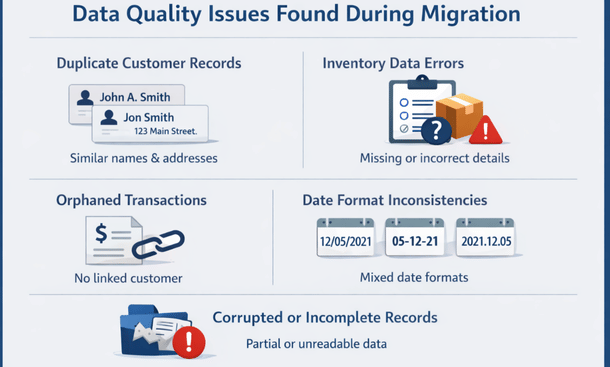
Data Quality Issues Infographic
Every business has unique data problems that only emerge when you try moving everything to a new system. You’ve got customers entered multiple times with slightly different spellings. You’ve got inventory items that exist in your warehouse management system but not your accounting software. You’ve got transactions from temporary employees whose user accounts no longer exist.
Your old system tolerated these issues because it evolved alongside your business. Workarounds became institutionalized. People knew which data was reliable and which required manual verification. The new ERP doesn’t have that context and won’t accept messy data without breaking.
The larger your company and the longer you’ve been in business, the more data problems you’ve accumulated. A five-year-old company with 50 employees has fewer migration challenges than a 15-year-old company with 200 employees.
Assessing what data you actually need to migrate
The biggest mistake companies make is trying to migrate everything. Years of historical transactions, archived orders, deleted customers, obsolete products, and outdated pricing records all get dumped into the migration scope.
This approach triples your migration effort and imports garbage you’ll never reference again.
Start by identifying what data is actually necessary for operations. You need active customers, current inventory, open orders, valid vendors, and recent transaction history. You probably don’t need every order from eight years ago or products you discontinued five years back.
Financial data requires the most careful consideration. Your accountants need enough history to run comparative reports and satisfy audit requirements. That might mean three years of detailed transactions or just opening balances and summary records depending on your industry and regulatory requirements.
Work with your CFO to determine the minimum financial history that satisfies both operational needs and compliance obligations. Migrating five years of detailed general ledger transactions when you only need two years doubles your migration complexity for minimal benefit.
Historical data that doesn’t need to migrate can be archived. Export it from the old system, store it in a secure location, and keep the old system accessible in read-only mode for a transition period. This gives you access to historical records when needed without burdening your migration project.

Be ruthless about data cleanup decisions. That customer who hasn’t ordered in six years and doesn’t respond to emails? Don’t migrate them. That vendor account you closed three years ago? Archive it. Those test transactions from your old system implementation? Delete them.
Reducing migration scope by 30 to 50 percent through smart scoping decisions saves weeks of effort and eliminates data that would clutter your new system.
Data quality assessment and cleanup strategies
Before you migrate anything, you need to understand what condition your data is actually in.
Run data quality reports on everything you plan to migrate. Look for duplicates, missing required fields, invalid formats, orphaned records, and logical inconsistencies. Every source system has unique problems, and you need visibility into all of them.
Customer data typically has the most quality issues. People get entered multiple times with slight name variations. Addresses are incomplete or formatted inconsistently. Contact information is outdated. Companies change names but records don’t get updated.
Create matching rules to identify duplicates. Exact name matches are easy, but you need fuzzy matching to catch “ABC Company” and “ABC Co.” and “ABC Corp” as the same customer. This requires either specialized software or significant manual effort.
Decide on merge strategies before you start combining records. Which address do you keep when duplicates have different information? How do you handle transaction history split across multiple customer records? These decisions need consistent rules applied across thousands of records.
Inventory data quality impacts operations immediately. Missing product descriptions, incorrect quantities, invalid SKUs, or wrong unit of measure values will break your warehouse operations on day one.
Audit your inventory data thoroughly. Verify that physical counts match system records. Ensure product attributes are complete and correct. Validate that location data accurately reflects where items are stored.
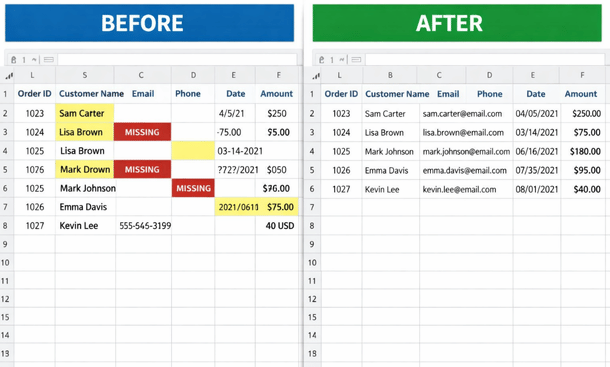
Financial data must be perfectly accurate. Even small errors in opening balances or transaction details can create accounting nightmares that take months to untangle.
Reconcile all financial data before migration. Ensure that trial balances are correct, aged receivables and payables match actual obligations, and all accounts reconcile properly. If you find discrepancies in the old system, fix them there before migrating.
Don’t assume you’ll clean things up after migration. That almost never happens. Address data quality issues before you move data, when your team still has access to the old system and institutional knowledge about what the data should look like.
Building effective data mapping documentation
Data mapping defines how information from your old system translates to your new ERP. This documentation becomes the blueprint for your entire migration.
Start by documenting all fields in your source systems. Create spreadsheets that list every database table, every field, what data it contains, and what format it uses.
Then document the target ERP structure. What tables and fields exist? What formats do they require? What are the validation rules? Where are the required fields that must have values?
Now map source to target. For each field in your source system, identify which field in the new ERP should receive that data. Some mappings are straightforward – customer name goes to customer name. Others require transformation – your old system uses a single address field while the new system separates street, city, state, and zip.
Document every transformation rule. If phone numbers in your old system include extensions in the same field but the new system has separate fields, you need a rule for parsing them. If your old product codes don’t match the new ERP’s SKU format requirements, you need a transformation formula.
Some source data won’t have a direct mapping. Maybe your old system tracked information the new system doesn’t need. Document these unmapped fields so you can decide whether to archive them separately or discard them.
Other target fields require data that doesn’t exist in your old system. New required fields need default values or manual population before migration can proceed.
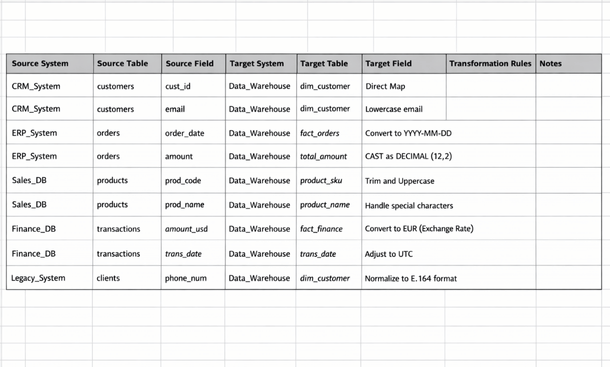
Create test cases for every mapping rule. Define specific source records and document exactly what they should look like after transformation. These test cases let you verify that your migration process works correctly before you run it on production data.
This mapping documentation takes significant time to build – expect several weeks for a typical small business migration. Rushing this phase guarantees problems during actual migration.
Testing migration processes thoroughly
Never run your migration process against production data without extensive testing first.
Set up a complete test environment that mirrors your production systems. Copy a representative sample of data from all source systems. Include normal records, edge cases, and examples of every data quality issue you’ve identified.
Run your migration process against test data. Load everything into the new ERP test environment. Then verify results meticulously.
Check record counts. Did everything get migrated? Are you missing records that should have transferred?
Verify data accuracy. Pick random samples from each data type and compare source to target. Do customer addresses match? Are product descriptions correct? Do financial balances tie out?
Test transformations. For every mapping rule that changes data format or structure, verify the transformation worked correctly. Look at dozens of examples, not just one or two.
Validate relationships. In ERP systems, data is interconnected. Orders link to customers. Transactions link to accounts. Inventory links to locations. Verify that all these relationships survived migration intact.
Run business processes in the test system using migrated data. Can you create a sales order? Can you receive inventory? Can you process payroll? Can you run financial reports? If migrated data prevents normal operations, you’ve got problems to fix.
Document every issue you find during testing. Don’t just fix individual records – identify the root cause and update your migration process to handle similar cases correctly.
Run multiple test migrations. Your first attempt will uncover issues. Fix them and test again. Keep iterating until a complete test migration runs without errors and produces accurate results.
Some companies skip thorough testing because they’re impatient to go live. This always backfires. Problems that would take hours to fix during testing take weeks to fix in production when your entire company is waiting to use the new system.
Managing the actual migration event
You’ve cleaned your data, documented mappings, and tested thoroughly. Now comes the actual migration.
Schedule migration during a period of minimal business activity. Most companies migrate over a weekend or during a planned shutdown period. You need enough time to complete migration and verify results before employees start working in the new system.
Create a detailed migration runbook that documents every step. Who does what, in what order, with what validation at each stage. Don’t rely on memory or improvisation during a high-stakes event.
Freeze your source systems before migration starts. Stop all data entry so that nothing changes while you’re extracting and migrating information. Communicate the freeze timing clearly so employees know when they must complete work in the old systems.

Extract all data from source systems and verify extract files are complete before starting transformation. Compare record counts from extract files against source system reports. If you’re missing records in the extract, stop and investigate before proceeding.
Run your transformation process against extracted data. Monitor for errors and unexpected results. Even with thorough testing, production data sometimes contains surprises.
Load transformed data into your new ERP. Again, monitor for errors. Most ERP systems provide detailed logs of what succeeded and what failed during data loading.
Verify loaded data immediately. Run the same validation checks you used during testing. Compare record counts, spot-check accuracy, verify relationships, and confirm that critical business processes work with real data.
Don’t declare victory until business users have verified their data looks correct. Your accounting team needs to confirm opening balances. Your warehouse manager needs to verify inventory records. Your sales team needs to check customer information. Their validation catches problems that technical checks might miss.
If you find critical problems during validation, be prepared to roll back and fix them rather than going live with bad data. Rolling back is painful but way less painful than operating for weeks with incorrect information.
Post-migration validation and reconciliation
Migration doesn’t end when data loads successfully. You need ongoing validation to catch issues that only emerge through actual use.
Run parallel operations for at least two weeks if possible. Keep the old system running in read-only mode while employees start using the new ERP. This lets you compare results and verify that critical business processes produce correct outcomes.
Create reconciliation reports that compare old system data to new system data. Customer lists should match. Inventory quantities should match. Account balances should match. Payment terms should match. Pricing should match.
Discrepancies will emerge. Some are expected – data that intentionally didn’t migrate or changed based on transformation rules. Others indicate problems that need fixing.
Assign someone to track and resolve every discrepancy. Don’t assume small differences are harmless. That $100 variance in accounts receivable might be an isolated error or it might indicate a systematic problem affecting hundreds of records.
Monitor user reports of data problems closely during the first month. When employees say something looks wrong, investigate immediately. They know your business data intimately and often spot issues that technical validation missed.
Create a process for correcting migrated data. Some fixes can happen through normal ERP functions. Others might require database updates by administrators. Document what was changed and why to maintain an audit trail.
Plan for a data cleanup sprint a few weeks after go-live. Despite your best efforts, some data issues only become apparent through daily use. Budget time and resources for this cleanup work.
Common migration mistakes and how to avoid them
Let me share the migration disasters I see repeatedly so you can avoid them.
Underestimating timeline. Companies assume migration takes a few weeks when realistic timelines are three to six months including planning, cleanup, testing, and validation. Build adequate time into your implementation schedule.
Skipping data cleanup. Migrating dirty data means your new ERP starts life polluted with errors. The time you save skipping cleanup gets spent fixing problems over months of operation. Clean first, migrate after.
Inadequate testing. One test migration isn’t enough. You need multiple iterations to refine your process and handle edge cases. Budget time for thorough testing.
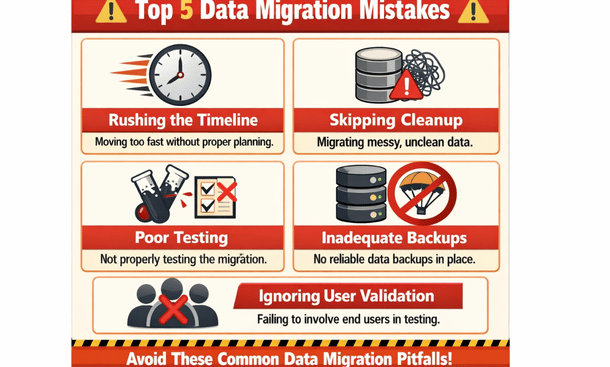
Poor backup strategies. If migration goes wrong, you need the ability to roll back and try again. Without solid backups of both old and new systems, you’re risking catastrophic data loss.
Ignoring user validation. Technical checks aren’t enough. Business users must verify that migrated data is correct and usable. Their insights catch problems that database queries miss.
Migrating too much history. Bringing over every transaction from the past decade triples your effort without adding value. Be selective about historical data.
Missing transformation rules. Every data format difference between systems requires a transformation rule. Missing even small transformations causes errors that corrupt records.
Inadequate documentation. Six months after migration, someone will need to understand why data looks a certain way or how specific transformation decisions were made. Document everything.
Once your data is safely migrated and validated, your next critical decision is choosing the right vendor partner who will support you through implementation and beyond.
Knowing the ERP vendor selection red flags helps you avoid partnerships that doom your project before migration even begins.
Data migration challenges represent just one category of common ERP implementation mistakes that can derail even well-planned projects.
About the Author

mike
Mike is a tech enthusiast passionate about SaaS innovation and digital growth. He explores emerging technologies and helps businesses scale through smart software solutions.
Did you find this helpful?
Your feedback helps us curate better content for the community.