
Table of Contents
- Understanding the Core Difference
- What Configuration Really Means
- What Customization Actually Involves
- Cost Comparison: The Real Numbers
- Upgrade and Maintenance Implications
- Flexibility and Future-Proofing
- When to Configure vs When to Customize
- Making the Right Choice for Your Business
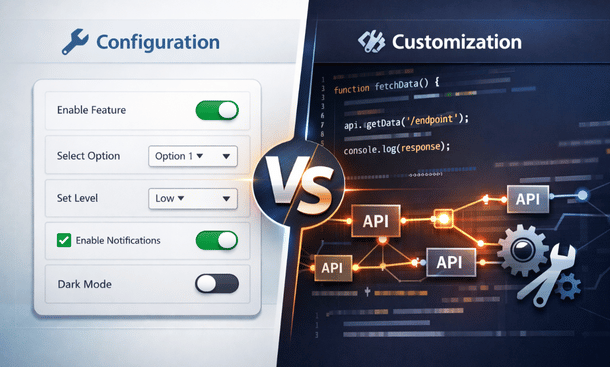
Here’s a question I get all the time from fellow entrepreneurs: “Should I customize or just configure my ERP?” It’s honestly one of the most important decisions you’ll make during implementation. Configuration means adjusting existing settings and features within your ERP’s standard framework—think turning knobs and flipping switches. Customization involves actual code changes and building new functionality from scratch. The choice dramatically impacts your budget, upgrade path, and long-term flexibility. This decision becomes especially critical when you’re developing your approach to tailoring your system to your business goals. Let me walk you through the real differences.
Understanding the Core Difference
The distinction between configuration and customization isn’t just semantics—it fundamentally changes your relationship with your ERP system and vendor.
Configuration works within the boundaries your ERP vendor has already built. Think of it like customizing a car at the dealership. You can choose the color, the trim package, the wheel style, and optional features like heated seats or a sunroof. But you’re still working within predefined options the manufacturer designed. You’re not rebuilding the engine or redesigning the chassis.
In ERP terms, configuration includes activities like setting up your chart of accounts, defining user roles and permissions, choosing which modules to activate, creating workflow approval paths from dropdown menus, and building reports using the vendor’s report writer tool. Everything happens through interfaces the vendor provides specifically for customers to adjust settings.
Customization goes beyond those guardrails. You’re modifying the underlying code, database structure, or core functionality. This might mean writing custom scripts, developing new modules, changing how existing features calculate or display data, or building entirely new interfaces. You’re not just using the car the manufacturer built—you’re taking it to a custom shop to install a turbocharger or swap out the transmission.
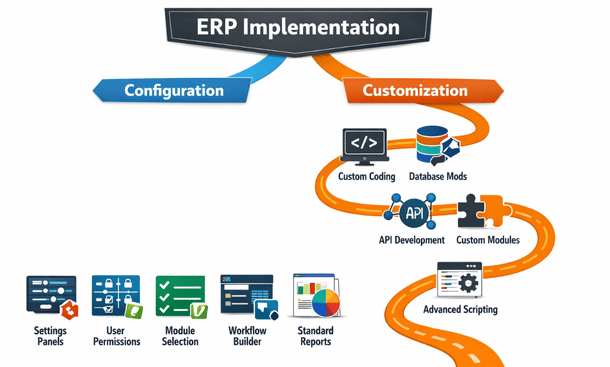
The practical implication is that configuration changes are reversible and relatively risk-free. If you configure a workflow one way and it doesn’t work, you can reconfigure it differently without major consequences. Customization changes are harder to undo and can create dependencies that affect your system’s stability and upgradeability.
What Configuration Really Means
Let’s get specific about what you can accomplish through configuration alone, because modern ERP systems are surprisingly flexible without touching any code.
Module selection and activation is pure configuration. Most ERP platforms are built modularly—you pay for and activate only the components you need. A small retailer might enable inventory management, point of sale, and basic accounting while leaving manufacturing and project management modules dormant. This keeps your system simpler and your licensing costs lower.
User management and security configuration controls who can see and do what within the system. You create roles like “warehouse staff,” “accounting manager,” or “sales rep,” then assign specific permissions to each role. Sarah in accounting can approve invoices but can’t modify inventory. Mike in the warehouse can receive shipments but can’t view financial data. This granular control happens entirely through configuration interfaces.
Workflow configuration defines how processes flow through your organization. Many ERP systems include visual workflow builders where you drag and drop steps, set conditions, and assign approvers. You might configure a workflow where purchase requisitions under ten thousand dollars auto-approve, amounts between ten and fifty thousand require manager approval, and anything higher needs director sign-off. No coding required—just point-and-click logic.
Report configuration using built-in report writers lets you create custom views of your data. You select which fields to include, set filters and sorting rules, add calculations and groupings, and format the output. While you’re limited to the data already in your system and the capabilities of the report writer, that’s often sufficient for standard business reporting needs.
Dashboard configuration arranges widgets showing key metrics. You might configure a sales dashboard displaying today’s revenue, this month’s pipeline value, top customers by order volume, and conversion rates by source. The data and calculations already exist in the system—you’re just choosing what to display and how to arrange it.
Field visibility and requirement configuration adjusts what users see on forms. Maybe the standard customer form has thirty fields, but your business only needs twenty. You can hide irrelevant fields and mark essential ones as required. This happens through configuration settings without modifying the underlying database.
The beauty of configuration is that it’s usually documented in user guides, supported directly by your vendor, and doesn’t interfere with system updates. When your ERP vendor releases version 2.0, your configurations typically migrate smoothly because they’re working within the vendor’s supported framework.
What Customization Actually Involves
Customization enters the picture when configuration options can’t deliver what you need. This is where things get more technical and expensive.
Custom field creation beyond what’s configurable adds new data points to your system. Maybe you need to track five specific attributes for products that don’t exist in the standard data model. Creating these fields might require database modifications and updating forms and reports to include the new information. Depending on the ERP platform, this could require technical skills ranging from simple to advanced.
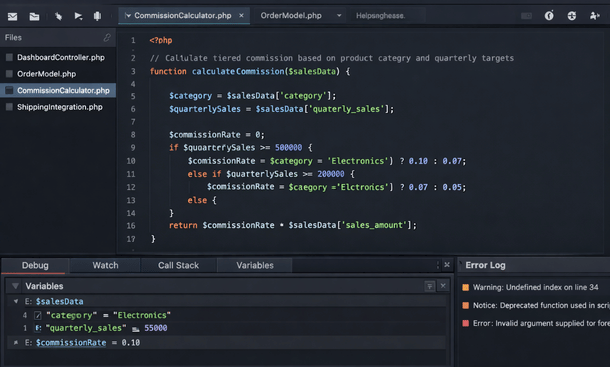
Custom code development writes new functionality from scratch. This might be a script that calculates complex commissions based on multiple variables, a routine that generates specialized shipping documents, or logic that enforces unique business rules. Code customization requires developers who understand your ERP’s programming language and architecture.
API development and integration connects your ERP with external systems in ways not supported by standard connectors. Building a custom API integration with a niche industry platform or legacy system requires development expertise. You’re writing code that maps data between systems, handles authentication, manages error conditions, and keeps everything synchronized.
User interface modifications change how screens look and function beyond what configuration allows. Maybe you want to completely redesign the order entry interface to match your unique sales process, or create a simplified mobile view for field staff. Significant UI changes require front-end development skills and deep understanding of your ERP’s interface framework.
Database customization modifies the underlying data structure. Creating new tables, establishing relationships between data entities, or changing how information is stored requires database expertise. This is serious technical work that can create major complications if done incorrectly.
Module development builds entirely new sections of functionality. If your ERP lacks a capability essential to your business—maybe specialized equipment maintenance tracking or complex subscription billing—you might develop a custom module. This is essentially software development within your ERP environment and represents the highest level of customization complexity.
The challenge with customization is that you’re now maintaining custom code. When your vendor releases updates, you need to test whether your customizations still work correctly. Sometimes vendor updates break customizations, requiring rework. You also need technical resources who understand your customizations for ongoing support and future modifications.
Cost Comparison: The Real Numbers
Let’s talk dollars, because the cost difference between configuration and customization can be substantial.
Configuration costs are relatively predictable. If you’re working with an implementation partner, expect hourly rates between one hundred and two hundred dollars for consultants who can handle configuration work. A typical small business configuration project might consume fifty to two hundred hours depending on complexity. That puts you somewhere between five thousand and forty thousand dollars for professional configuration services. Many businesses handle simpler configurations themselves after initial training, reducing costs further.
Customization costs vary wildly based on complexity. Simple customizations like adding calculated fields might run a few thousand dollars. Moderate customizations like custom reports with complex logic or basic integrations might range from five to twenty thousand dollars. Complex customizations like custom modules or extensive API development can easily hit fifty thousand to two hundred thousand dollars or more.
The hourly rates for customization work are typically higher too—between one hundred fifty and three hundred dollars per hour for experienced ERP developers, depending on the platform and location. Specialized platforms or niche expertise command even higher rates.
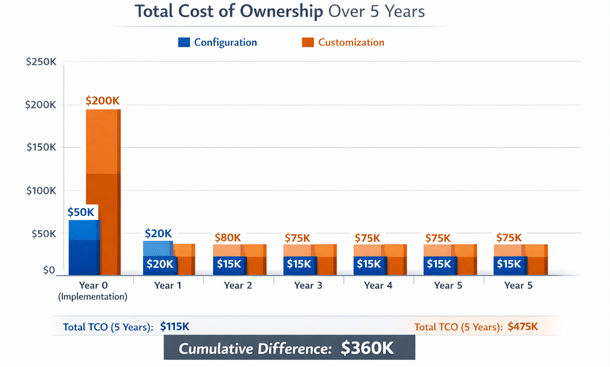
But initial development is only part of the cost equation. Configuration maintenance is minimal—you just adjust settings as needs change. Customization maintenance is ongoing. Every time your ERP vendor releases an update, you need to test your customizations and potentially fix compatibility issues. Budget at least ten to twenty percent of initial customization costs annually for maintenance and updates.
There’s also an opportunity cost to consider. Customization projects take longer to implement. If configuration gets you live in two months but customization takes six months, that’s four additional months you’re operating without your new system’s benefits. For a growing business, that delay might cost more than the actual customization expenses.
Upgrade and Maintenance Implications
This is where the configuration versus customization decision really impacts your long-term experience with your ERP system.
Configuration-heavy systems upgrade relatively smoothly. When your vendor releases a new version with improved features, better performance, or security patches, you can typically upgrade with minimal hassle. Your configurations migrate automatically or require minor adjustments. The vendor has tested the upgrade path because you’re using the system as designed.
Customization-heavy systems face upgrade challenges. Your custom code might not be compatible with the new version. Features you customized might work differently in the updated release. You need to budget time and money for regression testing—making sure everything still works after the upgrade. Sometimes you’ll need to modify or even rebuild customizations to work with the new version.
I’ve seen California startups postpone vendor upgrades for years because they were afraid of breaking critical customizations. They missed out on new features, performance improvements, and security patches because the risk and cost of upgrading with extensive customizations was too high. That’s a dangerous position to be in.
Vendor support also differs. When you call support with a configuration question, they help you directly—that’s standard product support. When you call with a customization issue, they often can’t help because you’ve modified their product in unsupported ways. You’re relying on whoever built the customization or your internal team for support.
Documentation is another factor. Vendor documentation covers all configuration options thoroughly. Your customizations need separate documentation, and if the original developer leaves without documenting their work, you’re stuck trying to reverse-engineer custom code to understand how it works.
The maintenance burden grows with customization complexity. A few simple customizations are manageable. But as you add more custom code, interactions and dependencies become harder to track. What started as a few targeted modifications can evolve into a tangled web that’s expensive to maintain and risky to change.
Flexibility and Future-Proofing
Ironically, while customization seems like it provides more flexibility, it can actually lock you in more than configuration.
Configuration changes are fast and flexible. Need to adjust an approval threshold? Takes five minutes. Want to add a field to a form? Maybe thirty minutes including testing. Need to create a new report? Could be done in an hour. The speed of configuration changes lets you adapt quickly as your business evolves.
Customization changes require developer involvement. Even simple modifications to custom code might take hours or days depending on developer availability and system complexity. This slower change cycle can make your business less agile just when your ERP should be enabling faster adaptation.
Vendor lock-in differs too. Configuration-heavy implementations are easier to migrate away from if you eventually outgrow your ERP or find a better option. Your business processes aren’t deeply embedded in proprietary custom code. Moving to a different system means reconfiguring rather than rebuilding.
Customization-heavy implementations create stronger vendor lock-in. You’ve invested heavily in custom code specific to your current platform. Moving to a different ERP means abandoning that investment and rebuilding functionality from scratch. This makes it harder to switch vendors even if your current ERP becomes suboptimal.
Platform dependency is another consideration. Modern cloud ERP platforms are constantly evolving—vendors add features quarterly or even monthly. A workflow you customized two years ago might now be available as a standard configurable feature. But you’re stuck maintaining your custom version because switching would require rework.
The most future-proof approach is actually maximal configuration with minimal, strategic customization. Configure everything you can, and customize only the truly unique capabilities that create competitive advantage. This keeps you flexible and ensures you benefit from vendor platform improvements over time.
When to Configure vs When to Customize
So when does each approach make sense? Here’s how I think about the decision framework.
Choose configuration when:
- Standard features exist that meet your needs with reasonable adjustments
- Your processes align reasonably well with industry best practices
- You want lower costs and faster implementation
- Your team has limited technical resources
- You value easy upgrades and vendor support
- Your business is still evolving and you need flexibility to change quickly
Choose customization when:
- You have truly unique processes that create competitive advantage
- No amount of configuration can achieve what you need
- The ROI clearly justifies the higher investment and ongoing maintenance
- You have technical resources to support custom code long-term
- Your processes are stable and unlikely to change drastically
- The customization addresses a core capability central to your business model
Many times the answer is both—configure everything possible, and customize only the specific gaps where configuration falls short. This hybrid approach maximizes the benefits of each while minimizing the downsides.
A practical strategy is starting with configuration only for your initial implementation. Get live with the system, let your team learn it, and identify what really needs customization versus what just seemed necessary before you understood the platform’s capabilities. After six months of production use, you’ll have much better insight into which customizations actually deliver ROI worth the investment.
Also consider the maturity of your business processes. If you’re a young startup still figuring out your optimal workflows, heavy customization locks you into current thinking. Configuration lets you adapt as you learn. Once your processes stabilize and you’ve validated what works, then strategic customization makes more sense.
Making the Right Choice for Your Business
The configuration versus customization decision isn’t one-size-fits-all. Your right answer depends on your specific circumstances, budget, technical capabilities, and business model.
Start by documenting your actual requirements in detail. For each need, ask whether configuration can address it. You might be surprised how much modern ERP platforms can do through configuration alone. Many perceived needs for customization evaporate once you fully understand the platform’s configurable capabilities.
For requirements that truly need customization, prioritize ruthlessly. Rank them by business impact and implementation difficulty. Focus customization budget on high-impact capabilities that configuration can’t deliver. Accept configuration-based compromises for lower-impact needs.
Consider the total cost of ownership over five years, not just initial implementation costs. A customization that costs twenty thousand dollars upfront but requires five thousand per year in maintenance costs forty-five thousand over five years. Could you achieve eighty percent of the benefit through a configuration approach costing five thousand upfront and minimal ongoing maintenance? Sometimes the math favors the simpler approach even if it’s less perfect.
Think about your team’s technical capabilities honestly. If you don’t have developers on staff or a strong relationship with an implementation partner, extensive customization creates vulnerability. What happens when the consultant who built your customizations moves on? Can you support the code yourself?
Remember that configuration versus customization isn’t binary—it’s a spectrum. You can start configuration-heavy and add targeted customizations over time as needs become clear and ROI is proven. This iterative approach reduces risk and ensures customization investments deliver measurable value.
Want to explore what specific customizations might make sense for your business? Check out our breakdown of the costs to Drives ERP Customization to understand your options. And for comprehensive guidance on planning your implementation strategy, our complete guide on ERP customization covers everything from decision frameworks to execution.
The right balance between configuration and customization sets your business up for sustainable growth. Choose wisely, and your ERP becomes an enabler rather than a constraint as you scale.
About the Author

mike
Mike is a tech enthusiast passionate about SaaS innovation and digital growth. He explores emerging technologies and helps businesses scale through smart software solutions.
Did you find this helpful?
Your feedback helps us curate better content for the community.