

Real talk – I’ve watched more ERP implementations fail because of people problems than technology problems. The software worked fine. The servers never crashed. The integrations ran smoothly. But the team absolutely refused to use the new system, and the whole project became a multi-million dollar paperweight.
ERP change management isn’t some soft HR concept you can skip if you’re in a hurry. It’s the difference between a system that transforms your operations and one that employees actively sabotage because they hate it.
California’s competitive job market makes this even trickier. Your talented people have options. Push too hard without bringing them along, and they’ll just bounce to another company. Handle change management right, and you’ll turn potential resisters into enthusiastic advocates who make your ERP implementation a success story.
Why smart employees resist new ERP systems
Let’s start by understanding that resistance isn’t about stupidity or stubbornness. Your team has legitimate reasons for being skeptical about the new ERP.
They’re comfortable with current systems. Maybe the old software is clunky and outdated, but your employees know exactly how to navigate it. They’ve built workflows, shortcuts, and workarounds that help them get their jobs done efficiently. A new ERP throws all that institutional knowledge in the trash.
Change creates uncertainty about job security. When you announce a new system that automates processes, people immediately wonder if you’re planning to reduce headcount. Even if that’s not your intention, employees start updating their resumes because they’re nervous.
Previous technology rollouts probably went badly. Most companies have a history of implementing new tools that were supposed to make life easier but actually created more work. Your team remembers those disasters and assumes this ERP will be more of the same.

Nobody asked for their input. Executives and managers picked the new ERP, made all the decisions, and now they’re telling employees to use it. That top-down approach breeds resentment even when the system is actually better than what you’re replacing.
The training probably won’t be enough. Employees know from experience that they’ll get a couple hours of rushed training, then be expected to figure everything out on their own while still hitting their productivity targets.
Understanding these concerns doesn’t mean you cave to resistance. It means you design change management strategies that address the real issues instead of pretending they don’t exist.
Starting change management before vendor selection
Most companies think about change management after they’ve picked an ERP and started implementation. That’s way too late.
Effective change management begins during vendor selection. Include employees from different departments in the evaluation process. When your warehouse manager, accounting supervisor, and customer service lead all have input on which system you choose, they develop ownership over the decision.
You’re not giving employees veto power. You’re still making the final call. But their involvement creates buy-in that pays dividends during implementation.
Form a cross-functional selection committee with representation from every department that will use the new system. Give them real responsibilities – reviewing demos, testing systems, providing feedback on which features matter most for their daily work.
This approach takes more time upfront. Your vendor evaluation stretches from a few weeks to a couple months. But you’re building a coalition of internal champions who will advocate for the new system instead of fighting it.
Document the problems with your current system during this phase. Ask employees to track how much time they spend on manual workarounds, where errors occur most frequently, what reports they can’t generate, and what frustrates them daily. This creates a clear picture of why change is necessary.
Communication strategies that actually work
Here’s what doesn’t work: sending an email announcement that says “We’re implementing a new ERP system. Training will be scheduled soon. Please be patient during the transition.”
That corporate speak triggers immediate anxiety and resistance.
Effective communication about ERP change needs to be honest, frequent, and two-way.
Start by explaining why you’re making this change in terms that matter to employees. Don’t talk about strategic initiatives or digital transformation. Talk about how the current system forces them to work late fixing errors, how they can’t get the data they need to do their jobs, how manual processes waste their time on repetitive tasks.

Frame the new ERP as a solution to their problems, not a corporate mandate they need to tolerate.
Hold regular town halls where employees can ask questions and voice concerns. Actually answer those questions honestly instead of giving corporate non-answers. If someone asks whether the new system will lead to layoffs, give them a straight answer. If you’re worried about job security concerns, address them directly rather than pretending they don’t exist.
Create multiple communication channels. Some people prefer email updates, others want face-to-face conversations, some will engage in Slack channels or internal forums. Use all of them.
Share implementation progress transparently. When things go well, celebrate. When you hit problems, acknowledge them and explain how you’re solving them. Employees can handle bad news. They can’t handle feeling like you’re hiding information.
Building your internal champion network
You can’t personally convince every employee that the new ERP is worth embracing. You need advocates throughout the organization who will do that work for you.
Identify natural influencers in each department. These aren’t necessarily managers or people with formal authority. They’re the employees others listen to and trust. The person everyone asks for help. The team member who knows all the shortcuts. The colleague who’s been around long enough to have credibility.
Recruit these influencers early. Give them advanced access to the new system. Involve them in configuration decisions for their departments. Ask them to identify what training their teams will need. Make them feel like partners in the implementation instead of subjects who need to comply.
Train your champions more extensively than general staff. They need to become power users who can answer questions, troubleshoot problems, and demonstrate best practices after go-live.
Give champions visible recognition for their role. Maybe they get special titles like “ERP Ambassador” or “System Champion.” Maybe they get first access to new features. Maybe their involvement gets highlighted in company communications. Public recognition motivates continued engagement.
These champions become your front-line support after implementation. When an employee has questions or hits a problem, they’re more likely to ask a trusted colleague than submit a help desk ticket. Your champion network provides that peer-to-peer support.
Training approaches that stick
Standard ERP training consists of a consultant showing PowerPoint slides for two hours, then doing a quick demo of the system. Employees nod along, pretend to understand, then panic on day one when they actually need to use the software.
That approach fails because it treats training as information transfer instead of skill development.
Effective training is hands-on, role-specific, and spaced over time.
Hands-on means employees practice in a sandbox environment using scenarios from their actual jobs. Your warehouse staff practice receiving inventory, picking orders, and processing shipments. Your accounting team practices journal entries, month-end close procedures, and financial reporting. Your sales staff practice quote creation, order entry, and customer management.
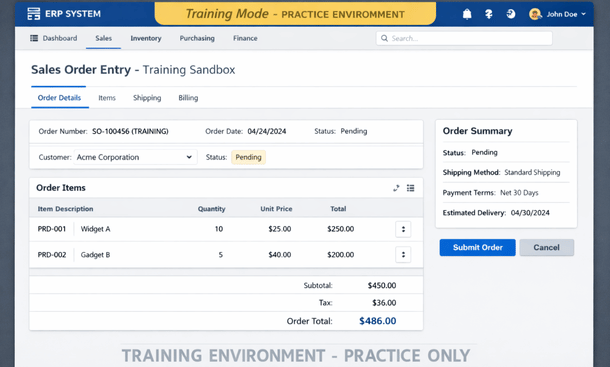
Role-specific training means you don’t waste warehouse workers’ time teaching them financial close procedures they’ll never use. Each team gets training focused on their specific responsibilities in the new system.
Spaced training means multiple sessions over weeks instead of cramming everything into one marathon session. Initial overview training introduces the system. Follow-up sessions dive deeper into specific functions. Refresher training happens right before go-live. Post-implementation training addresses questions that only emerge through actual use.
Record all training sessions so employees can review them later. Create quick reference guides, cheat sheets, and video tutorials they can access when they need help. Build a searchable knowledge base of common questions and solutions.
Expect productivity to drop during the learning curve. Budget for it. Don’t punish employees for being slower while they’re learning. Give them time and support to develop proficiency.
Managing the transition period
Go-live day is when change management becomes absolutely critical. This is where implementations succeed or collapse.
Run parallel operations for at least two weeks if possible. Keep the old system running while employees start using the new one. This safety net reduces anxiety and catches problems before they become disasters.
Provide extensive support during the first month. Have consultants, champions, and managers available to answer questions immediately. When someone gets stuck, they need help within minutes, not hours or days.
Create a rapid response team that can troubleshoot problems and make quick system adjustments. Something that seemed fine during testing might create issues in real-world use. You need the ability to fix things fast.
Monitor system usage closely. Identify employees who aren’t logging in or who are still using old workarounds instead of the new system. These are your resisters who need additional support and attention.
Celebrate early wins. When the new system helps someone solve a problem faster, share that story. When a process that used to take hours now takes minutes, make sure everyone hears about it. Positive reinforcement accelerates adoption.
Address problems honestly. If something isn’t working right, acknowledge it and explain what you’re doing to fix it. Employees can tell when you’re pretending everything is fine when it clearly isn’t.
Sustaining momentum after implementation
Change management doesn’t end after the first month. You need ongoing effort to maintain engagement and optimize system usage.
Schedule regular check-ins with each department to discuss what’s working and what needs improvement. Actually implement the improvements they suggest. Nothing kills momentum faster than asking for feedback and then ignoring it.
Continue training on advanced features once basic proficiency is established. Your initial training covered essential functions. Now show users how to leverage reporting, automation, and analytics capabilities that make their jobs easier.

Track metrics that demonstrate ERP value. Show employees how the new system reduced errors, saved time, improved customer service, or provided better data. Make the benefits visible and tangible.
Recognize power users who maximize system capabilities. Feature them in company communications, ask them to share tips with colleagues, and reward their expertise.
Keep your champion network engaged with regular meetings, advanced training, and early access to new features or modules you’re rolling out.
Address degradation immediately. Over time, people slip back into old habits and workarounds. When you notice this happening, intervene with refresher training and reminders about proper system usage.
Handling persistent resistance
Despite your best efforts, some employees will continue resisting the new system. You need strategies for dealing with this reality.
First, understand why specific individuals are struggling. Is it genuine difficulty learning the system? Fear about job security? Frustration with specific features that don’t work well? Personal resistance to any change? The cause determines your response.
Provide additional one-on-one support for people who are genuinely struggling. Some employees need more training time than others. Pair them with champions who can mentor them through daily tasks.
Address performance issues directly when resistance becomes obstruction. If someone refuses to use the system properly and their resistance impacts team productivity, that’s a performance management issue. Document expectations clearly and follow through.
Consider whether some resistance points to legitimate system problems. If multiple employees complain about the same issue, maybe the system really does have a problem that needs fixing. Don’t dismiss all resistance as stubbornness.
Be willing to make role adjustments in rare cases. If someone absolutely cannot adapt to the new system despite extensive support, it might be better to move them to a role with different technology requirements or part ways entirely.
Your ERP investment only delivers value if people actually use it effectively. Change management transforms your expensive software purchase into a productivity engine that improves how your entire company operates. Getting deployment decisions right from the beginning sets you up for the smooth change management process you need.
Understanding whether cloud ERP or on-premise deployment fits your business model impacts everything from team adoption to long-term flexibility. These change management principles help you avoid common ERP implementation mistakes that waste your investment and frustrate your team.
About the Author

mike
Mike is a tech enthusiast passionate about SaaS innovation and digital growth. He explores emerging technologies and helps businesses scale through smart software solutions.
Did you find this helpful?
Your feedback helps us curate better content for the community.