

The cloud versus traditional ERP debate has been raging for years now. But here’s what most articles miss. The real question isn’t which architecture is theoretically better. It’s which one actually lets you run your business from wherever you happen to be.
I’ve implemented both types of systems for California small businesses. The mobile access difference between cloud and traditional ERP is night and day. Let me show you exactly what that means in practice.
Understanding the Fundamental Architecture Difference
Traditional ERP systems, sometimes called on-premise ERP, run on servers physically located in your office or data center. Your data lives on hardware you own or lease. You install software on those servers and maintain everything yourself or hire IT staff to do it.
Cloud ERP systems run on servers owned and maintained by the software vendor. Your data lives in massive data centers run by companies like Amazon Web Services, Microsoft Azure, or Google Cloud. You access everything through a web browser or mobile app. The vendor handles all the technical infrastructure.
This architectural difference creates cascading effects on how you access your ERP from mobile devices. It’s not just about where the servers physically sit. It’s about how the entire system was designed and built.
Traditional ERP systems were designed when everyone worked at desks with desktop computers. Mobile access got bolted on later as an afterthought. Cloud ERP systems were built during the smartphone era. Mobile access was part of the core design from day one.
Think about it like this. Traditional ERP is like adding a garage door opener to a barn that was built in 1950. Sure, you can make it work, but the barn wasn’t designed with automatic doors in mind. Cloud ERP is like a modern house built with a smart garage system integrated from the blueprint stage. Everything works together seamlessly.
How Traditional ERP Handles Mobile Access
Traditional ERP mobile access typically requires virtual private network connections. You install a VPN app on your phone. When you need to access the ERP, you connect to the VPN first. Then you open your ERP mobile app or browser. The VPN creates an encrypted tunnel between your phone and your office network.
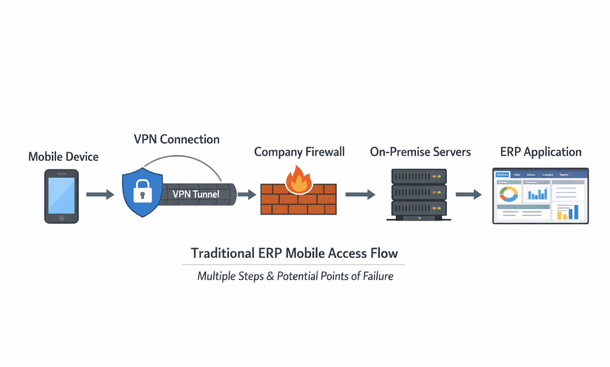
This setup works, sort of. But it creates friction at every step. VPN connections drop randomly, especially on cellular networks. You waste time reconnecting. The VPN adds latency, so every action feels sluggish. Loading a simple report might take ten seconds instead of two.
Security becomes complicated with VPNs. Your IT team needs to configure firewall rules, manage VPN certificates, and troubleshoot connection issues. Each remote user represents a potential security hole that needs careful management.
The mobile apps themselves often feel clunky with traditional ERP. Many vendors literally just shrunk their desktop interface to fit phone screens. Tiny buttons, microscopic text, excessive scrolling. You’re constantly zooming in and out just to read information or tap the right button.
Offline functionality barely exists with most traditional ERP mobile solutions. Everything requires that VPN connection back to your office servers. Lose your internet connection and you lose access to everything. No checking data. No creating records. You’re completely stuck until connectivity returns.
Updates and maintenance create additional headaches. When your IT team updates the on-premise servers, they might break mobile app compatibility. Users need to download new app versions. Sometimes the timing doesn’t sync up perfectly and people can’t access the system for hours or even days.
The infrastructure requirements add cost and complexity. You need servers powerful enough to handle remote connections. You need sufficient bandwidth for remote users. You might need additional security appliances. These costs pile up quickly.
Some traditional ERP vendors offer cloud-hosted versions of their on-premise software. They take that same traditional architecture and run it in a data center instead of your office. This eliminates some infrastructure management but doesn’t solve the fundamental mobile access problems. The software still wasn’t designed for mobile-first workflows.
How Cloud ERP Delivers Mobile Access
Cloud ERP mobile access works completely differently. You open the mobile app on your phone. You log in. That’s it. No VPN. No complicated connection setup. The app communicates directly with the cloud servers using standard internet connections.
The experience feels fast and responsive. Cloud providers build massive infrastructure specifically optimized for this type of access. They use content delivery networks that serve data from servers geographically close to you. When you’re in Los Angeles, your requests get handled by West Coast data centers, not servers on the opposite side of the country.
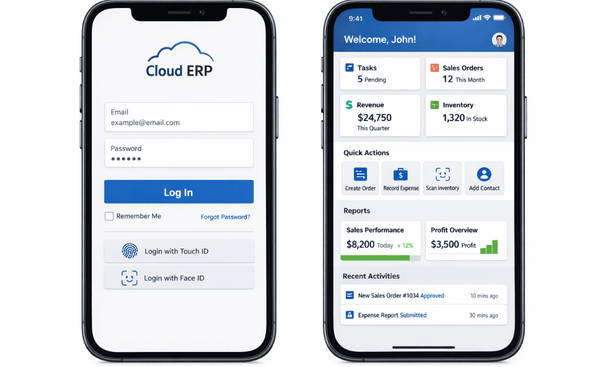
The mobile apps themselves are designed specifically for smartphones and tablets. Large touch-friendly buttons. Text sized for reading without zooming. Forms optimized for quick data entry. Navigation that makes sense on small screens. These apps feel like consumer apps you use every day, not business software from 2005.
Offline functionality works properly in quality cloud ERP systems. The app intelligently caches data you recently accessed. You can view that cached data without connectivity. Many systems let you create new records offline. Those records queue on your device and sync automatically when connection returns. The system handles conflict resolution if someone else modified the same data while you were offline.
Updates happen automatically and transparently. The vendor updates the cloud servers. Your mobile app might need an occasional update from the app store, but these updates rarely break functionality. You don’t coordinate maintenance windows or worry about compatibility between different system components.
Security feels simpler even though it’s actually more sophisticated. You don’t manage VPN certificates or firewall rules. The cloud vendor handles security infrastructure using enterprise-grade protection most small businesses couldn’t afford on their own. Multi-factor authentication, encryption, threat detection, all managed professionally.
The mobile apps get better over time without you doing anything. Cloud vendors continuously improve their mobile interfaces based on user feedback and usage analytics. You benefit from these improvements automatically. Traditional ERP mobile apps might get one major update every year or two if you’re lucky.
Integration with phone features works seamlessly. Camera for document capture. GPS for location tracking. Biometric authentication using fingerprint or face recognition. Push notifications for approvals and alerts. Cloud ERP apps leverage all these capabilities because they’re designed as true mobile applications.
Performance Comparison in Real World Scenarios
Let me walk you through some specific scenarios that highlight the practical differences between these architectures.
Your sales rep is meeting a customer at their office in San Diego. They need to check inventory availability and create a quote. With traditional ERP, they connect to VPN, wait for it to establish, open the app, navigate through multiple screens, and finally check inventory. The whole process takes three to four minutes. With cloud ERP, they open the app, search the product, see availability instantly, and create the quote. Total time maybe forty-five seconds.
Your warehouse manager is doing a physical inventory count. They’re walking through the warehouse scanning barcodes and updating quantities. With traditional ERP over VPN, each scan and update takes several seconds as data travels through the VPN tunnel to your office servers and back. They might process thirty items per hour. With cloud ERP, scans and updates happen almost instantly. They can easily handle sixty items per hour. That’s double the productivity from just removing connection latency.
You’re reviewing and approving expense reports while waiting at the airport. With traditional ERP, you connect VPN on airport wifi. The connection is flaky so it keeps dropping. You reconnect multiple times. Each approval takes forever to process because of the slow connection. You get frustrated and give up, deciding to deal with it when you get to your hotel with better wifi. With cloud ERP, you open the app on that same airport wifi. Approvals process quickly despite the mediocre connection. You knock out all pending approvals before boarding.
Your internet goes down at the office. With traditional ERP, everyone in the office loses access because the servers are right there but unreachable. Remote employees also lose access because the VPN connects to your now-offline office network. Your entire business grinds to a halt. With cloud ERP, the office internet outage doesn’t matter. People switch to their phone hotspots and keep working. Remote employees aren’t affected at all. Business continues normally.
Cost Implications Beyond the Obvious
The pricing models differ substantially between cloud and traditional ERP, especially when you factor in mobile access requirements.
Traditional ERP typically requires large upfront license fees. You might pay fifty thousand dollars or more just for the software licenses. Then you buy servers, maybe fifteen thousand dollars. Network equipment and security appliances, another five thousand. You haven’t even started implementation yet and you’re seventy thousand dollars in.
Mobile access often costs extra with traditional ERP. Want mobile apps for your team? That might be an additional license fee per user. Need VPN infrastructure that supports twenty concurrent connections? More money. The mobile functionality you need gets nickel-and-dimed as add-ons.
Ongoing costs include server maintenance, electricity, cooling, and IT staff. Someone needs to manage those physical servers. Back them up regularly. Apply security patches. Monitor performance. These labor costs often exceed the original software investment over time.
Cloud ERP uses subscription pricing. You pay monthly or annually per user. Maybe a hundred dollars per user per month for a full-featured system. Twenty users means two thousand dollars per month or twenty-four thousand per year. Mobile access is included in that subscription. Everyone gets mobile apps at no additional cost.
The subscription includes infrastructure, maintenance, updates, and support. The vendor handles server management, security patches, backups, and monitoring. You don’t need dedicated IT staff for ERP infrastructure management. Those labor cost savings add up significantly.
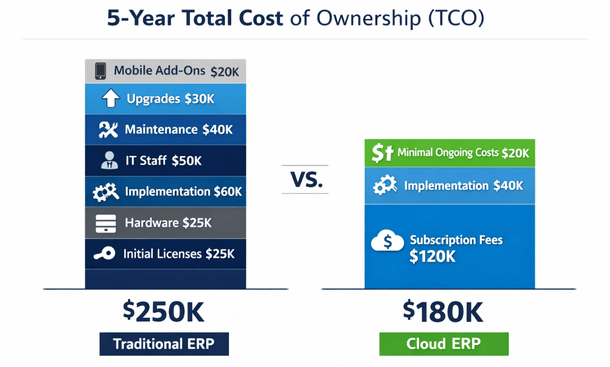
The total cost of ownership calculation often favors cloud ERP despite higher annual costs. You avoid the massive upfront investment. You get better mobile functionality included. You save on IT labor. Over five years, cloud ERP frequently costs thirty to forty percent less than traditional ERP when you account for everything.
Cash flow improves with cloud ERP. Instead of seventy thousand dollars upfront, you spread costs over time. That capital stays available for other business investments. For growing California businesses, this cash flow advantage can be strategic.
Security Considerations for Mobile Access
Security arguments go both ways depending on who you ask. Let’s look at the reality instead of the hype.
Traditional ERP advocates claim on-premise is more secure because you control the infrastructure. Your data never leaves your building. You manage who has access. This sounds reassuring until you examine it critically.
Most small businesses lack the expertise and resources for truly robust security. Your office servers probably don’t have the same security monitoring as major cloud providers. Your IT person handles security among dozens of other responsibilities. Cloud providers employ teams of security specialists focused exclusively on protection.
Physical security matters too. Your office servers sit in a closet or small server room. Cloud providers use data centers with biometric access controls, security guards, and surveillance. Which is actually more secure?
VPN connections create security vulnerabilities. Poorly configured VPNs are common entry points for attackers. Each remote user represents a potential compromise vector. Cloud ERP eliminates VPN requirements entirely, removing this attack surface.
Cloud ERP providers undergo extensive security audits and certifications. They comply with SOC 2, ISO 27001, and industry-specific standards. They can afford security tools most small businesses can’t justify. Intrusion detection systems, advanced firewalls, security information and event management platforms. This enterprise-grade security protects your data better than typical small business infrastructure.
Data residency concerns are valid for some businesses. Certain industries or compliance requirements mandate data stays within specific geographic boundaries. Cloud providers address this with regional data centers. You can specify your data stays on US servers or even California-specific servers. Traditional ERP gives you complete control over physical location, which matters in specific regulated scenarios.
Encryption standards are typically stronger with cloud ERP. Data gets encrypted in transit and at rest using current best practices. Traditional ERP systems, especially older installations, might use outdated encryption or none at all. Upgrading security on traditional systems requires planning and coordination that often gets postponed indefinitely.
The honest assessment is that cloud ERP provides better security for most small businesses. The exceptions are businesses with specific compliance requirements or those with sophisticated in-house security teams. For typical California small businesses, cloud security advantages are substantial.
Scalability and Growth Considerations
Your business won’t stay the same size forever. How each architecture handles growth affects long-term mobile access quality.
Traditional ERP scaling requires hardware upgrades. Add more users and you might need bigger servers. More powerful processors. Additional memory. More storage. Each upgrade involves purchasing equipment, scheduling downtime, and migrating to new hardware. This process disrupts operations and costs money.
Mobile access performance degrades as traditional ERP systems grow. Those office servers that handled twenty remote users adequately start struggling with forty users. VPN connections slow down. Response times suffer. Eventually you need to invest in more infrastructure to maintain acceptable performance.
Cloud ERP scales elastically. Need to add twenty users? Just purchase additional subscriptions. The cloud infrastructure automatically allocates more resources. No hardware purchases. No downtime. Mobile access performance stays consistent regardless of how many users you add.
Geographic expansion creates challenges for traditional ERP. Open an office in San Francisco and another in San Diego, both accessing servers in Los Angeles? Users in San Diego might experience slower performance. Setting up redundant servers in multiple locations gets expensive fast. Cloud ERP serves all locations efficiently through geographically distributed data centers.
Seasonal businesses benefit from cloud elasticity. Maybe you need fifty users during peak season but only twenty during slow periods. With traditional ERP, you size infrastructure for peak demand and that capacity sits mostly idle much of the year. With cloud ERP, many vendors let you scale subscriptions up and down seasonally, paying only for active users.
Integration capabilities scale differently too. Cloud ERP systems typically offer robust APIs designed for integration from the start. Adding new connected applications works smoothly. Traditional ERP integration often requires custom development and middleware that becomes more complex as you add systems.
Making the Decision for Your Business
The cloud versus traditional choice depends on your specific situation, but mobile access requirements increasingly tip the scales toward cloud.
If mobile access is critical to your operations, cloud ERP delivers dramatically better experiences. Sales teams working remotely. Warehouse staff managing inventory. Managers approving transactions from anywhere. Field service technicians accessing customer data. These scenarios all work better with cloud architecture.
Understanding which specific mobile capabilities you need helps clarify the decision. Our detailed guide on essential mobile ERP features breaks down which functions matter most for different types of California businesses and how architecture choices affect feature availability and performance.
Consider your IT resources honestly. Do you have skilled IT staff with time to manage on-premise infrastructure? Or would your IT person’s time be better spent on projects that directly improve your business instead of maintaining servers? Cloud ERP frees up IT resources for strategic work.
Think about your internet connectivity reliability. Cloud ERP requires good internet connections. If your business operates in areas with unreliable connectivity, traditional ERP with local servers might be more practical. However, good mobile apps with offline functionality mitigate many connectivity concerns.
Evaluate your data sensitivity and compliance requirements. Most businesses handle data that’s sensitive but not regulated. Cloud ERP security is excellent for typical business data. If you operate in heavily regulated industries like healthcare or finance, verify that cloud providers meet your specific compliance needs. Most major providers do, but confirm the details.
Budget considerations matter significantly. Can your business afford the upfront investment traditional ERP requires? Do you prefer spreading costs over time with subscription pricing? How important is preserving capital for other business investments? Cloud ERP’s financial model often makes more sense for growing businesses.
Your growth trajectory influences the decision. Planning aggressive expansion? Cloud ERP scales seamlessly with your growth. Expecting relatively stable headcount? Traditional ERP’s fixed infrastructure costs become less of a disadvantage. Think three to five years ahead, not just your current situation.
Industry momentum strongly favors cloud. New ERP development focuses almost exclusively on cloud platforms. Traditional ERP vendors are shifting resources to their cloud offerings. The traditional model isn’t disappearing immediately, but it’s clearly the legacy approach. Choosing traditional ERP today means betting against the industry direction.
Once you’ve decided on architecture, implementation becomes the next critical step. Our comprehensive guide to managing your business operations on the go provides the complete picture of how mobile ERP transforms business operations and what you need to consider throughout your evaluation and implementation journey.
For most California small businesses evaluating ERP options today, cloud architecture delivers superior mobile access at lower total cost with better security. The traditional model made sense when it was the only option. Now you have better choices. Choose the architecture that positions your business for how we actually work in 2026, not how we worked in 2006.
About the Author

mike
Mike is a tech enthusiast passionate about SaaS innovation and digital growth. He explores emerging technologies and helps businesses scale through smart software solutions.
Did you find this helpful?
Your feedback helps us curate better content for the community.