

Let me be upfront with you. There is no single best project management tool for every small business. Anyone who tells you otherwise is either selling something or hasn’t run a team before.
Let me be upfront with you. There is no single best project management tool for every small business. Anyone who tells you otherwise is either selling something or hasn’t run a team before.
What there is, though, is a best tool for your business based on how your team works, what you actually need, and how much you’re willing to spend. That’s what this breakdown is about.
I’ve spent a lot of time inside these platforms. Not just clicking around during free trials but actually building workflows, onboarding team members, and figuring out what holds up in real day to day use versus what just looks good in a demo. What follows is an honest look at the tools that consistently stand out for small teams in 2026.
The tools we’re covering
There are dozens of project management tools on the market right now. For this comparison i’m focusing on five that come up most often for small businesses and early stage startups: Asana, ClickUp, Monday.com, Notion and Trello. Each one has a different personality and a different ideal user. Understanding those differences is how you stop guessing and start choosing.
Asana the one that feels like it was built for teams
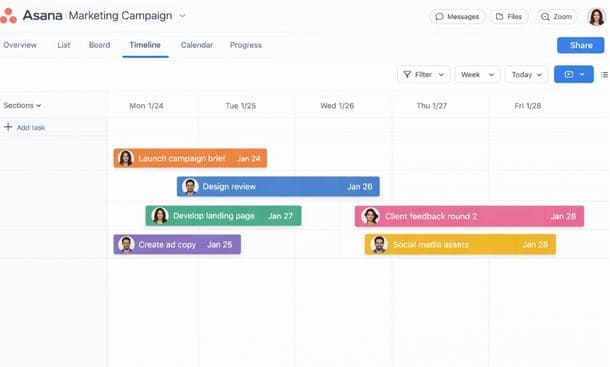
Asana has been around long enough to work out most of its early kinks and what’s left is a tool that feels genuinely polished. The interface is clean, task management is intuitive and the way it handles project timelines and team workload is hard to beat at this price point.
Where Asana really shines is in team coordination. If you have multiple people working across multiple projects and you need visibility into who is doing what and when, Asana makes that almost effortless. The timeline view in particular is excellent for spotting bottlenecks before they become problems.
The free plan is decent for very small teams but it does limit you on features like timeline view and reporting, which are two of the things that make Asana worth using. The paid plans start at around 10$ to 13$ per user per month depending on billing frequency.
Best for: Teams of three or more who need strong coordination features and are willing to pay for a clean, reliable experience.
Watch out for: Solo users or very small budgets. The free tier gets limiting fast and the per-user pricing adds up.
ClickUp the one that does almost everything
ClickUp is the tool that people either love or find overwhelming sometimes both at the same time. It is genuinely one of the most feature rich project management platforms available and it is priced aggressively, which makes it incredibly attractive for small businesses that want flexibility without paying for multiple tools.
The free plan is one of the most generous in the industry. You get unlimited tasks, unlimited members and a surprisingly deep feature set before hitting any real limitations. For a bootstrapped startup or a small freelance operation this is a big deal.
The tradeoff is complexity. ClickUp can do so much that setting it up in a way that doesn’t feel chaotic requires some intentional thought. If you go in without a plan you’ll end up with a workspace that has too many views, too many folders and a team that doesn’t know where to look for anything. But if you invest a bit of time upfront the payoff is real.
Best for: Founders and small teams who want one tool to replace several and don’t mind a learning curve in exchange for that level of flexibility.
Watch out for: Teams that need something simple and fast to adopt. ClickUp rewards patience and setup time that not everyone has.
Monday.com the one that looks incredible
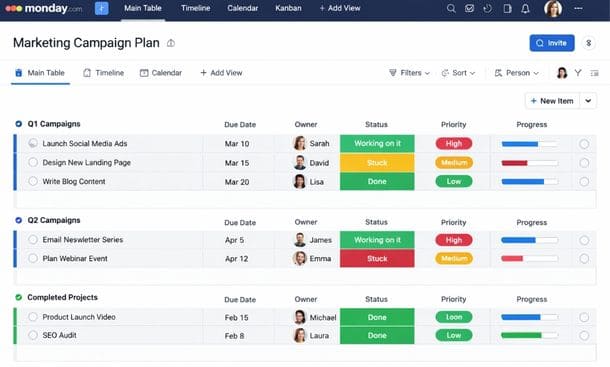
Monday.com is the most visually polished tool on this list and that’s not a small thing. When your whole team can glance at a dashboard and immediately understand what’s happening, project communication gets a lot easier.
The platform is built around a spreadsheet-style board that is flexible enough to handle everything from content calendars to product roadmaps to client projects. It’s also one of the better tools for businesses that work closely with clients because the interface is approachable enough that you can bring someone external in without a long explanation.
The pricing is where Monday.com loses some people. There’s no meaningful free tier just a trial and the minimum seat requirements on paid plans can feel steep if you’re a team of two or three. You’re essentially paying for a polished experience and the question is whether that polish is worth the premium for your stage.
Best for: Small teams that prioritize visual clarity and client-facing collaboration and have the budget for a premium tool.
Watch out for: Very early stage businesses or solo operators. The pricing structure doesn’t reward small teams the way ClickUp’s does.
Notion the one that’s more than a project manager
Notion occupies a unique position in this list because it isn’t purely a project management tool. It’s more like a flexible workspace that can function as a project manager, a wiki, a content calendar, a CRM and a document hub all at once if you’re willing to build it that way.
For founders who live in documents and databases, Notion feels like home. You can build exactly the system you want instead of adapting to someone else’s structure. The AI features added in recent years have also made it genuinely useful for writing and summarizing within your workspace.
The limitation is that Notion requires real setup investment to become a functional project management system. Out of the box it’s a blank canvas. If you don’t have the time or interest to build your workspace thoughtfully it can quickly become a collection of half finished pages that nobody uses.
The pricing is very reasonable the free plan covers individuals well and the paid tiers are among the most affordable on this list.
Best for: Founders who are comfortable with systems thinking, want an all in-one workspace and enjoy building their own setup from scratch.
Watch out for: Teams that need something ready to use immediately. Notion’s flexibility is also its biggest barrier to quick adoption.
Trello the one that keeps it simple
Trello is where a lot of small businesses start and for good reason. It’s the simplest tool on this list by a significant margin. If you understand sticky notes on a board to do, in progress, done you already understand Trello.
The Kanban board interface is clean, visual and immediately intuitive. There’s almost no learning curve which means your team can be up and running within an hour. For small teams with straightforward workflows this is genuinely enough.
Where Trello starts to show its limits is when your projects get more complex. There’s no native timeline view on the free plan, reporting is limited and if you’re managing multiple overlapping projects with several people the board structure can start to feel fragmented. Trello’s Power Up system lets you extend functionality but it requires third-party integrations that add complexity.
Best for: Solo operators, very small teams or anyone who needs a no-fuss system to get organized quickly without a steep learning curve.
Watch out for: Growing teams with complex workflows. Trello is a great starting point but many businesses outgrow it faster than expected.
A quick side-by-side summary
Here’s how these five tools stack up across the factors that matter most for small businesses.
Ease of use: Trello wins here, followed by Monday.com and Asana. ClickUp and Notion require the most setup time.
Free plan quality: ClickUp has the strongest free offering. Notion’s free plan is solid for individuals. Trello’s free tier is functional but limited. Asana’s free plan works for small teams with basic needs. Monday.com doesn’t offer a meaningful free option.
Scalability: ClickUp and Asana scale best as your team and complexity grow. Notion can scale if you invest in the setup. Monday.com scales well but gets expensive. Trello reaches its ceiling relatively quickly.
Best value for small teams: ClickUp for feature to price ratio. Notion for all in one flexibility at low cost. Trello if you just need something simple and free.
So which one should you actually pick
Start with what your team will actually use. Not what has the most features or what the biggest names are using. The right tool is the one that reduces friction for your specific situation.
If you’re just getting started and need something today: Trello or Notion’s free plan.
If you have a small team and want room to grow: ClickUp or Asana.
If visual collaboration and client-facing work are priorities: Monday.com.
If you want one tool to run your entire business: Notion with a proper setup.
And if you’re still figuring out exactly what your business needs before committing to any tool, start with Why Your Small Business Needs a Project Management System Now to understand the real operational impact of putting the right structure in place.
When you’re ready to evaluate your options, The Best Project Management System for Small Business in 2026 (No Cap, This Changes Everything) breaks down the top solutions to help you choose with clarity and confidence.
Once you’ve made your pick, the real work begins setting everything up in a way your team will actually stick with. The guide on how to set up a project management system step by step covers exactly that, without the overwhelm.
About the Author

Pamela
Pamela is a dynamic professional with a deep passion for SaaS and emerging technologies. She provides valuable insights into software trends, digital innovation, and cutting-edge tools that empower businesses to thrive and expand.
Did you find this helpful?
Your feedback helps us curate better content for the community.