
I’m Pamela, 35, writing this between a cold brew run and a late afternoon work sprint. Living in Florida teaches you one thing real quick. When things get messy, you slow down. Same goes for startups. You can have a solid product and strong demand, but if daily work is unclear, momentum fades.
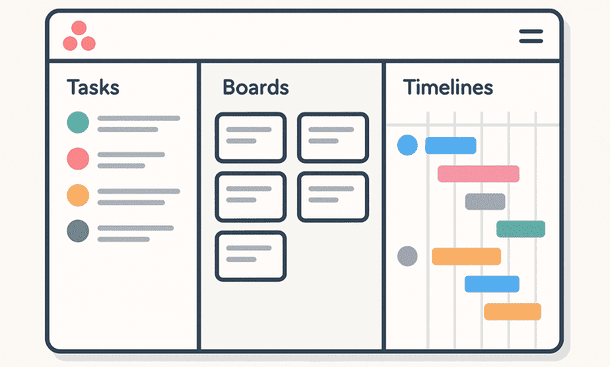
The Asana project management tool shines because it turns abstract plans into visible action. Tasks, boards, and timelines are not fancy features. They are practical ways to keep a fast-moving team aligned without endless meetings.
This is where execution starts to feel smooth instead of stressful.
Tasks are the foundation of real progress
Everything in Asana starts with a task. That might sound obvious, but many teams underestimate how powerful a well-defined task can be.
A task is not just a reminder. It is a commitment with an owner, a deadline, and context. When tasks are clear, people stop guessing. They know exactly what needs to be done and by when.
For founders, this removes mental overload. You stop carrying unfinished work in your head. Once a task is written and assigned, it lives in the system, not in your stress level.
Good tasks are specific. Instead of “work on landing page,” you get “write hero section copy” or “review mobile layout.” That clarity speeds things up and reduces back-and-forth.
Subtasks keep work realistic
Big tasks often feel overwhelming. Asana handles this well through subtasks.
Subtasks allow you to break work into steps that feel doable. This is especially useful for early-stage startups where one person often wears multiple hats.
You might have one main task called “prepare product launch.” Under it, subtasks handle copy, visuals, email setup, and testing. Progress becomes visible without cluttering the whole project.
This structure helps teams move steadily instead of rushing at the last minute.
Boards bring instant clarity
Boards are one of the most loved features in the Asana project management tool, especially for visual thinkers.
Each board shows work as cards moving through stages. To do. In progress. Review. Done. Simple and effective.
At a glance, you know where things stand. You see bottlenecks immediately. If everything is stuck in review, that is your signal. No need to ask the team what’s going on.
Boards work great for marketing campaigns, content production, sales pipelines, and even hiring flows. They mirror how work actually moves.
For startups that value speed, boards feel natural and intuitive.
List view keeps things grounded
Not everyone loves visuals all the time. That is where list view comes in.
List view shows tasks in a clean, structured format. You see priorities, due dates, and assignees without distraction. It is perfect for daily planning and personal focus.
Many founders start their day here. They scan what needs attention and plan accordingly. No noise, just work.
The ability to switch between board and list views means each team member can work in the way that suits them best.
Timelines turn plans into reality
Timelines are where strategy meets execution.
In Asana, timelines show how tasks connect over time. You see start dates, end dates, and dependencies. This is crucial when projects involve multiple steps and people.
For example, design needs to finish before development starts. Content must be ready before launch. Timelines make these relationships visible.
When something shifts, the impact is clear. You can adjust dates and see how the whole project moves. This prevents surprises and last-minute chaos.
For growing startups, timelines bring a sense of control that spreadsheets never manage to deliver.
Dependencies reduce hidden delays
Dependencies are one of the most underrated features in project management.
They answer one simple question. What is blocking this task?
In Asana, you can mark tasks as waiting on others. This creates transparency. Team members know when to act and when to wait.
Founders benefit because delays surface early. Instead of discovering problems days later, you see them as they happen.
This is especially useful in cross-functional teams where work overlaps.
Projects organize work by goal
Tasks live inside projects, and projects reflect goals.
You might have a project for onboarding new clients, another for product updates, and another for marketing campaigns. Each project has its own structure and rhythm.
This separation helps teams stay focused. Work feels organized instead of scattered.
Projects also make reporting easier. You can review progress by initiative instead of chasing updates from different people.
If you want to understand how this structure fits into a broader execution system, this project management tools guide explains how founders use platforms like Asana at scale:
Templates save time and energy
Asana allows teams to create templates for repeatable work.
For startups, this is a game changer. Launches, content cycles, onboarding flows, and recurring operations all follow patterns.
Templates prevent reinventing the wheel. They ensure consistency and reduce setup time. New projects start with structure already in place.
This also helps onboard new hires faster. They learn the process by using it, not by reading long documents.
Collaboration stays tied to the work
One of the biggest advantages of the Asana project management tool is how communication stays connected to tasks.
Comments live inside tasks. Files are attached where they belong. Decisions are documented in context.
This reduces the need to search through chat history or emails. Everything relevant to the work is right there.
For remote and hybrid teams, this keeps collaboration clean and efficient.
Daily use feels light, not heavy
A common fear among founders is that project management tools slow teams down. In practice, the opposite happens when the setup is simple.
Asana feels light because it adapts to your workflow. You do not need to use every feature. Start with tasks and boards. Add timelines when projects grow more complex.
This flexibility makes adoption easier. Teams do not feel forced into rigid processes.
That balance is key for early-stage startups still finding their rhythm.
How founders usually get the most value
Founders who succeed with Asana tend to follow a few patterns.
They keep tasks clear and specific.
They limit the number of active projects.
They review priorities regularly.
They use the tool as a shared reference, not as a control system.
When leadership uses Asana consistently, the team follows naturally. The tool becomes part of the culture, not just another app.
Tasks, boards, and timelines are not separate features. Together, they form a system that turns ideas into action.
The Asana project management tool helps startups move fast without losing clarity. Work becomes visible. Dependencies are clear. Planning feels realistic instead of optimistic.
Once teams master these basics, productivity increases without added pressure.
The next logical step after understanding daily execution is learning how to connect Asana with the rest of your tools. This guide on project management tools integrations shows how startups automate workflows and save even more time:
About the Author

Pamela
Pamela is a dynamic professional with a deep passion for SaaS and emerging technologies. She provides valuable insights into software trends, digital innovation, and cutting-edge tools that empower businesses to thrive and expand.
Did you find this helpful?
Your feedback helps us curate better content for the community.