
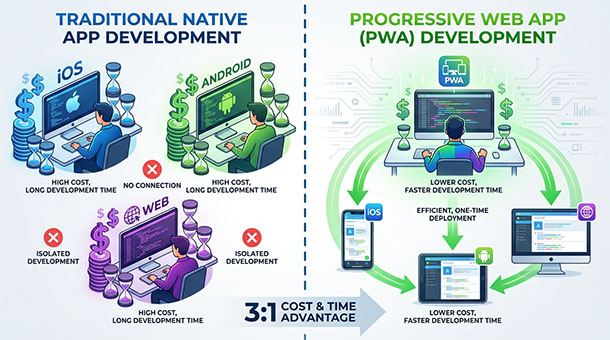
A founder wants users to access their tool on mobile. The assumption is immediate: build an iOS app and an Android app.
That means hiring two developers with different skill sets. That means waiting six months for both versions to be ready. That means paying Apple and Google their platform fees. That means submitting every update for app store review and waiting days for approval.
For most first-time founders, this path burns through runway before the product proves itself in the market.
There’s a third option that most founders miss: progressive web apps, which are websites that behave like native apps, complete with home screen icons, offline access, push notifications, and full-screen experiences.
PWAs cost a fraction of what native apps cost to build and maintain. They update instantly without app store gatekeepers. They work across every device from a single codebase.
For founders trying to stretch every dollar while still offering mobile access, PWAs are often the smartest way to launch while building a subscription business on a backend that works seamlessly across platforms.
What a progressive web app actually delivers
A progressive web app is not a simplified version of a real app. It’s a website built with modern standards that make it behave indistinguishably from a native app in most use cases.
Users visit the website on their phone. The browser prompts them to “add to home screen.” They tap yes. An icon appears on their home screen next to their other apps. When they tap it, the website opens in full-screen mode with no browser chrome, no URL bar, no back button.
From the user’s perspective, it feels like a native app. They don’t see a URL. They don’t think about browsers. They just open the app and use it.
Behind the scenes, the PWA uses service workers, background scripts that cache essential files so the app works even without an internet connection. Users can open the app on a plane, review their data, make changes, and those changes sync automatically when connectivity returns.
PWAs also support push notifications, the alert messages that appear on a phone’s lock screen. A user’s subscription is about to expire. The backend sends a push notification through the PWA. The user sees it just like they would from any native app.
The technology has matured to the point where most users can’t tell the difference between a well-built PWA and a native app. The only people who notice are developers who understand what’s happening under the hood.
Why PWAs cost 70% less than native app development
Building native apps means writing the same features three times: once for iOS in Swift, once for Android in Kotlin, and once for the web in JavaScript.
Three codebases. Three sets of bugs. Three teams to maintain them. If a feature takes two weeks to build on one platform, it takes six weeks to build across all three.
PWAs eliminate this duplication. One codebase written in standard web technologies works everywhere. Build a feature once. Deploy it to iOS, Android, desktop, and tablet simultaneously.
The savings compound over time. Every bug fix benefits all platforms. Every new feature launches everywhere at once. Every performance improvement applies universally.
Hiring costs drop dramatically too. Instead of needing specialists in Swift and Kotlin, a founder needs developers who understand modern JavaScript frameworks like React or Vue. The talent pool is larger. The hourly rates are lower. The ramp-up time is faster.
For bootstrapped founders or teams without venture funding, this cost difference is often the determining factor in whether they can afford mobile access at all.
How PWAs eliminate app store friction and gatekeeping
Apple and Google control native app distribution through their app stores. This creates friction at every stage of the product lifecycle.
Want to launch? Submit the app for review. Wait five to seven days. Hope they approve it. If they reject it for violating some obscure guideline, fix it and wait another week.
Want to push an urgent bug fix? Submit an update. Wait for review. Hope users actually download the update instead of running the broken version indefinitely.
Want to A/B test a new feature? Too bad. App stores don’t allow dynamic updates that change behavior without review.
PWAs bypass all of this. Updates deploy instantly. Users always run the latest version. There’s no review process. There’s no waiting period. There’s no risk of rejection because Apple decided some feature violates their interpretation of guideline 4.2.6.
This difference matters enormously for early-stage products that need to iterate quickly based on user feedback. Shipping updates daily is normal for PWAs. It’s impossible for native apps.
The lack of platform fees matters too. Apple takes 30% of all in-app subscription revenue for the first year, dropping to 15% afterward. For a founder trying to reach profitability, that’s a significant margin hit. PWAs process payments directly through services like Stripe, with no platform middleman taking a cut.
When native apps still make sense and when they don’t
PWAs are not always the right choice. Some use cases genuinely require native app capabilities that web technologies can’t match.
Apps that need deep hardware integration, like accessing raw camera data for augmented reality or connecting to Bluetooth medical devices, often require native code. Apps that need to run complex background processes, like fitness trackers constantly monitoring steps, work better as native apps.
Gaming apps with high-performance 3D graphics often need native development to access the full power of the device’s GPU. Apps that need to integrate tightly with operating system features, like appearing in system share sheets or handling file associations, benefit from native capabilities.
But for the majority of business applications, especially SaaS tools focused on data management, communication, or productivity, PWAs deliver everything users need at a fraction of the cost.
A project management tool. A CRM. An invoicing system. A team communication platform. A content management system. All of these work perfectly as PWAs without sacrificing user experience.
Founders should default to PWAs unless there’s a specific technical requirement that demands native development. Starting with a PWA and adding native apps later is far easier than starting with native apps and trying to retrofit web access afterward.
How modern backends make PWAs feel instantly responsive
The biggest criticism of web apps used to be performance. They felt slower than native apps. Interactions lagged. Data took too long to load.
Modern PWAs eliminate these problems through aggressive caching and optimistic updates, the pattern where the interface updates immediately while the backend processes the change in the background.
A user marks a task as complete. The PWA updates the interface instantly, showing the checkmark before the backend confirms anything. Meanwhile, the service worker sends the update to the backend. If it succeeds, nothing changes. If it fails, the PWA reverts the change and shows an error.
This pattern makes PWAs feel just as responsive as native apps, even on slow connections.
Backends like Supabase enhance this with real-time subscriptions. When one user updates data, all other users see the change instantly without refreshing. This works seamlessly with PWAs because the backend handles the real-time communication through standard web protocols.
The combination of aggressive caching, optimistic updates, and real-time sync creates an experience indistinguishable from native apps for most users.
The bottom line
Progressive web apps are not a compromise. They’re a strategic choice that prioritizes speed to market, cost efficiency, and iteration velocity over marginal technical advantages that most users never notice.
For founders building subscription businesses, PWAs offer the fastest path to mobile access without the overhead of maintaining multiple codebases, navigating app store politics, or paying platform fees that eat into already-thin margins.
The technology has matured to the point where PWAs can deliver professional, responsive, feature-rich experiences that users happily pay for. The question is no longer whether PWAs are “good enough.” The question is whether spending 3x more on native development delivers 3x more value.
For most early-stage SaaS products, the answer is no.
For more on how backend architecture supports seamless experiences across web and mobile, check out how websites and backends need to talk to each other to deliver the real-time updates that make PWAs feel native.
About the Author

AISalah
AISalah bridges linguistics and technology at PointOfSaaS, exploring AI applications in business software. English Studies BA with hands-on back-end and ERP development experience.
Did you find this helpful?
Your feedback helps us curate better content for the community.