
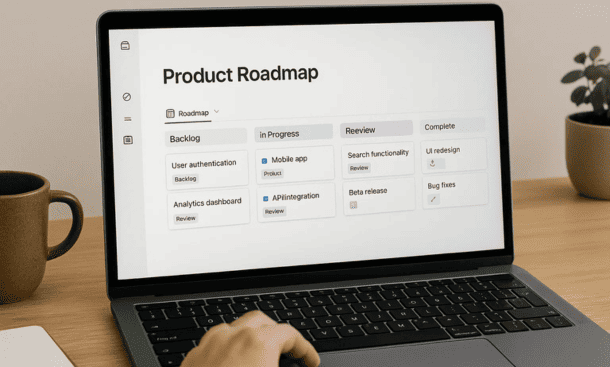
Product roadmaps fail when they become static documents that nobody looks at after the planning meeting. I’ve created roadmaps in PowerPoint that were outdated before I even presented them, and I’ve used dedicated roadmap tools that were too rigid to reflect how startups actually work.
Notion changed this for me because it treats roadmaps as living databases rather than fixed documents. You can update priorities in real time, switch between different views depending on your audience, and link features directly to the project pages where work happens.
Why Notion Works for Product Roadmaps
Traditional roadmap tools force you into specific formats and timelines. That works great if you’re at a mature company with predictable release cycles, but startups need flexibility. Your priorities shift based on customer feedback, market changes, and resource constraints.
Notion lets you build a roadmap that adapts. The same underlying data can display as a timeline for executives, a kanban board for your product team, and a table for detailed planning. You’re not maintaining multiple versions of the truth, you’re showing different perspectives on the same information.
The database structure means you can add custom properties that matter to your specific situation. Maybe you need to track which customer segment each feature serves, or which strategic objective it supports, or the estimated engineering effort. You define the fields that help you make decisions.
Integration with the rest of your workspace is the other major advantage. When a feature on your roadmap is ready to build, you can link it to the actual project page, meeting notes where it was discussed, and customer research that informed it. Everything connects.
Setting Up Your Roadmap Database
Start by creating a new database. I use a full-page database rather than an inline one because roadmaps need space to breathe. Name it something simple like Product Roadmap or Feature Pipeline.
The properties you include depend on what information drives your decisions. At minimum you need a feature name, status, and timeline. Beyond that, consider what you actually use to prioritize. I include these properties in mine:
Status helps you track where each item stands. I use categories like Idea, Planned, In Progress, Launched, and Parked. Parked is important because not every idea deserves to be fully rejected, some just aren’t the right timing.
Priority tells you what matters most. I use a simple High, Medium, Low system rather than numerical scoring because overthinking prioritization wastes time. If everything is high priority, nothing is.
Timeline fields let you set target quarters or dates. I use a quarter field with options like Q1 2024, Q2 2024 rather than specific dates because precision is false confidence in early stage planning. You can add a launch date property for features actively in development.
Owner shows who’s responsible for driving each feature. This might be a product manager, an engineering lead, or a founder. The point is clarity about who makes decisions.
Customer segment or target user helps you ensure you’re building for real people. I tag features with labels like Enterprise, SMB, or Individual Users so we can see if we’re neglecting any group.
Effort estimate gives you a rough sense of resource requirements. I use t-shirt sizing with Small, Medium, Large rather than story points because exact estimates are impossible anyway. This helps spot when you’re planning too many large features in one quarter.
Strategic theme connects features to bigger company goals. If your themes this year are Improving Retention and Enterprise Readiness, tagging features with these themes shows whether your roadmap actually supports your strategy.
Creating Multiple Views for Different Audiences
The power of a Notion roadmap is showing the same data in different ways. Your engineering team needs different information than your board of directors, and views let you serve both without duplicate work.
A timeline view works perfectly for executive updates and board meetings. It shows features laid out across quarters with swimlanes for different categories. I group mine by priority so the most important initiatives are visually prominent. This view answers the question “what are we building when” at a glance.
To create a timeline view, add a new view to your database, select timeline, and choose your date property. Then configure the grouping and filtering to show what matters. I typically filter out ideas and parked items from this view so it shows only committed work.
A kanban board view helps your product team manage the pipeline. Group by status and you get columns for Idea, Planned, In Progress, and Launched. People can drag cards between columns as features progress. This view is what we reference in weekly product meetings.
I also create filtered views for specific use cases. A view filtered to just high priority items shows your focus areas. A view grouped by owner shows each person’s workload. A view filtered to a specific quarter shows your upcoming releases.
Table views work well for detailed planning sessions where you need to see all the properties and sort by different criteria. I use these when we’re doing quarterly planning and need to evaluate trade-offs across multiple dimensions.
Linking Roadmap Items to Execution
A roadmap that doesn’t connect to actual work is just wishful thinking. In Notion, you can link roadmap features to the project pages where implementation happens.
When a feature moves from Planned to In Progress, create a project page for it and add a relation property in your roadmap database that links the two. Now your roadmap item shows a live link to the project, and the project page can show which roadmap feature it’s delivering.
This connection means stakeholders can click from the roadmap directly into project details. They can see sprint boards, technical specs, design mocks, and progress updates without asking for status reports.
I also link roadmap items to customer research. If we’re building a feature because of specific feedback, I create a relation to the research database or link directly to customer interview notes. This keeps the why visible alongside the what.
Meeting notes should reference roadmap items too. When you discuss a feature in a planning meeting, link to it. When a customer asks about upcoming capabilities, link to the roadmap. These connections make your roadmap a central hub rather than an isolated document.
Managing Roadmap Changes
Roadmaps change constantly at startups. A customer churns because you’re missing a critical feature, so you reprioritize. A technical constraint makes something harder than expected, so you adjust timelines. Staying flexible without losing sight of strategy is the challenge.
I update our roadmap weekly based on new information. This doesn’t mean changing everything each week, but it does mean reflecting reality. If a feature slips from Q1 to Q2, move it. If priority shifts, update it. Accuracy matters more than optimism.
Use comments on roadmap items to document why decisions changed. When we deprioritize something, I add a comment explaining the reasoning. This creates a historical record and prevents relitigating the same discussions later.
The version history in Notion helps too. You can see what the roadmap looked like at any point in the past. This is valuable during retrospectives when you’re examining what you planned versus what you delivered.
Create an archived view for features you’ve launched. Filtering to just show status equals Launched gives you a growing list of shipped capabilities. This is motivating for the team and useful when you need to show progress to investors or partners.
Communicating the Roadmap Across Your Startup
Different people need different levels of detail. Executives want strategic direction, your team wants tactical clarity, customers want to know what’s coming, and investors want to see momentum.
For internal stakeholders, give full access to the database with all views available. They can explore based on their needs. I share the timeline view in company all-hands to show the big picture, then point people to the database for details.
For customers, I create a separate public view or a dedicated page that pulls from the main database. This shows committed features without exposing internal debates or items we’re not ready to discuss externally. You control the narrative while staying truthful.
In customer conversations, reference specific roadmap items. When someone asks if you’re building something, pull up Notion and show them exactly where it sits in your plans. This transparency builds trust and manages expectations better than vague promises.
For investors, quarterly updates should include the roadmap timeline view showing what shipped last quarter and what’s planned next quarter. This demonstrates execution and strategic thinking without overwhelming them with details.
Keeping Your Roadmap Realistic
The biggest mistake I see with roadmaps is overcommitting. You add 20 features to next quarter because everything feels important, then you deliver five and everyone feels like you failed. Better to plan eight, deliver eight, and maintain credibility.
Capacity planning matters. Look at what your team delivered in the past quarter and use that as a baseline. If you shipped three medium features and five small ones, don’t plan six large features next quarter. Historical velocity is your best predictor.
Build in buffer time. Things take longer than expected, bugs appear, people get sick. If your roadmap assumes perfect execution with zero surprises, you’re setting yourself up for disappointment. I aim to plan about 70 percent of available capacity and leave 30 percent for the unexpected.
Review your roadmap monthly with your leadership team. Ask what’s at risk, what’s changed, and whether your priorities still make sense. These reviews catch problems early and keep everyone aligned. The notion product roadmap structure you’ve built should facilitate these conversations, not complicate them.
Say no more than you say yes. Every feature you add makes everything else take longer. Protect your roadmap from feature creep by being clear about what doesn’t fit. I keep a separate Someday database for ideas that are interesting but not now.
Your roadmap is a tool for making better decisions about where to invest your limited resources. It should help you stay focused, communicate clearly, and adapt as you learn. When it does those things, it’s working regardless of how polished it looks.
About the Author

Melanie Hart
Co-founder of Point of SaaS | SaaS Strategist Helping businesses leverage software innovation to optimize performance, streamline workflows, and achieve sustainable growth.
Did you find this helpful?
Your feedback helps us curate better content for the community.