

Most tool comparison articles read like a feature matrix with a conclusion bolted on afterward. Tool A has this capability. Tool B has that one. Tool C has the most. Here is a table. Pick accordingly.
That approach answers the wrong question. For a small business the relevant question is not which tool has the most capabilities on paper but which tool will actually get used consistently by your specific team managing your specific type of work. A feature-rich platform your team abandons in week three produces worse outcomes than a simpler tool your team opens every morning without being reminded.
I have spent real time inside all three of these tools not during demo walkthroughs but in actual operational use with real projects and real team members. What follows is an honest evaluation of where each one wins, where each one falls short and which specific business type is best served by each.
What each tool was actually built to do
Before any comparison the most useful thing is understanding the design philosophy behind each product because the tools were built to solve different problems and that shapes every feature decision and every evaluation conclusion.
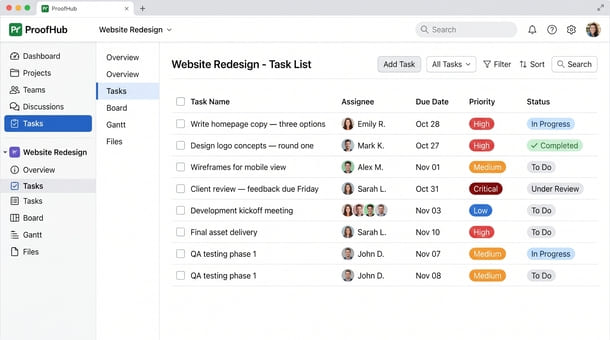
ProofHub was built to consolidate. Its core assumption is that small businesses lose meaningful time and money managing a fragmented tool stack separate subscriptions for project management, team communication, time tracking and client review. ProofHub brings all four functions under one flat-fee subscription. The trade-off is that no individual function is as deep as a best-in-class specialized tool.
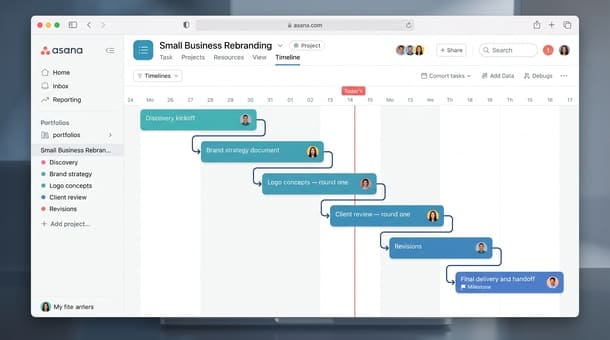
Asana was built to manage tasks and workflows. Its core assumption is that work can be broken into discrete units with clear ownership and defined progression through stages. It scales well as team complexity grows and offers stronger workflow automation and portfolio-level visibility than ProofHub. The trade-off is per-user pricing that grows with the team and no native time tracking or proofing functionality.
ClickUp was built for maximum flexibility. Its core assumption is that different teams have fundamentally different needs and a project management tool should accommodate all of them. It is the most customizable of the three and has the most generous free plan. The trade-off is a steeper setup curve and an interface that can feel overwhelming before the workspace is properly configured.
These are three different tools solving three different versions of the same problem. The right choice depends on which version of that problem your business actually has.
The Simplicity Score how this comparison works
Each tool is rated across four dimensions on a scale of one to five. The maximum total score is 20. The four dimensions are setup speed, adoption ease, interface clarity and mobile usability the factors that most directly determine whether a small business gets lasting operational value from a project management tool rather than just a temporary trial experience.
A score of 16 or above means the tool genuinely earns the simple label for small business use. Below 12 means the tool may be excellent for specific reasons but simplicity is not among its primary strengths.
ProofHub Simplicity Score: 15/20
Setup speed: 4/5
ProofHub is fast to get running. The workspace structure is clear enough that most founders can move from signup to a functional project in under two hours. The fixed project structure the same set of features available in every project means fewer configuration decisions during setup than ClickUp requires. The trade-off is less flexibility once the workspace is built. If the default structure does not match how a specific type of project is managed the options for customization are limited compared to ClickUp’s more malleable hierarchy.
Adoption ease: 4/5
The interface is clean and approachable enough that team members with no prior project management tool experience can orient themselves quickly. The all-in-one structure reduces context switching tasks, communication, time logging and file review all happen in the same workspace rather than requiring the team to move between platforms. The adoption challenge specific to ProofHub is getting team members to use the time tracking and proofing features consistently rather than defaulting to their pre-existing habits for those functions. Getting both configured in the first week rather than deferring them to later makes a significant difference in whether they get adopted at all.
Interface clarity: 3/5
ProofHub’s interface is clean and well-organized at the individual project level. Navigation between views kanban, Gantt, table is straightforward once the team is familiar with it. Where it loses points relative to Asana is in cross-project visibility. Seeing the status of all active projects in a single consolidated view requires navigating to individual projects rather than reading a centralized dashboard. For a founder managing five or more concurrent projects that navigational overhead has a real daily cost. The reporting feature provides some cross-project visibility but it is not as fluid or real-time as Asana’s portfolio views on paid plans.
Mobile usability: 4/5
ProofHub’s mobile app handles core daily actions well checking task status, updating progress, logging time, reviewing files and responding to discussion threads. For team members who work across different locations or need to check project status between client meetings the mobile experience is genuinely functional rather than a degraded version of the desktop. It is one of the stronger mobile implementations in this comparison.
Total: 15/20
Asana Simplicity Score: 14/20
Setup speed: 3/5
Asana is faster to configure than ClickUp but slower than ProofHub for a basic setup. Creating a project and populating it with tasks, assignees and due dates is genuinely straightforward. The setup investment increases when using Asana’s more powerful capabilities custom fields, workflow rules, automation, portfolio views which require real configuration time to deliver their value. A founder who sets up only the basic task management layer gets a functional system quickly. One who tries to build out the full feature set on day one will spend days configuring and less time actually using.
Adoption ease: 4/5
Asana’s polished interface and intuitive default views tend to produce good adoption when the workspace is kept appropriately simple during the early stage. When it gets over-engineered from day one too many custom fields, too much automation configured before the team has developed the basic usage habit it becomes as complex as ClickUp without the same ceiling. The absence of native time tracking and proofing means businesses that need those capabilities add external tools which reintroduces the fragmentation problem that ProofHub was built to solve.
Interface clarity: 4/5
Asana’s interface is cleaner and more task-focused than ProofHub’s at the cross-project level. The list view is immediately readable. The timeline view on paid plans is one of the better Gantt implementations available for small businesses. Portfolio views on Business and higher tiers provide the consolidated cross-project visibility that ProofHub lacks though at a pricing tier that significantly changes the per-user cost comparison.
Mobile usability: 3/5
Asana’s mobile app handles core task management actions well creating tasks, checking assignments, marking things complete. It lags behind ProofHub on more complex workflows. Accessing the full range of project views and working with detailed task information is less seamless on mobile than on a laptop. For teams that primarily manage work from a desktop the mobile limitation is minor. For teams working across locations it is worth testing during the trial period before committing.
Total: 14/20
ClickUp Simplicity Score: 12/20
Setup speed: 2/5
ClickUp has the slowest initial setup of the three tools by a significant margin. The workspace configuration involves more decisions than most small business founders expect hierarchy structures, spaces versus folders versus lists, views to enable and configure, notification preferences that need deliberate management. A founder who goes in without a clear picture of how their business operates can spend a full day in setup and still produce a workspace that does not reflect how work actually moves. That upfront cost is real and should be factored into the evaluation alongside subscription pricing.
Adoption ease: 3/5
ClickUp rewards teams that invest in setup and punishes teams that need something immediately usable. The range of options visible at any given moment creates genuine disorientation for team members who are new to the tool — too many choices about where things belong and how to navigate between views. The free plan’s generosity is ClickUp’s strongest adoption argument for cost-conscious early-stage businesses. For teams willing to invest the setup time the operational ceiling is higher than either ProofHub or Asana.
Interface clarity: 3/5
ClickUp’s interface is functional but visually busy before customization. The home dashboard is genuinely powerful once configured correctly but arriving at a well-configured home dashboard requires decisions that new users are not equipped to make immediately. The notification system can become overwhelming without deliberate management. Teams that have someone on staff who genuinely enjoys building operational systems tend to get significantly more out of ClickUp than teams that need something that works out of the box.
Mobile usability: 4/5
ClickUp’s mobile app is one of its relative strengths. Core actions are accessible and the simplified interface on a smaller screen sometimes feels cleaner than the full desktop experience. For teams that primarily use the tool on a phone it holds up better than Asana’s mobile offering.
Total: 12/20
The side-by-side summary
| Dimension | ProofHub | Asana | ClickUp |
|---|---|---|---|
| Setup speed | 4/5 | 3/5 | 2/5 |
| Adoption ease | 4/5 | 4/5 | 3/5 |
| Interface clarity | 3/5 | 4/5 | 3/5 |
| Mobile usability | 4/5 | 3/5 | 4/5 |
| Total | 15/20 | 14/20 | 12/20 |
The scenario based recommendation
The scores provide a framework but the right choice depends on more than aggregate numbers. Here is the honest scenario-based guidance.
Choose ProofHub if your business manages creative deliverables through client review and approval cycles, needs time tracking connected to project tasks without a separate subscription, is growing toward a team of eight or more where the flat-fee model becomes financially advantageous and wants to consolidate a fragmented tool stack into one subscription. Agencies, design studios, content teams, consultancies and remote-first small businesses are the natural ProofHub fit.
Choose Asana if your work is primarily task-centric with defined workflow progression, you need automation capabilities that scale with team complexity, your team stays under ten people where per-user pricing remains competitive and you do not need native time tracking or client proofing functionality. Asana’s free plan for up to ten team members also makes it particularly compelling for early-stage businesses managing budget carefully.
Choose ClickUp if you want a single tool that can eventually replace several others and are willing to invest real setup time to achieve that, your team has at least one person who enjoys building and maintaining operational systems, you need the most generous free plan in the category or you require task management customization that neither ProofHub nor Asana provides at comparable pricing.
The honest answer about which tool wins
No tool wins universally. The right tool is the one that fits how your business actually operates and that your team will use consistently without being reminded. A tool your team uses every day at 70 percent of its capability produces better operational outcomes than a tool your team uses inconsistently at 100 percent.
ProofHub wins for businesses where consolidation is the primary need where the tool’s all-in-one approach replaces a fragmented stack and the flat-fee pricing delivers real financial advantage as the team grows. Asana wins where task management depth and workflow automation matter more than consolidation. ClickUp wins where flexibility is the priority and the team has the capacity to build and maintain a genuinely customized operational system.
The comparison that tells you which category your business falls into is not about features it is about the problems your business has right now and which tool was built to solve them.
Understanding what ProofHub is actually designed to do and who it was genuinely built for is the clearest starting point for making that determination because the right comparison is always the one that starts with your business rather than with the tools.
ProofHub scores 15/20, Asana 14/20 and ClickUp 12/20 on the Simplicity Score for small business use. ProofHub leads on setup speed and the all-in-one consolidation value that makes adoption smoother for teams managing multiple operational functions. Asana leads on interface clarity and cross-project visibility. ClickUp leads on customization ceiling and free plan generosity.
For agencies, consultancies and creative businesses managing client deliverables through review cycles ProofHub is the most complete solution at the best price point for teams above eight users. For simpler task-management needs or very small teams still deciding on a first tool the alternatives may serve the business better.
The right evaluation sequence is always the same: understand what your business actually needs, identify which tool was built to solve that specific problem and run a structured trial with real work rather than sample projects. That sequence produces a confident decision rather than another abandoned subscription.
About the Author

Pamela
Pamela is a dynamic professional with a deep passion for SaaS and emerging technologies. She provides valuable insights into software trends, digital innovation, and cutting-edge tools that empower businesses to thrive and expand.
Did you find this helpful?
Your feedback helps us curate better content for the community.