

ProofHub is one of the faster project management tools to get running the interface is clean, the structure is logical and most founders can have a functional workspace within a few hours of signing up. That speed is an advantage and it is also where most ProofHub implementations go quietly wrong.
Fast setup and correct setup are not the same thing. When founders move too quickly creating projects without a clear organizational logic, inviting the team before the workspace reflects real workflows, skipping the time tracking and proofing configuration because it can be done later they end up with a workspace that looks organized and functions like a slightly digital version of whatever scattered system they were using before. The team logs in once or twice, finds nothing that matches how they actually work and starts quietly defaulting back to email and Slack by week two.
Getting the first week right is the leverage point for any project management implementation. The habits and structures that form in the first 30 days determine whether ProofHub becomes the operational center of the business or one more subscription that never fully delivered on its promise.
This guide covers the sequence that produces the first outcome rather than the second.
Before you open ProofHub: 20 minutes on paper
The most valuable thing you can do before creating your first project is spend 20 minutes writing things down before touching the tool.
Write down every active project your business is running right now. Not tasks full projects with a defined scope. For each project note two things: what done looks like when the project is complete and which team members are involved. Then list the three types of work that repeat most regularly in your business the project structures that recur on a regular cycle, like monthly client reporting, content production runs or new client onboarding sequences.
That 20-minute inventory tells you what the ProofHub workspace needs to hold before you start building inside it. Founders who skip this step almost always end up restructuring their workspace in week two when they realize the folder structure they built does not reflect how work actually flows in their business. The restructuring takes more time than the 20 minutes of planning would have.
Day one: structure the workspace around real work
Sign into ProofHub and create your first three projects using the active projects from the inventory session.
Use specific descriptive names. Not “Client Work” but “Website Redesign Torres Studio.” Not “Marketing” but “Q3 Content Calendar Bloom Health.” The name should tell anyone on the team exactly what the project is without requiring context which matters both for daily navigation and for the onboarding of team members who will join later.
Inside each project ProofHub gives you the option to set up task lists. Create at least two or three lists that reflect the real phases or categories of work within that project. A client design project might have lists for “Discovery,” “Design Rounds” and “Final Delivery.” An internal operations project might have “This Week,” “In Progress” and “Completed.” The lists should mirror how work actually moves rather than a generic structure that sounds organized but does not match reality.
Add your first set of tasks to each project before inviting anyone. Use specific action-oriented names that describe what done looks like not “homepage copy” but “write three homepage headline options for client review.” Give each task one assignee and a due date. Keep time estimates optional for now. The goal is to get enough real work into the system that when the team logs in for the first time they immediately find tasks that belong to them and understand what they are looking at.
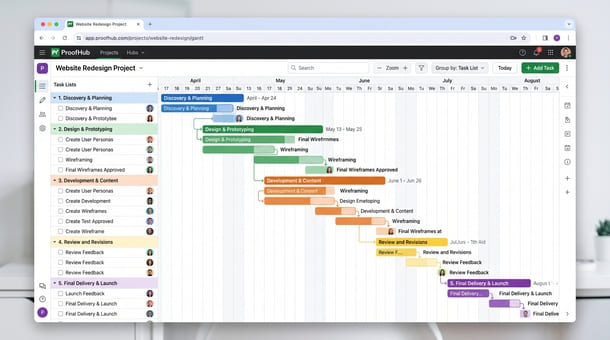
Enable the Gantt view for any project that has a defined timeline and multiple phases. Even a rough timeline is significantly more useful than no timeline because it surfaces schedule conflicts before they become urgent problems and gives the team a shared understanding of how the project is expected to progress.
Day two: invite the team with context not just credentials
Most founders make the mistake of inviting team members the moment the account is created. The team logs in to an empty workspace or a half-built structure that does not look like it has anything to do with the work they are actually doing. The tool forms an impression of being unfinished and that impression is difficult to reverse.
Wait until the first three projects are built with real tasks and real assignees before inviting anyone. When the invitation goes out include a brief personal message alongside it two or three sentences explaining what you have built inside ProofHub, where they will find their assigned tasks and what you need from them during the first week.
ProofHub’s onboarding flow will walk new users through the interface. Your job is to set the expectation that ProofHub is the primary place where work gets tracked and communicated not a supplementary system running alongside the existing email threads and Slack messages but the actual operational home base for all active projects.
That expectation needs to be set explicitly because most team members will interpret the introduction of a new tool as optional additional infrastructure unless someone says clearly that it is not.
Day three: turn on time tracking and test the proofing tool
Time tracking and the proofing tool are two of ProofHub’s strongest differentiators and they are also the two features most likely to get deferred to “we will set that up later.” Later almost never comes. Configure both in the first week while setup motivation is high and before the team has formed habits around the tool that do not include those features.
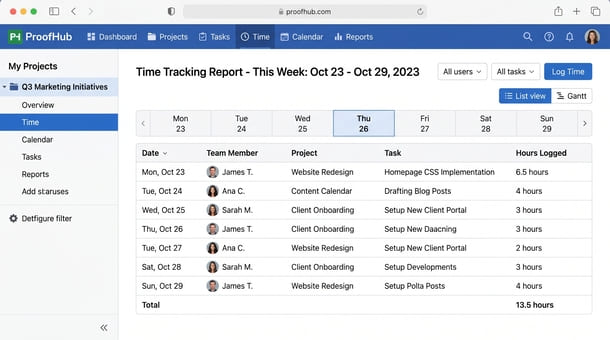
Time tracking: Navigate to each active project and confirm that time tracking is enabled. Then communicate clearly to the team that from this week forward time gets logged directly from ProofHub task cards rather than in a separate time tracking app. Walk them through the timer button on a task card it takes 30 seconds to demonstrate and it is the specific friction point where teams either build the habit or break it.
If anyone on the team is currently using a separate time tracking tool Harvest, Toggl, Clockify this is the week to make the decision about whether that tool continues alongside ProofHub or gets retired. Running parallel time tracking systems defeats the consolidation value that makes ProofHub’s pricing model work.
Proofing tool: If the business delivers creative work to clients designs, documents, marketing assets, any files that go through a review cycle set up the proofing tool for at least one active project this week. Upload a real current deliverable and run through one annotation or approval cycle internally before a client is involved.
That internal test run matters because the proofing tool requires a behavioral shift from the review process your team and clients are currently using. Practicing the workflow internally before introducing it to a client means the first client-facing use goes smoothly rather than feeling like a live experiment.
Day four and five: the team walkthrough and the first norm
Before the end of the first week schedule a 20-minute session with the full team. Not a training session and not a feature demo a walkthrough of the three specific actions the team will perform most often inside ProofHub.
Show in real time how to find assigned tasks across all active projects. Show how to update a task status and add a comment. Show how to log time from a task card. If the proofing tool is relevant to the team’s work show how to add an annotation to a file. Every person in the session should be able to perform those actions independently by the time the 20 minutes is up. Anything beyond those core actions can be discovered through use over time.
End the walkthrough by establishing one clear norm: for the next 30 days all task updates, project-related communication and time logging happen inside ProofHub. Not a preference or a suggestion a specific practice with a defined timeframe. The difference between “please try to use ProofHub” and “for the next 30 days, ProofHub is where this work lives” is the difference between a tool that gets used occasionally and one that becomes a genuine operational habit.
The two-week checkpoint you should not skip
Schedule a check-in for two weeks after the initial launch before the end of day five. Put it on the calendar now rather than planning to schedule it later.
At the two-week mark ask the team three specific questions. What is taking longer than it should because of how ProofHub is currently set up? What are you still doing outside ProofHub that should probably be inside it? And what one change would make you more likely to open ProofHub first rather than going somewhere else?
Those three questions surface the friction that compounds into abandoned tools if it goes unaddressed. Fix the top two issues from the answers before week three. Rename a project that nobody can navigate. Restructure a task list that does not match how the work actually moves. Enable a notification setting that was creating noise rather than useful alerts.
Small adjustments at this stage have disproportionate impact on adoption trajectory. They also signal something important to the team: this implementation is being taken seriously and their experience of it matters. That signal alone increases voluntary adoption more than any feature or reminder message.
Before diving into implementation it helps to ground the process in what ProofHub is genuinely designed to accomplish for entrepreneurs and small businesses because the setups that work best are built around the product’s actual logic rather than assumptions carried over from whatever tool the team was using before.
Getting ProofHub set up correctly in the first week is not complicated. It follows a sequence: 20 minutes of planning before opening the tool, three real projects built on day one with real tasks and real assignees, team invitations sent on day two with context not just credentials, time tracking and proofing configured on day three, a team walkthrough on day four or five with one explicit operational norm and a two-week checkpoint scheduled before the week ends.
That sequence does not guarantee perfect adoption. Nothing does. But it gives ProofHub the best possible chance of becoming the operational center of the business rather than another well-configured workspace that gradually gets bypassed when the pressures of daily work compete with the overhead of maintaining a new system.
Once the implementation is stable the final evaluation question most founders face is how ProofHub compares to the alternatives they were also considering specifically whether Asana or ClickUp would have served the business better. That comparison, done honestly with a consistent scoring framework, is exactly what ProofHub vs Asana vs ClickUp: which tool wins for small business in 2026 covers next.
About the Author

Pamela
Pamela is a dynamic professional with a deep passion for SaaS and emerging technologies. She provides valuable insights into software trends, digital innovation, and cutting-edge tools that empower businesses to thrive and expand.
Did you find this helpful?
Your feedback helps us curate better content for the community.