

Running a small business in 2026 means making decisions every day about where your time goes. The operational side tracking projects, coordinating with your team, following up on deliverables, keeping clients informed can consume hours that should be going toward the work that actually grows the business. Most founders know this. What they are less sure about is whether a project management tool actually fixes it or just adds one more platform to manage.
ProofHub makes a specific promise: one flat-fee platform that handles project management, team communication, time tracking and client collaboration without per-user pricing that penalizes growth. For a small business or early-stage startup trying to get organized without assembling a stack of five different subscriptions that barely talk to each other that promise is worth taking seriously.
Whether it holds up depends on how your business actually operates. ProofHub project management for small business works exceptionally well for certain types of teams and certain types of workflows. It is less suited to others. The evaluation that matters is not whether ProofHub has impressive features it does but whether those features match the way your team works today and whether the pricing makes sense at your current scale.
This guide covers the full picture. What ProofHub actually is and who it was built for. Which features deliver real time savings for small teams. Whether the flat-fee pricing model makes financial sense compared to per-user alternatives. How to get it set up in a way that sticks. And how it compares honestly against Asana and ClickUp for small business use in 2026.
what ProofHub is and what it is not
Most project management tools fall into one of two categories. Task managers that do one thing very well and rely on integrations to cover everything else. Or all-in-one platforms that try to consolidate multiple operational functions into a single workspace.
ProofHub is firmly in the second category and that positioning shapes everything about how it should be evaluated.
At its core ProofHub is a project management and team collaboration platform that combines task management, Gantt charts, team chat, time tracking, proofing and approval workflows and client-facing project views in a single subscription. The product is designed for small to mid-sized businesses that want to eliminate the tool fragmentation problem where a project management tool, a separate communication platform, a time tracking app and a client collaboration tool each carry their own subscription cost and require manual coordination between them.
The flat-fee pricing model reinforces that philosophy. ProofHub charges one monthly rate regardless of how many users are on the account which means a ten-person team and a thirty-person team pay the same price. That model is either a significant financial advantage or an irrelevance depending entirely on your team size and growth trajectory.
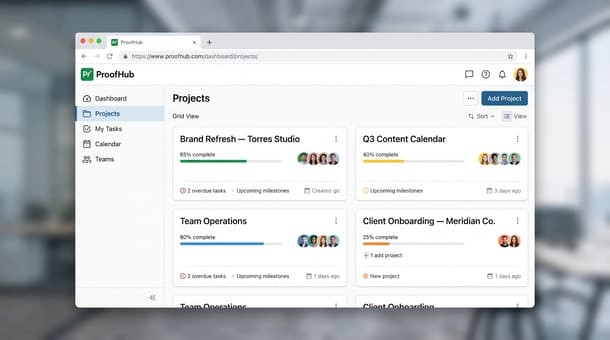
What ProofHub is not is equally important for a fair evaluation. It is not the most powerful task management tool in the market ClickUp’s task hierarchy and customization depth exceed what ProofHub provides. It is not the cleanest interface for teams that need only task tracking and nothing else Trello and Basecamp are simpler if that is the entire scope of the requirement. And it is not a construction or field operations platform the tool was built for knowledge work and digital project delivery rather than site-based or physical operations.
The businesses that get the most out of ProofHub are agencies managing multiple client projects simultaneously, consultancies that need time tracking connected to project delivery, remote and distributed teams that need communication and project management in one workspace and early-stage startups that want to avoid the tool fragmentation problem before it gets established.
If your business fits that profile the all-in-one value proposition is genuine. If your needs are simpler or more specialized a different tool may serve you better and that honest assessment is exactly what this complete look at ProofHub as a productivity tool for entrepreneurs and small businesses is built around.
ProofHub features that save time for small teams and the ones that matter most
ProofHub’s feature list is long enough to feel overwhelming during an initial evaluation. The honest approach is not to assess every capability in isolation but to identify which ones deliver the most meaningful time savings for a small business operating under real pressure and which ones are genuinely useful versus theoretically impressive.
Task management and project organization
ProofHub organizes work through projects, task lists within those projects and individual tasks within each list. Each task supports assignees, due dates, labels, time estimates, attachments and comments. The structure is clean enough that most team members can navigate it without training and deep enough that complex multi-phase projects can be managed without workarounds.
The kanban board view and the table view give different team members the flexibility to work in the format that suits them which matters in a small team where everyone has slightly different working styles and nobody has the bandwidth to fight with a tool that does not match how they think.
What is missing compared to ClickUp is dependency management depth and the ability to create highly customized task hierarchies. For most small businesses those gaps are not operational limitations. For software development teams managing sprint cycles with complex dependencies they are worth noting before committing.
Gantt charts for project planning
ProofHub’s built-in Gantt chart is one of its most underappreciated features for small business use. Most tools that include Gantt functionality put it behind higher pricing tiers. ProofHub includes it at every plan level.
For agencies and consultancies managing multi-phase client engagements the Gantt view provides timeline visibility that a simple task list cannot showing which phases overlap, which milestones are dependent on prior completion and where the schedule is at risk of slipping before the slip actually happens.
Time tracking built directly into tasks
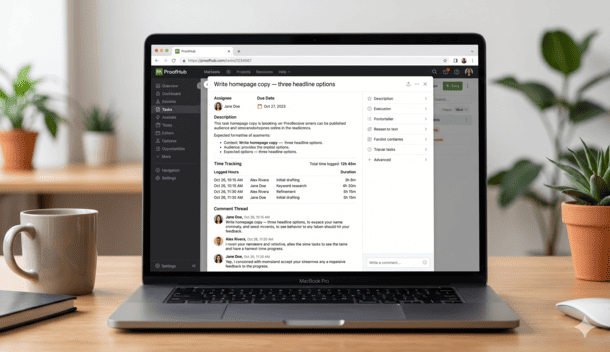
Time tracking in ProofHub is connected to individual tasks rather than running as a separate system alongside the project management layer. Team members can start a timer directly from a task, log time manually or both. The logged time rolls up to project-level reports that show time spent per project, per person and per task.
For service businesses billing by the hour this integration eliminates the reconciliation step that exists when time tracking and project management live in different tools.
Proofing and approval workflows
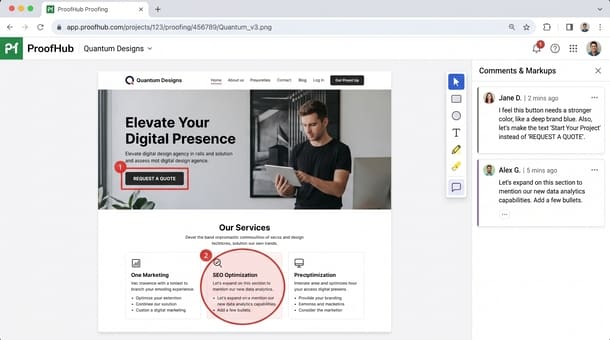
ProofHub’s proofing tool allows creative files designs, documents, images, videos to be uploaded directly into the platform where team members and clients can annotate, comment and approve without switching to a separate review tool. Feedback is attached to the specific element it references rather than described in an email thread that requires interpretation.
For marketing agencies, design studios, content teams and any business that regularly moves creative work through review cycles the proofing tool alone can justify the subscription.
Team chat and announcements
ProofHub includes built-in group chat organized by project which keeps communication contextually tied to the work it relates to rather than scattered across a general communication tool. Functional but not as polished as Slack. Teams already deeply embedded in Slack may find ProofHub’s communication layer adequate but not a full replacement.
Reporting and project visibility
ProofHub’s reporting gives founders a consolidated view of project progress, time logged per person and task completion rates across active projects. Not as granular as ClickUp’s dashboard system but sufficient for most small business operational needs.
The complete breakdown of which ProofHub features deliver real time savings for small teams and which ones matter less at the early stage covers each capability in depth — including the proofing workflow that most evaluation articles underemphasize.
ProofHub pricing in 2026 is the flat fee worth it for your business?
ProofHub currently offers two plans.
The Essential plan is priced at $45 per month billed annually. It covers unlimited users, 40 projects and 15GB of storage with core features including task management, Gantt charts, time tracking, discussions and kanban view.
The Ultimate Control plan is priced at $89 per month billed annually. It covers unlimited users, unlimited projects, 100GB of storage and adds white labeling, custom roles, priority support and advanced reporting.
Both plans are flat fee. The cost does not change when a new team member joins.
The math at three team sizes
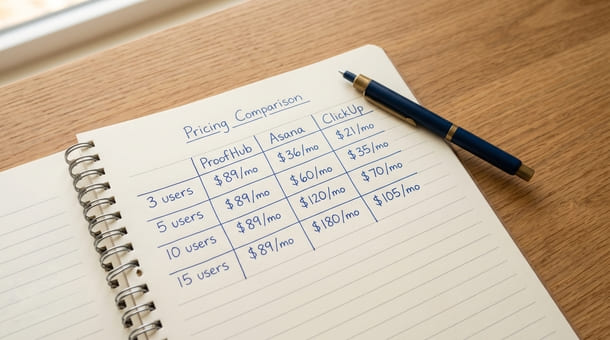
At three to five people ProofHub at $45 per month is competitive but not clearly cheaper than per-user alternatives. The case at this scale is consolidation if the business currently pays separately for time tracking and a proofing tool the combined savings can make the math work regardless of team size.
At eight to twelve people the flat-fee advantage materializes clearly. ClickUp Business costs $70 to $120 per month for ten users. Asana Starter costs $110 per month. ProofHub Essential at $45 covers the same team with no per-user math to manage.
At fifteen or more people ProofHub becomes one of the most cost-efficient options in the market. Per-user tools at this scale cost $150 to $300 per month or more. ProofHub covers the same team at $45 or $89 with no change in cost regardless of further growth.
The real cost comparison: ProofHub versus a fragmented stack
The most useful pricing comparison is ProofHub versus what the business would pay to assemble comparable functionality from multiple tools. A small agency running Asana, Slack, Harvest and a client review tool might pay $80 to $150 per month for those four subscriptions at eight to ten people. ProofHub Ultimate Control at $89 per month covers all four functions at a depth sufficient for most small business operational needs.
Two limitations worth naming honestly: the 15GB storage cap at Essential can become constraining for teams managing large creative files and feature depth in specific areas trails specialized competitors. ProofHub’s value is in consolidation rather than being best-in-class for any single function.
The complete breakdown of whether ProofHub’s 2026 pricing makes financial sense for your specific team size and operational needs runs the math at each scenario in detail including the stack consolidation calculation that most pricing comparisons skip entirely.
how to set up ProofHub for your small business in the first week
Before you open ProofHub: the 20 minute clarity session
Spend 20 minutes on paper before creating your first project. Write down every active project your business is currently running, what done looks like for each one and who is involved. Then write down your three most recurring project types. This inventory determines what the workspace needs to hold before any structure gets built inside it.
Day one: workspace structure and first projects
Create your first three projects using specific descriptive names not “Client Work” but “Brand Refresh Torres Studio.” Add task lists reflecting real phases of each project. Enable the Gantt view for any project with a defined timeline. Populate each project with the actual next two weeks of real tasks specific names, one assignee per task, a due date.
Day two: invite your team with context
Wait until the first three projects are built before sending invitations. Include a brief personal message with the invitation explaining what you built, where their assigned tasks live and what you need from them in the first week. Set the expectation that ProofHub is the primary place where work gets tracked not a parallel system alongside email.
Day three: configure time tracking and proofing
Enable time tracking at the project level on day three. Instruct the team to log time directly from task cards rather than in a separate app. If the business manages creative deliverables set up the proofing tool for at least one active project this week and run one internal annotation cycle before involving a client.
Day four and five: establish team norms and the daily habit
Schedule a 20-minute walkthrough with the full team before the end of the first week. Cover three things in real time: how to find assigned tasks across all active projects, how to update a task status and how to log time or use the proofing tool. Set one explicit norm: for the next 30 days all task updates, project communication and time logging happen inside ProofHub. Schedule a two-week checkpoint to surface friction and fix the top two issues before week three.
The full step-by-step breakdown of how to set up ProofHub for your small business and navigate the critical first week without losing your team’s adoption momentum covers each phase in detail.
ProofHub vs. Asana vs. ClickUp which tool wins for small business in 2026?
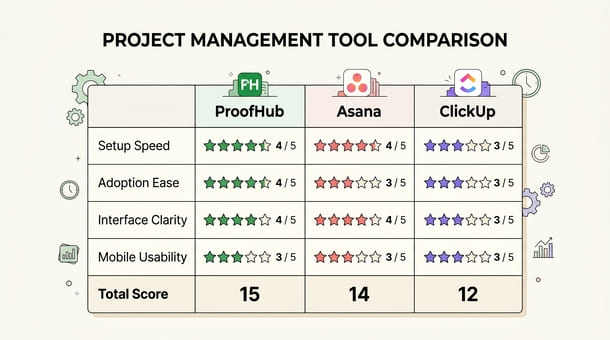
This comparison uses the Simplicity Score four dimensions rated one to five for a maximum of 20 to evaluate ProofHub, Asana and ClickUp on setup speed, adoption ease, interface clarity and mobile usability.
ProofHub Simplicity Score: 15/20 Setup speed 4/5 fast to get running with a clear workspace structure and minimal configuration decisions. Adoption ease 4/5 clean interface that reduces context switching through consolidation. Interface clarity 3/5 functional at project level but lacks consolidated cross-project dashboard visibility. Mobile usability 4/5 one of the stronger mobile experiences in this comparison for core daily actions.
Asana Simplicity Score: 14/20 Setup speed 3/5 straightforward for basic use, more investment required for advanced features. Adoption ease 4/5 polished interface produces good adoption when kept appropriately simple. Interface clarity 4/5 cleaner and more task-focused than ProofHub with better cross-project visibility on paid tiers. Mobile usability 3/5 handles core tasks well but lags on complex workflows.
ClickUp Simplicity Score: 12/20 Setup speed 2/5 slowest of the three with significantly more configuration decisions required. Adoption ease 3/5 rewards setup investment but frustrates teams needing immediate usability. Interface clarity 3/5 visually busy before customization but powerful once configured. Mobile usability 4/5 one of its relative strengths with a cleaner mobile experience than the desktop.
The scenario-based recommendation
Choose ProofHub if your business manages creative deliverables through client review cycles, needs time tracking connected to project management without a separate subscription and has or expects a team of eight or more where the flat-fee model becomes financially advantageous.
Choose Asana if your work is taskn centric with complex workflow progression, your team stays under ten people where per-user cost remains competitive and you do not need native time tracking or proofing.
Choose ClickUp if you want maximum flexibility and are willing to invest meaningful setup time, need the most generous free plan in the category or have someone on the team who enjoys building and maintaining operational systems.
The full head-to-head of how ProofHub compares against Asana and ClickUp for small business use in 2026 across specific workflow types and team sizes applies this framework to more granular scenarios including the use cases where ProofHub’s consolidation advantage outweighs its feature depth limitations.
ProofHub project management for small business makes a specific and honest value proposition: one flat fee platform that consolidates the functions most small businesses currently manage across multiple separate subscriptions project management, team communication, time tracking and client proofing into a single workspace that does not charge more when the team grows.
Whether that proposition is right for your business depends on two things. Whether your workflow actually needs those consolidated functions. And whether the team size math tips the flat-fee model in your favor compared to per-user alternatives.
For agencies, consultancies, content teams and any small business managing creative deliverables through client review cycles the answer to both questions is usually yes. ProofHub’s proofing tool eliminates enough email-based review friction to justify a serious look. The built-in time tracking connected to tasks eliminates the reconciliation work that comes from managing time in a separate app. And the flat-fee pricing becomes genuinely advantageous somewhere between eight and twelve users.
For businesses whose work is purely task-centric, whose team is small enough that per-user pricing remains competitive and who do not need client proofing or integrated time tracking ProofHub may be more tool than the operation currently requires.
The founders who get the most out of ProofHub evaluated it against their actual workflow the specific types of projects they manage, the team members who need to collaborate, the functions they are currently paying for separately and found a genuine match. Then they set it up with intention during the first week and built the daily habits that make a project management tool the operational center of the business rather than one more platform everyone works around.
The most immediately useful next step before evaluating pricing tiers or committing to a trial is getting a clear picture of what ProofHub actually does, how it organizes work and whether its all-in-one philosophy genuinely matches the way your business operates. That starting point is exactly what what ProofHub is actually used for and who the product was genuinely built to serve covers in full.
About the Author

Pamela
Pamela is a dynamic professional with a deep passion for SaaS and emerging technologies. She provides valuable insights into software trends, digital innovation, and cutting-edge tools that empower businesses to thrive and expand.
Did you find this helpful?
Your feedback helps us curate better content for the community.