
Table of Contents
- Why your backend is the invisible cashier
- The three pieces every payment system needs
- Common payment headaches and how backends solve them
- Getting paid faster means growing faster
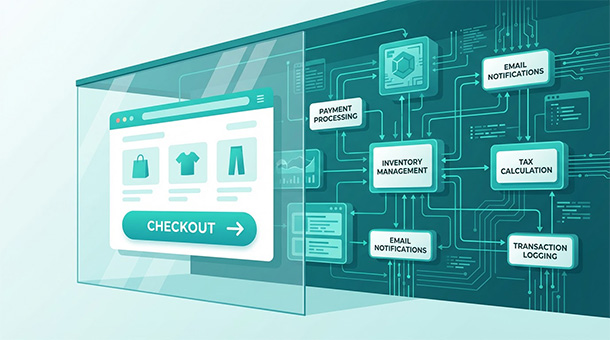
You built a product people want to buy, but now you need to collect money without hiring a payment engineer. Between the moment a customer clicks “buy now” and sees “order confirmed,” your backend runs through dozens of technical processes that most founders never think about. It charges the credit card, verifies the billing address, calculates sales tax based on location, updates inventory across all platforms, sends a confirmation email, logs the transaction for accounting, and checks for fraud patterns that might indicate a stolen card.
This entire sequence happens in about two seconds. When it works perfectly, customers assume checkout is simple. When any piece breaks, customers abandon carts, email support, or file chargebacks. The difference between a professional online business and an amateur side project lives in these invisible backend workflows that process payments reliably thousands of times without human intervention.
Traditional e-commerce required hiring developers to build custom payment systems, configure servers, manage databases, and write code connecting everything together. That approach took months and cost tens of thousands in developer fees. Modern backends like Supabase eliminate this complexity by providing pre-built infrastructure that connects to payment processors, email services, and tax APIs with minimal code.
This guide explains how backends handle the complete transaction lifecycle from a business perspective, not a technical one. You’ll understand what happens during checkout, why each step matters, and how to implement reliable payment processing without a computer science degree. By the end, you’ll know exactly how your backend turns clicks into revenue while you focus on growing your business instead of firefighting payment failures at midnight.
Why your backend is the invisible cashier
The kitchen analogy works perfectly for understanding backend payment processing. Your website or app is the dining room where customers browse the menu and place orders. Your backend is the kitchen where orders get prepared, ingredients get tracked, and bills get calculated. Customers never see the kitchen, but without it, the restaurant doesn’t function.
When a customer clicks “buy now,” they’re handing their order to a waiter who carries it to the kitchen. The kitchen, your backend, processes the request by checking if ingredients are available, preparing the dish, calculating the bill with taxes, and sending the completed order back to the dining room. The waiter, your frontend, delivers the confirmation to the customer. The entire process feels instant from the customer’s perspective, but dozens of systems worked together behind the scenes.
The invisible nature of this work is both its strength and its danger. When backends work correctly, customers never think about payment processing complexity. They click a button, see a confirmation, and move on with their day. But when backends fail, the customer experience collapses immediately. A declined payment with no error message leaves customers confused. A confirmation email that never arrives triggers anxiety. An order that charges the card but doesn’t update inventory creates fulfillment nightmares.
Most founders underestimate backend complexity until something breaks in production. You launch your store, process your first fifty orders manually checking each one, and everything seems fine. Then you go on vacation, orders keep coming in, and you return to discover five customers were charged twice, three orders never shipped because inventory wasn’t updated, and two customers filed chargebacks because they never received confirmation emails. These failures don’t stem from incompetence, they stem from not having automated backend systems handling the work you were doing manually.
What happens in the three seconds between “buy now” and “order confirmed”
The transaction process contains more steps than most founders realize. Breaking down what happens in those three seconds reveals why reliable backends matter more than flashy frontend design.
Second one begins when the customer clicks “buy now” on your checkout page. Your frontend collects the payment details, billing address, and shipping address, then packages everything into a secure request sent to your backend. The backend receives this request and immediately starts validation. Does the email address follow proper format? Is the billing address complete? Does the product ID match something in your database? Failed validation returns an error to the customer asking them to fix the form before trying again.
Second two is where payment processing happens. Your backend forwards the payment details to Stripe or PayPal, which contacts the customer’s bank to verify the card is valid, has sufficient funds, and matches the billing address provided. The bank approves or declines the charge within milliseconds. If approved, your backend receives a confirmation ID from Stripe and stores it in your database next to the order details. If declined, your backend logs the failure reason and displays an appropriate error message to the customer.
Second three handles everything after payment confirmation. Your backend updates inventory by subtracting purchased quantities from available stock. It calculates sales tax based on the customer’s location using a tax API. It creates an order record in your database with all relevant details: customer information, items purchased, amounts charged, tax collected, and shipping address. It triggers an edge function that sends a confirmation email through your email service provider. It logs the transaction for accounting purposes and fraud monitoring.
All of this happens automatically, in order, without manual intervention. You write the code once, deploy it, and it processes thousands of transactions identically. The backend never gets tired, never forgets a step, and never makes data entry errors. This reliability is what separates businesses that scale from those that collapse under their own growth.
Real cost of doing this manually instead of automating
Some founders try to save money by processing orders manually, especially in the early days when order volume is low. They receive an email notification when someone places an order, manually log into Stripe to verify the payment went through, copy the order details into a spreadsheet, send a confirmation email from their personal inbox, and update inventory in another spreadsheet. This workflow seems manageable when you’re processing five orders per day.
The problems emerge as you grow. At twenty orders daily, you’re spending two hours on order processing that generates zero new revenue. At fifty orders daily, manual processing becomes a full-time job that pulls you away from marketing, product development, and customer relationships. At one hundred orders daily, manual processing is literally impossible for one person, and hiring someone to do it costs more than the automation would have cost in the first place.
Manual processing also introduces errors that automated systems avoid. You forget to send a confirmation email and the customer thinks their order failed. You update inventory in one place but forget to update it in another and oversell a product. You miscalculate sales tax and undercollect by thousands over a year. Each error costs money to fix, damages customer trust, and creates support tickets that consume even more of your time.
The hidden cost is opportunity cost. Every hour you spend manually processing orders is an hour you’re not spending on activities that grow your business. A founder processing fifty orders daily at fifteen minutes per order spends over twelve hours weekly on pure administrative work. That’s twelve hours not spent on content marketing, partnership development, product improvements, or customer acquisition. Over a year, that’s over six hundred hours of founder time consumed by tasks that a backend would handle for $25 monthly.
The three pieces every payment system needs
Payment processing isn’t a single system, it’s three separate components working together. Understanding how these pieces connect helps you choose the right tools and debug problems when they occur.
Payment gateway: the digital bridge between customer and bank
The payment gateway is the software layer that securely transmits payment information between your website and the financial institutions processing the transaction. When a customer enters their credit card number on your checkout page, the gateway encrypts that sensitive data and sends it to the payment processor without it ever touching your servers.
This separation is crucial for security and compliance. Storing raw credit card numbers on your own servers requires PCI DSS certification, a compliance standard so complex and expensive that most small businesses can’t achieve it. Payment gateways handle this complexity for you by encrypting card data immediately and passing only tokenized references back to your system.
Stripe and PayPal both function as payment gateways, though they bundle gateway functionality with processing and merchant services. When you integrate Stripe into your backend, you’re using their gateway to collect and encrypt card details, their processor to authorize charges, and their merchant services to move money from customers to your bank account. This all-in-one approach simplifies integration dramatically compared to assembling separate gateway, processor, and merchant account providers.
Your backend interacts with the gateway through APIs. When a customer completes checkout, your backend calls the gateway’s API with the payment amount, currency, and a tokenized reference to the customer’s card. The gateway returns either a success confirmation with a transaction ID or a failure code explaining why the charge was declined. Your backend uses this response to update your database and show the appropriate message to the customer.
Merchant account: where money sits before hitting your real bank
A merchant account is a special type of bank account that temporarily holds funds from customer payments before transferring them to your business bank account. Every payment you process flows into your merchant account first, sits there for a holding period typically two to seven days, then transfers to your regular bank account in a batch settlement.
The holding period exists because payment processors need time to verify transactions and handle potential chargebacks. If a customer disputes a charge three days after purchase, the processor can deduct the disputed amount from your merchant account balance before settling funds to your bank. This protects processors from fronting money for transactions that later get reversed.
Stripe and PayPal manage merchant accounts automatically when you sign up. You don’t need to apply separately or maintain separate credentials. Funds from your sales appear in your Stripe dashboard, where you can see pending balances and settlement schedules. When settlement occurs, money transfers directly to the bank account you connected during onboarding.
For most startups, this automatic merchant account management is ideal because it eliminates administrative overhead. You never think about merchant accounts, you just see money appearing in your bank account two days after customers pay. The tradeoff is less control over settlement timing compared to traditional merchant accounts that let you negotiate holding periods directly with banks.
Your backend doesn’t interact with merchant accounts directly. Once payment succeeds and Stripe confirms the charge, the merchant account handling happens automatically in the background. Your only concern is ensuring you have sufficient balance to cover refunds and chargebacks, which your backend tracks by logging every transaction and periodically checking your Stripe balance against expected settlement amounts.
The processor: the traffic cop directing money safely
The payment processor sits between the gateway and the banking network, handling the actual movement of money. When your gateway sends an authorization request, the processor contacts the customer’s bank, verifies the transaction meets approval criteria, and either approves or declines the charge based on the bank’s response.
Processors handle the complex communication between thousands of different banks using standardized protocols. Your customer might use Chase, Bank of America, a credit union, or an international bank. The processor knows how to talk to all of them using the same API calls from your backend. This abstraction is what makes accepting payments from anywhere in the world possible without integrating with each bank individually.
Processing fees are where processors make money. The standard rate for online businesses is 2.9% plus thirty cents per transaction when using Stripe or PayPal. Higher risk businesses, those with high chargeback rates or operating in fraud-prone industries, pay higher rates. Volume discounts kick in at around $100,000 monthly processing volume, dropping fees to 2.7% or lower depending on negotiation.
Your backend sees processing as a black box. You send a charge request to Stripe, Stripe’s processor handles everything with the banking network, and you receive either approval or decline. The processor’s speed determines how long checkout takes. Modern processors respond in 200-500 milliseconds, fast enough that customers never notice the delay. Slow processors that take two to three seconds create abandoned cart problems because customers assume the page froze.
How Supabase connects to Stripe or PayPal without reinventing wheels
Supabase doesn’t process payments directly, it provides the infrastructure that connects your app to payment processors seamlessly. This separation of concerns is exactly what makes modern development efficient. Payment processing is a solved problem with established providers. Your backend’s job is integrating with those providers, not rebuilding what they already perfected.
Integration happens through edge functions that make API calls to Stripe or PayPal when customers complete checkout. Your frontend sends payment details to a Supabase edge function, the function forwards everything to Stripe’s API, waits for Stripe’s response, then updates your Supabase database based on whether the payment succeeded or failed. The entire flow takes a few dozen lines of code because Supabase handles server infrastructure and Stripe handles payment complexity.
The beauty of this architecture is modularity. If you later decide to add a second payment processor like Square or switch from Stripe to PayPal entirely, you only modify the edge function that talks to payment APIs. Your frontend code, database schema, and business logic remain unchanged. This flexibility prevents vendor lock-in and gives you negotiating power with payment processors because switching costs stay low.
Common payment headaches and how backends solve them
Payment processing seems straightforward until edge cases appear. Declined cards, international customers, refund requests, and security compliance create complexity that founders rarely anticipate during planning phases. Backends handle these challenges systematically through automated logic that would otherwise require manual intervention for every problematic transaction.
Failed payments and retry logic
Credit cards decline for dozens of reasons beyond insufficient funds. The card expired last month and the customer hasn’t updated it. The issuing bank flagged the transaction as potentially fraudulent because the purchase amount or location seems unusual. A temporary network error prevented the authorization request from reaching the bank. The customer entered their CVV code incorrectly three times and the card is now temporarily locked.
Each decline reason requires a different response strategy. Insufficient funds might resolve if the customer retries tomorrow after their paycheck deposits. Expired cards require the customer to update their payment method entirely. Fraud flags often clear when the customer contacts their bank. Network errors succeed immediately upon retry.
Your backend implements intelligent retry logic based on decline codes. When Stripe returns “insufficient funds,” your backend schedules automatic retry attempts over the next week, gradually increasing the time between attempts. When Stripe returns “expired card,” your backend immediately emails the customer asking them to update their payment information without wasting time on doomed retry attempts. When Stripe returns “do not honor,” a generic bank decline, your backend suggests the customer contact their bank or try a different payment method.
This automated decision tree prevents manual payment chasing that consumes founder time. Without retry logic, you’re emailing every customer whose payment failed, asking them to retry manually, and tracking who responded versus who ignored you. With retry logic, your backend handles 60-70% of failed payments automatically through scheduled retries that succeed when temporary issues resolve themselves.
The same retry system works for subscription businesses where monthly recurring charges sometimes fail. Retry logic keeps subscription revenue flowing even when individual payment attempts fail temporarily. The key is configuring retry schedules that balance persistence with user experience, aggressive enough to recover revenue but not so aggressive that customers feel harassed by daily retry attempts.
Refunds without spreadsheet nightmares
A customer emails requesting a refund three days after purchase. The manual process involves logging into Stripe, finding the transaction by searching the customer’s email address or order number, clicking refund, entering the refund amount, confirming the action, then updating your own records to show the order was refunded and inventory was returned to stock.
Do this five times per week and it’s manageable. Do it fifty times per week and you’ve created a part-time job that generates negative revenue. Worse, manual refunds create opportunities for errors. You refund the wrong transaction by misreading order numbers. You forget to update inventory and oversell the refunded product. You refund the customer but forget to revoke their account access for digital products.
Your backend automates refunds through a simple workflow triggered from an admin dashboard or customer self-service portal. The refund request identifies the transaction ID, your backend calls Stripe’s refund API with that ID, waits for confirmation, then updates your database to mark the order as refunded. If the order included physical products, the backend adds those quantities back to inventory. If it included digital access, the backend immediately revokes the customer’s premium features.
Partial refunds follow the same pattern with added complexity. A customer orders three items but returns two. Your backend calculates the refund amount by summing the returned item prices, adds back the appropriate sales tax, calls Stripe with the partial refund amount, and updates the order record to show which items were returned versus kept. The entire process happens in seconds with zero risk of calculation errors.
Refund timing matters for customer satisfaction. Customers expect refunds to appear in their account within 5-10 business days, the standard timeframe for credit card refund processing. Your backend can’t accelerate this timeline since it’s controlled by banks, but it can send a confirmation email immediately after processing the refund explaining the timeline. This proactive communication prevents customers from emailing support asking when their refund will arrive.
Currency conversion for international customers
A customer in Germany wants to buy your product priced at $50 USD. They expect to see the price in euros at checkout and have their card charged in euros. Forcing them to manually calculate currency conversion or charging their card in USD creates friction that reduces conversion rates and increases support tickets.
Your backend handles currency conversion automatically by integrating with Stripe’s multi-currency support. You set your base prices in USD, Stripe converts to the customer’s local currency using current exchange rates, and the customer sees prices in euros throughout checkout. Stripe charges their card in euros, settles to your account in USD, and handles all currency conversion fees transparently.
The conversion rates update constantly to reflect real-time foreign exchange markets. Your backend doesn’t need to track exchange rates or perform conversion math manually. Stripe handles everything and provides clear reporting showing the original currency amount, the settled USD amount, and the conversion fees deducted.
Some businesses prefer to set fixed prices in multiple currencies rather than using real-time conversion. A product priced at $50 USD might be set at €45 EUR and £40 GBP based on market research about what those customers will pay. Your backend stores multiple price points per product in your database and displays the appropriate price based on the customer’s detected location. This approach gives you control over international pricing strategy but requires manually updating prices when exchange rates shift significantly.
Currency conversion becomes more complex when handling refunds. If a customer paid €45 for a product and requests a refund two weeks later, exchange rates have changed. Your backend needs to refund €45, not the USD equivalent at today’s rate. Stripe handles this correctly by refunding in the original transaction currency, but your backend needs to store the original currency amount in your database rather than only the USD settlement amount.
Security compliance without hiring lawyers
PCI DSS, the Payment Card Industry Data Security Standard, defines requirements for any business that accepts credit card payments. The full compliance process involves network security audits, penetration testing, and extensive documentation that costs tens of thousands of dollars. Fortunately, most small businesses qualify for simplified compliance through SAQ A, a self-assessment questionnaire that takes an hour to complete.
SAQ A eligibility depends on one critical factor: your servers never touch raw credit card data. When you use Stripe as your payment gateway, card details go directly from the customer’s browser to Stripe’s servers without passing through your backend. Your backend only receives tokenized references that are useless to fraudsters even if your database gets compromised.
This architecture automatically satisfies most PCI requirements because the sensitive data you’re supposed to protect never enters your systems. You still need to complete the SAQ A questionnaire annually and maintain an SSL certificate on your website, but you avoid the expensive audits required when storing card data directly.
Your backend’s role in PCI compliance is primarily ensuring payment forms communicate directly with Stripe using their hosted checkout or Stripe Elements, client-side JavaScript libraries that create secure payment fields. When implementing checkout, never send raw card numbers to your backend. Always tokenize first using Stripe’s client libraries, then send only the token to your backend for processing.
Beyond PCI compliance, your backend needs to handle basic security practices that protect customer data stored in your database: encrypted connections using HTTPS, strong password hashing for user accounts, regular security updates for all dependencies, and access controls that limit which team members can view sensitive customer information. Supabase handles most infrastructure security automatically, but you’re responsible for application-level security like input validation and SQL injection prevention.
Handling edge cases that break amateur implementations
Payment systems reveal their quality through edge case handling. Amateur implementations work fine for the happy path where everything succeeds but collapse when unusual scenarios occur. Professional backends anticipate these edge cases and handle them gracefully without human intervention.
A customer completes checkout, their payment succeeds, but their browser crashes before seeing the confirmation page. They refresh and see an empty cart, panic, and try to place the order again. Now they’ve been charged twice for the same purchase. Your backend prevents this with idempotency keys, unique identifiers attached to each payment request that ensure duplicate requests don’t create duplicate charges. If the customer retries checkout with the same cart contents within a short window, your backend recognizes the duplicate request and returns the original transaction result instead of charging twice.
A customer’s payment succeeds but a bug in your edge function prevents the confirmation email from sending. They never receive confirmation, assume the order failed, and contact support. Your backend implements fallback monitoring that detects failed email sends and automatically retries or alerts you to investigate. Email delivery is unreliable enough that professional systems always include retry logic and monitoring rather than assuming sends always succeed.
A customer disputes a charge with their bank claiming fraud despite having legitimately purchased and received your product. This friendly fraud scenario requires evidence that the transaction was legitimate. Your backend automatically logs evidence during checkout: the IP address used, device fingerprint, timestamp, billing address verification result, and for digital products, usage logs showing the customer accessed the product after purchase. This evidence compiles automatically into dispute response packages you submit to Stripe when chargebacks occur.
Network timeouts create the most frustrating edge case. Your backend calls Stripe to process a payment, Stripe charges the card successfully, but the network connection drops before Stripe’s response reaches your backend. From your backend’s perspective, the charge status is unknown. From the customer’s perspective, they don’t know if payment succeeded. Your backend handles this by implementing webhook listeners that receive payment confirmations from Stripe asynchronously. Even if the initial API response gets lost, the webhook eventually arrives confirming the charge succeeded, and your backend updates the order status accordingly.
Getting paid faster means growing faster
Revenue velocity, the speed at which money flows from customers to your bank account, directly impacts growth rate. Faster payment processing means faster cash flow, which means more capital available for inventory, marketing, and hiring. Backends accelerate revenue velocity by automating everything that traditionally required manual processing delays.
Subscription billing that runs while you sleep
One-time purchases require constant customer acquisition effort. You make a $50 sale, the customer disappears, and you start hunting for the next customer. Subscription businesses flip this model by converting one customer into twelve monthly payments instead of one. A customer paying $20 monthly generates $240 annually without you convincing them to buy again.
The challenge is that monthly billing creates monthly work if handled manually. You need to charge each customer on their billing anniversary, handle declined cards, send receipts, track who paid and who didn’t, and manage cancellations without breaking account states. Process this manually for one hundred subscribers and you’ve created a part-time accounting job that generates zero new revenue.
Your backend automates the subscription lifecycle end-to-end. When a customer subscribes, your backend creates a subscription record in Stripe linking their payment method to a recurring charge schedule. Stripe automatically charges the card monthly, sends webhooks to your backend confirming each payment, and your backend extends the customer’s access without manual intervention. The customer experiences seamless service, you collect predictable revenue, and nobody clicks buttons to make this happen.
Failed subscription payments trigger automated recovery workflows. When a card declines, Stripe automatically retries the charge using smart retry logic that optimizes timing based on historical success patterns. Your backend monitors these retry attempts through webhooks and sends recovery emails to customers explaining the payment issue and providing links to update their card. Most failed payments recover within a week through this automated sequence, revenue that would be lost forever under manual processing.
Subscription analytics live in your database because every payment event gets logged automatically. You can query average subscription lifetime, calculate monthly recurring revenue trends, identify which plans have the lowest churn rates, and forecast revenue based on current subscriber counts. These insights drive business decisions that would be impossible to extract from manual spreadsheet tracking.
Handling one-time purchases versus recurring revenue
One-time purchases and subscriptions require different backend workflows despite both being payment transactions at their core. One-time purchases are stateless, each transaction is independent with no future obligations. Subscriptions are stateful, each transaction is part of an ongoing relationship that requires tracking renewal dates, handling upgrades and downgrades, and managing cancellations gracefully.
For one-time purchases, your backend’s job ends once payment succeeds and the order ships. The customer relationship continues through marketing emails and future promotions, but the transaction itself is complete. Your backend focuses on processing the payment quickly, sending confirmation, and triggering fulfillment workflows.
For subscriptions, payment is the beginning of an ongoing process. Your backend needs to track the subscription’s current state: active, past due, canceled, or paused. It needs to handle mid-cycle plan changes where customers upgrade or downgrade, requiring proration calculations and immediate feature access changes. It needs to manage grace periods where customers keep access temporarily after payment failures, giving them time to fix card issues without service interruption.
The database schema reflects these differences. One-time purchases store a single order record with fixed values. Subscriptions store a subscription record that gets updated over time, plus a payment history table logging every successful charge, failed attempt, and refund. Querying subscription data requires aggregating across multiple related tables to understand customer lifetime value and payment success rates.
Some businesses blend both models. A SaaS platform might sell monthly subscriptions as its primary revenue stream while also offering one-time purchases for additional features or consulting hours. Your backend handles both transaction types simultaneously, routing each through the appropriate workflow based on the product type purchased.
Keep your inventory synced across platforms becomes critical when you’re selling both subscription access to digital features and one-time purchases of physical products that require real inventory tracking. The backend manages both inventory types through the same database, preventing scenarios where subscription customers can access features that should be restricted to higher tiers or physical products show as available after selling out.
Reporting that shows which products actually make money
Revenue numbers in your Stripe dashboard tell you how much you collected, but they don’t tell you which products are profitable. Profitability requires combining revenue data with cost data, something your backend accomplishes by storing both in the same database.
Each product in your database has a cost field representing your wholesale price, manufacturing cost, or estimated cost to deliver the service. When an order completes, your backend calculates gross margin by subtracting cost from sale price. Aggregate these margins across all sales and you see which products drive profit versus which merely drive volume.
A product might sell frequently but generate thin margins. Another product sells less often but generates three times the margin per unit. Without backend reporting, you’d optimize for sales volume and miss that you’re spending more on fulfillment than you’re earning. With backend reporting, you spot the margin problem and either raise prices, reduce costs, or focus marketing on higher-margin products.
Subscription businesses benefit enormously from cohort analysis that your backend enables. Group subscribers by the month they signed up, then track how many remain active after three months, six months, and twelve months. Early cohorts with low retention indicate product-market fit problems or poor onboarding. Later cohorts with improving retention prove you’re fixing the problems and building a sustainable business.
Your backend calculates customer lifetime value automatically by summing all revenue from each customer over time. Sort customers by lifetime value and you discover that 20% of customers generate 80% of revenue, the classic Pareto distribution. This insight drives acquisition strategy, you should spend more to acquire customers who look like your high-value segment because their lifetime value justifies higher acquisition costs.
When to upgrade from basic Stripe to something custom
Stripe works beautifully for most small businesses, but some scenarios eventually require custom payment infrastructure. Understanding these scenarios helps you plan backend architecture that scales without requiring complete rewrites later.
High volume businesses processing millions in monthly revenue can negotiate better processing fees by working directly with payment processors and banks. At that scale, the 2.9% Stripe fee represents tens of thousands in monthly costs that drop to 2.2% or lower with direct agreements. Your backend switches from Stripe’s API to the processor’s API, but the workflow logic remains similar.
Highly regulated industries like healthcare or financial services need additional payment controls beyond what Stripe provides out of the box. Handling insurance claims, managing HIPAA-compliant payment records, or implementing know-your-customer verification for financial regulations requires custom backend logic integrated with specialized payment partners.
Complex marketplace models where you’re collecting payments then distributing funds to multiple sellers create splits that Stripe Connect handles well, but optimizing settlement timing and fee structures at scale often requires custom treasury management solutions. Your backend orchestrates these splits and tracks each party’s balance in your database.
International expansion into regions where Stripe isn’t available requires integrating alternative payment methods. WeChat Pay in China, Pix in Brazil, or local bank transfers in India require backend integrations with region-specific payment providers. Your backend routes payments through the appropriate provider based on customer location, presenting a unified checkout experience despite using different underlying infrastructure.
The transition from Stripe to custom infrastructure rarely happens suddenly. Most businesses run hybrid systems where Stripe handles standard credit card payments while specialized providers handle specific payment types or regions. Your backend abstracts these differences behind a unified payment interface that the rest of your application interacts with consistently.
Why cash flow velocity matters more than revenue
A business doing $100,000 in monthly sales sounds successful until you learn they’re burning through cash reserves because payment settlements take two weeks while suppliers demand payment in seven days. Revenue measures success, but cash flow determines survival.
Your backend’s role in cash flow velocity is minimizing delays between customer payment and funds hitting your bank account. Stripe’s standard settlement is two business days, meaning a payment that succeeds Monday arrives in your bank account Wednesday. Faster settlement to next-day or same-day costs additional fees but dramatically improves cash flow for businesses operating on thin margins.
Payment method affects settlement speed. Credit card payments settle in two days, ACH bank transfers take five to seven days, and international wire transfers can take two weeks. Your backend can incentivize faster payment methods by offering small discounts for methods that improve your cash flow, or charge convenience fees for slower methods that tie up capital longer.
Subscription businesses have inherently better cash flow than one-time purchase businesses because revenue arrives predictably. Your backend calculates projected cash flow by summing all active subscriptions scheduled to renew this month. This forecast lets you plan inventory purchases, marketing spend, and hiring decisions with confidence rather than hoping enough one-time sales materialize.
Chargebacks and refunds create negative cash flow events that your backend needs to account for in financial projections. A business with a 3% refund rate and 1% chargeback rate effectively loses 4% of gross revenue before accounting for processing fees. Your backend tracks these rates in real-time and alerts you when they spike unexpectedly, indicating product quality issues or fraud attacks that need immediate attention.
The difference between profitable and struggling businesses often comes down to cash flow management, not revenue generation. Your backend provides the data visibility and automation that keeps cash flowing smoothly while you focus on growth activities instead of manually reconciling bank statements.
Your backend is the difference between a hobby project and a scalable business. Beautiful product pages and slick checkout forms mean nothing if payments fail silently, confirmation emails never arrive, or inventory falls out of sync when you’re processing hundreds of orders. The infrastructure handling these invisible workflows determines whether your business can grow from ten orders per week to ten thousand without collapsing under operational complexity.
Traditional e-commerce required months of developer time and tens of thousands in infrastructure costs to build reliable payment systems. Modern backends like Supabase compress this timeline to days and reduce costs to $25 monthly because the hard problems of payment processing, database management, and server scaling are already solved. Your job isn’t building infrastructure from scratch, it’s connecting pre-built pieces that handle payments, inventory, taxes, and customer communications automatically.
The founders who succeed fastest understand that backend automation isn’t optional, it’s foundational. Every hour you spend manually processing orders, tracking inventory in spreadsheets, or chasing failed payments is an hour you’re not spending on marketing, product development, or customer relationships. Automation converts manual labor into systems that scale infinitely without consuming more of your time.
Start by automating the basics: payment processing, confirmation emails, and inventory updates. Once that foundation exists, layer in subscription billing, tax automation, and fraud detection as your business grows. Each additional automation compounds the previous ones, creating a system that handles complexity you’d never manage manually.
The path from first sale to sustainable revenue goes through reliable backend infrastructure. Build it properly once and it serves your business for years. Skip it or implement it poorly and you’ll spend those years firefighting preventable problems instead of growing.
Your backend isn’t glamorous. Customers never see it, investors rarely ask about it, and founders tend to underinvest in it while chasing shinier features. But the businesses that survive their first year of growth almost always have solid backend infrastructure handling the boring work that makes money flow reliably. That’s what this guide equipped you to build.
About the Author

AISalah
Bridges linguistics and technology at PointOfSaaS, exploring AI applications in business software. English Studies BA with hands-on back-end and ERP development experience.
Did you find this helpful?
Your feedback helps us curate better content for the community.