
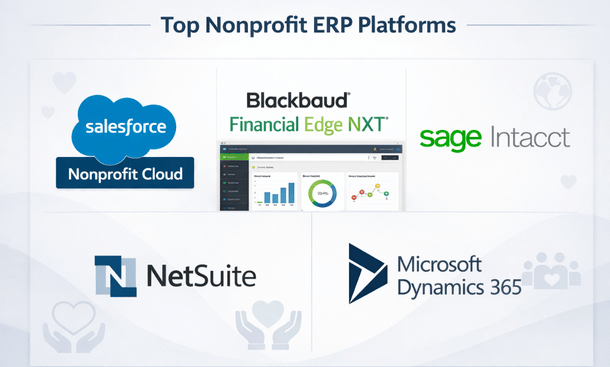
Alright, let’s cut through the noise—you need an ERP solution that actually works for your nonprofit’s unique challenges. After evaluating platforms ranging from enterprise giants to nimble cloud solutions, I’ve put together this honest comparison of what’s crushing it in 2026. We’re talking real pricing (no “contact us” runaround when possible), actual user experiences from California nonprofits, and straight-up pros and cons. Whether you’re a small community org or managing multi-state programs, finding the right fit is critical. This review builds on insights from our foundational guide explaining how ERP technology streamlines nonprofit operations, so you’ll understand not just which software to choose, but why it matters.
What makes an ERP great for nonprofits
Before we jump into specific platforms, let’s establish what you should be looking for.
The system needs native fund accounting, not bolt-on modules that feel like afterthoughts. When a platform was designed from the ground up for nonprofits, you can tell immediately. Navigation makes sense, reports are structured around nonprofit needs, and you don’t spend half your time working around limitations.
Pricing matters enormously. Transparent pricing helps you budget accurately and compare options fairly. Some vendors make you jump through hoops just to get a ballpark number, which wastes everyone’s time.
Implementation support can make or break your experience. The best software in the world is useless if you can’t get it configured properly and your team trained effectively. Look for vendors with proven nonprofit implementation experience and strong customer success programs.
User community and ecosystem tell you a lot. Platforms with active user groups, third-party consultants, and robust app marketplaces give you resources beyond the vendor. When you hit a challenge, you want multiple sources of help.
NetSuite for nonprofits: enterprise power
NetSuite delivers serious enterprise capabilities wrapped in a cloud-based platform that’s come a long way in serving nonprofits.
The platform handles multi-entity consolidation beautifully, which makes it perfect for national nonprofits with chapters or affiliates. You can manage dozens of separate entities while consolidating financials for overall organizational reporting. The workflow automation is incredibly powerful once you get it configured.
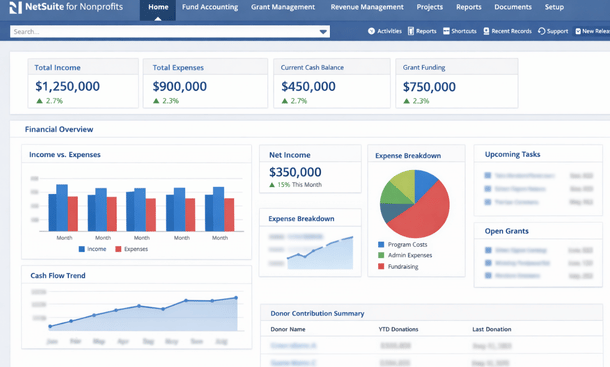
Fund accounting capabilities are robust. The system tracks fund restrictions, handles complex allocations, and manages grants with solid compliance features. Revenue recognition follows nonprofit standards, and the financial reporting meets audit requirements without heavy customization.
Donor management exists but isn’t NetSuite’s strongest feature. You can track constituent relationships and gifts, but organizations serious about fundraising often integrate with dedicated platforms like Salesforce or Blackbaud. The API makes integration feasible, though it adds complexity.
Pricing sits at the higher end. Expect to invest $50,000 to $150,000 annually depending on your user count, modules, and complexity. Implementation costs typically run $75,000 to $200,000. For organizations with revenue under $10 million, this feels steep. But for larger, complex nonprofits, the capabilities justify the investment.
Pros include scalability, comprehensive functionality, strong financial management, and excellent reporting. The platform grows with you from $5 million in revenue to $500 million without needing to switch systems.
Cons involve complexity and cost. Smaller nonprofits often find NetSuite overwhelming. The learning curve is real, and you need dedicated staff or consultants to maximize the platform. Customer support can be hit or miss.
Best for national nonprofits with multiple entities, organizations planning significant growth, and those needing sophisticated financial management and consolidation.
Microsoft dynamics 365: familiar and flexible
Dynamics 365 brings Microsoft’s ecosystem advantages and nonprofit-specific configurations through partners.
The nonprofit accelerator provides templates and configurations specifically for mission-driven organizations. Fund accounting, program management, and outcomes tracking come pre-configured, though you’ll need a qualified partner to implement it properly. The Nonprofit Common Data Model creates consistency in how data is structured.
Integration with the Microsoft ecosystem is seamless. Organizations already using Office 365, Teams, SharePoint, and Power BI find incredible synergy. Your ERP data flows naturally into familiar tools your team already uses. Power BI dashboards connected to Dynamics data create stunning visualizations without third-party tools.
Flexibility is both a strength and challenge. Dynamics can be configured to match virtually any workflow, but that means implementation requires careful planning and expertise. Cookie-cutter deployments rarely work well. You need a partner who understands both Dynamics and nonprofit operations.
Pricing operates on a modular structure. Core licenses run $95 to $210 per user monthly depending on functionality needed. For a 20-user organization, expect $30,000 to $60,000 annually in licensing plus implementation costs of $50,000 to $150,000. Microsoft offers nonprofit discounts that help significantly.
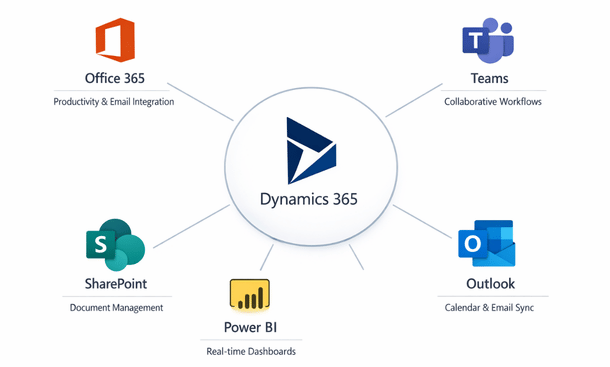
Pros include deep Microsoft integration, flexible customization, strong partner ecosystem, and nonprofit-specific templates. The platform is modern, cloud-based, and regularly updated with new features.
Cons center on complexity and the need for skilled implementation partners. Not all Dynamics consultants understand nonprofits, so choosing the right partner is critical. The out-of-box experience isn’t as polished as some competitors.
Best for Microsoft-centric organizations, nonprofits needing heavy customization, and those with existing Dynamics expertise on staff or easy access to qualified partners.
Sage intacct: financial management excellence
Sage Intacct focuses intensely on financial management and does it exceptionally well for nonprofits.
The fund accounting functionality is outstanding. Multi-dimensional tracking, automated allocations, grant management, and sophisticated reporting come standard. The platform was built for complex financial needs, and it shows in every feature. Month-end closing processes that took weeks in other systems happen in days with Intacct.
Dimensional reporting lets you slice financial data any way imaginable. Revenue by fund by program by location by campaign—all without painful custom reports. The ability to create dynamic reports that users can drill into and manipulate themselves reduces burden on your finance team.
Automation capabilities shine. Recurring transactions, automated allocations, workflow approvals, and scheduled report distribution eliminate repetitive manual work. One California nonprofit told me Intacct cut their routine accounting tasks by 40 percent within six months.
The user interface feels modern and intuitive. Compared to legacy accounting systems, Intacct is refreshingly easy to navigate. Training new staff takes days instead of weeks. Cloud access means your team works from anywhere without VPN headaches.
Pricing is more accessible than enterprise platforms. Organizations typically invest $25,000 to $75,000 annually for licensing and $30,000 to $100,000 for implementation. The value proposition is strong for mid-sized nonprofits.
Pros include exceptional financial management, great automation, user-friendly interface, strong nonprofit focus, and reasonable pricing for the capability delivered.
Cons involve limited built-in CRM and donor management. Organizations need to integrate with separate fundraising platforms. Program management features are basic compared to all-in-one solutions. You’re essentially getting best-in-class finance with adequate but not exceptional features elsewhere.
Best for nonprofits prioritizing financial management excellence, organizations with complex fund accounting needs, and those willing to integrate best-of-breed solutions rather than seeking all-in-one platforms.
Blackbaud financial edge NXT: purpose-built solution
Blackbaud owns the nonprofit technology market for fundraising, and Financial Edge NXT extends that expertise into ERP territory.
The nonprofit DNA runs deep. Blackbaud understands mission-driven organizations better than anyone. Financial Edge was built specifically for nonprofits, and every feature reflects that focus. Fund accounting, grant tracking, and nonprofit reporting work exactly as you’d expect without workarounds.
Integration with Blackbaud’s fundraising ecosystem is the killer feature. If you’re using Raiser’s Edge NXT for donor management, the integration is seamless. Revenue from fundraising flows into Financial Edge automatically with proper fund coding and campaign attribution. This eliminates the reconciliation nightmares that plague nonprofits using separate finance and fundraising systems.
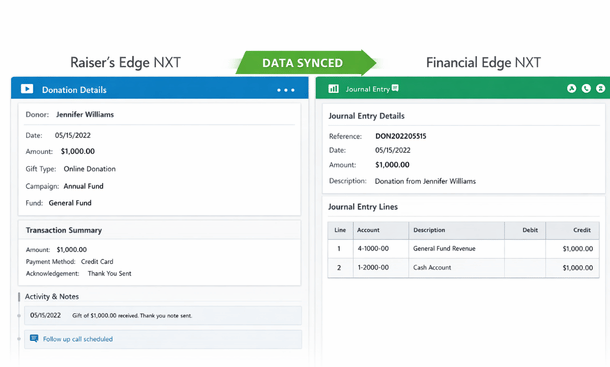
Cloud deployment and mobile access bring modern convenience. Your team accesses the system from anywhere, and Blackbaud handles updates and maintenance. You’re always on the current version without disruptive upgrade projects.
User experience has improved significantly with the NXT generation. Earlier versions felt dated and clunky. The NXT platform is cleaner, faster, and more intuitive, though still not quite as modern as some competitors.
Pricing requires conversation with Blackbaud, but expect $20,000 to $60,000 annually for mid-sized organizations, with implementation costs of $25,000 to $80,000. Existing Blackbaud customers often get favorable pricing.
Pros include deep nonprofit expertise, outstanding integration if you’re in the Blackbaud ecosystem, solid fund accounting, and strong support resources including training and user community.
Cons involve being somewhat locked into the Blackbaud ecosystem. Switching becomes harder over time. The platform isn’t as customizable as Dynamics or as powerful for complex consolidation as NetSuite. Some users report customer support inconsistency.
Best for organizations already using Blackbaud fundraising products, nonprofits wanting purpose-built nonprofit solutions, and those prioritizing seamless finance and fundraising integration over cutting-edge features.
Acumatica cloud ERP: growing organizations
Acumatica offers a modern cloud ERP that partners have configured effectively for nonprofits.
The platform is genuinely unlimited users, meaning you pay for resources consumed rather than per-user licensing. For nonprofits with many staff needing system access, this pricing model can save substantial money compared to per-user platforms.
Modern architecture and mobile capabilities impress. Acumatica was built for the cloud from the ground up, not retrofitted from legacy on-premise software. The mobile app provides real functionality, not just inquiry screens.
Nonprofit configurations exist through partners who’ve built vertical solutions. These add fund accounting, grant management, and nonprofit reporting to Acumatica’s solid core ERP capabilities. Quality varies by partner, so choosing the right implementation firm is crucial.
Customization flexibility lets you adapt the system to your specific workflows. The platform is highly configurable without custom code in many cases. When coding is needed, the framework is modern and well-documented.
Pricing runs $20,000 to $50,000 annually for licensing based on transaction volume and modules, not user count. Implementation costs range from $40,000 to $100,000. The total cost of ownership is competitive for organizations with many users.
Pros include unlimited user licensing, modern cloud architecture, good customization options, and growing nonprofit partner ecosystem.
Cons involve dependence on partners for nonprofit-specific functionality, smaller nonprofit user community compared to established players, and the need to carefully vet implementation partners who claim nonprofit expertise.
Best for growing nonprofits expecting to add many users, organizations wanting modern cloud architecture, and those comfortable working with implementation partners to configure nonprofit-specific needs.
Abila MIP fund accounting: traditional reliability
Abila MIP has served nonprofits for decades and continues supporting organizations that value proven stability.
Fund accounting depth is exceptional. MIP was purpose-built for nonprofit fund accounting and handles the most complex scenarios. Multi-fund structures, sophisticated allocations, grant compliance, and audit requirements are MIP’s wheelhouse.
Reporting capabilities are comprehensive. Standard reports cover virtually every nonprofit accounting need. Custom report development is possible though somewhat technical. Organizations with complex reporting to multiple funders appreciate the flexibility.
The user interface shows its age. MIP works, but doesn’t feel modern compared to newer cloud platforms. Navigation and workflows reflect older software design patterns. Newer staff sometimes struggle with the dated feel.
Cloud deployment is available through MIP Cloud, though many organizations still run on-premise installations. The cloud version addresses accessibility and maintenance concerns while maintaining the core functionality.
Integration with other Abila products works well, including grants management and donor management tools in the Abila suite. Integration with non-Abila products can be challenging and often requires middleware or custom development.
Pricing ranges from $15,000 to $40,000 annually depending on modules and deployment model. Implementation costs run $20,000 to $60,000. For organizations that need solid fund accounting without flashy features, the value is reasonable.
Pros include deep fund accounting expertise, comprehensive reporting, proven stability and reliability, and strong understanding of complex nonprofit scenarios.
Cons involve dated user interface, integration challenges outside the Abila ecosystem, slower adoption of modern features, and questions about long-term product direction.
Best for established nonprofits prioritizing fund accounting above all else, organizations with complex accounting requirements, and those already invested in the Abila ecosystem.
How to choose the right platform
Picking an ERP is one of the biggest technology decisions your nonprofit will make. Here’s how to approach it.
Start with your priorities. If fundraising integration is paramount, Blackbaud makes sense. If financial sophistication matters most, look at Sage Intacct. If you’re deeply committed to Microsoft, Dynamics fits naturally. Match your primary needs to each platform’s strengths.
Consider your budget realistically. Include implementation costs, ongoing licensing, training, and support in your total cost analysis. The cheapest option rarely delivers the best value. Underfunding implementation leads to poor configurations and failed projects.
Evaluate your team’s technical capacity. Some platforms require more technical expertise than others. Be honest about whether you have staff who can manage the system or if you’ll need ongoing consultant support.
Talk to references at similar organizations. Vendors will provide happy customers to call, but also search out unbiased reviews. Find California nonprofits with similar budget sizes and programs who’ve implemented the systems you’re considering.
Insist on seeing live demonstrations with your actual data. Canned demos look great but don’t reveal how the system handles your specific complexities. Load sample data and watch the system process scenarios you face daily.
Plan for adequate implementation time. Rushed implementations lead to poor results. Budget six to twelve months for most platforms, understanding that complex organizations might need longer.
Choosing the right ERP platform sets the foundation for your nonprofit’s operational success for years to come. But selecting software is only the beginning—successful implementation requires careful planning, dedicated resources, and change management expertise. To ensure your ERP project delivers the value you’re investing in, explore our comprehensive guide on how to implement ERP in a nonprofit, which walks through project planning, team preparation, data migration, and launch strategies. And for the big-picture strategic context on how all these pieces fit together, check out our complete guide to ERP for nonprofits.
About the Author

mike
Mike is a tech enthusiast passionate about SaaS innovation and digital growth. He explores emerging technologies and helps businesses scale through smart software solutions.
Did you find this helpful?
Your feedback helps us curate better content for the community.